slow networking speeds

simmsgre

New member
Local time
3:53 AM
Messages
4
Location
Florida
hello,
I have two win 7 machines, my main rig is win 7 64bit and the other an HTPC running win 7 32 bit fresh install. file transfer and sharing works without a hitch and I am running both on gigabit with cat 6 cables and showing in hardware config. speeds will top out at 8-9 mb/sec for some reason and does so for any and every file. Transfering a 20gb file takes quite a while. Any suggestions? Thanks
 

My Computer

OS
Windows 7 Ulitimate 64-bit
CPU
i7 920 2.6, o.c to 3.2 stable
Motherboard
Asus P6T Deluxe V.2
Memory
6gb OCZ XMP DDR3 1600
Graphics Card(s)
GeForce 8800GT 512Mb
Sound Card
Soundblaster X-Fi Extreme Audio
Monitor(s) Displays
1). Acer H233H 2).Acer P223w
Screen Resolution
1920x1080
Hard Drives
x1 Intel x25-M 80Gb
x1 Samsung 1Tb
PSU
PC power and cooling 750w
Case
Antec 900
Cooling
Corsair H50
Mouse
Logitech G5
Internet Speed
cable 20mb
hello,
I have two win 7 machines, my main rig is win 7 64bit and the other an HTPC running win 7 32 bit fresh install. file transfer and sharing works without a hitch and I am running both on gigabit with cat 6 cables and showing in hardware config. speeds will top out at 8-9 mb/sec for some reason and does so for any and every file. Transfering a 20gb file takes quite a while. Any suggestions? Thanks

I suspect you are using homegroup for networking. One some systems homegroup can cause slow transfer, connectivity issues, etc. You can verify this by simply setting up a new network connection and using the workgroup model instead.. workgroup uses IPv4, homegroup uses IPv6. Some hardware does not yet fully support IPv6 support.

Ken
 

My Computer

Computer Manufacturer/Model Number
HP Pavillion dv-7 1005 Tx
OS
Win 8 Release candidate 8400
CPU
[email protected]
Memory
4 gigs
Graphics Card(s)
Nvidia 9600M
Sound Card
HD built-in
Monitor(s) Displays
17" Wxga
Screen Resolution
1440x900
Cooling
none
Internet Speed
45Mb down 5Mb up
The router or switch between the machines is also gigabit?
 

My Computer

Computer Manufacturer/Model Number
ultraplanet - model 23
OS
Windows 7
CPU
P4 3.0 HT
Motherboard
Intel DQ965GF
Memory
4 gigs of Crucial DDR2
Graphics Card(s)
nVidia GeForce 7800GT 256MB 256-bit w/ ACCELS1 Rev 2
Sound Card
on board
Monitor(s) Displays
HP 2509m
Screen Resolution
1920x1080
Hard Drives
2x 320gb Seagate Barracuda's - SATA 3Gbit/s - RAID-0 array
PSU
650 watt
Case
Antec
Cooling
Cool Master
Keyboard
Logitech diNovo Media Desktop
Mouse
see keyboard
Internet Speed
comcast cable
Other Info
7 Ultimate and 7 Pro twice each at home - Gigabit on the Network - Tomato on the Linksys - I freely share my wireless with my neighbors (8-10 additional devices)
my appologies for leaving out specifics. they are both not on a homegroup and yes the switch is gigabit and the nics on both comps are reporting gigabit speeds.
 

My Computer

OS
Windows 7 Ulitimate 64-bit
CPU
i7 920 2.6, o.c to 3.2 stable
Motherboard
Asus P6T Deluxe V.2
Memory
6gb OCZ XMP DDR3 1600
Graphics Card(s)
GeForce 8800GT 512Mb
Sound Card
Soundblaster X-Fi Extreme Audio
Monitor(s) Displays
1). Acer H233H 2).Acer P223w
Screen Resolution
1920x1080
Hard Drives
x1 Intel x25-M 80Gb
x1 Samsung 1Tb
PSU
PC power and cooling 750w
Case
Antec 900
Cooling
Corsair H50
Mouse
Logitech G5
Internet Speed
cable 20mb
I suspect you are using homegroup for networking. One some systems homegroup can cause slow transfer, connectivity issues, etc. You can verify this by simply setting up a new network connection and using the workgroup model instead.. workgroup uses IPv4, homegroup uses IPv6. Some hardware does not yet fully support IPv6 support.

Ken

Ken,

I'm having terrible problems with my Win7 64-bit computer and it's transfer to either my WinXP box or my NAS box (Thecus N2200). Speeds used to be fairly quick but over time it's just degraded. It's now at the point where it won't connect to the network.

I'm therefore thinking of doing a repair install as shown at http://www.sevenforums.com/tutorials/3413-repair-install.html .

If I was to do this, how to I setup a workgroup connection rather than a homegroup connection? Is it simply done by not joining a homegroup?

Thanks
 

My Computer

OS
Windows 7 Professional 64-bit
Motherboard
Gigabyte GA-EP45-DS3 (rev. 1.0)
Sound Card
Onboard Sound
Case
Antec P183
I suspect you are using homegroup for networking. One some systems homegroup can cause slow transfer, connectivity issues, etc. You can verify this by simply setting up a new network connection and using the workgroup model instead.. workgroup uses IPv4, homegroup uses IPv6. Some hardware does not yet fully support IPv6 support.

Ken


If I was to do this, how to I setup a workgroup connection rather than a homegroup connection? Is it simply done by not joining a homegroup?

Thanks

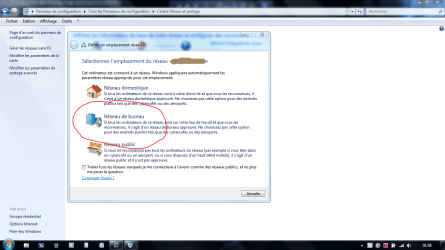
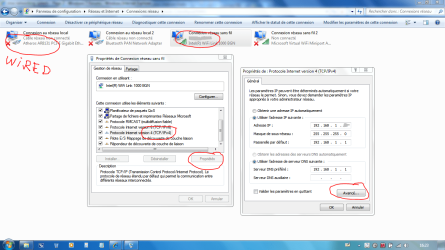
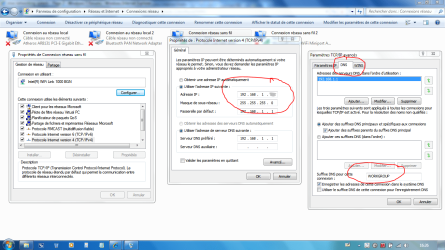
I think maybe if you're allowed to do so...change the way of your network, this will desactivated the Homegroup settings to Workgroup...and this will parameter the firewall to this network. You can either doing it if you're not allowed to set the network, at the second pic. You'll have as well to set the DNS Name (WORKGROUP) in the advanced properties of your card.
See pics:
 

Attachments

  • Capture.PNG
    Capture.PNG
    77 KB · Views: 171
  • CaptureII.PNG
    CaptureII.PNG
    81.8 KB · Views: 192

My Computer

Computer type
PC/Desktop
Computer Manufacturer/Model Number
Custom Build
OS
Windows 7 Professional SP1 - x64 [Non-UEFI Boot]
CPU
Ivy Bridge Core i5 3570K (Delidded)
Motherboard
Asus P8Z77-V LE PLUS
Memory
G.Skill "Ares" DDR3 PC3-12800 - 1600MHz (16Gb)
Graphics Card(s)
Asus Dual-RX480-O4G
Sound Card
Creative Sound Blaster Z w/5.1 sound system
Monitor(s) Displays
Asus IPS 23"
Screen Resolution
16/9
Hard Drives
Internal:
500Go Sata 6Gb/s (x2)
500Go Sata 3Gb/s (x2)
SSD 60Go Sata 6Gb/s
PSU
In Win C 900W Series 80+ Platinum
Case
Thermaltake Chaser A71
Cooling
Custom Water Cooling Loop
Keyboard
Cooler Master QuickFire XTi
Mouse
Razer Imperator 2012 (4G)
Antivirus
MSE
Browser
IE 11.0.xxx Rtm
Other Info
"Raid0" with Intel Smart Response Technology (HDD/SSD)
Homegroups has absolutely nothing, zero, zip nadda, not one thing to do with how fast your transfer speeds are and yes I have tested this six ways to Sunday. Some of the BS I hear around here is utterly rediculous.
 

My Computer

Computer type
PC/Desktop
Computer Manufacturer/Model Number
Home built
OS
Windows 7 Ult, Windows 8.1 Pro,
CPU
Q9650-4.275GHz, E8600 4.5GHz, E6750-3.8GHz
Motherboard
Evga 780i FTW
Memory
G.Skill PC2 9600 1200Mhz 5 5 5 15 2T
Graphics Card(s)
GTX480
Sound Card
Asus Xonar D2
Monitor(s) Displays
HannsG
Screen Resolution
1680X1050
Hard Drives
GSkill Phoenix Pro 120GB SSD
PSU
ThermalTake Toughpower 1000Watt modular
Case
ThermalTake XaserV
Cooling
Xigmatek S1283
Keyboard
Logitech G15
Mouse
Logitech G9
Internet Speed
T1
All I know at the moment is that my networking of my Win7 computer is so all over the place that the best thing probably is to do a repair install.

This is because I've:

  • tried NIC drivers from Windows Update, Realtek, Gigabyte (mobo);
  • changed registry settings
  • changed network homegroup settings
  • changed NIC settings (eg auto-negotiate speed, etc)
  • and so on

All based on suggestions from my questions on various forums plus reading other similar problem threads.

Cheers
 

My Computer

OS
Windows 7 Professional 64-bit
Motherboard
Gigabyte GA-EP45-DS3 (rev. 1.0)
Sound Card
Onboard Sound
Case
Antec P183
All I know at the moment is that my networking of my Win7 computer is so all over the place that the best thing probably is to do a repair install.

This is because I've:

  • tried NIC drivers from Windows Update, Realtek, Gigabyte (mobo);
  • changed registry settings
  • changed network homegroup settings
  • changed NIC settings (eg auto-negotiate speed, etc)
  • and so on
All based on suggestions from my questions on various forums plus reading other similar problem threads.

Cheers

Well, registry settings are not always at ease to use...unless you know how to undo.
Could tried those settings, when you'll have repaired.

Networking run smooth here, (Win7=>Vista=>Xp) in general. I haven't tried through 2 Win7 yet.
 

My Computer

Computer type
PC/Desktop
Computer Manufacturer/Model Number
Custom Build
OS
Windows 7 Professional SP1 - x64 [Non-UEFI Boot]
CPU
Ivy Bridge Core i5 3570K (Delidded)
Motherboard
Asus P8Z77-V LE PLUS
Memory
G.Skill "Ares" DDR3 PC3-12800 - 1600MHz (16Gb)
Graphics Card(s)
Asus Dual-RX480-O4G
Sound Card
Creative Sound Blaster Z w/5.1 sound system
Monitor(s) Displays
Asus IPS 23"
Screen Resolution
16/9
Hard Drives
Internal:
500Go Sata 6Gb/s (x2)
500Go Sata 3Gb/s (x2)
SSD 60Go Sata 6Gb/s
PSU
In Win C 900W Series 80+ Platinum
Case
Thermaltake Chaser A71
Cooling
Custom Water Cooling Loop
Keyboard
Cooler Master QuickFire XTi
Mouse
Razer Imperator 2012 (4G)
Antivirus
MSE
Browser
IE 11.0.xxx Rtm
Other Info
"Raid0" with Intel Smart Response Technology (HDD/SSD)
Guys,

Since my last posting a week ago, I tried doing the repair install. Although the install itself worked fine, my network capability was still a shambles, even after following up the install with the install of the mobo chipset drivers and the Win7-64 bit drivers for the NIC from the Gigabyte mobo page.

I then went the whole hog and did a format of the partition and reinstalled the OS from scratch. Installed the drivers, did Windows update and still transfers were slow at less than 90kb/second to my NAS box. At the same time, transfers of the same sized files don't take that long when transferring from my WinXP to my NAS box. (I have TV cards on both WinXP and Win7 computer and store the resulting files on the NAS box to be viewed by Network Media Players).

I have even tried assigning a specific IP address to the NIC - still no luck.

I then went to Black Viper's website to tweak the services (see Windows 7 Service Configurations by Black Viper) with no increase in network transfer speed.

Is there anywhere where I can see what might be the cause of the slow transfer's?? Would it be something to do with IP6? MTU sizes? Auto-negotiate vs setting a set speed? Some service that's started (or not started)?

ZigZag3143 wrote earlier:

I suspect you are using homegroup for networking. One some systems homegroup can cause slow transfer, connectivity issues, etc. You can verify this by simply setting up a new network connection and using the workgroup model instead.. workgroup uses IPv4, homegroup uses IPv6. Some hardware does not yet fully support IPv6 support.
When I did the repair Install, and the fresh install, when it came to the prompt for networking, it had "Home", "Office", "Public" (I think they were the 3, but you'll know which ones I mean). I could not skip pass this so I think it forced me to use a homegroup for networking. How can I turn this off and use just use workgroup networking?

++ EDIT ++

I found a thread which describes how to leave a homegroup and use workgroups

http://www.sevenforums.com/network-sharing/66050-3-pc-network-sharing.html#post587385
http://www.sevenforums.com/tutorials/43980-homegroup-leave.html?filter

++ END EDIT ++

Regards
 
Last edited:

My Computer

OS
Windows 7 Professional 64-bit
Motherboard
Gigabyte GA-EP45-DS3 (rev. 1.0)
Sound Card
Onboard Sound
Case
Antec P183
Well guys, following my previous posts, I found I couldn't disconnect from the homegroup and even tried some ideas from threads regarding this problem but still couldn't disconnect.

So I did a format of the partition and re-installed Win7 from scratch. I then installed AVG 9 (Free), did Windows update, installed Mobo chipset drivers (I didn't install the NIC drivers from Gigabyte's (mobo) website as I wanted to see how Win7 drivers went), installed drivers for my TV card, installed Office 2003, did Microsoft update (to get Office updates). I also went into Networking and said I wanted to leave the Homegroup which it allowed me to do (after the warning regarding sharing etc)

My network speed is still rubbish. Since I've done this re-install a few days ago, I've tried transferring some of my TV shows via a mapped drive to the Thecus N2200 box. Clicking on the mapped drive usually brings up the listing of files immediately although there's some times when there seems to be a delay with the green bar progressing along the top, but perhaps this is due to doing it immediately after startup and there's some delayed services still starting. Anyway, the transfer speeds are around 6 - 26 kbps so I end up canceling the transfer as you can imagine how long it will take to transfer files ranging from 1GB to 2GB in size.

Last night was the worse. It's now doing what I saw prior to my initial "repair" and subsequent "fresh" installs. What happens is:


  • The network icon in bottom right corner keeps showing a red circle, becomes green and then circle disappears. A few seconds later, it does it all over again.
  • Right clicking on this icon and bring up the network map shows the connection from my computer existing and then disappearing then coming back.
  • From this screen, at the bottom left corner, there's a link to the Firewall. Clicking on this shows a 2-pane window. When it first displayed, it had Home connected, Public disconnected. Then it would alternate. Home would disconnect and Public would connect.
Why is it doing this? Since I told it I wanted to leave the Homegroup, why does Windows Firewall even show something about being connected to a Home or Public group??

I even went into the properties of the NIC and set a default IP of 192.168.1.1 with a subnet mask of 255.255.255.0 and a gateway of 192.168.1.254 and the same for the DNS. In case it's of any importance, my ADSL modem/router is a Billion BiPac 7402. There's also a couple of switch boxes in my network setup since the Billion only has 4 and I have more network devices than that.

Why can't I get a stable network connection?
Why, when I do have a network connection, is my transfer speed to either the Thecus N2200 NAS box or my WinXP 32 bit computer so slow? (Prior to the last install, I had to resort to a cross over cable from Win7 to WinXP to transfer my files and then use the network to transfer from WinXP to N2200)

I haven't tried looking at whether shared drives work now after the install. This is another issue I'm having and have raised another thread about. FYI, my Ziova network media players can see the Win7 computer (indicating it's in the same workgroup) but when I select it, it says there's no shares. I'm not going to work on this issue until I get my network stability and transfer speed issue resolved first. I noticed in an earlier posting above that NoS said:

You'll have as well to set the DNS Name (WORKGROUP) in the advanced properties of your card.

Can someone please help me? As a stand alone computer, Win7 65 bit Pro is wonderful. Very quick and stable. But when it comes to networking, it's shocking if the network is anything other than other Win7 computers (I assume Win7 -> Win7 networking will be a breeze with homegroups and IP6)

Thanks in advance

 

My Computer

OS
Windows 7 Professional 64-bit
Motherboard
Gigabyte GA-EP45-DS3 (rev. 1.0)
Sound Card
Onboard Sound
Case
Antec P183
This is most likely a driver problem. Try disabling "Jumbo Frames" if you see one in the NIC's option in Device Manager. It won't hurt to update the NIC driver to the latest one, and oh - disable IPv6 if you don't use Homegroup/IPv6. See if it helps...

zzz2496
 

My Computer

Computer Manufacturer/Model Number
Self Built
OS
Windows7 Ultimate 64bit
CPU
Intel Core 2 Quad Q6600
Motherboard
Abit IN9-32X-MMAX
Memory
DDR2 Adata 4GB
Graphics Card(s)
Nvidia GeForce GTX 285 1024 and Nvidia GeForce 8800GT 512
Sound Card
Asus Xonar HDAV 1.3
Monitor(s) Displays
Dell 2407WFP and BenQ 2400v and Philips 150v3
Screen Resolution
3840x1200 and 1024x768
Hard Drives
2 WDC 1TB
1 WDC 1.5TB
1 WDC 640GB
1 WDC 320GB
1 Seagate 200GB
PSU
Corsair TX 850W
Case
Cooler Master HAF932
Cooling
Arctic Cooling Freezer Extreme and plenty of fans...
Keyboard
MicrosoftNaturalKeyboard 4000/Apple Alu keyboard/Dinovo mini
Mouse
Logitech G5/MarbleMouseTrackball/PerformanceMX/SpacePilotPRO
Internet Speed
1.5Mbps down/384Kbps up
Other Info
APC SURT 1000XL
Logitech Z-560
Wiimote
Mikrotik Router
Linksys (now Cisco) SD2008 8 port Gigabit switch
Linksys WRT54G (acting as AP)
Apple wireless Aluminium keyboard
Apple Magic Mouse
Xbox360 wired controller
Failing switch maybe. Is there a way you can hardwire the 2 machines together and try that. You won't need a x-over cable since nearly every GigE adapter has auto-mdix.
 

My Computer

Computer Manufacturer/Model Number
HAL-9000
OS
Windows 7 Ultimate 64bit
CPU
Intel i7 3770K
Motherboard
Asus Sabertooth Z77
Memory
16GB DDR3 1333 Corsair XMS3
Graphics Card(s)
XFX HD6950 2GB EyeFinity
Sound Card
Logitech G35 & Sennheiser PC135 & VIA HD
Monitor(s) Displays
23" HP 2310e, 23" Samsung B2230, 21.5" Viewsonic
Screen Resolution
5760x1080
Hard Drives
16TB of Storage
128GB & 256GB Crucial M4 SSD's, 2X 1TB WD Black, 3x 2TB WD, 3x 2TB Samsung F4, 1.5TB Seagate, WD 500GB,
PSU
Antec True Power New 650watt
Case
Cooler Master HAF-932
Cooling
Corsair H60 Hydro Cooler, 3x 230mm Fans, 2x120mm Fan
Keyboard
Logitech G15 and G13
Mouse
Logitech G700 Gaming Mouse
Internet Speed
50/10 Mbit
Other Info
Speakers : Alesis M1 Active Mk2 Studio Monitors , APC RS 1200 UPS, HP 4500DN Color Laser, HP P1006 mono Laser, Kodak 8500 Dye-Sub, Epson 1280 inkjet, Epson Worforce 610 MFC
Failing switch maybe. Is there a way you can hardwire the 2 machines together and try that. You won't need a x-over cable since nearly every GigE adapter has auto-mdix.

I gather by the 2 machines you want me to hardwire together, you are talking about the Win7 computer and the N2200??

Here's how my setup is.

4 computers in my 'office' at home - Win7 Pro 64bit, 2 x WinXP 32bit, 1 x Ubuntu. All these connected to a switch. From the switch, it's connected to the socket in the wall.

Lounge-room and Bedroom - both have a Ziova/Zensonic Network media player connected to socket in wall.

Hallway closet - All wall sockets in other rooms come into this closet in addition to a telephone line. Closet has Billion Modem, Thecus N2200 NAS box and another switch.


As mentioned, yesterday the "network" connection just kept resetting yet the day before it was stable. I didn't have time this morning to see how it was. I have tried changing the port on the switch box in the "office" it's connected to.


Are there any event viewer logs I should specifically look out for? Or is there any other Performance/Error logs that Win7 generates that I should look at?
 

My Computer

OS
Windows 7 Professional 64-bit
Motherboard
Gigabyte GA-EP45-DS3 (rev. 1.0)
Sound Card
Onboard Sound
Case
Antec P183
I would really try to get my hands on another switch at this point to test with. My speeds on Windows 64-bit and 32-bit have been very solid at work. Going across a Netgear small SOHO switch or a Cisco 2970, I'm seeing speeds around 70-80MB/s consistently from Win64 to Server 2008, to Server 2003 and to Linux hosts.
 

My Computer

Computer Manufacturer/Model Number
Self-Built in July 2009
OS
Windows 7 Ultimate x64
CPU
Intel Q9550 2.83Ghz OC'd to 3.40Ghz
Motherboard
Gigabyte GA-EP45-UD3R rev. 1.1, F12 BIOS
Memory
8GB G.Skill PI DDR2-800, 4-4-4-12 timings
Graphics Card(s)
EVGA 1280MB Nvidia GeForce GTX570
Sound Card
Realtek ALC899A 8 channel onboard audio
Monitor(s) Displays
23" Acer x233H
Screen Resolution
1920x1080
Hard Drives
Intel X25-M 80GB Gen 2 SSD
Western Digital 1TB Caviar Black, 32MB cache. WD1001FALS
PSU
Corsair 620HX modular
Case
Antec P182
Cooling
stock
Keyboard
ABS M1 Mechanical
Mouse
Logitech G9 Laser Mouse
Internet Speed
15/2 cable modem
Other Info
Windows and Linux enthusiast. Logitech G35 Headset.
Hi MadMax1412,

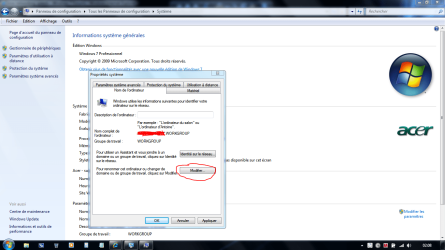
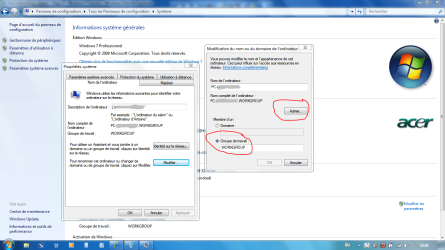
First you'll have to name all your computers "PC Name.WORKGROUP" (see screenshots!)
Keep the name you created when you had activated your copies of windows on each computers, and name them WORKGROUP.

They will all appear like: PC Name.WORKGROUP
 

Attachments

  • Capture.PNG
    Capture.PNG
    95.3 KB · Views: 63
  • CaptureB.PNG
    CaptureB.PNG
    103.4 KB · Views: 42
Last edited:

My Computer

Computer type
PC/Desktop
Computer Manufacturer/Model Number
Custom Build
OS
Windows 7 Professional SP1 - x64 [Non-UEFI Boot]
CPU
Ivy Bridge Core i5 3570K (Delidded)
Motherboard
Asus P8Z77-V LE PLUS
Memory
G.Skill "Ares" DDR3 PC3-12800 - 1600MHz (16Gb)
Graphics Card(s)
Asus Dual-RX480-O4G
Sound Card
Creative Sound Blaster Z w/5.1 sound system
Monitor(s) Displays
Asus IPS 23"
Screen Resolution
16/9
Hard Drives
Internal:
500Go Sata 6Gb/s (x2)
500Go Sata 3Gb/s (x2)
SSD 60Go Sata 6Gb/s
PSU
In Win C 900W Series 80+ Platinum
Case
Thermaltake Chaser A71
Cooling
Custom Water Cooling Loop
Keyboard
Cooler Master QuickFire XTi
Mouse
Razer Imperator 2012 (4G)
Antivirus
MSE
Browser
IE 11.0.xxx Rtm
Other Info
"Raid0" with Intel Smart Response Technology (HDD/SSD)
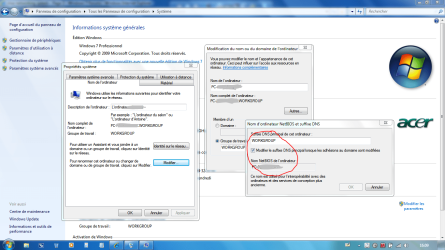
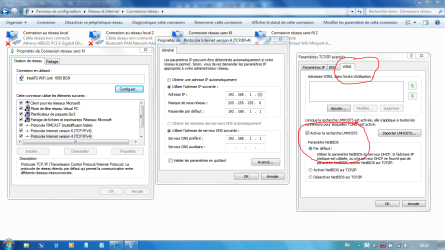
Second you'll have to set on each computer as the post above (on all computers aswell), the DNS name (WORKGROUP) in your card Wireless or NIC , depend if you are wired or not...(see again screenshots).

This will resolve some of your troubles...maybe not all but if all your computers are set the same they will be connected better & faster recognized together.

Name their IP adress in order to use:
-Computer 1: 192.168.1.11...192.168.1.1 (Wifi router)
-Computer 2: 192.168.1.12
-Computer 3: 192.168.1.13
-Computer 4: 192.168.1.14

Or if Wired you should use: 192.168.0.11 instead...192.168.0.1 (NIC router)
 

Attachments

  • Capture.PNG
    Capture.PNG
    79.2 KB · Views: 23
  • CaptureB.PNG
    CaptureB.PNG
    90.1 KB · Views: 21
Last edited:

My Computer

Computer type
PC/Desktop
Computer Manufacturer/Model Number
Custom Build
OS
Windows 7 Professional SP1 - x64 [Non-UEFI Boot]
CPU
Ivy Bridge Core i5 3570K (Delidded)
Motherboard
Asus P8Z77-V LE PLUS
Memory
G.Skill "Ares" DDR3 PC3-12800 - 1600MHz (16Gb)
Graphics Card(s)
Asus Dual-RX480-O4G
Sound Card
Creative Sound Blaster Z w/5.1 sound system
Monitor(s) Displays
Asus IPS 23"
Screen Resolution
16/9
Hard Drives
Internal:
500Go Sata 6Gb/s (x2)
500Go Sata 3Gb/s (x2)
SSD 60Go Sata 6Gb/s
PSU
In Win C 900W Series 80+ Platinum
Case
Thermaltake Chaser A71
Cooling
Custom Water Cooling Loop
Keyboard
Cooler Master QuickFire XTi
Mouse
Razer Imperator 2012 (4G)
Antivirus
MSE
Browser
IE 11.0.xxx Rtm
Other Info
"Raid0" with Intel Smart Response Technology (HDD/SSD)
Third you'll have the options tweaking the registry for "LanmanServer & LanmanWorkstation" Parameters & "Tcpip" Parameters....to secure & improve the bandwidth.

But this is another later matter discuss for the Windows 2000 Professional Ed. And you can find over the net some of it.

Hope these 3 posts helps! Let us know...:)
 
Last edited:

My Computer

Computer type
PC/Desktop
Computer Manufacturer/Model Number
Custom Build
OS
Windows 7 Professional SP1 - x64 [Non-UEFI Boot]
CPU
Ivy Bridge Core i5 3570K (Delidded)
Motherboard
Asus P8Z77-V LE PLUS
Memory
G.Skill "Ares" DDR3 PC3-12800 - 1600MHz (16Gb)
Graphics Card(s)
Asus Dual-RX480-O4G
Sound Card
Creative Sound Blaster Z w/5.1 sound system
Monitor(s) Displays
Asus IPS 23"
Screen Resolution
16/9
Hard Drives
Internal:
500Go Sata 6Gb/s (x2)
500Go Sata 3Gb/s (x2)
SSD 60Go Sata 6Gb/s
PSU
In Win C 900W Series 80+ Platinum
Case
Thermaltake Chaser A71
Cooling
Custom Water Cooling Loop
Keyboard
Cooler Master QuickFire XTi
Mouse
Razer Imperator 2012 (4G)
Antivirus
MSE
Browser
IE 11.0.xxx Rtm
Other Info
"Raid0" with Intel Smart Response Technology (HDD/SSD)
Hi MadMax1412,

First you'll have to name all your computers "PC Name.WORKGROUP" (see screenshots!)
Keep the name you created when you had activated your copies of windows, and name them WORKGROUP.

They will all appear like: PC Name.WORKGROUP

Second you'll have to set on each computer as the post above (on all computers aswell), the DNS name (WORKGROUP) in your card Wireless or NIC , depend if you are wired or not...(see again screenshots).

This will resolve some of your troubles...maybe not all but if all your computers are set the same they will be connected better & faster recognized together.

Name their IP adress in order to use:
-Computer 1: 192.168.1.11...192.168.1.1 (Wifi router)
-Computer 2: 192.168.1.12
-Computer 3: 192.168.1.13
-Computer 4: 192.168.1.14

Or if Wired you should use: 192.168.0.11 instead...192.168.0.1 (NIC router)

Third you'll have the options tweaking the registry for "LanmanServer & LanmanWorkstation" Parameters & "Tcpip" Parameters....to secure & improve the bandwidth.

But this is another later matter, discuss for the Windows 2000 Professional Ed. And you can find over the net some of it.

Hope these 3 posts helps! Let us know...:)
Wow, nicely done... I had my days in W2K Client/Server administration. Your guide brings back memories (good ones, and ugly ones) :) One correction though, "WORKGROUP" is not a "DNS name", it's WINS name/group and you don't need to be on the same "workgroup" to be able to contact each other. Workgroups are only for "folder"-ing networked computers so when you open Network (or Network neighborhood) it will only show computers in your current workgroup, simplifying your network browsing experience.

zzz2496
 

My Computer

Computer Manufacturer/Model Number
Self Built
OS
Windows7 Ultimate 64bit
CPU
Intel Core 2 Quad Q6600
Motherboard
Abit IN9-32X-MMAX
Memory
DDR2 Adata 4GB
Graphics Card(s)
Nvidia GeForce GTX 285 1024 and Nvidia GeForce 8800GT 512
Sound Card
Asus Xonar HDAV 1.3
Monitor(s) Displays
Dell 2407WFP and BenQ 2400v and Philips 150v3
Screen Resolution
3840x1200 and 1024x768
Hard Drives
2 WDC 1TB
1 WDC 1.5TB
1 WDC 640GB
1 WDC 320GB
1 Seagate 200GB
PSU
Corsair TX 850W
Case
Cooler Master HAF932
Cooling
Arctic Cooling Freezer Extreme and plenty of fans...
Keyboard
MicrosoftNaturalKeyboard 4000/Apple Alu keyboard/Dinovo mini
Mouse
Logitech G5/MarbleMouseTrackball/PerformanceMX/SpacePilotPRO
Internet Speed
1.5Mbps down/384Kbps up
Other Info
APC SURT 1000XL
Logitech Z-560
Wiimote
Mikrotik Router
Linksys (now Cisco) SD2008 8 port Gigabit switch
Linksys WRT54G (acting as AP)
Apple wireless Aluminium keyboard
Apple Magic Mouse
Xbox360 wired controller
Hi MadMax1412,

First you'll have to name all your computers "PC Name.WORKGROUP" (see screenshots!)
Keep the name you created when you had activated your copies of windows, and name them WORKGROUP.

They will all appear like: PC Name.WORKGROUP

Second you'll have to set on each computer as the post above (on all computers aswell), the DNS name (WORKGROUP) in your card Wireless or NIC , depend if you are wired or not...(see again screenshots).

This will resolve some of your troubles...maybe not all but if all your computers are set the same they will be connected better & faster recognized together.

Name their IP adress in order to use:
-Computer 1: 192.168.1.11...192.168.1.1 (Wifi router)
-Computer 2: 192.168.1.12
-Computer 3: 192.168.1.13
-Computer 4: 192.168.1.14

Or if Wired you should use: 192.168.0.11 instead...192.168.0.1 (NIC router)

Third you'll have the options tweaking the registry for "LanmanServer & LanmanWorkstation" Parameters & "Tcpip" Parameters....to secure & improve the bandwidth.

But this is another later matter, discuss for the Windows 2000 Professional Ed. And you can find over the net some of it.

Hope these 3 posts helps! Let us know...:)
Wow, nicely done... I had my days in W2K Client/Server administration. Your guide brings back memories (good ones, and ugly ones) :) One correction though, "WORKGROUP" is not a "DNS name", it's WINS name/group and you don't need to be on the same "workgroup" to be able to contact each other. Workgroups are only for "folder"-ing networked computers so when you open Network (or Network neighborhood) it will only show computers in your current workgroup, simplifying your network browsing experience.

zzz2496

WORKGROUP is only there for the purpose of resolving NetBios Name..."Wins" should be set as default either.

That's what I meant in those previous posts, by simplifying the network browsing experience.:)
 

Attachments

  • Capture.PNG
    Capture.PNG
    86.6 KB · Views: 18

My Computer

Computer type
PC/Desktop
Computer Manufacturer/Model Number
Custom Build
OS
Windows 7 Professional SP1 - x64 [Non-UEFI Boot]
CPU
Ivy Bridge Core i5 3570K (Delidded)
Motherboard
Asus P8Z77-V LE PLUS
Memory
G.Skill "Ares" DDR3 PC3-12800 - 1600MHz (16Gb)
Graphics Card(s)
Asus Dual-RX480-O4G
Sound Card
Creative Sound Blaster Z w/5.1 sound system
Monitor(s) Displays
Asus IPS 23"
Screen Resolution
16/9
Hard Drives
Internal:
500Go Sata 6Gb/s (x2)
500Go Sata 3Gb/s (x2)
SSD 60Go Sata 6Gb/s
PSU
In Win C 900W Series 80+ Platinum
Case
Thermaltake Chaser A71
Cooling
Custom Water Cooling Loop
Keyboard
Cooler Master QuickFire XTi
Mouse
Razer Imperator 2012 (4G)
Antivirus
MSE
Browser
IE 11.0.xxx Rtm
Other Info
"Raid0" with Intel Smart Response Technology (HDD/SSD)
Back
Top