Slow Performance message

morrowmedia

New member
Local time
6:15 PM
Messages
51
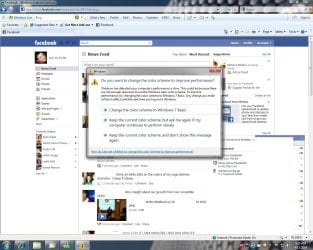
I read another thread (http://www.sevenforums.com/performance-maintenance/68801-windows-7-message-slow-performance.html) about a simliar problem...I have not recived the message sense but I thought I would ask why I would get this message with my setup.

CPU - Intel Core i5 750 Quad Core
Mobo - Gigabyte - P55A-UD3
Memory - 4gb DDR3
HD - 1TB Sata
Graphics card - ATI HD5770

At the time of my message I just started running a "Screencast" program and started recording my movements on the system to do a tutorial for my company. I was using like 1.12gb out of the 3.75 usable gb of memory, cpu was running at like 8-15% load, so nothing extreme. The message frustrated me more than anything :mad:. Its like going out and buying a corvette and being told that you have a slow car by some stupid computer. Even though you KNOW you have a fast and effeciant system, it sticks in the back of your mind...like why would this thing even detect that I have slow performance when I KNOW that I do not.

Any idea if this windows message is accurate?

THank you in adanvance and I look forward to getting to know everyone on this forum.

Zach Morrow
 

My Computer

OS
Windows 7 Ultimate
CPU
Intel Core i5 750 (Quad Core)
Motherboard
Gigabyte P55A-UD3
Memory
4GB DDR3 1600
Graphics Card(s)
XFX ATI Radeon HD5770
Sound Card
On board
Monitor(s) Displays
2
Screen Resolution
1280x1024
Hard Drives
1tb Hitachi Sata
PSU
Thermaltake 750W
Case
Corsair 800D
Cooling
Corsair H50
Keyboard
Logitech Wireless
Mouse
Logitech WIreless
Internet Speed
Cable Internet
Here are a few things to do:

Update your gfx drivers to the latest version.
32-Bit 5xxx series Radeon Drivers >> http://game.amd.com/us-en/drivers_catalyst.aspx?p=win7/windows-7-32bit
64-Bit 5xxx series Radeon Drivers >> http://game.amd.com/us-en/drivers_catalyst.aspx?p=win7/windows-7-64bit

Update your motherboard BIOS to the latest version.
http://www.gigabyte.us/Support/Motherboard/BIOS_Model.aspx?ProductID=3254

Check to make sure that you have an adequate power supply for the hardware you have.
Video Card - Minimum 450 Watt PS

Turn off certain Windows features to enable higher performance.
http://www.sevenforums.com/tutorials/11728-optimize-windows-7-a.html

Make sure that your performance settings in Power Saver aren't set to low.
http://www.sevenforums.com/tutorials/778-power-plan-settings-change.html?filter[2]=Power%20Management
 

My Computer

Computer Manufacturer/Model Number
Apple Macbook Pro (April 2009)
OS
W7 Ult. x64 | OS X
CPU
Intel Mobile Core 2 Duo 2.93Ghz [T9800 Penryn]
Motherboard
NVIDIA nForce 730i Rev. B1 [Mac-F2268EC8 (U2E1)]
Memory
4096MB Samsung DDR3 Dual Channel [PC3-8500F 1066Mhz]
Graphics Card(s)
NVIDIA GeForce 9600M GT 512MB [G96M Rev. C1]
Sound Card
SB X-Fi Surround 5.1 USB | Onboard Realtek (Disabled)
Monitor(s) Displays
Acer x223wbd 22" | Apple Anti-Glare 17" (Disabled)
Screen Resolution
{Current} 1440x900 {Acer} 1680x1050 {Apple} 1920x1200
Hard Drives
{Internal}
Seagate Momentus 320GB 2.5" 7200RPM [ST9320421AS]

{Externals}
LaCie 320GB USB 2.0 HDD [301284UR]
LaCie 750GB USB 2.0 FW400 eSATA HDD [301314U]
LaCie 1TB USB 2.0 HDD [301304UR]
PSU
Magsafe
Case
Aluminum/Unibody (MBP52)
Cooling
2 x 6000 RPM Fans
Keyboard
Logitech G-15v2 [PN 920-000379]
Mouse
Logitech G-9 [PN 910-000338]
Internet Speed
12Mbps/2.5Mbps w/ 24Mbps Speed Boost [Comcast]
Other Info
Logitech X-540 Speakers [PN 970223-0122]
Sennheiser PC-151 Headset
Welcome to the forum morrowmedia!

You werent too specific as to the error message, so I have a few questions...

  • Is your system experiencing this same message as the thread you linked to?
  • Is your system also a new build or recent upgrade?
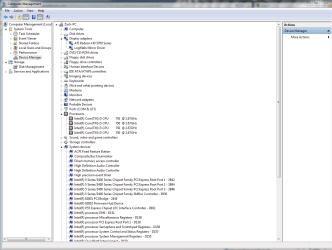
If the answers are yes and yes... the issue is most likely caused by improper chipset/video drivers. Take a look at device manager, a screenshot might even be nice.

Also, please take the time to fill in your system specs... sometimes that can help us help you!
 

My Computer

Computer Manufacturer/Model Number
Homebrew PC - "Alpha_Dawg"
OS
Windows 7 Ultimate 64 bit Steve Ballmer Signature Edition
CPU
Intel Core 2 Quad - Q9550 - 2.83GHz stock - OC'd to 3.6GHz
Motherboard
Gigabyte EP45-UD3P
Memory
4GB DDR2 800MHz (PC6400) OCZ Reaper
Graphics Card(s)
Nvidia GE Force 8800 GTS
Sound Card
Asus Xonar DX
Monitor(s) Displays
Samsung SyncMaster 2333HD
Screen Resolution
1920 x 1080
Hard Drives
WD Caviar Black 750GB - 7200RPM - 32MB cache
WD Caviar Green 1.5TB - 5400RPM - 64MB cache
WD Caviar Green 2.0TB - 5400RPM - 64MB cache
PSU
PC Power & Cooling Silencer 750
Case
Gigabyte 3D Aurora
Cooling
Case is Air - 5ea. 120mm fans (mix of Arctic and Xigmatec)
Keyboard
MS Natural Wireless KB
Mouse
MS Wireless Mouse
Internet Speed
50 mbps down/5 mbps up
Other Info
AVerMedia - AVerTVHD G2 Dual Tuner Card
No errors in the device manager. It is a new system/new build. It just gave me the error coming out of a game. The computer runs flawless. MAX FPS in the game, no lag, everything opens up fast, nothing slows down, and I get that message...very odd.

Zach
 

Attachments

  • Capture.PNG
    Capture.PNG
    44.6 KB · Views: 22

My Computer

OS
Windows 7 Ultimate
CPU
Intel Core i5 750 (Quad Core)
Motherboard
Gigabyte P55A-UD3
Memory
4GB DDR3 1600
Graphics Card(s)
XFX ATI Radeon HD5770
Sound Card
On board
Monitor(s) Displays
2
Screen Resolution
1280x1024
Hard Drives
1tb Hitachi Sata
PSU
Thermaltake 750W
Case
Corsair 800D
Cooling
Corsair H50
Keyboard
Logitech Wireless
Mouse
Logitech WIreless
Internet Speed
Cable Internet
No errors in the device manager. It is a new system/new build. It just gave me the error coming out of a game. The computer runs flawless. MAX FPS in the game, no lag, everything opens up fast, nothing slows down, and I get that message...very odd.

Zach

One thing to try... just because your card says ATI doesnt mean it is made by ATI... for example Sapphire makes ATI cards. WHo is the maker of your card? You may want to go to that site instead of the ATI site for updated drivers.
 

My Computer

Computer Manufacturer/Model Number
Homebrew PC - "Alpha_Dawg"
OS
Windows 7 Ultimate 64 bit Steve Ballmer Signature Edition
CPU
Intel Core 2 Quad - Q9550 - 2.83GHz stock - OC'd to 3.6GHz
Motherboard
Gigabyte EP45-UD3P
Memory
4GB DDR2 800MHz (PC6400) OCZ Reaper
Graphics Card(s)
Nvidia GE Force 8800 GTS
Sound Card
Asus Xonar DX
Monitor(s) Displays
Samsung SyncMaster 2333HD
Screen Resolution
1920 x 1080
Hard Drives
WD Caviar Black 750GB - 7200RPM - 32MB cache
WD Caviar Green 1.5TB - 5400RPM - 64MB cache
WD Caviar Green 2.0TB - 5400RPM - 64MB cache
PSU
PC Power & Cooling Silencer 750
Case
Gigabyte 3D Aurora
Cooling
Case is Air - 5ea. 120mm fans (mix of Arctic and Xigmatec)
Keyboard
MS Natural Wireless KB
Mouse
MS Wireless Mouse
Internet Speed
50 mbps down/5 mbps up
Other Info
AVerMedia - AVerTVHD G2 Dual Tuner Card
I am in the process of downloading the "ATI" drivers from XFX's website now...All I installed prior is cataylst setup. Dunno what good this will do...I have a 480w Power Supply, but I am thinking I may need to upgrade it...The computer boots and runs fine like I said...I would never expect to get ANY message about "slow" performance...kind of odd...
 

My Computer

OS
Windows 7 Ultimate
CPU
Intel Core i5 750 (Quad Core)
Motherboard
Gigabyte P55A-UD3
Memory
4GB DDR3 1600
Graphics Card(s)
XFX ATI Radeon HD5770
Sound Card
On board
Monitor(s) Displays
2
Screen Resolution
1280x1024
Hard Drives
1tb Hitachi Sata
PSU
Thermaltake 750W
Case
Corsair 800D
Cooling
Corsair H50
Keyboard
Logitech Wireless
Mouse
Logitech WIreless
Internet Speed
Cable Internet
I have not gotten the message again, but I am thinking my power supply is bearly cutting it. I have a 480w power supply that cost me like 30 bucks, and wholes is prob. a 10 dollar power supply. I am thinking that will be my next upgrade being is I am running a pretty beafy graphics card.

*edit*

I just updated my system specs. Sorry about that. Also thank you for all the helpful information on my first day on the forum. Great response!
 
Last edited:

My Computer

OS
Windows 7 Ultimate
CPU
Intel Core i5 750 (Quad Core)
Motherboard
Gigabyte P55A-UD3
Memory
4GB DDR3 1600
Graphics Card(s)
XFX ATI Radeon HD5770
Sound Card
On board
Monitor(s) Displays
2
Screen Resolution
1280x1024
Hard Drives
1tb Hitachi Sata
PSU
Thermaltake 750W
Case
Corsair 800D
Cooling
Corsair H50
Keyboard
Logitech Wireless
Mouse
Logitech WIreless
Internet Speed
Cable Internet
I have not gotten the message again, but I am thinking my power supply is bearly cutting it. I have a 480w power supply that cost me like 30 bucks, and wholes is prob. a 10 dollar power supply. I am thinking that will be my next upgrade being is I am running a pretty beafy graphics card.

*edit*

I just updated my system specs. Sorry about that. Also thank you for all the helpful information on my first day on the forum. Great response!

Hmmm, so the new drivers have stopped the error? <--- If it aint broke dont fix it!

Yeah, that PSU may be borderline... plus I doubt the $30 "480W" is really 480W! If you are a big gamer, definately get a name brand PSU that is of the correct (true) wattage!

Here's a nice easy to use PSU calculator... Newegg.com - Computer Parts, PC Components, Laptop Computers, Digital Cameras and more!
 

My Computer

Computer Manufacturer/Model Number
Homebrew PC - "Alpha_Dawg"
OS
Windows 7 Ultimate 64 bit Steve Ballmer Signature Edition
CPU
Intel Core 2 Quad - Q9550 - 2.83GHz stock - OC'd to 3.6GHz
Motherboard
Gigabyte EP45-UD3P
Memory
4GB DDR2 800MHz (PC6400) OCZ Reaper
Graphics Card(s)
Nvidia GE Force 8800 GTS
Sound Card
Asus Xonar DX
Monitor(s) Displays
Samsung SyncMaster 2333HD
Screen Resolution
1920 x 1080
Hard Drives
WD Caviar Black 750GB - 7200RPM - 32MB cache
WD Caviar Green 1.5TB - 5400RPM - 64MB cache
WD Caviar Green 2.0TB - 5400RPM - 64MB cache
PSU
PC Power & Cooling Silencer 750
Case
Gigabyte 3D Aurora
Cooling
Case is Air - 5ea. 120mm fans (mix of Arctic and Xigmatec)
Keyboard
MS Natural Wireless KB
Mouse
MS Wireless Mouse
Internet Speed
50 mbps down/5 mbps up
Other Info
AVerMedia - AVerTVHD G2 Dual Tuner Card
I would not call myself a "big" gamer, but I do like max FPS for the games I do play. I also highly doubt this PSU is up to par. I have to use a converter to plug into my graphics card power. The calculator said 425w, I will go to the store this week and get a 550w or 600w and I'm sure i'll be good.

The messages have not popped up again, but I did tell it to not remind me agian...lol
 

My Computer

OS
Windows 7 Ultimate
CPU
Intel Core i5 750 (Quad Core)
Motherboard
Gigabyte P55A-UD3
Memory
4GB DDR3 1600
Graphics Card(s)
XFX ATI Radeon HD5770
Sound Card
On board
Monitor(s) Displays
2
Screen Resolution
1280x1024
Hard Drives
1tb Hitachi Sata
PSU
Thermaltake 750W
Case
Corsair 800D
Cooling
Corsair H50
Keyboard
Logitech Wireless
Mouse
Logitech WIreless
Internet Speed
Cable Internet
The PSU is a very important part of your PC. A lot of first time builders find this out the wrong way. You must not be cheap on a PSU. I would get at least a 550w PSU for your system and make sure it is name brand. In my experience OCZ makes great PSU, but this is just opinion. Everyone will have their own opinion on which is best, but never, ever buy a cheap off brand PSU IMHO.
 

My Computer

Computer Manufacturer/Model Number
Asus K60IJ
OS
Windows 7 Ultimate x64
CPU
Intel Pentium Dual Core T4200
Motherboard
HP Laptop
Memory
4gb PC-6400
Graphics Card(s)
Integrated Intel GMA 4500
Sound Card
onboard(laptop)
Monitor(s) Displays
16"
Screen Resolution
1300 X 766 with true 720p HD support
Hard Drives
320GB 5400RPM
Mouse
Microsoft 3000 laptop mouse
Internet Speed
15mbit+ down and 768kbit up
Other Info
1TB external Western Digital Essentials HDD
I was looking into XFX PSU's being is I have an XFX graphics card..they look pretty nice, plus they are designed with gaming in mind. Any idea on the quality of those?
 

My Computer

OS
Windows 7 Ultimate
CPU
Intel Core i5 750 (Quad Core)
Motherboard
Gigabyte P55A-UD3
Memory
4GB DDR3 1600
Graphics Card(s)
XFX ATI Radeon HD5770
Sound Card
On board
Monitor(s) Displays
2
Screen Resolution
1280x1024
Hard Drives
1tb Hitachi Sata
PSU
Thermaltake 750W
Case
Corsair 800D
Cooling
Corsair H50
Keyboard
Logitech Wireless
Mouse
Logitech WIreless
Internet Speed
Cable Internet
Just after exiting Bioshock 2 (which plays flawless with MAX fps btw)

Zach
 

Attachments

  • performance.jpg
    performance.jpg
    148.3 KB · Views: 36

My Computer

OS
Windows 7 Ultimate
CPU
Intel Core i5 750 (Quad Core)
Motherboard
Gigabyte P55A-UD3
Memory
4GB DDR3 1600
Graphics Card(s)
XFX ATI Radeon HD5770
Sound Card
On board
Monitor(s) Displays
2
Screen Resolution
1280x1024
Hard Drives
1tb Hitachi Sata
PSU
Thermaltake 750W
Case
Corsair 800D
Cooling
Corsair H50
Keyboard
Logitech Wireless
Mouse
Logitech WIreless
Internet Speed
Cable Internet
Back
Top