Solved Slow SSD Boot with long OtherKernelInitDuration delay

Raillex

New member
Member
Local time
4:58 PM
Messages
66
I built my first SSD based PC last week and was blown away by how fast it booted into Windows. After a few days, however, my boot times became noticeably slower, rising from around 18 seconds to 42 seconds according to Windows Diagnostics-Performance logs. On further inspection, I discovered that most of the extra delay is associated with an event called "OtherKernelInitDuration," which rose from under a second to around 23 seconds.

Any suggestions as to what may be causing this? I've tried just about every solution I could find on the net for fixing slow SSD boots (making sure the desktop has wallpaper, enabling EHCI handoff in bios, unplugging my DVD burner, running a Windows repair, turning off unused peripherals in bios, etc.) and am getting frustrated.

BTW, my Crucial SSD has the latest firmware and scored a 7.9 on the Windows experience index.
 

My Computer

OS
Windows 7 Home 64bit
CPU
Intel Core i7-2600K
Motherboard
ASUS P8Z68-V PRO
Memory
16GB CORSAIR Vengeance DDR3 RAM
Graphics Card(s)
MSI Twin Frozr II Radeon HD 6870
Sound Card
Creative X-Fi XtremeMusic
Monitor(s) Displays
ASUS VE276Q
Hard Drives
Crucial M4 CT128M4SSD2 SSD /
Western Digital Caviar Black WD2002FAEX
PSU
CORSAIR HX850 PSU
Case
LIAN LI PC-K9B
Cooling
ZALMAN CNPS9900MAX
Have you followed the guide on this website regarding disabling page file, super fetch, prefetch and so forth.

I've ran three different types of SSDs...from Intel to OCZ SATA 2 to my more recent OCZ SATA3. I haven't once experienced any delayed boot times spanning multiple Win7 installs.

It's possible the issue could be related to mobo / controller issues. I would highly recommend contact the HDD manufacturer to ensure there isn't a hardware issue that might require patching in a future firmware update
 

My Computer

OS
Windows 7 Ultimate x64
CPU
Intel Core i7-2600
Memory
16Gb DDR3-1600
Graphics Card(s)
ATI Radeon 7950
Sound Card
Creative X-Fi Extreme Gamer
Monitor(s) Displays
(2) 22" LG WideScreens
Screen Resolution
1920 x 1080
Hard Drives
(1) Samsung 840 Pro 256GB
(1) WD RE4 1Tb SATA3 Drive
PSU
Antec TruPower 750W
Internet Speed
50Mbps
I have 2 Crucial M4's and have experienced no problems with them. Is your sata controller in ahci mode? Firmware 0009 is out now, maybe that would help. Check your alignment and make sure trim is enabled. If you need help in doing that, let us know.

For trim in an elevated command prompt, type/copy-paste fsutil behavior query disabledeletenotify if it returns fsutil behavior query disabledeletenotify=0 then trim is enabled.
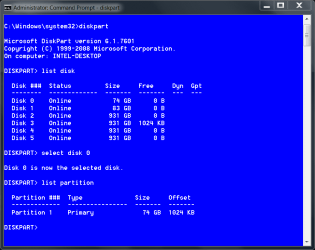
To check alignment in an elevated command prompt type diskpart (press enter) type list disk (press enter) type select disk # (where # is the number of your SSD) then type list partition. you will get a screen that lists the partition size and the offset. The offset is alignment. Mine is 1024 it looks like this.
alignment.PNG

You may also want to run sfc /scannow from an elevated command prompt to check system files. The scan now tutorial.
 

My Computers

System One System Two

  • Computer type
    PC/Desktop
    Computer Manufacturer/Model Number
    ALWAYS UNDER CONSTRUCTION
    OS
    Windows 11 Pro
    CPU
    Ryzen 9 5900X
    Motherboard
    Asus X570 Crosshair Viii Hero
    Memory
    32GB G Skill DDR4-3600
    Graphics Card(s)
    EVGA RTX 3080 FTW 3 Ultra
    Sound Card
    On Board/Sennheiser PC37X Headset
    Monitor(s) Displays
    3 X Asus 27"
    Screen Resolution
    2560x1440
    Hard Drives
    2 X 1 TB NVME drives
    PSU
    EVGA 850
    Case
    Phanteks Eclipse P400A
    Cooling
    EVGA 280 AIO
    Keyboard
    Logitech G510s/ Logitech G13
    Mouse
    Logitech G502
    Internet Speed
    24/1
    Antivirus
    ESET/MBAM Pro/SAS Pro
    Browser
    Chrome/ Firefox/ Edge
  • Computer type
    Laptop
    System Manufacturer/Model Number
    Dell 16 Plus
    OS
    Windows 11 Pro
    CPU
    Intel Ultra 9 288V
    Memory
    32 GB LPDDR5X 8533
    Monitor(s) Displays
    16" Mini-LED HDR600 Touch 90 Hz
    Screen Resolution
    2560X1600
    Hard Drives
    1 TB NVME
If you added a TV card, that will do it. Mine went from about 18 seconds to about 42 seconds after adding a Hauppage card.
 

My Computer

Computer type
PC/Desktop
Computer Manufacturer/Model Number
Built 2/11/2011
OS
Windows 7 Pro-x64
CPU
i7-2600 3.4GHz - 3.8GHz Turbo
Motherboard
Intel DH67BL-B3
Memory
8Gb - 2x4GB, Muskin 991770 PC3-1333
Graphics Card(s)
Integrated Intel HD 2000
Sound Card
Integrated Intel 10.1 HD, RealTek ALC892
Monitor(s) Displays
Asus LCD VH222H, Haier HL24XSL2a
Screen Resolution
1920x1080, 1920x1080
Hard Drives
Crucial SSD C300-128Gb,
Western Digital WD5002AALX - 500Gb,
Western Digital WD7501AALS - 750Gb
PSU
Seasonic 650W 80+ Gold Modular
Case
Rosewill Defender
Cooling
Stock CPU, Four 120mm case fans, PCH fan added
Keyboard
Logitech EX100 Y-RBH94 Wireless
Mouse
Logitech EX100 M-RCE95 Wireless
Internet Speed
3.0/1.5 Mbs
Antivirus
Microsoft Security Essentials
Browser
Microsoft Internet Explorer 11
Other Info
Antec Veris Premier-Multimedia IR Station,
Cyber Accoustics-3602 Speakers,
AFT XM-5U Card Reader,
Hauppauge TV-HVR-2250,
Sony LX300 USB Turntable
If you added a TV card, that will do it. Mine went from about 18 seconds to about 42 seconds after adding a Hauppage card.

Mine also. I have two HVR 2250's.
Any mapped drives will also increase the boot time.
 

My Computer

Computer type
PC/Desktop
Computer Manufacturer/Model Number
Custom Built
OS
Windows 10 Pro x64, Windows 8.1 Pro x64, Windows 7 Ultimate x64 SP1,
CPU
INTEL i9-7920X LGA 2066
Motherboard
Gigabyte X299-WU8 F3
Memory
64 GB (4 X 16 GB) G-Skill V Series DDR4 3200 Quad Channel
Graphics Card(s)
EVGA GTX 1060 SC 3 GB
Sound Card
Realtek Onboard ALC1220
Monitor(s) Displays
2 x Samsung S27E310
Screen Resolution
1920x1080
Hard Drives
Samsung 2 x 970 EVO Plus 500 GB NVMe
1 x 6TB WD 6003FZBX SATA
1 x 6TB WD 60EFRX SATA
12 x 3TB WD 30EFRX SATA
PSU
Seasonic X-1050
Case
Thermaltake Armor+
Cooling
Corsair H80i V2 Liquid AOI Cooler
Keyboard
Logitech G510s
Mouse
Logitech MX Master 2S
Internet Speed
200 Mb/s
Antivirus
ESET NOD32 13.1
Browser
EDGE (Dev, Canary, Beta), Chrome
Other Info
ASUS RT-AC68U router
Malwarebytes 4.0.4
I used somebody else's guide, but yes, I did disable prefetch, superfetch and the rest. I also ran a Google search on OtherKernelInitDuration, and no help there, either. The Google search did show that folks experiencing boot delay have OtherKernelInitDuration times below five seconds, which is why I am getting frustrated
 
Last edited:

My Computer

OS
Windows 7 Home 64bit
CPU
Intel Core i7-2600K
Motherboard
ASUS P8Z68-V PRO
Memory
16GB CORSAIR Vengeance DDR3 RAM
Graphics Card(s)
MSI Twin Frozr II Radeon HD 6870
Sound Card
Creative X-Fi XtremeMusic
Monitor(s) Displays
ASUS VE276Q
Hard Drives
Crucial M4 CT128M4SSD2 SSD /
Western Digital Caviar Black WD2002FAEX
PSU
CORSAIR HX850 PSU
Case
LIAN LI PC-K9B
Cooling
ZALMAN CNPS9900MAX
If you added a TV card, that will do it. Mine went from about 18 seconds to about 42 seconds after adding a Hauppage card.

No TV card here. I do have a D-Link Wifi card in the first PCIE slot, a Radeon 6870 in the PCIEX16 slot right below it, and a Microsoft USB mouse/keyboard transmitter in one of the USB ports. My Windows experience score is still 7.9, and my DiskMark64 scores are like 520MB/s sequential read, 200MB/s sequential write, so it seems the SSD is working just fine once I boot into Windows. It's the boot lag that's not right.

Anyone know what OtherKernelInitDuratiion is supposed to signify, anyway?
 

My Computer

OS
Windows 7 Home 64bit
CPU
Intel Core i7-2600K
Motherboard
ASUS P8Z68-V PRO
Memory
16GB CORSAIR Vengeance DDR3 RAM
Graphics Card(s)
MSI Twin Frozr II Radeon HD 6870
Sound Card
Creative X-Fi XtremeMusic
Monitor(s) Displays
ASUS VE276Q
Hard Drives
Crucial M4 CT128M4SSD2 SSD /
Western Digital Caviar Black WD2002FAEX
PSU
CORSAIR HX850 PSU
Case
LIAN LI PC-K9B
Cooling
ZALMAN CNPS9900MAX
I have 2 Crucial M4's and have experienced no problems with them. Is your sata controller in ahci mode? Firmware 0009 is out now, maybe that would help. Check your alignment and make sure trim is enabled. If you need help in doing that, let us know.

For trim in an elevated command prompt, type/copy-paste fsutil behavior query disabledeletenotify if it returns fsutil behavior query disabledeletenotify=0 then trim is enabled.
To check alignment in an elevated command prompt type diskpart (press enter) type list disk (press enter) type select disk # (where # is the number of your SSD) then type list partition. you will get a screen that lists the partition size and the offset. The offset is alignment. Mine is 1024 it looks like this.
View attachment 180128

You may also want to run sfc /scannow from an elevated command prompt to check system files. The scan now tutorial.

The firmware is 0009, trim is enabled, alignment is 1024, and I'm in AHCI mode. I did a repair install and an error check through Windows, and couldn't find anything wrong.
 

My Computer

OS
Windows 7 Home 64bit
CPU
Intel Core i7-2600K
Motherboard
ASUS P8Z68-V PRO
Memory
16GB CORSAIR Vengeance DDR3 RAM
Graphics Card(s)
MSI Twin Frozr II Radeon HD 6870
Sound Card
Creative X-Fi XtremeMusic
Monitor(s) Displays
ASUS VE276Q
Hard Drives
Crucial M4 CT128M4SSD2 SSD /
Western Digital Caviar Black WD2002FAEX
PSU
CORSAIR HX850 PSU
Case
LIAN LI PC-K9B
Cooling
ZALMAN CNPS9900MAX
About all I can say is post a list of your processes and services and we'll have a look. Do you use any special Group Policies? How many users do you have defined?
 

My Computer

Computer type
PC/Desktop
Computer Manufacturer/Model Number
Built 2/11/2011
OS
Windows 7 Pro-x64
CPU
i7-2600 3.4GHz - 3.8GHz Turbo
Motherboard
Intel DH67BL-B3
Memory
8Gb - 2x4GB, Muskin 991770 PC3-1333
Graphics Card(s)
Integrated Intel HD 2000
Sound Card
Integrated Intel 10.1 HD, RealTek ALC892
Monitor(s) Displays
Asus LCD VH222H, Haier HL24XSL2a
Screen Resolution
1920x1080, 1920x1080
Hard Drives
Crucial SSD C300-128Gb,
Western Digital WD5002AALX - 500Gb,
Western Digital WD7501AALS - 750Gb
PSU
Seasonic 650W 80+ Gold Modular
Case
Rosewill Defender
Cooling
Stock CPU, Four 120mm case fans, PCH fan added
Keyboard
Logitech EX100 Y-RBH94 Wireless
Mouse
Logitech EX100 M-RCE95 Wireless
Internet Speed
3.0/1.5 Mbs
Antivirus
Microsoft Security Essentials
Browser
Microsoft Internet Explorer 11
Other Info
Antec Veris Premier-Multimedia IR Station,
Cyber Accoustics-3602 Speakers,
AFT XM-5U Card Reader,
Hauppauge TV-HVR-2250,
Sony LX300 USB Turntable
About all I can say is post a list of your processes and services and we'll have a look. Do you use any special Group Policies? How many users do you have defined?

I don't have any group policies (I don't think I even can with Windows 7 Home Premum) and there is only one user account.

How do I go about copying my processes and services and posting them? When I try to export the entries, I end up with unformatted text files that are basically unreadable.

In the meantime, here is my diagnostics performance event log.

-
EventData


BootTsVersion
2
BootStartTime
2011-10-22T15:16:04.624800200Z
BootEndTime
2011-10-22T15:18:04.743659000Z
SystemBootInstance
68
UserBootInstance
62
BootTime
42087
MainPathBootTime
29587
BootKernelInitTime
15
BootDriverInitTime
227
BootDevicesInitTime
1201
BootPrefetchInitTime
0
BootPrefetchBytes
0
BootAutoChkTime
0
BootSmssInitTime
3418
BootCriticalServicesInitTime
259
BootUserProfileProcessingTime
793
BootMachineProfileProcessingTime
0
BootExplorerInitTime
886
BootNumStartupApps
11
BootPostBootTime
12500
BootIsRebootAfterInstall
false
BootRootCauseStepImprovementBits
0
BootRootCauseGradualImprovementBits
0
BootRootCauseStepDegradationBits
0
BootRootCauseGradualDegradationBits
0
BootIsDegradation
false
BootIsStepDegradation
false
BootIsGradualDegradation
false
BootImprovementDelta
0
BootDegradationDelta
0
BootIsRootCauseIdentified
false
OSLoaderDuration
556
BootPNPInitStartTimeMS
15
BootPNPInitDuration
1223
OtherKernelInitDuration
22589
SystemPNPInitStartTimeMS
23808
SystemPNPInitDuration
205
SessionInitStartTimeMS
24019
Session0InitDuration
2865
Session1InitDuration
206
SessionInitOtherDuration
345
WinLogonStartTimeMS
27437
OtherLogonInitActivityDuration
470
UserLogonWaitDuration
159
 
Last edited:

My Computer

OS
Windows 7 Home 64bit
CPU
Intel Core i7-2600K
Motherboard
ASUS P8Z68-V PRO
Memory
16GB CORSAIR Vengeance DDR3 RAM
Graphics Card(s)
MSI Twin Frozr II Radeon HD 6870
Sound Card
Creative X-Fi XtremeMusic
Monitor(s) Displays
ASUS VE276Q
Hard Drives
Crucial M4 CT128M4SSD2 SSD /
Western Digital Caviar Black WD2002FAEX
PSU
CORSAIR HX850 PSU
Case
LIAN LI PC-K9B
Cooling
ZALMAN CNPS9900MAX
What Asus utility programs do you have installed? Sometimes they can slow down boot times.
 

My Computers

System One System Two

  • Computer type
    PC/Desktop
    Computer Manufacturer/Model Number
    ALWAYS UNDER CONSTRUCTION
    OS
    Windows 11 Pro
    CPU
    Ryzen 9 5900X
    Motherboard
    Asus X570 Crosshair Viii Hero
    Memory
    32GB G Skill DDR4-3600
    Graphics Card(s)
    EVGA RTX 3080 FTW 3 Ultra
    Sound Card
    On Board/Sennheiser PC37X Headset
    Monitor(s) Displays
    3 X Asus 27"
    Screen Resolution
    2560x1440
    Hard Drives
    2 X 1 TB NVME drives
    PSU
    EVGA 850
    Case
    Phanteks Eclipse P400A
    Cooling
    EVGA 280 AIO
    Keyboard
    Logitech G510s/ Logitech G13
    Mouse
    Logitech G502
    Internet Speed
    24/1
    Antivirus
    ESET/MBAM Pro/SAS Pro
    Browser
    Chrome/ Firefox/ Edge
  • Computer type
    Laptop
    System Manufacturer/Model Number
    Dell 16 Plus
    OS
    Windows 11 Pro
    CPU
    Intel Ultra 9 288V
    Memory
    32 GB LPDDR5X 8533
    Monitor(s) Displays
    16" Mini-LED HDR600 Touch 90 Hz
    Screen Resolution
    2560X1600
    Hard Drives
    1 TB NVME
What Asus utility programs do you have installed? Sometimes they can slow down boot times.

I had the Asus AI Suite for a while, and then uninstalled it. There were also three Asus services set to run automatically even after I uninstalled all Asus software, and unchecking those didn't improve my boot times.

Here are my services.

Name Status Startup Type Log On As
ActiveX Installer (AxInstSV) Manual Local System
Adaptive Brightness Manual Local Service
Adobe Acrobat Update Service Started Automatic Local System
AMD External Events Utility Started Automatic Local System
Apple Mobile Device Started Automatic Local System
Application Experience Started Manual Local System
Application Identity Manual Local Service
Application Information Manual Local System
Application Layer Gateway Service Manual Local Service
ASUS Com Service Started Automatic Local System
ASUS HM Com Service Started Automatic Local System
ASUS System Control Service Started Automatic Local System
Background Intelligent Transfer Service Started Manual Local System
Base Filtering Engine Started Automatic Local Service
BitLocker Drive Encryption Service Manual Local System
Block Level Backup Engine Service Manual Local System
Bluetooth Support Service Manual Local Service
Bonjour Service Started Automatic Local System
Certificate Propagation Manual Local System
CNG Key Isolation Started Manual Local System
COM+ Event System Started Automatic Local Service
COM+ System Application Manual Local System
Computer Browser Manual Local System
Credential Manager Manual Local System
Cryptographic Services Started Automatic Network Service
DCOM Server Process Launcher Started Automatic Local System
Desktop Window Manager Session Manager Started Automatic Local System
DHCP Client Started Automatic Local Service
Diagnostic Policy Service Started Automatic Local Service
Diagnostic Service Host Started Manual Local Service
Diagnostic System Host Manual Local System
Disk Defragmenter Manual Local System
Distributed Link Tracking Client Started Automatic Local System
Distributed Transaction Coordinator Manual Network Service
DNS Client Started Automatic Network Service
Encrypting File System (EFS) Manual Local System
Extensible Authentication Protocol Started Manual Local System
Fax Manual Network Service
Function Discovery Provider Host Started Manual Local Service
Function Discovery Resource Publication Started Automatic Local Service
Futuremark SystemInfo Service Manual Local System
Google Update Service (gupdate) Automatic (Delayed Start) Local System
Google Update Service (gupdatem) Manual Local System
Group Policy Client Started Automatic Local System
Health Key and Certificate Management Manual Local System
HomeGroup Listener Started Manual Local System
HomeGroup Provider Started Manual Local Service
Human Interface Device Access Started Manual Local System
IKE and AuthIP IPsec Keying Modules Manual Local System
Intel(R) Rapid Storage Technology Started Automatic (Delayed Start) Local System
Intel® PROSet Monitoring Service Started Automatic Local System
Interactive Services Detection Manual Local System
Internet Connection Sharing (ICS) Disabled Local System
IP Helper Started Automatic Local System
iPod Service Started Manual Local System
IPsec Policy Agent Manual Network Service
JumpStart Wi-Fi Protected Setup Manual Local System
KtmRm for Distributed Transaction Coordinator Manual Network Service
Link-Layer Topology Discovery Mapper Manual Local Service
Media Center Extender Service Disabled Local Service
Microsoft .NET Framework NGEN v2.0.50727_X64 Disabled Local System
Microsoft .NET Framework NGEN v2.0.50727_X86 Disabled Local System
Microsoft .NET Framework NGEN v4.0.30319_X64 Automatic (Delayed Start) Local System
Microsoft .NET Framework NGEN v4.0.30319_X86 Automatic (Delayed Start) Local System
Microsoft Antimalware Service Started Automatic Local System
Microsoft iSCSI Initiator Service Manual Local System
Microsoft Network Inspection Manual Local Service
Microsoft Office Diagnostics Service Manual Local System
Microsoft Software Shadow Copy Provider Manual Local System
Multimedia Class Scheduler Started Automatic Local System
Net Driver HPZ12 Disabled Local Service
Net.Tcp Port Sharing Service Disabled Local Service
Netlogon Manual Local System
Network Access Protection Agent Manual Network Service
Network Connections Started Manual Local System
Network List Service Started Manual Local Service
Network Location Awareness Started Automatic Network Service
Network Store Interface Service Started Automatic Local Service
Office Source Engine Manual Local System
Parental Controls Manual Local Service
Peer Name Resolution Protocol Started Manual Local Service
Peer Networking Grouping Started Manual Local Service
Peer Networking Identity Manager Started Manual Local Service
Performance Counter DLL Host Manual Local Service
Performance Logs & Alerts Manual Local Service
Plug and Play Started Automatic Local System
Pml Driver HPZ12 Disabled Local Service
PnP-X IP Bus Enumerator Manual Local System
PNRP Machine Name Publication Service Manual Local Service
Portable Device Enumerator Service Manual Local System
Power Started Automatic Local System
Print Spooler Started Automatic Local System
Problem Reports and Solutions Control Panel Support Manual Local System
Program Compatibility Assistant Service Started Automatic Local System
Protected Storage Manual Local System
Quality Windows Audio Video Experience Manual Local Service
Remote Access Auto Connection Manager Manual Local System
Remote Access Connection Manager Manual Local System
Remote Desktop Configuration Manual Local System
Remote Desktop Services Manual Network Service
Remote Procedure Call (RPC) Started Automatic Network Service
Remote Procedure Call (RPC) Locator Manual Network Service
Remote Registry Manual Local Service
Routing and Remote Access Disabled Local System
RPC Endpoint Mapper Started Automatic Network Service
Secondary Logon Manual Local System
Secure Socket Tunneling Protocol Service Manual Local Service
Security Accounts Manager Started Automatic Local System
Security Center Started Automatic (Delayed Start) Local Service
Server Started Automatic Local System
Shell Hardware Detection Started Automatic Local System
Smart Card Manual Local Service
Smart Card Removal Policy Manual Local System
SNMP Trap Manual Local Service
Software Protection Automatic (Delayed Start) Network Service
SPP Notification Service Manual Local Service
SSDP Discovery Started Manual Local Service
Superfetch Manual Local System
System Event Notification Service Started Automatic Local System
Tablet PC Input Service Manual Local System
Task Scheduler Started Automatic Local System
TCP/IP NetBIOS Helper Started Automatic Local Service
Telephony Manual Network Service
Themes Started Automatic Local System
Thread Ordering Server Manual Local Service
TPM Base Services Manual Local Service
UPnP Device Host Manual Local Service
User Profile Service Started Automatic Local System
Virtual Disk Manual Local System
Volume Shadow Copy Manual Local System
WebClient Manual Local Service
Windows Activation Technologies Service Manual Local System
Windows Audio Started Automatic Local Service
Windows Audio Endpoint Builder Started Automatic Local System
Windows Backup Started Manual Local System
Windows Biometric Service Manual Local System
Windows CardSpace Manual Local System
Windows Color System Manual Local Service
Windows Connect Now - Config Registrar Started Manual Local Service
Windows Defender Manual Local System
Windows Driver Foundation - User-mode Driver Framework Manual Local System
Windows Error Reporting Service Manual Local System
Windows Event Collector Manual Network Service
Windows Event Log Started Automatic Local Service
Windows Firewall Started Automatic Local Service
Windows Font Cache Service Started Automatic (Delayed Start) Local Service
Windows Image Acquisition (WIA) Manual Local Service
Windows Installer Manual Local System
Windows Management Instrumentation Started Automatic Local System
Windows Media Center Receiver Service Manual Network Service
Windows Media Center Scheduler Service Manual Network Service
Windows Media Player Network Sharing Service Disabled Network Service
Windows Modules Installer Manual Local System
Windows Remote Management (WS-Management) Manual Network Service
Windows Search Started Automatic (Delayed Start) Local System
Windows Time Manual Local Service
Windows Update Started Automatic (Delayed Start) Local System
WinHTTP Web Proxy Auto-Discovery Service Manual Local Service
Wired AutoConfig Manual Local System
WLAN AutoConfig Started Automatic Local System
WMI Performance Adapter Manual Local System
Workstation Started Automatic Network Service
WWAN AutoConfig Manual Local Service

 

My Computer

OS
Windows 7 Home 64bit
CPU
Intel Core i7-2600K
Motherboard
ASUS P8Z68-V PRO
Memory
16GB CORSAIR Vengeance DDR3 RAM
Graphics Card(s)
MSI Twin Frozr II Radeon HD 6870
Sound Card
Creative X-Fi XtremeMusic
Monitor(s) Displays
ASUS VE276Q
Hard Drives
Crucial M4 CT128M4SSD2 SSD /
Western Digital Caviar Black WD2002FAEX
PSU
CORSAIR HX850 PSU
Case
LIAN LI PC-K9B
Cooling
ZALMAN CNPS9900MAX
Try this. hold down the Windows key (the one with the flag) and press the R key, type in msconfig. give approval and go to the startup tab. Uncheck everything except windows OS, your A/V program and CCC. Click apply and OK. it will ask for a restart. restart The first restart may be slow as it is making changes, after that see if startup times improve.
 

My Computers

System One System Two

  • Computer type
    PC/Desktop
    Computer Manufacturer/Model Number
    ALWAYS UNDER CONSTRUCTION
    OS
    Windows 11 Pro
    CPU
    Ryzen 9 5900X
    Motherboard
    Asus X570 Crosshair Viii Hero
    Memory
    32GB G Skill DDR4-3600
    Graphics Card(s)
    EVGA RTX 3080 FTW 3 Ultra
    Sound Card
    On Board/Sennheiser PC37X Headset
    Monitor(s) Displays
    3 X Asus 27"
    Screen Resolution
    2560x1440
    Hard Drives
    2 X 1 TB NVME drives
    PSU
    EVGA 850
    Case
    Phanteks Eclipse P400A
    Cooling
    EVGA 280 AIO
    Keyboard
    Logitech G510s/ Logitech G13
    Mouse
    Logitech G502
    Internet Speed
    24/1
    Antivirus
    ESET/MBAM Pro/SAS Pro
    Browser
    Chrome/ Firefox/ Edge
  • Computer type
    Laptop
    System Manufacturer/Model Number
    Dell 16 Plus
    OS
    Windows 11 Pro
    CPU
    Intel Ultra 9 288V
    Memory
    32 GB LPDDR5X 8533
    Monitor(s) Displays
    16" Mini-LED HDR600 Touch 90 Hz
    Screen Resolution
    2560X1600
    Hard Drives
    1 TB NVME
Your PNP, Kernel and Session times are all high. These are also all disk bound too. I don't think it's any particular driver as much as the disk itself. Did you image the system disk from another disk? Reload Windows? What changed during the week?

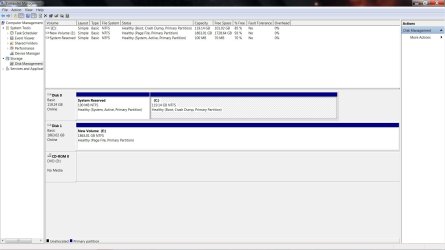
Download and run AS-SSD. This will put the drive through a read/write test with timings and provide an alignment check. Snip the results and post the image. Also post a snip of your Disk Management screen.

You can get AS-SSD here: Alex Intelligent Software - Downloads
Click the Download Box at the bottom of the page. Unzip and execute--There's no install.
 

My Computer

Computer type
PC/Desktop
Computer Manufacturer/Model Number
Built 2/11/2011
OS
Windows 7 Pro-x64
CPU
i7-2600 3.4GHz - 3.8GHz Turbo
Motherboard
Intel DH67BL-B3
Memory
8Gb - 2x4GB, Muskin 991770 PC3-1333
Graphics Card(s)
Integrated Intel HD 2000
Sound Card
Integrated Intel 10.1 HD, RealTek ALC892
Monitor(s) Displays
Asus LCD VH222H, Haier HL24XSL2a
Screen Resolution
1920x1080, 1920x1080
Hard Drives
Crucial SSD C300-128Gb,
Western Digital WD5002AALX - 500Gb,
Western Digital WD7501AALS - 750Gb
PSU
Seasonic 650W 80+ Gold Modular
Case
Rosewill Defender
Cooling
Stock CPU, Four 120mm case fans, PCH fan added
Keyboard
Logitech EX100 Y-RBH94 Wireless
Mouse
Logitech EX100 M-RCE95 Wireless
Internet Speed
3.0/1.5 Mbs
Antivirus
Microsoft Security Essentials
Browser
Microsoft Internet Explorer 11
Other Info
Antec Veris Premier-Multimedia IR Station,
Cyber Accoustics-3602 Speakers,
AFT XM-5U Card Reader,
Hauppauge TV-HVR-2250,
Sony LX300 USB Turntable
Your PNP, Kernel and Session times are all high. These are also all disk bound too. I don't think it's any particular driver as much as the disk itself. Did you image the system disk from another disk? Reload Windows? What changed during the week?

Download and run AS-SSD. This will put the drive through a read/write test with timings and provide an alignment check. Snip the results and post the image. Also post a snip of your Disk Management screen.

You can get AS-SSD here: Alex Intelligent Software - Downloads
Click the Download Box at the bottom of the page. Unzip and execute--There's no install.

OK, I'll try both of your suggestions.

As to what happened in the last week, I ran a Windows repair install thinking that might fix the slow boot times, but boot times were pretty much identical after I ran it.

I did a clean install of Windows 7 64bit on my SSD last Saturday with the SSD and DVD drives as my only SATA components. I added a 2TB WD drive a little later, and my boot times were still quick. I started noticing slower boot times after I added the D-Link Wifi card and an HP all in one printer. The printer and printer software are now gone, and all I have left are the Radeon card, D-Link card and Microsoft USB/Keyboard bluetooth transmitter.

The only other thing I can think of is that my WD storage drive is listed as a primary partition in Windows Disk Management. I usually set up my storage drives as logical partitions, but forgot to do so on this build. Could this be the reason?
 

Attachments

  • Disks(1).jpg
    Disks(1).jpg
    126.7 KB · Views: 80

My Computer

OS
Windows 7 Home 64bit
CPU
Intel Core i7-2600K
Motherboard
ASUS P8Z68-V PRO
Memory
16GB CORSAIR Vengeance DDR3 RAM
Graphics Card(s)
MSI Twin Frozr II Radeon HD 6870
Sound Card
Creative X-Fi XtremeMusic
Monitor(s) Displays
ASUS VE276Q
Hard Drives
Crucial M4 CT128M4SSD2 SSD /
Western Digital Caviar Black WD2002FAEX
PSU
CORSAIR HX850 PSU
Case
LIAN LI PC-K9B
Cooling
ZALMAN CNPS9900MAX
The primary on the WDis not an issue. It will have little to no affect on boot times. I am assuming the SSD is connected to the intel 6GB/s port 0. If you will run AS SSD as carwiz recommended, we should be able to tell if it is a problem with the SSD.
 

My Computers

System One System Two

  • Computer type
    PC/Desktop
    Computer Manufacturer/Model Number
    ALWAYS UNDER CONSTRUCTION
    OS
    Windows 11 Pro
    CPU
    Ryzen 9 5900X
    Motherboard
    Asus X570 Crosshair Viii Hero
    Memory
    32GB G Skill DDR4-3600
    Graphics Card(s)
    EVGA RTX 3080 FTW 3 Ultra
    Sound Card
    On Board/Sennheiser PC37X Headset
    Monitor(s) Displays
    3 X Asus 27"
    Screen Resolution
    2560x1440
    Hard Drives
    2 X 1 TB NVME drives
    PSU
    EVGA 850
    Case
    Phanteks Eclipse P400A
    Cooling
    EVGA 280 AIO
    Keyboard
    Logitech G510s/ Logitech G13
    Mouse
    Logitech G502
    Internet Speed
    24/1
    Antivirus
    ESET/MBAM Pro/SAS Pro
    Browser
    Chrome/ Firefox/ Edge
  • Computer type
    Laptop
    System Manufacturer/Model Number
    Dell 16 Plus
    OS
    Windows 11 Pro
    CPU
    Intel Ultra 9 288V
    Memory
    32 GB LPDDR5X 8533
    Monitor(s) Displays
    16" Mini-LED HDR600 Touch 90 Hz
    Screen Resolution
    2560X1600
    Hard Drives
    1 TB NVME
Must be that Apple stuff slowing it down. :) Just kidding.

I don't see anything glaring in the services. I was expecting to see some HP stuff but the un-install must have worked. Lets see some drive times.
 

My Computer

Computer type
PC/Desktop
Computer Manufacturer/Model Number
Built 2/11/2011
OS
Windows 7 Pro-x64
CPU
i7-2600 3.4GHz - 3.8GHz Turbo
Motherboard
Intel DH67BL-B3
Memory
8Gb - 2x4GB, Muskin 991770 PC3-1333
Graphics Card(s)
Integrated Intel HD 2000
Sound Card
Integrated Intel 10.1 HD, RealTek ALC892
Monitor(s) Displays
Asus LCD VH222H, Haier HL24XSL2a
Screen Resolution
1920x1080, 1920x1080
Hard Drives
Crucial SSD C300-128Gb,
Western Digital WD5002AALX - 500Gb,
Western Digital WD7501AALS - 750Gb
PSU
Seasonic 650W 80+ Gold Modular
Case
Rosewill Defender
Cooling
Stock CPU, Four 120mm case fans, PCH fan added
Keyboard
Logitech EX100 Y-RBH94 Wireless
Mouse
Logitech EX100 M-RCE95 Wireless
Internet Speed
3.0/1.5 Mbs
Antivirus
Microsoft Security Essentials
Browser
Microsoft Internet Explorer 11
Other Info
Antec Veris Premier-Multimedia IR Station,
Cyber Accoustics-3602 Speakers,
AFT XM-5U Card Reader,
Hauppauge TV-HVR-2250,
Sony LX300 USB Turntable
The primary on the WDis not an issue. It will have little to no affect on boot times. I am assuming the SSD is connected to the intel 6GB/s port 0. If you will run AS SSD as carwiz recommended, we should be able to tell if it is a problem with the SSD.

The SSD is on an Intel Controller 6GB/s port, and it's port 0.

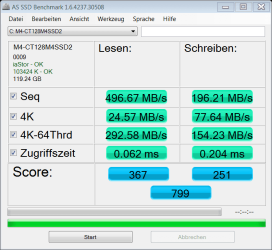
Here are my results:
 

Attachments

  • as-ssd-bench M4-CT128M4SSD2 10.22.2011 4-48-56 PM.png
    as-ssd-bench M4-CT128M4SSD2 10.22.2011 4-48-56 PM.png
    18.3 KB · Views: 26

My Computer

OS
Windows 7 Home 64bit
CPU
Intel Core i7-2600K
Motherboard
ASUS P8Z68-V PRO
Memory
16GB CORSAIR Vengeance DDR3 RAM
Graphics Card(s)
MSI Twin Frozr II Radeon HD 6870
Sound Card
Creative X-Fi XtremeMusic
Monitor(s) Displays
ASUS VE276Q
Hard Drives
Crucial M4 CT128M4SSD2 SSD /
Western Digital Caviar Black WD2002FAEX
PSU
CORSAIR HX850 PSU
Case
LIAN LI PC-K9B
Cooling
ZALMAN CNPS9900MAX
It is not the SSD. The speeds and access times are good. The score is very good.
 

My Computers

System One System Two

  • Computer type
    PC/Desktop
    Computer Manufacturer/Model Number
    ALWAYS UNDER CONSTRUCTION
    OS
    Windows 11 Pro
    CPU
    Ryzen 9 5900X
    Motherboard
    Asus X570 Crosshair Viii Hero
    Memory
    32GB G Skill DDR4-3600
    Graphics Card(s)
    EVGA RTX 3080 FTW 3 Ultra
    Sound Card
    On Board/Sennheiser PC37X Headset
    Monitor(s) Displays
    3 X Asus 27"
    Screen Resolution
    2560x1440
    Hard Drives
    2 X 1 TB NVME drives
    PSU
    EVGA 850
    Case
    Phanteks Eclipse P400A
    Cooling
    EVGA 280 AIO
    Keyboard
    Logitech G510s/ Logitech G13
    Mouse
    Logitech G502
    Internet Speed
    24/1
    Antivirus
    ESET/MBAM Pro/SAS Pro
    Browser
    Chrome/ Firefox/ Edge
  • Computer type
    Laptop
    System Manufacturer/Model Number
    Dell 16 Plus
    OS
    Windows 11 Pro
    CPU
    Intel Ultra 9 288V
    Memory
    32 GB LPDDR5X 8533
    Monitor(s) Displays
    16" Mini-LED HDR600 Touch 90 Hz
    Screen Resolution
    2560X1600
    Hard Drives
    1 TB NVME
Ditto that. Those are blazing fast! Driver-good, Offset-good. Just had to have a look.

Why is your pagefile on E? Also, how large is it? (Your setting)
 

My Computer

Computer type
PC/Desktop
Computer Manufacturer/Model Number
Built 2/11/2011
OS
Windows 7 Pro-x64
CPU
i7-2600 3.4GHz - 3.8GHz Turbo
Motherboard
Intel DH67BL-B3
Memory
8Gb - 2x4GB, Muskin 991770 PC3-1333
Graphics Card(s)
Integrated Intel HD 2000
Sound Card
Integrated Intel 10.1 HD, RealTek ALC892
Monitor(s) Displays
Asus LCD VH222H, Haier HL24XSL2a
Screen Resolution
1920x1080, 1920x1080
Hard Drives
Crucial SSD C300-128Gb,
Western Digital WD5002AALX - 500Gb,
Western Digital WD7501AALS - 750Gb
PSU
Seasonic 650W 80+ Gold Modular
Case
Rosewill Defender
Cooling
Stock CPU, Four 120mm case fans, PCH fan added
Keyboard
Logitech EX100 Y-RBH94 Wireless
Mouse
Logitech EX100 M-RCE95 Wireless
Internet Speed
3.0/1.5 Mbs
Antivirus
Microsoft Security Essentials
Browser
Microsoft Internet Explorer 11
Other Info
Antec Veris Premier-Multimedia IR Station,
Cyber Accoustics-3602 Speakers,
AFT XM-5U Card Reader,
Hauppauge TV-HVR-2250,
Sony LX300 USB Turntable
Back
Top