Solved Slow SSD Boot with long OtherKernelInitDuration delay

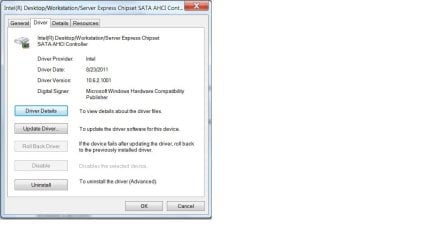
That's very interesting. I did notice that I got a "found new hardware" notification after I disabled my intel ethernet nic, and I thought the name of the controller changed at the same time. Can I roll the driver back?
 

My Computer

OS
Windows 7 Home 64bit
CPU
Intel Core i7-2600K
Motherboard
ASUS P8Z68-V PRO
Memory
16GB CORSAIR Vengeance DDR3 RAM
Graphics Card(s)
MSI Twin Frozr II Radeon HD 6870
Sound Card
Creative X-Fi XtremeMusic
Monitor(s) Displays
ASUS VE276Q
Hard Drives
Crucial M4 CT128M4SSD2 SSD /
Western Digital Caviar Black WD2002FAEX
PSU
CORSAIR HX850 PSU
Case
LIAN LI PC-K9B
Cooling
ZALMAN CNPS9900MAX
iaStor comes from IRST, the intel rapid storage raid program. I use it, but install it then go to services.msc and disable the IRST, but still have the iaStor driver that way without the raid program running.
 

My Computers

System One System Two

  • Computer type
    PC/Desktop
    Computer Manufacturer/Model Number
    ALWAYS UNDER CONSTRUCTION
    OS
    Windows 11 Pro
    CPU
    Ryzen 9 5900X
    Motherboard
    Asus X570 Crosshair Viii Hero
    Memory
    32GB G Skill DDR4-3600
    Graphics Card(s)
    EVGA RTX 3080 FTW 3 Ultra
    Sound Card
    On Board/Sennheiser PC37X Headset
    Monitor(s) Displays
    3 X Asus 27"
    Screen Resolution
    2560x1440
    Hard Drives
    2 X 1 TB NVME drives
    PSU
    EVGA 850
    Case
    Phanteks Eclipse P400A
    Cooling
    EVGA 280 AIO
    Keyboard
    Logitech G510s/ Logitech G13
    Mouse
    Logitech G502
    Internet Speed
    24/1
    Antivirus
    ESET/MBAM Pro/SAS Pro
    Browser
    Chrome/ Firefox/ Edge
  • Computer type
    Laptop
    System Manufacturer/Model Number
    Dell 16 Plus
    OS
    Windows 11 Pro
    CPU
    Intel Ultra 9 288V
    Memory
    32 GB LPDDR5X 8533
    Monitor(s) Displays
    16" Mini-LED HDR600 Touch 90 Hz
    Screen Resolution
    2560X1600
    Hard Drives
    1 TB NVME
iaStor comes from IRST, the intel rapid storage raid program. I use it, but install it then go to services.msc and disable the IRST, but still have the iaStor driver that way without the raid program running.

I'm not sure what I need to install, because I already have IRST and iaStor on my system. I disabled IRST in services.msc, and no joy.

What will happen if I simply uninstall the Intel controller?

Edit: I searched for iaStor.sys in my Windows System32 folder and found both iaStor.sys and something called iaStorV.sys, the latter dated 2010 and the former 2011.
 

Attachments

  • Intel Driver.jpg
    Intel Driver.jpg
    45.8 KB · Views: 20

My Computer

OS
Windows 7 Home 64bit
CPU
Intel Core i7-2600K
Motherboard
ASUS P8Z68-V PRO
Memory
16GB CORSAIR Vengeance DDR3 RAM
Graphics Card(s)
MSI Twin Frozr II Radeon HD 6870
Sound Card
Creative X-Fi XtremeMusic
Monitor(s) Displays
ASUS VE276Q
Hard Drives
Crucial M4 CT128M4SSD2 SSD /
Western Digital Caviar Black WD2002FAEX
PSU
CORSAIR HX850 PSU
Case
LIAN LI PC-K9B
Cooling
ZALMAN CNPS9900MAX
Do you have the latest bios for your board?
 

My Computers

System One System Two

  • Computer type
    PC/Desktop
    Computer Manufacturer/Model Number
    ALWAYS UNDER CONSTRUCTION
    OS
    Windows 11 Pro
    CPU
    Ryzen 9 5900X
    Motherboard
    Asus X570 Crosshair Viii Hero
    Memory
    32GB G Skill DDR4-3600
    Graphics Card(s)
    EVGA RTX 3080 FTW 3 Ultra
    Sound Card
    On Board/Sennheiser PC37X Headset
    Monitor(s) Displays
    3 X Asus 27"
    Screen Resolution
    2560x1440
    Hard Drives
    2 X 1 TB NVME drives
    PSU
    EVGA 850
    Case
    Phanteks Eclipse P400A
    Cooling
    EVGA 280 AIO
    Keyboard
    Logitech G510s/ Logitech G13
    Mouse
    Logitech G502
    Internet Speed
    24/1
    Antivirus
    ESET/MBAM Pro/SAS Pro
    Browser
    Chrome/ Firefox/ Edge
  • Computer type
    Laptop
    System Manufacturer/Model Number
    Dell 16 Plus
    OS
    Windows 11 Pro
    CPU
    Intel Ultra 9 288V
    Memory
    32 GB LPDDR5X 8533
    Monitor(s) Displays
    16" Mini-LED HDR600 Touch 90 Hz
    Screen Resolution
    2560X1600
    Hard Drives
    1 TB NVME
Do you have the latest bios for your board?

No. Asus came out with a newer one about a month ago and I haven't updated it yet. Suppose that's next on my list.

BTW, I uninstalled the Intel ACHI driver and replaced it with the MS one, and no joy there either. Reinstalled the Intel driver and now back to square one.
 

My Computer

OS
Windows 7 Home 64bit
CPU
Intel Core i7-2600K
Motherboard
ASUS P8Z68-V PRO
Memory
16GB CORSAIR Vengeance DDR3 RAM
Graphics Card(s)
MSI Twin Frozr II Radeon HD 6870
Sound Card
Creative X-Fi XtremeMusic
Monitor(s) Displays
ASUS VE276Q
Hard Drives
Crucial M4 CT128M4SSD2 SSD /
Western Digital Caviar Black WD2002FAEX
PSU
CORSAIR HX850 PSU
Case
LIAN LI PC-K9B
Cooling
ZALMAN CNPS9900MAX
At this point, it probably time to make a backup, remove everything from the machine short of enough RAM to boot, the CPU, a video card, and the SSD, and start testing to see what happens after installing the OS (and take good notes). It could still be a hardware issue, but as to what, it'd be hard to say.
 

My Computer

Computer type
PC/Desktop
Computer Manufacturer/Model Number
Custom
OS
Windows 10 Pro x64
CPU
Intel Core i7 4790K @ 4.5GHz
Motherboard
Asus Maximus Hero VII
Memory
32GB DDR3
Graphics Card(s)
Nvidia GeForce GTX970
Sound Card
Realtek HD Audio
Screen Resolution
1920x1200
Hard Drives
1x Samsung 250GB SSD
4x WD RE 2TB (RAIDZ)
PSU
Corsair AX760i
Case
Fractal Design Define R4
Cooling
Noctua NH-D15
Well, I'm finally starting to make some headway.

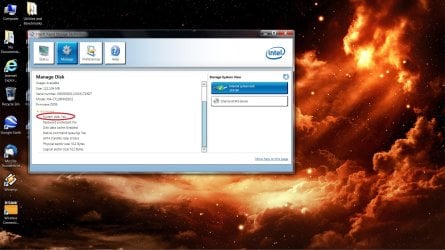
One anomaly that continued to bother me was why Intel's IRST utility identified my WD storage drive as being the "system drive" while the SSD was clearly the system drive. On a hunch, I unplugged both SATA cables from my board, and then plugged the SSD into the SATA 6GB/s port formerly occupied by the WD. I hit the start button, and BAM, the SSD booted into Windows in nothing flat. I opened the IRST utility, and what do you know, the SSD was correctly identified as the system drive.

Adding the WD drive to the other 6GB/s port, unfortunately, slowed my boot back to a crawl. Unplugged it again, and the SSD was off to the races.

I'm wondering whether placing my temporary internet files and Google cache file on the storage drive (via a junction) is causing the OS to see the WD as a second system drive and screwing up my boot. Very weird.

Edit: Moved the page file and temporary internet file folder back to the SSD and uninstalled Google Earth. No change. Disconnected the WD and move the SSD back to port 0, blazingly fast boot. Plugged the WD into port 1, slow boot again, but at least the SSD is detected by IRST as the system drive again.

Why would the simple addition of a HDD storage drive cause boot slowdowns? I don't get it.

 

Attachments

  • irst.jpg
    irst.jpg
    223.8 KB · Views: 49
Last edited:

My Computer

OS
Windows 7 Home 64bit
CPU
Intel Core i7-2600K
Motherboard
ASUS P8Z68-V PRO
Memory
16GB CORSAIR Vengeance DDR3 RAM
Graphics Card(s)
MSI Twin Frozr II Radeon HD 6870
Sound Card
Creative X-Fi XtremeMusic
Monitor(s) Displays
ASUS VE276Q
Hard Drives
Crucial M4 CT128M4SSD2 SSD /
Western Digital Caviar Black WD2002FAEX
PSU
CORSAIR HX850 PSU
Case
LIAN LI PC-K9B
Cooling
ZALMAN CNPS9900MAX
Just a though, use IDE instead of ACHI and no RAID.
 

My Computer

Computer type
PC/Desktop
Computer Manufacturer/Model Number
Home made Desktop
OS
Windows 10 Pro. 64/ version 1709 Windows 7 Pro/64
CPU
Intel i7-6800K @ 4.3
Motherboard
ASUS X-99 Deluxe II
Memory
Corsair Platinum 16 gig @2400
Graphics Card(s)
EVGA GTX 1070 OC
Monitor(s) Displays
Asus 27" LED LCD/VE278Q
Screen Resolution
1920-1080 or 1280-720 HDMI
Hard Drives
INTEL SSD 730-240 Gb Sata 3.0/
PSU
EVGA Platium 1200W
Case
Phanteks Luxe Tempered Glass 8 fans/ one radiator
Cooling
XSPC/ Water Cooled CPU
Keyboard
Das 4 Professional
Mouse
Logitech M705/MX Anywhere 2-S
Internet Speed
100 mbits
Antivirus
Microsoft Security Essentials/ Malwarebytes Premium 3.0/ SAS
Browser
I.E. 11 default/Firefox/ ISP Time Warner Cable/Spectrum
Other Info
LG BluRay Burner/
Sound system-KLipsch-THX/
Icy Dock ssd Hot Swap bays.
I hate to say it, but either there's a problem with the Intel storage driver, or you have a configuration or hardware problem with the disk subsystem.

I enabled the Marvel SATA controller and put the WD drive on it to see whether segregating the two drives would have any affect. Sadly, no.

Any suggestion as to why the disk subsystem would work fine with just the SSD but stall with the addition of a second drive?
 
Last edited:

My Computer

OS
Windows 7 Home 64bit
CPU
Intel Core i7-2600K
Motherboard
ASUS P8Z68-V PRO
Memory
16GB CORSAIR Vengeance DDR3 RAM
Graphics Card(s)
MSI Twin Frozr II Radeon HD 6870
Sound Card
Creative X-Fi XtremeMusic
Monitor(s) Displays
ASUS VE276Q
Hard Drives
Crucial M4 CT128M4SSD2 SSD /
Western Digital Caviar Black WD2002FAEX
PSU
CORSAIR HX850 PSU
Case
LIAN LI PC-K9B
Cooling
ZALMAN CNPS9900MAX
Just a though, use IDE instead of ACHI and no RAID.

Are there any drawbacks to changing from ACHI to IDE after the OS is installed? I just want to make sure I can safely return to ACHI mode once I've made the change.
 

My Computer

OS
Windows 7 Home 64bit
CPU
Intel Core i7-2600K
Motherboard
ASUS P8Z68-V PRO
Memory
16GB CORSAIR Vengeance DDR3 RAM
Graphics Card(s)
MSI Twin Frozr II Radeon HD 6870
Sound Card
Creative X-Fi XtremeMusic
Monitor(s) Displays
ASUS VE276Q
Hard Drives
Crucial M4 CT128M4SSD2 SSD /
Western Digital Caviar Black WD2002FAEX
PSU
CORSAIR HX850 PSU
Case
LIAN LI PC-K9B
Cooling
ZALMAN CNPS9900MAX
Your Z68 board supports an SSD assist to the hard drive. Do you have that set up?
 

My Computers

System One System Two

  • Computer type
    PC/Desktop
    Computer Manufacturer/Model Number
    ALWAYS UNDER CONSTRUCTION
    OS
    Windows 11 Pro
    CPU
    Ryzen 9 5900X
    Motherboard
    Asus X570 Crosshair Viii Hero
    Memory
    32GB G Skill DDR4-3600
    Graphics Card(s)
    EVGA RTX 3080 FTW 3 Ultra
    Sound Card
    On Board/Sennheiser PC37X Headset
    Monitor(s) Displays
    3 X Asus 27"
    Screen Resolution
    2560x1440
    Hard Drives
    2 X 1 TB NVME drives
    PSU
    EVGA 850
    Case
    Phanteks Eclipse P400A
    Cooling
    EVGA 280 AIO
    Keyboard
    Logitech G510s/ Logitech G13
    Mouse
    Logitech G502
    Internet Speed
    24/1
    Antivirus
    ESET/MBAM Pro/SAS Pro
    Browser
    Chrome/ Firefox/ Edge
  • Computer type
    Laptop
    System Manufacturer/Model Number
    Dell 16 Plus
    OS
    Windows 11 Pro
    CPU
    Intel Ultra 9 288V
    Memory
    32 GB LPDDR5X 8533
    Monitor(s) Displays
    16" Mini-LED HDR600 Touch 90 Hz
    Screen Resolution
    2560X1600
    Hard Drives
    1 TB NVME

My Computer

OS
Windows 7 Home 64bit
CPU
Intel Core i7-2600K
Motherboard
ASUS P8Z68-V PRO
Memory
16GB CORSAIR Vengeance DDR3 RAM
Graphics Card(s)
MSI Twin Frozr II Radeon HD 6870
Sound Card
Creative X-Fi XtremeMusic
Monitor(s) Displays
ASUS VE276Q
Hard Drives
Crucial M4 CT128M4SSD2 SSD /
Western Digital Caviar Black WD2002FAEX
PSU
CORSAIR HX850 PSU
Case
LIAN LI PC-K9B
Cooling
ZALMAN CNPS9900MAX
Just a though, use IDE instead of ACHI and no RAID.

I put the WD drive on the Marvel controller and set it to IDE. Still no dice. Looks like the mere presence of the WD in any SATA port on any controller in any mode is causing the delay.
 

My Computer

OS
Windows 7 Home 64bit
CPU
Intel Core i7-2600K
Motherboard
ASUS P8Z68-V PRO
Memory
16GB CORSAIR Vengeance DDR3 RAM
Graphics Card(s)
MSI Twin Frozr II Radeon HD 6870
Sound Card
Creative X-Fi XtremeMusic
Monitor(s) Displays
ASUS VE276Q
Hard Drives
Crucial M4 CT128M4SSD2 SSD /
Western Digital Caviar Black WD2002FAEX
PSU
CORSAIR HX850 PSU
Case
LIAN LI PC-K9B
Cooling
ZALMAN CNPS9900MAX

My Computers

System One System Two

  • Computer type
    PC/Desktop
    Computer Manufacturer/Model Number
    ALWAYS UNDER CONSTRUCTION
    OS
    Windows 11 Pro
    CPU
    Ryzen 9 5900X
    Motherboard
    Asus X570 Crosshair Viii Hero
    Memory
    32GB G Skill DDR4-3600
    Graphics Card(s)
    EVGA RTX 3080 FTW 3 Ultra
    Sound Card
    On Board/Sennheiser PC37X Headset
    Monitor(s) Displays
    3 X Asus 27"
    Screen Resolution
    2560x1440
    Hard Drives
    2 X 1 TB NVME drives
    PSU
    EVGA 850
    Case
    Phanteks Eclipse P400A
    Cooling
    EVGA 280 AIO
    Keyboard
    Logitech G510s/ Logitech G13
    Mouse
    Logitech G502
    Internet Speed
    24/1
    Antivirus
    ESET/MBAM Pro/SAS Pro
    Browser
    Chrome/ Firefox/ Edge
  • Computer type
    Laptop
    System Manufacturer/Model Number
    Dell 16 Plus
    OS
    Windows 11 Pro
    CPU
    Intel Ultra 9 288V
    Memory
    32 GB LPDDR5X 8533
    Monitor(s) Displays
    16" Mini-LED HDR600 Touch 90 Hz
    Screen Resolution
    2560X1600
    Hard Drives
    1 TB NVME

I did, and it passed.

I also updated the bios to the latest version, and still the same problem.

Short of putting both drives on the Marvell controller (or doing a fresh Windows install, which I'm not interested in doing at the moment), I think I'm about out of options.
 

My Computer

OS
Windows 7 Home 64bit
CPU
Intel Core i7-2600K
Motherboard
ASUS P8Z68-V PRO
Memory
16GB CORSAIR Vengeance DDR3 RAM
Graphics Card(s)
MSI Twin Frozr II Radeon HD 6870
Sound Card
Creative X-Fi XtremeMusic
Monitor(s) Displays
ASUS VE276Q
Hard Drives
Crucial M4 CT128M4SSD2 SSD /
Western Digital Caviar Black WD2002FAEX
PSU
CORSAIR HX850 PSU
Case
LIAN LI PC-K9B
Cooling
ZALMAN CNPS9900MAX
If the SSD runs good alone and the only time you have problems is with both drives attached, it seems to me that there is somthing wrong with the WD drive or the sata controllers on the board.
 

My Computers

System One System Two

  • Computer type
    PC/Desktop
    Computer Manufacturer/Model Number
    ALWAYS UNDER CONSTRUCTION
    OS
    Windows 11 Pro
    CPU
    Ryzen 9 5900X
    Motherboard
    Asus X570 Crosshair Viii Hero
    Memory
    32GB G Skill DDR4-3600
    Graphics Card(s)
    EVGA RTX 3080 FTW 3 Ultra
    Sound Card
    On Board/Sennheiser PC37X Headset
    Monitor(s) Displays
    3 X Asus 27"
    Screen Resolution
    2560x1440
    Hard Drives
    2 X 1 TB NVME drives
    PSU
    EVGA 850
    Case
    Phanteks Eclipse P400A
    Cooling
    EVGA 280 AIO
    Keyboard
    Logitech G510s/ Logitech G13
    Mouse
    Logitech G502
    Internet Speed
    24/1
    Antivirus
    ESET/MBAM Pro/SAS Pro
    Browser
    Chrome/ Firefox/ Edge
  • Computer type
    Laptop
    System Manufacturer/Model Number
    Dell 16 Plus
    OS
    Windows 11 Pro
    CPU
    Intel Ultra 9 288V
    Memory
    32 GB LPDDR5X 8533
    Monitor(s) Displays
    16" Mini-LED HDR600 Touch 90 Hz
    Screen Resolution
    2560X1600
    Hard Drives
    1 TB NVME
I checked my Diagnostics-Performance logs to see whether getting my SSD properly recognized as the system drive made any difference in boot times. That one change seems to have fixed the OtherKernelInitDuration problem but created another, albeit less time consuming, delay in a metric called SessionInitOtherDuration. My total boot time dropped by six seconds in the exchange.

Anyone care to hazard a guess as to what SessionInitOtherDuration is supposed to be measuring? It increased from 345 to 19358 milliseconds.

[FONT=&quot]-[/FONT]
[FONT=&quot]EventData[/FONT]
[FONT=&quot]BootTsVersion[/FONT]
[FONT=&quot]2[/FONT]
[FONT=&quot]BootStartTime[/FONT]
[FONT=&quot]2011-10-25T00:14:04.624800200Z[/FONT]
[FONT=&quot]BootEndTime[/FONT]
[FONT=&quot]2011-10-25T00:15:59.527641700Z[/FONT]
[FONT=&quot]SystemBootInstance[/FONT]
[FONT=&quot]130[/FONT]
[FONT=&quot]UserBootInstance[/FONT]
[FONT=&quot]124[/FONT]
[FONT=&quot]BootTime[/FONT]
[FONT=&quot]36659[/FONT]
[FONT=&quot]MainPathBootTime[/FONT]
[FONT=&quot]23859[/FONT]
[FONT=&quot]BootKernelInitTime[/FONT]
[FONT=&quot]21[/FONT]
[FONT=&quot]BootDriverInitTime[/FONT]
[FONT=&quot]227[/FONT]
[FONT=&quot]BootDevicesInitTime[/FONT]
[FONT=&quot]1221[/FONT]
[FONT=&quot]BootPrefetchInitTime[/FONT]
[FONT=&quot]0[/FONT]
[FONT=&quot]BootPrefetchBytes[/FONT]
[FONT=&quot]0[/FONT]
[FONT=&quot]BootAutoChkTime[/FONT]
[FONT=&quot]0[/FONT]
[FONT=&quot]BootSmssInitTime[/FONT]
[FONT=&quot]20632[/FONT]
[FONT=&quot]BootCriticalServicesInitTime[/FONT]
[FONT=&quot]290[/FONT]
[FONT=&quot]BootUserProfileProcessingTime[/FONT]
[FONT=&quot]366[/FONT]
[FONT=&quot]BootMachineProfileProcessingTime[/FONT]
[FONT=&quot]0[/FONT]
[FONT=&quot]BootExplorerInitTime[/FONT]
[FONT=&quot]855[/FONT]
[FONT=&quot]BootNumStartupApps[/FONT]
[FONT=&quot]11[/FONT]
[FONT=&quot]BootPostBootTime[/FONT]
[FONT=&quot]12800[/FONT]
[FONT=&quot]BootIsRebootAfterInstall[/FONT]
[FONT=&quot]false[/FONT]
[FONT=&quot]BootRootCauseStepImprovementBits[/FONT]
[FONT=&quot]0[/FONT]
[FONT=&quot]BootRootCauseGradualImprovementBits[/FONT]
[FONT=&quot]0[/FONT]
[FONT=&quot]BootRootCauseStepDegradationBits[/FONT]
[FONT=&quot]0[/FONT]
[FONT=&quot]BootRootCauseGradualDegradationBits[/FONT]
[FONT=&quot]0[/FONT]
[FONT=&quot]BootIsDegradation[/FONT]
[FONT=&quot]false[/FONT]
[FONT=&quot]BootIsStepDegradation[/FONT]
[FONT=&quot]false[/FONT]
[FONT=&quot]BootIsGradualDegradation[/FONT]
[FONT=&quot]false[/FONT]
[FONT=&quot]BootImprovementDelta[/FONT]
[FONT=&quot]0[/FONT]
[FONT=&quot]BootDegradationDelta[/FONT]
[FONT=&quot]0[/FONT]
[FONT=&quot]BootIsRootCauseIdentified[/FONT]
[FONT=&quot]false[/FONT]
[FONT=&quot]OSLoaderDuration[/FONT]
[FONT=&quot]563[/FONT]
[FONT=&quot]BootPNPInitStartTimeMS[/FONT]
[FONT=&quot]21[/FONT]
[FONT=&quot]BootPNPInitDuration[/FONT]
[FONT=&quot]1239[/FONT]
[FONT=&quot]OtherKernelInitDuration[/FONT]
[FONT=&quot]161[/FONT]
[FONT=&quot]SystemPNPInitStartTimeMS[/FONT]
[FONT=&quot]1391[/FONT]
[FONT=&quot]SystemPNPInitDuration[/FONT]
[FONT=&quot]208[/FONT]
[FONT=&quot]SessionInitStartTimeMS[/FONT]
[FONT=&quot]1609[/FONT]
[FONT=&quot]Session0InitDuration[/FONT]
[FONT=&quot]875[/FONT]
[FONT=&quot]Session1InitDuration[/FONT]
[FONT=&quot]398[/FONT]
[FONT=&quot]SessionInitOtherDuration[/FONT]
[FONT=&quot]19358[/FONT]
[FONT=&quot]WinLogonStartTimeMS[/FONT]
[FONT=&quot]22242[/FONT]
[FONT=&quot]OtherLogonInitActivityDuration[/FONT]
[FONT=&quot]396[/FONT]
[FONT=&quot]UserLogonWaitDuration[/FONT]
[FONT=&quot]141[/FONT]
 
Last edited:

My Computer

OS
Windows 7 Home 64bit
CPU
Intel Core i7-2600K
Motherboard
ASUS P8Z68-V PRO
Memory
16GB CORSAIR Vengeance DDR3 RAM
Graphics Card(s)
MSI Twin Frozr II Radeon HD 6870
Sound Card
Creative X-Fi XtremeMusic
Monitor(s) Displays
ASUS VE276Q
Hard Drives
Crucial M4 CT128M4SSD2 SSD /
Western Digital Caviar Black WD2002FAEX
PSU
CORSAIR HX850 PSU
Case
LIAN LI PC-K9B
Cooling
ZALMAN CNPS9900MAX
It measures the time it takes winlogon to start, minus smss.exe start time, minus session 0 and session 1 init time. If you take another trace and look at the Boot Phases graph, you should see what I'm talking about.
 

My Computer

Computer type
PC/Desktop
Computer Manufacturer/Model Number
Custom
OS
Windows 10 Pro x64
CPU
Intel Core i7 4790K @ 4.5GHz
Motherboard
Asus Maximus Hero VII
Memory
32GB DDR3
Graphics Card(s)
Nvidia GeForce GTX970
Sound Card
Realtek HD Audio
Screen Resolution
1920x1200
Hard Drives
1x Samsung 250GB SSD
4x WD RE 2TB (RAIDZ)
PSU
Corsair AX760i
Case
Fractal Design Define R4
Cooling
Noctua NH-D15
Uploading the new Boot Trace report to Rapidshare right now. I'm wondering whether this is some sort of logon related delay.
 

My Computer

OS
Windows 7 Home 64bit
CPU
Intel Core i7-2600K
Motherboard
ASUS P8Z68-V PRO
Memory
16GB CORSAIR Vengeance DDR3 RAM
Graphics Card(s)
MSI Twin Frozr II Radeon HD 6870
Sound Card
Creative X-Fi XtremeMusic
Monitor(s) Displays
ASUS VE276Q
Hard Drives
Crucial M4 CT128M4SSD2 SSD /
Western Digital Caviar Black WD2002FAEX
PSU
CORSAIR HX850 PSU
Case
LIAN LI PC-K9B
Cooling
ZALMAN CNPS9900MAX
It measures the time it takes winlogon to start, minus smss.exe start time, minus session 0 and session 1 init time. If you take another trace and look at the Boot Phases graph, you should see what I'm talking about.

Here is my latest Boot Trace report. I don't have the skills necessary to interpret the results, much less formulate an opinion as to what might be causing the high SessionInitOtherDuration reading. Could you help?

https://rapidshare.com/files/106346...CE_PERF_COUNTER_POWER_PRIORITY_REGISTRY_1.etl
 

My Computer

OS
Windows 7 Home 64bit
CPU
Intel Core i7-2600K
Motherboard
ASUS P8Z68-V PRO
Memory
16GB CORSAIR Vengeance DDR3 RAM
Graphics Card(s)
MSI Twin Frozr II Radeon HD 6870
Sound Card
Creative X-Fi XtremeMusic
Monitor(s) Displays
ASUS VE276Q
Hard Drives
Crucial M4 CT128M4SSD2 SSD /
Western Digital Caviar Black WD2002FAEX
PSU
CORSAIR HX850 PSU
Case
LIAN LI PC-K9B
Cooling
ZALMAN CNPS9900MAX
Back
Top