Solved Slow SSD Boot with long OtherKernelInitDuration delay

Ditto that. Those are blazing fast! Driver-good, Offset-good. Just had to have a look.

Why is your pagefile on E? Also, how large is it? (Your setting)

I put my pagefile on E based on a recommendation from this SSD setup guide: SpeedGuide.net :: SSD Speed Tweaks

I set it to Windows Managed.
 

My Computer

OS
Windows 7 Home 64bit
CPU
Intel Core i7-2600K
Motherboard
ASUS P8Z68-V PRO
Memory
16GB CORSAIR Vengeance DDR3 RAM
Graphics Card(s)
MSI Twin Frozr II Radeon HD 6870
Sound Card
Creative X-Fi XtremeMusic
Monitor(s) Displays
ASUS VE276Q
Hard Drives
Crucial M4 CT128M4SSD2 SSD /
Western Digital Caviar Black WD2002FAEX
PSU
CORSAIR HX850 PSU
Case
LIAN LI PC-K9B
Cooling
ZALMAN CNPS9900MAX
Try this. hold down the Windows key (the one with the flag) and press the R key, type in msconfig. give approval and go to the startup tab. Uncheck everything except windows OS, your A/V program and CCC. Click apply and OK. it will ask for a restart. restart The first restart may be slow as it is making changes, after that see if startup times improve.

Same result.


-
EventData


BootTsVersion
2
BootStartTime
2011-10-22T21:50:55.640400300Z
BootEndTime
2011-10-22T21:52:55.693649200Z
SystemBootInstance
70
UserBootInstance
64
BootTime
42138
MainPathBootTime
29638
BootKernelInitTime
15
BootDriverInitTime
225
BootDevicesInitTime
1192
BootPrefetchInitTime
0
BootPrefetchBytes
0
BootAutoChkTime
0
BootSmssInitTime
3402
BootCriticalServicesInitTime
246
BootUserProfileProcessingTime
785
BootMachineProfileProcessingTime
0
BootExplorerInitTime
889
BootNumStartupApps
11
BootPostBootTime
12500
BootIsRebootAfterInstall
false
BootRootCauseStepImprovementBits
0
BootRootCauseGradualImprovementBits
0
BootRootCauseStepDegradationBits
0
BootRootCauseGradualDegradationBits
0
BootIsDegradation
false
BootIsStepDegradation
false
BootIsGradualDegradation
false
BootImprovementDelta
0
BootDegradationDelta
0
BootIsRootCauseIdentified
false
OSLoaderDuration
542
BootPNPInitStartTimeMS
15
BootPNPInitDuration
1214
OtherKernelInitDuration
22677
SystemPNPInitStartTimeMS
23886
SystemPNPInitDuration
203
SessionInitStartTimeMS
24095
Session0InitDuration
2861
Session1InitDuration
196
SessionInitOtherDuration
343
WinLogonStartTimeMS
27498
OtherLogonInitActivityDuration
465
UserLogonWaitDuration
145
 
Last edited:

My Computer

OS
Windows 7 Home 64bit
CPU
Intel Core i7-2600K
Motherboard
ASUS P8Z68-V PRO
Memory
16GB CORSAIR Vengeance DDR3 RAM
Graphics Card(s)
MSI Twin Frozr II Radeon HD 6870
Sound Card
Creative X-Fi XtremeMusic
Monitor(s) Displays
ASUS VE276Q
Hard Drives
Crucial M4 CT128M4SSD2 SSD /
Western Digital Caviar Black WD2002FAEX
PSU
CORSAIR HX850 PSU
Case
LIAN LI PC-K9B
Cooling
ZALMAN CNPS9900MAX
Yeah, I don't agree with that part but it's your system. Windows 7 is reading and writing to the SSD about every second but that's not a reason to move the OS to a hard drive. Since the pagefile is sequential read/write, the SSD is super fast. And Windows will use the pagefile even if you have memory available. (For sure, you have that!) :eek:

I also don't agree with setting it equal to memory size. 1-2Gb is plenty but keep it 512Kb boundary relevant.

Wear on the SSD? It's already been shown that most SSDs will outlive the rest of your system. You have it, make it work for you.

In any case, I'm going to think about the boot delay some more.
 

My Computer

Computer type
PC/Desktop
Computer Manufacturer/Model Number
Built 2/11/2011
OS
Windows 7 Pro-x64
CPU
i7-2600 3.4GHz - 3.8GHz Turbo
Motherboard
Intel DH67BL-B3
Memory
8Gb - 2x4GB, Muskin 991770 PC3-1333
Graphics Card(s)
Integrated Intel HD 2000
Sound Card
Integrated Intel 10.1 HD, RealTek ALC892
Monitor(s) Displays
Asus LCD VH222H, Haier HL24XSL2a
Screen Resolution
1920x1080, 1920x1080
Hard Drives
Crucial SSD C300-128Gb,
Western Digital WD5002AALX - 500Gb,
Western Digital WD7501AALS - 750Gb
PSU
Seasonic 650W 80+ Gold Modular
Case
Rosewill Defender
Cooling
Stock CPU, Four 120mm case fans, PCH fan added
Keyboard
Logitech EX100 Y-RBH94 Wireless
Mouse
Logitech EX100 M-RCE95 Wireless
Internet Speed
3.0/1.5 Mbs
Antivirus
Microsoft Security Essentials
Browser
Microsoft Internet Explorer 11
Other Info
Antec Veris Premier-Multimedia IR Station,
Cyber Accoustics-3602 Speakers,
AFT XM-5U Card Reader,
Hauppauge TV-HVR-2250,
Sony LX300 USB Turntable
After sifting through all this information...Have you tried removing the Wi-Fi card and see if for whatever reason it was the cause of the slow down?
 

My Computer

OS
Windows 7 Ultimate x64
CPU
Intel Core i7-2600
Memory
16Gb DDR3-1600
Graphics Card(s)
ATI Radeon 7950
Sound Card
Creative X-Fi Extreme Gamer
Monitor(s) Displays
(2) 22" LG WideScreens
Screen Resolution
1920 x 1080
Hard Drives
(1) Samsung 840 Pro 256GB
(1) WD RE4 1Tb SATA3 Drive
PSU
Antec TruPower 750W
Internet Speed
50Mbps
After sifting through all this information...Have you tried removing the Wi-Fi card and see if for whatever reason it was the cause of the slow down?

Not yet. I'll have to wait until my wife finishes using the machine before I can shut it down and pull the card.

Are wireless cards known to cause boot delays?
 

My Computer

OS
Windows 7 Home 64bit
CPU
Intel Core i7-2600K
Motherboard
ASUS P8Z68-V PRO
Memory
16GB CORSAIR Vengeance DDR3 RAM
Graphics Card(s)
MSI Twin Frozr II Radeon HD 6870
Sound Card
Creative X-Fi XtremeMusic
Monitor(s) Displays
ASUS VE276Q
Hard Drives
Crucial M4 CT128M4SSD2 SSD /
Western Digital Caviar Black WD2002FAEX
PSU
CORSAIR HX850 PSU
Case
LIAN LI PC-K9B
Cooling
ZALMAN CNPS9900MAX
I have not come across any that have...HOWEVER, with so many different hardware and software configurations...It is entirely possible something is not happy and causes the delay.

Since its the only thing that hasnt been attempted so far, its a starting point. If that fails to solve the issue, then we can all scratch our heads some more.
 

My Computer

OS
Windows 7 Ultimate x64
CPU
Intel Core i7-2600
Memory
16Gb DDR3-1600
Graphics Card(s)
ATI Radeon 7950
Sound Card
Creative X-Fi Extreme Gamer
Monitor(s) Displays
(2) 22" LG WideScreens
Screen Resolution
1920 x 1080
Hard Drives
(1) Samsung 840 Pro 256GB
(1) WD RE4 1Tb SATA3 Drive
PSU
Antec TruPower 750W
Internet Speed
50Mbps
I have not come across any that have...HOWEVER, with so many different hardware and software configurations...It is entirely possible something is not happy and causes the delay.

Since its the only thing that hasnt been attempted so far, its a starting point. If that fails to solve the issue, then we can all scratch our heads some more.

The very last possibility might be related to the now disconnected and uninstalled HP all in one printer. When I first started noticing the boot delay, I booted into safe mode to see if I could find any unrecognized hardware in Device Manager. To my surprise, I found a yellow exclamation point next to an unknown mass storage controller. After I unplugged the HP printer from the USB port and uninstalled the printer, the unknown device went away. I read on the net somewhere that the device could have been a card reader, and I know one was integrated into the HP unit. Assuming this was the problem (big assumption), wouldn't it have disappeared along with the printer itself?

Anyway, now you know why I'm here.
 

My Computer

OS
Windows 7 Home 64bit
CPU
Intel Core i7-2600K
Motherboard
ASUS P8Z68-V PRO
Memory
16GB CORSAIR Vengeance DDR3 RAM
Graphics Card(s)
MSI Twin Frozr II Radeon HD 6870
Sound Card
Creative X-Fi XtremeMusic
Monitor(s) Displays
ASUS VE276Q
Hard Drives
Crucial M4 CT128M4SSD2 SSD /
Western Digital Caviar Black WD2002FAEX
PSU
CORSAIR HX850 PSU
Case
LIAN LI PC-K9B
Cooling
ZALMAN CNPS9900MAX
Not necessarially. When you uninstall a program, many times there are fragments of the program left in the registry.
 

My Computers

System One System Two

  • Computer type
    PC/Desktop
    Computer Manufacturer/Model Number
    ALWAYS UNDER CONSTRUCTION
    OS
    Windows 11 Pro
    CPU
    Ryzen 9 5900X
    Motherboard
    Asus X570 Crosshair Viii Hero
    Memory
    32GB G Skill DDR4-3600
    Graphics Card(s)
    EVGA RTX 3080 FTW 3 Ultra
    Sound Card
    On Board/Sennheiser PC37X Headset
    Monitor(s) Displays
    3 X Asus 27"
    Screen Resolution
    2560x1440
    Hard Drives
    2 X 1 TB NVME drives
    PSU
    EVGA 850
    Case
    Phanteks Eclipse P400A
    Cooling
    EVGA 280 AIO
    Keyboard
    Logitech G510s/ Logitech G13
    Mouse
    Logitech G502
    Internet Speed
    24/1
    Antivirus
    ESET/MBAM Pro/SAS Pro
    Browser
    Chrome/ Firefox/ Edge
  • Computer type
    Laptop
    System Manufacturer/Model Number
    Dell 16 Plus
    OS
    Windows 11 Pro
    CPU
    Intel Ultra 9 288V
    Memory
    32 GB LPDDR5X 8533
    Monitor(s) Displays
    16" Mini-LED HDR600 Touch 90 Hz
    Screen Resolution
    2560X1600
    Hard Drives
    1 TB NVME
After sifting through all this information...Have you tried removing the Wi-Fi card and see if for whatever reason it was the cause of the slow down?

Taking the Wifi card out didn't help. The only thing left is the Radeon card, and I just can't imagine it would be the culprit given how many millions of them are running on Windows 7 systems without issue.
 

My Computer

OS
Windows 7 Home 64bit
CPU
Intel Core i7-2600K
Motherboard
ASUS P8Z68-V PRO
Memory
16GB CORSAIR Vengeance DDR3 RAM
Graphics Card(s)
MSI Twin Frozr II Radeon HD 6870
Sound Card
Creative X-Fi XtremeMusic
Monitor(s) Displays
ASUS VE276Q
Hard Drives
Crucial M4 CT128M4SSD2 SSD /
Western Digital Caviar Black WD2002FAEX
PSU
CORSAIR HX850 PSU
Case
LIAN LI PC-K9B
Cooling
ZALMAN CNPS9900MAX
I don't recall, but have you run sfc /scannow? It is a system file checker and will verify and attempt to correct system files.
 

My Computers

System One System Two

  • Computer type
    PC/Desktop
    Computer Manufacturer/Model Number
    ALWAYS UNDER CONSTRUCTION
    OS
    Windows 11 Pro
    CPU
    Ryzen 9 5900X
    Motherboard
    Asus X570 Crosshair Viii Hero
    Memory
    32GB G Skill DDR4-3600
    Graphics Card(s)
    EVGA RTX 3080 FTW 3 Ultra
    Sound Card
    On Board/Sennheiser PC37X Headset
    Monitor(s) Displays
    3 X Asus 27"
    Screen Resolution
    2560x1440
    Hard Drives
    2 X 1 TB NVME drives
    PSU
    EVGA 850
    Case
    Phanteks Eclipse P400A
    Cooling
    EVGA 280 AIO
    Keyboard
    Logitech G510s/ Logitech G13
    Mouse
    Logitech G502
    Internet Speed
    24/1
    Antivirus
    ESET/MBAM Pro/SAS Pro
    Browser
    Chrome/ Firefox/ Edge
  • Computer type
    Laptop
    System Manufacturer/Model Number
    Dell 16 Plus
    OS
    Windows 11 Pro
    CPU
    Intel Ultra 9 288V
    Memory
    32 GB LPDDR5X 8533
    Monitor(s) Displays
    16" Mini-LED HDR600 Touch 90 Hz
    Screen Resolution
    2560X1600
    Hard Drives
    1 TB NVME
I don't recall, but have you run sfc /scannow? It is a system file checker and will verify and attempt to correct system files.

Yes, last night. No help there, either.

I wonder what part of the OS waits approximately 23 seconds for a device to respond before deciding it isn't there and allowing the boot to continue. It's almost as if the OS expects something to be there and is programmed to wait a set amount of time before concluding it isn't.
 

My Computer

OS
Windows 7 Home 64bit
CPU
Intel Core i7-2600K
Motherboard
ASUS P8Z68-V PRO
Memory
16GB CORSAIR Vengeance DDR3 RAM
Graphics Card(s)
MSI Twin Frozr II Radeon HD 6870
Sound Card
Creative X-Fi XtremeMusic
Monitor(s) Displays
ASUS VE276Q
Hard Drives
Crucial M4 CT128M4SSD2 SSD /
Western Digital Caviar Black WD2002FAEX
PSU
CORSAIR HX850 PSU
Case
LIAN LI PC-K9B
Cooling
ZALMAN CNPS9900MAX
Do you happen to have a solid color desktop (background)? .... Grasping here.
 

My Computer

Computer type
PC/Desktop
Computer Manufacturer/Model Number
Built 2/11/2011
OS
Windows 7 Pro-x64
CPU
i7-2600 3.4GHz - 3.8GHz Turbo
Motherboard
Intel DH67BL-B3
Memory
8Gb - 2x4GB, Muskin 991770 PC3-1333
Graphics Card(s)
Integrated Intel HD 2000
Sound Card
Integrated Intel 10.1 HD, RealTek ALC892
Monitor(s) Displays
Asus LCD VH222H, Haier HL24XSL2a
Screen Resolution
1920x1080, 1920x1080
Hard Drives
Crucial SSD C300-128Gb,
Western Digital WD5002AALX - 500Gb,
Western Digital WD7501AALS - 750Gb
PSU
Seasonic 650W 80+ Gold Modular
Case
Rosewill Defender
Cooling
Stock CPU, Four 120mm case fans, PCH fan added
Keyboard
Logitech EX100 Y-RBH94 Wireless
Mouse
Logitech EX100 M-RCE95 Wireless
Internet Speed
3.0/1.5 Mbs
Antivirus
Microsoft Security Essentials
Browser
Microsoft Internet Explorer 11
Other Info
Antec Veris Premier-Multimedia IR Station,
Cyber Accoustics-3602 Speakers,
AFT XM-5U Card Reader,
Hauppauge TV-HVR-2250,
Sony LX300 USB Turntable
Almost all motherboard manufacturers will tell you it is your fault, there is nothing wrong with their board. If you have 2 sata controllers in bios, disable the one you are not using. your board has 4 6GB/s controllers. 2 ports blue and 2 ports grey. That usually indicates they are on different controllers. The second is usually an add on. My board has 2 marvell controllers and takes an extra 5 seconds boot time if enabled.

On a more unpleasant note, in the time you have been trying to figure this out you could have done a clean install. Download the latest drivers from Asus, and all updates and see how it runs clean. Then add 1 program at a time, testing in between. That way you should find out which program or driver is causing the delay. Do the same in BIOS, start with optimized defaults and change 1 thing at a time to find out if any setting is causing problems. Just a suggestion, but we are running out of options. Do the install with no other hard drive connected except the SSD.
 

My Computers

System One System Two

  • Computer type
    PC/Desktop
    Computer Manufacturer/Model Number
    ALWAYS UNDER CONSTRUCTION
    OS
    Windows 11 Pro
    CPU
    Ryzen 9 5900X
    Motherboard
    Asus X570 Crosshair Viii Hero
    Memory
    32GB G Skill DDR4-3600
    Graphics Card(s)
    EVGA RTX 3080 FTW 3 Ultra
    Sound Card
    On Board/Sennheiser PC37X Headset
    Monitor(s) Displays
    3 X Asus 27"
    Screen Resolution
    2560x1440
    Hard Drives
    2 X 1 TB NVME drives
    PSU
    EVGA 850
    Case
    Phanteks Eclipse P400A
    Cooling
    EVGA 280 AIO
    Keyboard
    Logitech G510s/ Logitech G13
    Mouse
    Logitech G502
    Internet Speed
    24/1
    Antivirus
    ESET/MBAM Pro/SAS Pro
    Browser
    Chrome/ Firefox/ Edge
  • Computer type
    Laptop
    System Manufacturer/Model Number
    Dell 16 Plus
    OS
    Windows 11 Pro
    CPU
    Intel Ultra 9 288V
    Memory
    32 GB LPDDR5X 8533
    Monitor(s) Displays
    16" Mini-LED HDR600 Touch 90 Hz
    Screen Resolution
    2560X1600
    Hard Drives
    1 TB NVME
Almost all motherboard manufacturers will tell you it is your fault, there is nothing wrong with their board. If you have 2 sata controllers in bios, disable the one you are not using. your board has 4 6GB/s controllers. 2 ports blue and 2 ports grey. That usually indicates they are on different controllers. The second is usually an add on. My board has 2 marvell controllers and takes an extra 5 seconds boot time if enabled.

On a more unpleasant note, in the time you have been trying to figure this out you could have done a clean install. Download the latest drivers from Asus, and all updates and see how it runs clean. Then add 1 program at a time, testing in between. That way you should find out which program or driver is causing the delay. Do the same in BIOS, start with optimized defaults and change 1 thing at a time to find out if any setting is causing problems. Just a suggestion, but we are running out of options. Do the install with no other hard drive connected except the SSD.

I disabled the Marvell 6GB/s controller before I installed the OS, and I've never enabled it since.

Carwiz, I've been using a desktop background from day one.

I'll need to think about how badly I really need those extra 23 second boot savings before I decide to do another fresh install. The decision wouldn't be so hard had I not just done one last weekend.
 

My Computer

OS
Windows 7 Home 64bit
CPU
Intel Core i7-2600K
Motherboard
ASUS P8Z68-V PRO
Memory
16GB CORSAIR Vengeance DDR3 RAM
Graphics Card(s)
MSI Twin Frozr II Radeon HD 6870
Sound Card
Creative X-Fi XtremeMusic
Monitor(s) Displays
ASUS VE276Q
Hard Drives
Crucial M4 CT128M4SSD2 SSD /
Western Digital Caviar Black WD2002FAEX
PSU
CORSAIR HX850 PSU
Case
LIAN LI PC-K9B
Cooling
ZALMAN CNPS9900MAX
But is it a solid color?
 

My Computer

Computer type
PC/Desktop
Computer Manufacturer/Model Number
Built 2/11/2011
OS
Windows 7 Pro-x64
CPU
i7-2600 3.4GHz - 3.8GHz Turbo
Motherboard
Intel DH67BL-B3
Memory
8Gb - 2x4GB, Muskin 991770 PC3-1333
Graphics Card(s)
Integrated Intel HD 2000
Sound Card
Integrated Intel 10.1 HD, RealTek ALC892
Monitor(s) Displays
Asus LCD VH222H, Haier HL24XSL2a
Screen Resolution
1920x1080, 1920x1080
Hard Drives
Crucial SSD C300-128Gb,
Western Digital WD5002AALX - 500Gb,
Western Digital WD7501AALS - 750Gb
PSU
Seasonic 650W 80+ Gold Modular
Case
Rosewill Defender
Cooling
Stock CPU, Four 120mm case fans, PCH fan added
Keyboard
Logitech EX100 Y-RBH94 Wireless
Mouse
Logitech EX100 M-RCE95 Wireless
Internet Speed
3.0/1.5 Mbs
Antivirus
Microsoft Security Essentials
Browser
Microsoft Internet Explorer 11
Other Info
Antec Veris Premier-Multimedia IR Station,
Cyber Accoustics-3602 Speakers,
AFT XM-5U Card Reader,
Hauppauge TV-HVR-2250,
Sony LX300 USB Turntable
I apologize if I've missed it in the previous pages, but that particular function call is called during boot PnP init, and it measures the time from the very first diag event after the boot process starts until you see smss.exe startup - at this point, I would strongly suggest getting a boot trace so we can actually see what's happening when you box boots:
http://www.sevenforums.com/tutorial...up-shutdown-sleep-hibernate-reboot-trace.html
 

My Computer

Computer type
PC/Desktop
Computer Manufacturer/Model Number
Custom
OS
Windows 10 Pro x64
CPU
Intel Core i7 4790K @ 4.5GHz
Motherboard
Asus Maximus Hero VII
Memory
32GB DDR3
Graphics Card(s)
Nvidia GeForce GTX970
Sound Card
Realtek HD Audio
Screen Resolution
1920x1200
Hard Drives
1x Samsung 250GB SSD
4x WD RE 2TB (RAIDZ)
PSU
Corsair AX760i
Case
Fractal Design Define R4
Cooling
Noctua NH-D15

Attachments

  • Wallpaper.jpg
    Wallpaper.jpg
    227.8 KB · Views: 28

My Computer

OS
Windows 7 Home 64bit
CPU
Intel Core i7-2600K
Motherboard
ASUS P8Z68-V PRO
Memory
16GB CORSAIR Vengeance DDR3 RAM
Graphics Card(s)
MSI Twin Frozr II Radeon HD 6870
Sound Card
Creative X-Fi XtremeMusic
Monitor(s) Displays
ASUS VE276Q
Hard Drives
Crucial M4 CT128M4SSD2 SSD /
Western Digital Caviar Black WD2002FAEX
PSU
CORSAIR HX850 PSU
Case
LIAN LI PC-K9B
Cooling
ZALMAN CNPS9900MAX
I apologize if I've missed it in the previous pages, but that particular function call is called during boot PnP init, and it measures the time from the very first diag event after the boot process starts until you see smss.exe startup - at this point, I would strongly suggest getting a boot trace so we can actually see what's happening when you box boots:
http://www.sevenforums.com/tutorial...up-shutdown-sleep-hibernate-reboot-trace.html

BSOD, even when trying to boot into safe mode. Lucky I imaged my C Drive last night.

I'll try it again without the "+ Drivers."
 

My Computer

OS
Windows 7 Home 64bit
CPU
Intel Core i7-2600K
Motherboard
ASUS P8Z68-V PRO
Memory
16GB CORSAIR Vengeance DDR3 RAM
Graphics Card(s)
MSI Twin Frozr II Radeon HD 6870
Sound Card
Creative X-Fi XtremeMusic
Monitor(s) Displays
ASUS VE276Q
Hard Drives
Crucial M4 CT128M4SSD2 SSD /
Western Digital Caviar Black WD2002FAEX
PSU
CORSAIR HX850 PSU
Case
LIAN LI PC-K9B
Cooling
ZALMAN CNPS9900MAX
I apologize if I've missed it in the previous pages, but that particular function call is called during boot PnP init, and it measures the time from the very first diag event after the boot process starts until you see smss.exe startup - at this point, I would strongly suggest getting a boot trace so we can actually see what's happening when you box boots:
http://www.sevenforums.com/tutorial...up-shutdown-sleep-hibernate-reboot-trace.html

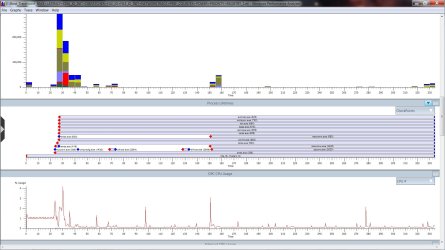
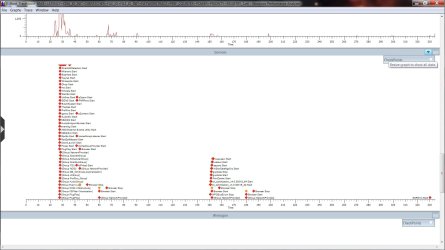
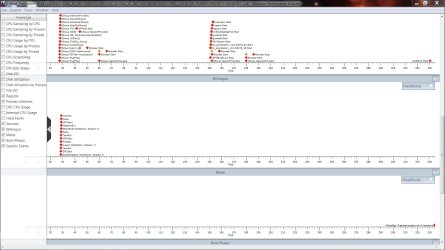
OK, I ran it, but the file it created is 320MB in size.

Do you need anything more than these screen captures?

Edit: Rapidshare link:

https://rapidshare.com/files/230435...CE_PERF_COUNTER_POWER_PRIORITY_REGISTRY_1.etl
 

Attachments

  • BR1.jpg
    BR1.jpg
    159.3 KB · Views: 56
  • BR2.jpg
    BR2.jpg
    122 KB · Views: 33
  • BR3.jpg
    BR3.jpg
    143.8 KB · Views: 30
Last edited:

My Computer

OS
Windows 7 Home 64bit
CPU
Intel Core i7-2600K
Motherboard
ASUS P8Z68-V PRO
Memory
16GB CORSAIR Vengeance DDR3 RAM
Graphics Card(s)
MSI Twin Frozr II Radeon HD 6870
Sound Card
Creative X-Fi XtremeMusic
Monitor(s) Displays
ASUS VE276Q
Hard Drives
Crucial M4 CT128M4SSD2 SSD /
Western Digital Caviar Black WD2002FAEX
PSU
CORSAIR HX850 PSU
Case
LIAN LI PC-K9B
Cooling
ZALMAN CNPS9900MAX
Well, that was very interesting. Ultimately, it appears there are an inordinate number of calls into HalpProfileInterrupt, which is responsible for interrupt dispatching (I do see a fairly consistent rise in, and consistent pattern of, DPC interrupts during this particular wait time). In looking closely at the summary table of these, I can see that we're in hal.dll (in the HalpProfileInterrupt routine), ACPI.sys (in the ACPIInterruptServiceRoutine), and ultimately into iastor.sys (at some function at offset 0xfffff880010759b0 - since we have no Intel symbols, I can't go further than that). Once whatever it is that we're parsing interrupts into the Intel storage driver for (you can see in the generic marks that all of the sudden the OS picks up again when this stops), you boot quite fast at that point.

I hate to say it, but either there's a problem with the Intel storage driver, or you have a configuration or hardware problem with the disk subsystem.
 

My Computer

Computer type
PC/Desktop
Computer Manufacturer/Model Number
Custom
OS
Windows 10 Pro x64
CPU
Intel Core i7 4790K @ 4.5GHz
Motherboard
Asus Maximus Hero VII
Memory
32GB DDR3
Graphics Card(s)
Nvidia GeForce GTX970
Sound Card
Realtek HD Audio
Screen Resolution
1920x1200
Hard Drives
1x Samsung 250GB SSD
4x WD RE 2TB (RAIDZ)
PSU
Corsair AX760i
Case
Fractal Design Define R4
Cooling
Noctua NH-D15
Back
Top