Slow start up-what can i safely remove or disable?

Buster

New member
Local time
10:51 AM
Messages
2
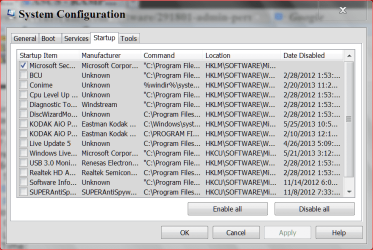
Which files do I absolutely need to keep? Which can I disable in start up? Which could be virus or redundant?

LIT
GoogleToolbarNotifier
Adobe Acrobat Synchronizer
My Drive Connect
Power Reg

QuickTime
WDDMStatus.exe
AcroTray-Adobe Acrobat Distiller helper application
Adobe Acrobat
(default)
Adobe Reader and Acrobat Manager
ThinkVantage Access Connections
Apple Push
Absolute Notifier
PWMTRV
Intel(R) PIconStartup -this appears 3times
CNSLMAIN.EXE
ALTOOLS
Hotkey Driver
SmartAudio Control Panel application
Access Connections
ThinkVantage Communications utility
FMAPP Application
TpShocks
Synaptics Pointing Device Driver

Thanks for the help.
 

My Computer My Computer

At a glance

Windows 7 Home Premium 64 bit
Computer type
Laptop
Computer Manufacturer/Model Number
Lenovo ThinkPad
OS
Windows 7 Home Premium 64 bit
Browser
Chrome
I imagine you can start up with all of those disabled. Whether that would make any difference on your system is another question. Never heard of most of them, but Windows shouldn't require any of them to start. I'd leave anti-virus enabled if you have one.
 

My Computer My Computer

At a glance

Windows 7 Home Premium SP1, 64-bitIntel Skylake i5-6600K, not overclocked8 GB HyperX DDR4-2666 (2 x 4 GB)none; graphics are integrated on CPU
Computer type
PC/Desktop
Computer Manufacturer/Model Number
Ignatz Special; 4 speed manual gearbox; factory air conditioning; one of one
OS
Windows 7 Home Premium SP1, 64-bit
CPU
Intel Skylake i5-6600K, not overclocked
Motherboard
AsRock Z170M Extreme 4, micro ATX
Memory
8 GB HyperX DDR4-2666 (2 x 4 GB)
Graphics Card(s)
none; graphics are integrated on CPU
Sound Card
onboard: Realtek ALC1150; external: USB Behringer UF0-202
Monitor(s) Displays
Dell S2340M 23 inch IPS
Screen Resolution
1600 x 900
Hard Drives
System: Crucial MX100 series SSD, 128 GB;
Data: Samsung Spinpoint 103SJ, 1 TB;
Backup: WD Caviar Green WD30EZRX-00D8PB0, 3 TB
PSU
Rosewill SilentNight 500 watt fanless, semi-modular
Case
Antec Solo II
Cooling
Noctua NH-U12S; Noctua F12 intake, Noctua S12A exhaust
Keyboard
Microsoft 200 6JH-00001 USB
Mouse
Dell or Microsoft optical wired; USB
Antivirus
Microsoft Security Essentials and Malwarebytes Premium
Browser
Pale Moon
Other Info
All fans PWM; speeds at idle: CPU circa 500 rpm; intake circa 600 rpm; exhaust circa 600 rpm; CPU temps 27 idle and 47 C load in a warm room (27 C/81 F) when running Intel Extreme Tuning Utility stress test.
I'd say all except Synaptics Pointing Device Driver for your Touchpad.
 

My Computer My Computer

At a glance

Windows 10 Pro X64Intel Quad Core i7-4770 @ 3.4Ghz16.0GB PC3-12800 DDR3 SDRAM 1600 MHzIntel Integrated HD Graphics
Computer type
PC/Desktop
Computer Manufacturer/Model Number
Lenovo IdeaCenter 450
OS
Windows 10 Pro X64
CPU
Intel Quad Core i7-4770 @ 3.4Ghz
Memory
16.0GB PC3-12800 DDR3 SDRAM 1600 MHz
Graphics Card(s)
Intel Integrated HD Graphics
Sound Card
Realtek HD Audio
Monitor(s) Displays
HP 22" LCD
Screen Resolution
1680 x 1050
Hard Drives
250GB Samsung EVO SATA-3 SSD
2TB Seagate ST2000DM001 SATA-2
1.5TB Seagate ST3150041AS SATA
Keyboard
Dell USB
Mouse
Lenovo USB
Internet Speed
Cable via Road Runner 3MB Upload, 30MB Download
Antivirus
Windows Defender, MBAM Pro, MBAE
Browser
Seamonkey
Other Info
UEFI/GPT
PLDS DVD-RW DH16AERSH
I'd say all except Synaptics Pointing Device Driver for your Touchpad.

disabling it won't effect badly on touchpad performance
 

My Computer My Computer

At a glance

Windows 7 Ultimate 32bitIntel Core 2 Quad @2.66 GHz4 GBgeforce GTS 250
Computer type
PC/Desktop
Computer Manufacturer/Model Number
custom build
OS
Windows 7 Ultimate 32bit
CPU
Intel Core 2 Quad @2.66 GHz
Memory
4 GB
Graphics Card(s)
geforce GTS 250
Antivirus
Avast
Browser
Firefox
Buster please remember that when something does not start up at boot doesn't mean you can't use it when needed.
All it does it not let it start at boot and run in the background when not needed.
Example would be a program like Office.
You wouldn't want it to run in the background until you need the program. When you need it all you do is tick on it and it will run as usual. When you are done with Office all you do is close it and it goes back to waiting for you to tick it again.

My Startup are set like this and things work great.

msconfig start up5 29 2013.PNG

I use NO auto updates. Which means the owner operator of the computer must manually check for updates. Not hard to do. I do it every day and it only takes a few minutes.

I don't use a laptop so I would follow Ztucker advice and keep your Pointer Device Driver for the touch pad at first. I don't have a way of testing because I'm a desktop person.

I'd say all except Synaptics Pointing Device Driver for your Touchpad.
 

My Computer My Computer

At a glance

Windows 10 Pro. 64/ version 1709 Windows 7 Pr...Intel i7-6800K @ 4.3Corsair Platinum 16 gig @2400EVGA GTX 1070 OC
Computer type
PC/Desktop
Computer Manufacturer/Model Number
Home made Desktop
OS
Windows 10 Pro. 64/ version 1709 Windows 7 Pro/64
CPU
Intel i7-6800K @ 4.3
Motherboard
ASUS X-99 Deluxe II
Memory
Corsair Platinum 16 gig @2400
Graphics Card(s)
EVGA GTX 1070 OC
Monitor(s) Displays
Asus 27" LED LCD/VE278Q
Screen Resolution
1920-1080 or 1280-720 HDMI
Hard Drives
INTEL SSD 730-240 Gb Sata 3.0/
PSU
EVGA Platium 1200W
Case
Phanteks Luxe Tempered Glass 8 fans/ one radiator
Cooling
XSPC/ Water Cooled CPU
Keyboard
Das 4 Professional
Mouse
Logitech M705/MX Anywhere 2-S
Internet Speed
100 mbits
Antivirus
Microsoft Security Essentials/ Malwarebytes Premium 3.0/ SAS
Browser
I.E. 11 default/Firefox/ ISP Time Warner Cable/Spectrum
Other Info
LG BluRay Burner/
Sound system-KLipsch-THX/
Icy Dock ssd Hot Swap bays.
Thanks everyone,
I appreciate your help. I followed your advice and only allowed the pointing device at start up an it worked well. I also found some tracking cookies that were causing some problems as well and removed them. This is a great forum, I'm really glad I found it.
Cheers.
 

My Computer My Computer

At a glance

Windows 7 Home Premium 64 bit
Computer type
Laptop
Computer Manufacturer/Model Number
Lenovo ThinkPad
OS
Windows 7 Home Premium 64 bit
Browser
Chrome
Back
Top