Slow startup

markvis14

New member
Member
Local time
1:22 AM
Messages
82
Hello,

Quite some time ago I installed Ubuntu besides my windows 7 installation.
That all went fine but then at some point I wanted to remove it again.

I simply deleted the partition Ubuntu was on, I then rebooted my computer and wasn't able to start up Windows again. I somehow got the boot files repaired and it works now BUT.. it takes me about 4 minutes before it "finds" the bootloader of Windows and starts up.

Please note that this has nothing to do with windows not starting up as it starts up fine. It just takes forever for it to start.

If anyone could help me , that would be great.
 
Last edited:

My Computer

Computer Manufacturer/Model Number
MSI
OS
Windows 7 64 Bit
CPU
Intel(R) Core(TM) i5 2500k @ 3.30GHz OC@ 4.4GHz
Motherboard
GA-Z68X-UD3H-B3
Memory
Corsair 8GB DDR3 RAM LP @ 1600Mhz
Graphics Card(s)
Nvidia GTS450 1GB
Monitor(s) Displays
22" 16:10
Screen Resolution
1680x1050
PSU
Corsair 750Watt
Keyboard
Steelseries G7
Mouse
Steelseries Xai
Internet Speed
10Mbit
Anyone who can help me with this problem?

Thanks.
 

My Computer

Computer Manufacturer/Model Number
MSI
OS
Windows 7 64 Bit
CPU
Intel(R) Core(TM) i5 2500k @ 3.30GHz OC@ 4.4GHz
Motherboard
GA-Z68X-UD3H-B3
Memory
Corsair 8GB DDR3 RAM LP @ 1600Mhz
Graphics Card(s)
Nvidia GTS450 1GB
Monitor(s) Displays
22" 16:10
Screen Resolution
1680x1050
PSU
Corsair 750Watt
Keyboard
Steelseries G7
Mouse
Steelseries Xai
Internet Speed
10Mbit
Hello,

Quite some time ago I installed Ubuntu besides my windows 7 installation.
That all went fine but then at some point I wanted to remove it again.

I simply deleted the partition Ubuntu was on, I then rebooted my computer and wasn't able to start up Windows again. I somehow got the boot files repaired and it works now BUT.. it takes me about 4 minutes before it "finds" the bootloader of Windows and starts up.

Please note that this has nothing to do with windows not starting up as it starts up fine. It just takes forever for it to start.

If anyone could help me , that would be great.

Hi
  • Type MSConfig in the search box and select;
  • Click on the Boot tab;
  • Do you have one or two boot options listed? If so, delete the old Ubuntu entry;
  • Reboot.
Let us know if this works?

Regards
UKMedia
 

My Computer

Computer Manufacturer/Model Number
Self Build
OS
Windows 7 Ultimate 64Bit (SP 1)
CPU
Intel Core i7 4770K OC
Motherboard
ASUS Maximus VII Ranger
Memory
32GB 1600Mhz DDR3
Graphics Card(s)
MSI GTX580 Twin Frozr II/OC and NVIDIA GTX 970
Sound Card
On-Board and Soundblaster Recon 3 D headset
Monitor(s) Displays
x2 Flat screen 21" LG displays + x1 LG W2363D (3D)
Hard Drives
5 internal Hard Drives:
1 x WD 120GB Solid State
4 x WD 1TB (CAVIAR BLACK 1TB 32MB 7200 SATA) as Raid 5 array
PSU
Dark Power Pro 10 1200W
Case
CoolerMaster HAF 932 Case - Black
Cooling
Thermaltake Contac21 cooler
Keyboard
Cyborg
Mouse
Razor Mamba
Internet Speed
0.5 Mb - (Benefits of rural location!) & 24 MB Sat
Antivirus
MSE
Other Info
Teaming 2 GB network connection to Wired 1GB switch.
Connected to 37TB (Raid 5) of network storage on a wired 1GB lan.
(Mixture of internal hard drives, 1TB, 2TB, 4TB & 16TB Terastations)
Hi,

No that does not help solve it. There is none such entry.

I believe it has something to do with post boot-up.

I just did another restart and made some pictures to help clearify what I mean.

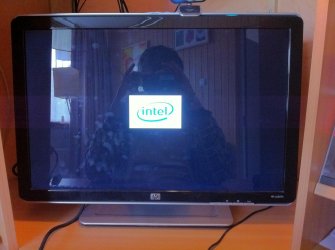
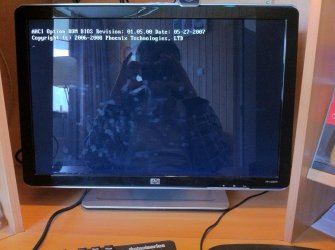
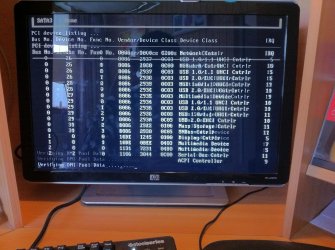
Picture 1, I see the intel logo whenever I power on my computer. This screen shows for about 5 minutes before it starts showing the stuff at picture 2 & 3.
Picture1.jpg
Picture2.jpg
Picture3.jpg


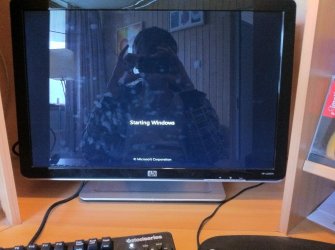
After that it works just fine and Windows 7 starts up. At picture 4.
Picture4.jpg

Somehow after uninstalling Ubuntu and deleting the partition of it my post boot became extremely slow? I just realised back then I also installed my new keyboard, an Steelseries G7 while my old keyboard was an usb one my new one uses the old school port. Could that have to do with it?

Anyone who can think of a solution?

Thanks :)
 

My Computer

Computer Manufacturer/Model Number
MSI
OS
Windows 7 64 Bit
CPU
Intel(R) Core(TM) i5 2500k @ 3.30GHz OC@ 4.4GHz
Motherboard
GA-Z68X-UD3H-B3
Memory
Corsair 8GB DDR3 RAM LP @ 1600Mhz
Graphics Card(s)
Nvidia GTS450 1GB
Monitor(s) Displays
22" 16:10
Screen Resolution
1680x1050
PSU
Corsair 750Watt
Keyboard
Steelseries G7
Mouse
Steelseries Xai
Internet Speed
10Mbit
Hi,

No that does not help solve it. There is none such entry.

I believe it has something to do with post boot-up.

I just did another restart and made some pictures to help clearify what I mean.

Picture 1, I see the intel logo whenever I power on my computer. This screen shows for about 5 minutes before it starts showing the stuff at picture 2 & 3.
View attachment 174519
View attachment 174520
View attachment 174521


After that it works just fine and Windows 7 starts up. At picture 4.
View attachment 174522

Somehow after uninstalling Ubuntu and deleting the partition of it my post boot became extremely slow? I just realised back then I also installed my new keyboard, an Steelseries G7 while my old keyboard was an usb one my new one uses the old school port. Could that have to do with it?

Anyone who can think of a solution?

Thanks :)


Okay, this sounds like the BIOS is timing out after waiting for something it expects to exist. Have a look in your BIOS settings (like boot priority) to see if there are pointers to your old partition.

Regards
UKMedia
 

My Computer

Computer Manufacturer/Model Number
Self Build
OS
Windows 7 Ultimate 64Bit (SP 1)
CPU
Intel Core i7 4770K OC
Motherboard
ASUS Maximus VII Ranger
Memory
32GB 1600Mhz DDR3
Graphics Card(s)
MSI GTX580 Twin Frozr II/OC and NVIDIA GTX 970
Sound Card
On-Board and Soundblaster Recon 3 D headset
Monitor(s) Displays
x2 Flat screen 21" LG displays + x1 LG W2363D (3D)
Hard Drives
5 internal Hard Drives:
1 x WD 120GB Solid State
4 x WD 1TB (CAVIAR BLACK 1TB 32MB 7200 SATA) as Raid 5 array
PSU
Dark Power Pro 10 1200W
Case
CoolerMaster HAF 932 Case - Black
Cooling
Thermaltake Contac21 cooler
Keyboard
Cyborg
Mouse
Razor Mamba
Internet Speed
0.5 Mb - (Benefits of rural location!) & 24 MB Sat
Antivirus
MSE
Other Info
Teaming 2 GB network connection to Wired 1GB switch.
Connected to 37TB (Raid 5) of network storage on a wired 1GB lan.
(Mixture of internal hard drives, 1TB, 2TB, 4TB & 16TB Terastations)
Sorry for my late reply.

I could not find anything in my BIOS and I am kind of lost. My computer is still booting up slowly.

I just checked under Device Manager and found this:
captureyq.jpg


Could that have to do with my slow POST boot? Having multiple ATA channels? (i'm clueless when it comes to terms like this)

Another thing I did following this tutorial: http://www.sevenforums.com/tutorial...down-sleep-hibernate-reboot-trace.html?filter[2]=Performance%20Maintenance

I made a boot trace and saved a log using the Windows Performance Toolkit. Is anyone willing and has the knowledge to read them through? If so then I will upload them. Thanks in advance!
 
Last edited:

My Computer

Computer Manufacturer/Model Number
MSI
OS
Windows 7 64 Bit
CPU
Intel(R) Core(TM) i5 2500k @ 3.30GHz OC@ 4.4GHz
Motherboard
GA-Z68X-UD3H-B3
Memory
Corsair 8GB DDR3 RAM LP @ 1600Mhz
Graphics Card(s)
Nvidia GTS450 1GB
Monitor(s) Displays
22" 16:10
Screen Resolution
1680x1050
PSU
Corsair 750Watt
Keyboard
Steelseries G7
Mouse
Steelseries Xai
Internet Speed
10Mbit
No, multiple ATA channels like this are normal for a SATA controller like yours.

You might try resetting your BIOS to default values. However, this may put your SATA controller into IDE mode as well.
Windows will still boot fine but won't be able to take advantage of AHCI mode any more, so make sure to put the controller back into AHCI mode (in the BIOS) after loading the default values.
 

My Computer

Computer type
PC/Desktop
Computer Manufacturer/Model Number
Custom-built
OS
Windows 7 Professional SP1 32-bit
CPU
Intel Core 2 Duo E6600 2.4GHz
Motherboard
Asus PL5D2
Memory
4GB DDR2-667 (4x1GB in dual-channel config)
Graphics Card(s)
nVidia GeForce 9800 GT
Sound Card
Creative X-Fi XtremeMusic
Monitor(s) Displays
Acer P236H
Screen Resolution
1920x1200 (DVI)
Hard Drives
OCZ SSD Vertex Plus 60GB SATA (Firmware 3.55), 64MB cache
Hitachi HD321KJ SATA, 320GB, 7200rpm, 16MB cache
PSU
Antec TruePower 2.0
Case
Cooler Master Centurion
Cooling
Too many fans
Keyboard
Standard
Mouse
Microsoft wireless optical mouse
Internet Speed
AT&T U-verse (18mbit/sec)
Antivirus
Microsoft Security Essentials
Browser
Firefox
Other Info
Other devices:
Compaq CQ-60 laptop
Google Nexus 7 (2012) tablet
Nvidia SHIELD tablet (US/LTE)
Hardkernel ODROID-XU single-board computer (Samsung Exynos 5420)
Thanks for your reply, how would I reset the bios though? Is there an option inside it? Thanks!
 

My Computer

Computer Manufacturer/Model Number
MSI
OS
Windows 7 64 Bit
CPU
Intel(R) Core(TM) i5 2500k @ 3.30GHz OC@ 4.4GHz
Motherboard
GA-Z68X-UD3H-B3
Memory
Corsair 8GB DDR3 RAM LP @ 1600Mhz
Graphics Card(s)
Nvidia GTS450 1GB
Monitor(s) Displays
22" 16:10
Screen Resolution
1680x1050
PSU
Corsair 750Watt
Keyboard
Steelseries G7
Mouse
Steelseries Xai
Internet Speed
10Mbit
Usually it's in the same place where you would go to "exit and save changes" or "discard changes".

Look for something along the lines of "load default values" or "safe defaults" - sometimes this automatically triggers a reboot, sometimes you have to explicitly "save changes and exit" after loading defaults.
 

My Computer

Computer type
PC/Desktop
Computer Manufacturer/Model Number
Custom-built
OS
Windows 7 Professional SP1 32-bit
CPU
Intel Core 2 Duo E6600 2.4GHz
Motherboard
Asus PL5D2
Memory
4GB DDR2-667 (4x1GB in dual-channel config)
Graphics Card(s)
nVidia GeForce 9800 GT
Sound Card
Creative X-Fi XtremeMusic
Monitor(s) Displays
Acer P236H
Screen Resolution
1920x1200 (DVI)
Hard Drives
OCZ SSD Vertex Plus 60GB SATA (Firmware 3.55), 64MB cache
Hitachi HD321KJ SATA, 320GB, 7200rpm, 16MB cache
PSU
Antec TruePower 2.0
Case
Cooler Master Centurion
Cooling
Too many fans
Keyboard
Standard
Mouse
Microsoft wireless optical mouse
Internet Speed
AT&T U-verse (18mbit/sec)
Antivirus
Microsoft Security Essentials
Browser
Firefox
Other Info
Other devices:
Compaq CQ-60 laptop
Google Nexus 7 (2012) tablet
Nvidia SHIELD tablet (US/LTE)
Hardkernel ODROID-XU single-board computer (Samsung Exynos 5420)
Hi Corazon,

Thanks for your help.

I looked in my BIOS and loaded the default settings and saved those. A thing that I found interesting is the following picture I made:

photopo.jpg


My BIOS doesn't seem to show my SATA drive (?)

Another thing I found was under my hard disk bootup sequence:

photo1aw.jpg


There it shows my harddrive is SCSI , I am confused, under Device Manager in Windows 7 it shows:
captureqld.jpg


Any thoughts?
 

My Computer

Computer Manufacturer/Model Number
MSI
OS
Windows 7 64 Bit
CPU
Intel(R) Core(TM) i5 2500k @ 3.30GHz OC@ 4.4GHz
Motherboard
GA-Z68X-UD3H-B3
Memory
Corsair 8GB DDR3 RAM LP @ 1600Mhz
Graphics Card(s)
Nvidia GTS450 1GB
Monitor(s) Displays
22" 16:10
Screen Resolution
1680x1050
PSU
Corsair 750Watt
Keyboard
Steelseries G7
Mouse
Steelseries Xai
Internet Speed
10Mbit
:shock:

That's weird. I have no idea, but I am convinced that we're onto something with the BIOS here. First it takes 5 minutes to POST, and now this...very weird. I can't explain it.

Does anyone else have any ideas?
 

My Computer

Computer type
PC/Desktop
Computer Manufacturer/Model Number
Custom-built
OS
Windows 7 Professional SP1 32-bit
CPU
Intel Core 2 Duo E6600 2.4GHz
Motherboard
Asus PL5D2
Memory
4GB DDR2-667 (4x1GB in dual-channel config)
Graphics Card(s)
nVidia GeForce 9800 GT
Sound Card
Creative X-Fi XtremeMusic
Monitor(s) Displays
Acer P236H
Screen Resolution
1920x1200 (DVI)
Hard Drives
OCZ SSD Vertex Plus 60GB SATA (Firmware 3.55), 64MB cache
Hitachi HD321KJ SATA, 320GB, 7200rpm, 16MB cache
PSU
Antec TruePower 2.0
Case
Cooler Master Centurion
Cooling
Too many fans
Keyboard
Standard
Mouse
Microsoft wireless optical mouse
Internet Speed
AT&T U-verse (18mbit/sec)
Antivirus
Microsoft Security Essentials
Browser
Firefox
Other Info
Other devices:
Compaq CQ-60 laptop
Google Nexus 7 (2012) tablet
Nvidia SHIELD tablet (US/LTE)
Hardkernel ODROID-XU single-board computer (Samsung Exynos 5420)
Back
Top