Slow Startup

jgeeman

New member
Local time
7:48 PM
Messages
9
Hi, apologies if this has been asked before or is in wrong forum.
My computer has become very slow on start-up. On start-up it seem to be OK until the Windows Logo (starting windows) appears, from this point it takes about 7 minutes to move to the "enter user password" screen. I enter the password and hit enter but no characters appear in the password box? After about anther 3 minutes the desktop appears and all is OK.
If I turn computer off and then back on straight away it will only take about 2 min 30s from start to desktop. If I leave it off for 30 mins or more it goes back to taking about 10 mins to get to the desktop.
I read there can be start-up problems caused by large numbers of restore points and installed the "hotfix" but to no avail. Help please!
 

My Computer

Computer Manufacturer/Model Number
Acer Aspire 5542
OS
Windows 7 Home Premium 64 bit
CPU
AMD Turion II x2 M500 (2.2 GHz 1MB L2 Cache)
Motherboard
Acer JV50TR
Memory
DDR2 SDRAM 4Gb
Graphics Card(s)
AMD M880G with ATI Mobility Radeon HD4200
Hard Drives
Hitachi HTS545050B9A300 SATA 500Gb
Seagate FreeAgent 1Tb external

My Computer

Computer type
PC/Desktop
Computer Manufacturer/Model Number
Self built custom
OS
64-bit Windows 11 Pro for Workstations
CPU
Intel i7-8700K OC'd to 5 GHz
Motherboard
ASUS ROG Maximus XI Formula Z390
Memory
64 GB (4x16GB) G.SKILL TridentZ RGB DDR4 3600 MHz
Graphics Card(s)
ASUS ROG-STRIX-GTX1080TI-O11G-GAMING
Sound Card
Integrated
Monitor(s) Displays
2 x Samsung Odyssey G7 27"
Screen Resolution
2560x1440
Hard Drives
1TB Samsung 990 PRO M.2,
4TB Samsung 990 PRO PRO M.2,
TerraMaster F8 SSD Plus NAS
PSU
Seasonic Prime Titanium 850W
Case
Thermaltake Core P3
Cooling
Corsair Hydro H115i
Keyboard
Logitech wireless K800
Mouse
Logitech MX Master 4
Internet Speed
2 Gb/s Download and 100 Mb/s Upload
Antivirus
Malwarebyte Anti-Malware Premium
Browser
Google Chrome
Other Info
Logitech Z625 speaker system,
Logitech BRIO 4K Pro webcam,
HP Color LaserJet Pro MFP M477fdn,
APC SMART-UPS RT 1000 XL - SURT1000XLI,
Galaxy S23 Plus phone
Thanks Shawn I'll give it a try and get back to you. Cheers
 

My Computer

Computer Manufacturer/Model Number
Acer Aspire 5542
OS
Windows 7 Home Premium 64 bit
CPU
AMD Turion II x2 M500 (2.2 GHz 1MB L2 Cache)
Motherboard
Acer JV50TR
Memory
DDR2 SDRAM 4Gb
Graphics Card(s)
AMD M880G with ATI Mobility Radeon HD4200
Hard Drives
Hitachi HTS545050B9A300 SATA 500Gb
Seagate FreeAgent 1Tb external
Hi Shawn, no joy with that. No difference at all in fact, took the best part of 15 mins.:(
 

My Computer

Computer Manufacturer/Model Number
Acer Aspire 5542
OS
Windows 7 Home Premium 64 bit
CPU
AMD Turion II x2 M500 (2.2 GHz 1MB L2 Cache)
Motherboard
Acer JV50TR
Memory
DDR2 SDRAM 4Gb
Graphics Card(s)
AMD M880G with ATI Mobility Radeon HD4200
Hard Drives
Hitachi HTS545050B9A300 SATA 500Gb
Seagate FreeAgent 1Tb external

My Computer

Computer type
PC/Desktop
Computer Manufacturer/Model Number
Self built custom
OS
64-bit Windows 11 Pro for Workstations
CPU
Intel i7-8700K OC'd to 5 GHz
Motherboard
ASUS ROG Maximus XI Formula Z390
Memory
64 GB (4x16GB) G.SKILL TridentZ RGB DDR4 3600 MHz
Graphics Card(s)
ASUS ROG-STRIX-GTX1080TI-O11G-GAMING
Sound Card
Integrated
Monitor(s) Displays
2 x Samsung Odyssey G7 27"
Screen Resolution
2560x1440
Hard Drives
1TB Samsung 990 PRO M.2,
4TB Samsung 990 PRO PRO M.2,
TerraMaster F8 SSD Plus NAS
PSU
Seasonic Prime Titanium 850W
Case
Thermaltake Core P3
Cooling
Corsair Hydro H115i
Keyboard
Logitech wireless K800
Mouse
Logitech MX Master 4
Internet Speed
2 Gb/s Download and 100 Mb/s Upload
Antivirus
Malwarebyte Anti-Malware Premium
Browser
Google Chrome
Other Info
Logitech Z625 speaker system,
Logitech BRIO 4K Pro webcam,
HP Color LaserJet Pro MFP M477fdn,
APC SMART-UPS RT 1000 XL - SURT1000XLI,
Galaxy S23 Plus phone
Hi Brink, tried both your recommendations plus SuperAntiSpyware scan for good measure but still the same. Can't understand why if I turn the computer off and then turn it back on straight away it only take about 2 min 30 secs to get to the desktop and ready to go but if I leave it for 30 mins or so it takes about 14 mins?
 

My Computer

Computer Manufacturer/Model Number
Acer Aspire 5542
OS
Windows 7 Home Premium 64 bit
CPU
AMD Turion II x2 M500 (2.2 GHz 1MB L2 Cache)
Motherboard
Acer JV50TR
Memory
DDR2 SDRAM 4Gb
Graphics Card(s)
AMD M880G with ATI Mobility Radeon HD4200
Hard Drives
Hitachi HTS545050B9A300 SATA 500Gb
Seagate FreeAgent 1Tb external
Not sure either, but since you were dealing with viruses, you might consider doing a clean install. :(
 

My Computer

Computer type
PC/Desktop
Computer Manufacturer/Model Number
Self built custom
OS
64-bit Windows 11 Pro for Workstations
CPU
Intel i7-8700K OC'd to 5 GHz
Motherboard
ASUS ROG Maximus XI Formula Z390
Memory
64 GB (4x16GB) G.SKILL TridentZ RGB DDR4 3600 MHz
Graphics Card(s)
ASUS ROG-STRIX-GTX1080TI-O11G-GAMING
Sound Card
Integrated
Monitor(s) Displays
2 x Samsung Odyssey G7 27"
Screen Resolution
2560x1440
Hard Drives
1TB Samsung 990 PRO M.2,
4TB Samsung 990 PRO PRO M.2,
TerraMaster F8 SSD Plus NAS
PSU
Seasonic Prime Titanium 850W
Case
Thermaltake Core P3
Cooling
Corsair Hydro H115i
Keyboard
Logitech wireless K800
Mouse
Logitech MX Master 4
Internet Speed
2 Gb/s Download and 100 Mb/s Upload
Antivirus
Malwarebyte Anti-Malware Premium
Browser
Google Chrome
Other Info
Logitech Z625 speaker system,
Logitech BRIO 4K Pro webcam,
HP Color LaserJet Pro MFP M477fdn,
APC SMART-UPS RT 1000 XL - SURT1000XLI,
Galaxy S23 Plus phone
Really trying to avoid that if at all possible but I expect that will be the eventual outcome. :cry: I'll try and put up with it for a while longer to see if anyone can hit on a solution. :confused:
 

My Computer

Computer Manufacturer/Model Number
Acer Aspire 5542
OS
Windows 7 Home Premium 64 bit
CPU
AMD Turion II x2 M500 (2.2 GHz 1MB L2 Cache)
Motherboard
Acer JV50TR
Memory
DDR2 SDRAM 4Gb
Graphics Card(s)
AMD M880G with ATI Mobility Radeon HD4200
Hard Drives
Hitachi HTS545050B9A300 SATA 500Gb
Seagate FreeAgent 1Tb external
Work through these Troubleshooting Steps for Windows 7 which cover all the basics.

Be sure you have all of your Important and Optional Windows Updates installed after enabling Automatically deliver drivers via Windows Update (Step 3) .

Are there any drivers in error at Startup?

If all else fails you can try Gathering a Startup, Shutdown, Sleep, Hibernate, or Reboot Trace - Windows 7 Forums or take the time to get a perfect Clean Reinstall - Factory OEM Windows 7 which after setup can be saved as a Backup Image so you never have to reinstall again if these problems arise.
 
Hi Gregrocker, I'll give these suggestions a try but it could take a while as I have to turn computer off for approx 30 mins before restart to see if it's been successful as if I shutdown and turn straight back on everything is ok. :( Watch this space!
 

My Computer

Computer Manufacturer/Model Number
Acer Aspire 5542
OS
Windows 7 Home Premium 64 bit
CPU
AMD Turion II x2 M500 (2.2 GHz 1MB L2 Cache)
Motherboard
Acer JV50TR
Memory
DDR2 SDRAM 4Gb
Graphics Card(s)
AMD M880G with ATI Mobility Radeon HD4200
Hard Drives
Hitachi HTS545050B9A300 SATA 500Gb
Seagate FreeAgent 1Tb external
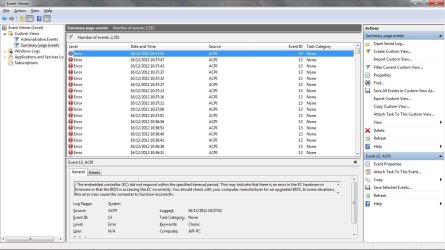
Hi a little more info, I don't know if it helps but when I looked at the event viewer I found the errors sshown in the screenshot below repeat every 5 secs from the moment I press the start button until the password screen appears. Does this shed any light on the problem I'm having?
EventViewerScreenshot.jpg
 

My Computer

Computer Manufacturer/Model Number
Acer Aspire 5542
OS
Windows 7 Home Premium 64 bit
CPU
AMD Turion II x2 M500 (2.2 GHz 1MB L2 Cache)
Motherboard
Acer JV50TR
Memory
DDR2 SDRAM 4Gb
Graphics Card(s)
AMD M880G with ATI Mobility Radeon HD4200
Hard Drives
Hitachi HTS545050B9A300 SATA 500Gb
Seagate FreeAgent 1Tb external
Cheers Liverpal I'll have a read! :)
 

My Computer

Computer Manufacturer/Model Number
Acer Aspire 5542
OS
Windows 7 Home Premium 64 bit
CPU
AMD Turion II x2 M500 (2.2 GHz 1MB L2 Cache)
Motherboard
Acer JV50TR
Memory
DDR2 SDRAM 4Gb
Graphics Card(s)
AMD M880G with ATI Mobility Radeon HD4200
Hard Drives
Hitachi HTS545050B9A300 SATA 500Gb
Seagate FreeAgent 1Tb external
Hi Gregrock I did check the performance log when working through the Troubleshooting steps for windows 7 and as I'm not that knowledgeable I thought this article might help me understand it. However I was unable to find any information to help me understand the results so thought I would ask for some further advice.
 

My Computer

Computer Manufacturer/Model Number
Acer Aspire 5542
OS
Windows 7 Home Premium 64 bit
CPU
AMD Turion II x2 M500 (2.2 GHz 1MB L2 Cache)
Motherboard
Acer JV50TR
Memory
DDR2 SDRAM 4Gb
Graphics Card(s)
AMD M880G with ATI Mobility Radeon HD4200
Hard Drives
Hitachi HTS545050B9A300 SATA 500Gb
Seagate FreeAgent 1Tb external
Check for a newer BIOS update and chipset to install on the PC or mobo's Support Downloads webpage.

If you decide to get a Clean Reinstall - Factory OEM Windows 7 check for the BIOS update first, follow the steps to prepare and reinstall while deleting all partitions to create new, then install all updates including drivers before importing any drivers or installing programs, report back performance.
 
Back
Top