Slowly but surely decreasing C drive space

SunnyBox

New member
Local time
10:33 AM
Messages
1
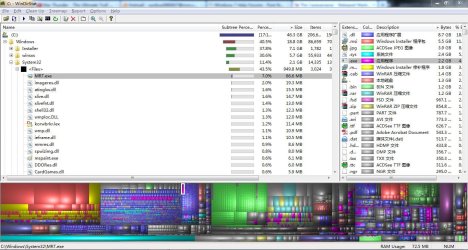
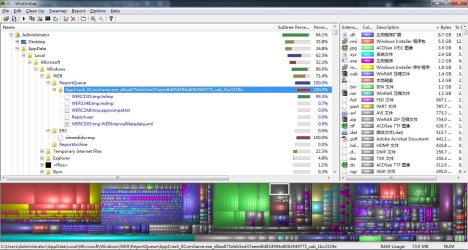
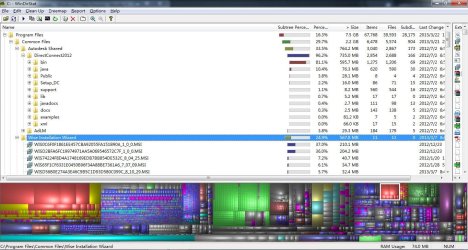
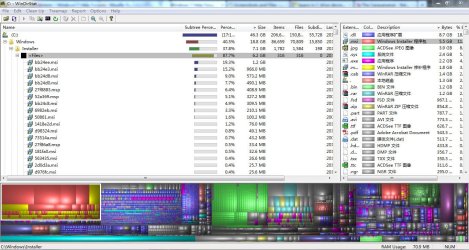
a common problem, but i could not find any virus that causes it for this one, any ideas? i used windirstat and the the screenshot is here, pls help, thank u :D

attached are the suspected regions that might causes the problem


if u guys need any other regions, reply and i will screen shot it
 

Attachments
  • 1.JPG
    1.JPG
    177.1 KB · Views: 17
  • 2.JPG
    2.JPG
    171.2 KB · Views: 11
  • 3.JPG
    3.JPG
    180.7 KB · Views: 9
  • 4.JPG
    4.JPG
    178 KB · Views: 8
  • 5.JPG
    5.JPG
    176.7 KB · Views: 12

My Computer My Computer

At a glance

Windows 7 Ultimate 32bitAMD P3402GB DDR3AMD Radeon HD 6650M
Computer type
Laptop
Computer Manufacturer/Model Number
Acer
OS
Windows 7 Ultimate 32bit
CPU
AMD P340
Memory
2GB DDR3
Graphics Card(s)
AMD Radeon HD 6650M
Hard Drives
500GB
1. Check "winsxs" folder inside your "Windows" folder. That keeps on growing in size as you install/update Windows components cuz it stores backups and other important things in there. You can check here though. You can also use TuneUp Utilities to clean up your C a bit. Please don't. :o It helps you remove update backups.

2. Also, many apps and Windows itself stores temporary files on C: itself. Temp folders can be manually cleaned by typing "%temp%" into Run box and deleting everything you find in that folder.

3. System restore points are also primarily stored in C. They do take a considerable amount of space.

4. Another space eater is you Appdata folder located at C:\Users\<username>\ (system hidden). Applications use this place to store their temp files in specific folders. For example, Chrome stores ALL its data here in the Local folder, which can grow upto a gig.

5. All browsers store their cache and other data on C by default.

And BTW, what is that "installer" folder doing in there? That must be deleted if it's not your stuff.

These are probably the reasons why you see space on C vanishing day by day.

Hope that helped.
 
Last edited:
I DO NOT agree at all about "TuneUp Utilities" and frankly am more than a little surprised that it was recommended to you to tell you the truth. Those all in one "optimizers/tune up/crapware" have no place on your machine period. Please disregard that "advice"! We see more problems related to those "utilities" here than I care to remember. I'm sure the majority if not all the senior members agree with me on this.

We have many fine tutorials here, try this : http://www.sevenforums.com/tutorials/11728-optimize-windows-7-a.html

THATS how you clean your system and free up space. I repeat DON"T use any "optimizers/cleanup" utilities! The ONLY exception to this is CCleaner, run the defaults and leave the registry ALONE. Heres a link for that, its free : http://www.piriform.com/ccleaner

Welcome to the forums by the way! Hope this helps.
 

My Computer My Computer

At a glance

Windows 10x64 Build 1709Intel i7 7700HQ Kaby Lake16 GB DDR4 @2400Nvidia Geforce GTX 1060
Computer type
Laptop
Computer Manufacturer/Model Number
MSI GE72VR Apache Pro-416
OS
Windows 10x64 Build 1709
CPU
Intel i7 7700HQ Kaby Lake
Motherboard
Micro-Star Intl. MS-179B (U3C1)
Memory
16 GB DDR4 @2400
Graphics Card(s)
Nvidia Geforce GTX 1060
Screen Resolution
1920x1080 120Hz
Hard Drives
256 GB Nvme M.2 SSD

1TB HDD@7200
Cooling
Cooler Blast 4
Keyboard
Steel Series
Antivirus
Bit Defender Free
Browser
Edge

My Computer My Computer

At a glance

64-bit Windows 11 Pro for WorkstationsIntel i7-8700K OC'd to 5 GHz64 GB (4x16GB) G.SKILL TridentZ RGB DDR4 3600...ASUS ROG-STRIX-GTX1080TI-O11G-GAMING
Computer type
PC/Desktop
Computer Manufacturer/Model Number
Self built custom
OS
64-bit Windows 11 Pro for Workstations
CPU
Intel i7-8700K OC'd to 5 GHz
Motherboard
ASUS ROG Maximus XI Formula Z390
Memory
64 GB (4x16GB) G.SKILL TridentZ RGB DDR4 3600 MHz
Graphics Card(s)
ASUS ROG-STRIX-GTX1080TI-O11G-GAMING
Sound Card
Integrated
Monitor(s) Displays
2 x Samsung Odyssey G7 27"
Screen Resolution
2560x1440
Hard Drives
1TB Samsung 990 PRO M.2,
4TB Samsung 990 PRO PRO M.2,
TerraMaster F8 SSD Plus NAS
PSU
Seasonic Prime Titanium 850W
Case
Thermaltake Core P3
Cooling
Corsair Hydro H115i
Keyboard
Logitech wireless K800
Mouse
Logitech MX Master 4
Internet Speed
2 Gb/s Download and 100 Mb/s Upload
Antivirus
Malwarebyte Anti-Malware Premium
Browser
Google Chrome
Other Info
Logitech Z625 speaker system,
Logitech BRIO 4K Pro webcam,
HP Color LaserJet Pro MFP M477fdn,
APC SMART-UPS RT 1000 XL - SURT1000XLI,
Galaxy S23 Plus phone
Back
Top