Small Icon Thumbnails instead of Icons

Eurosceptic

New member
Local time
3:37 PM
Messages
2
Location
Ireland
Would anyone here know how I could display small preview images instead of the icons in the small icons view in Windows 7 explorer?
 

Attachments

  • lNilAx3.png
    lNilAx3.png
    51.2 KB · Views: 4

My Computer

Computer type
PC/Desktop
Computer Manufacturer/Model Number
Custom Build
OS
Windows 7 Home Premium x64 SP1
CPU
AMD Phenom II X4 945
Motherboard
ASUSTeK Computer INC. M2N68-AM Plus (AM2)
Memory
8.00 GB
Graphics Card(s)
1024MB ATI AMD Radeon HD 5700 Series (XFX Pine Group)
Screen Resolution
1366x768 pixels
Hard Drives
465GB Seagate ST500LT0 12-9WS142 SCSI Disk Device (SATA)
1863GB Samsung M3 Portable USB Device USB (SATA)
Keyboard
Logitech 1533521 Wireless Keyboard
Mouse
CiT M14 USB/PS2 Combo Optical Mouse
Antivirus
Avast Free Anti-Virus
Browser
Chrome
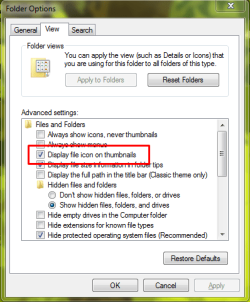
1. Press Win key, type "Folder Options", next - to "View" tab, and check this box:

401103d1507622718-small-icon-thumbnails-instead-icons-screenshot_1.png


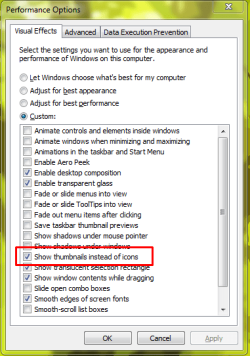
2. Or go to "Adjust The Appearance And Performance" and check this box:

401104d1507622718-small-icon-thumbnails-instead-icons-screenshot_2.png
 

Attachments

  • Screenshot_1.png
    Screenshot_1.png
    73.6 KB · Views: 45
  • Screenshot_2.png
    Screenshot_2.png
    77.9 KB · Views: 89

My Computer

Computer type
PC/Desktop
OS
Ultimate N x64
1. Press Win key, type "Folder Options", next - to "View" tab, and check this box:

401103d1507622718-small-icon-thumbnails-instead-icons-screenshot_1.png


2. Or go to "Adjust The Appearance And Performance" and check this box:

401104d1507622718-small-icon-thumbnails-instead-icons-screenshot_2.png
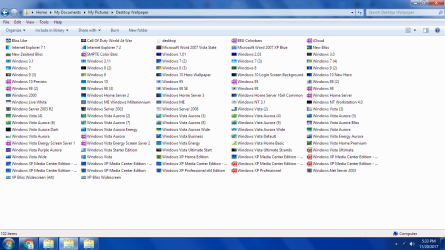
That doesn't make thumbnails appear on small icons, only medium and large icons. I'm trying to figure out how to get thumbnails for small icons too. I know Windows 7 can do it because when I switch to small icons from medium icons, large icons or thumbnail view it briefly shows the small icons as thumbnails sometimes.
 

My Computer

Computer type
PC/Desktop
Computer Manufacturer/Model Number
Lenovo ThinkCentre M58 7373
OS
Windows 7 Professional x64
CPU
Intel Core 2 Duo E7500 @ 2.93GHz
Motherboard
Lenovo 7373D1U
Memory
4 GB
Graphics Card(s)
Intel Q45/Q43 Express Chipset
Sound Card
High Definition Audio Device
Monitor(s) Displays
Compaq Q1859
Screen Resolution
1366X768
Hard Drives
WDC WD1600AAJS-08L7A0 130GB ATA
HGST HUS 726040ALE610 4TB HDD
Keyboard
Microsoft Comfort Curve 2000
Mouse
Logitech M100
Browser
Chrome
Other Info
Refurbished
I grabbed a screenshot of thumbnails briefly showing for small icons. I switched from extra large icons and it showed the thumbnails for a few seconds but then they changed into icons. Maybe they're just the larger thumbnails scaled down, but Windows 7 obviously is capable of showing small thumbnails.
 

Attachments

  • Untitled.png
    Untitled.png
    207.5 KB · Views: 5

My Computer

Computer type
PC/Desktop
Computer Manufacturer/Model Number
Lenovo ThinkCentre M58 7373
OS
Windows 7 Professional x64
CPU
Intel Core 2 Duo E7500 @ 2.93GHz
Motherboard
Lenovo 7373D1U
Memory
4 GB
Graphics Card(s)
Intel Q45/Q43 Express Chipset
Sound Card
High Definition Audio Device
Monitor(s) Displays
Compaq Q1859
Screen Resolution
1366X768
Hard Drives
WDC WD1600AAJS-08L7A0 130GB ATA
HGST HUS 726040ALE610 4TB HDD
Keyboard
Microsoft Comfort Curve 2000
Mouse
Logitech M100
Browser
Chrome
Other Info
Refurbished
Since I've seen Windows 7 show thumbnails for small icons briefly, it appears it is capable of doing it permanently. Anybody have any ideas about how to force Windows to do this?
 

My Computer

Computer type
PC/Desktop
Computer Manufacturer/Model Number
Lenovo ThinkCentre M58 7373
OS
Windows 7 Professional x64
CPU
Intel Core 2 Duo E7500 @ 2.93GHz
Motherboard
Lenovo 7373D1U
Memory
4 GB
Graphics Card(s)
Intel Q45/Q43 Express Chipset
Sound Card
High Definition Audio Device
Monitor(s) Displays
Compaq Q1859
Screen Resolution
1366X768
Hard Drives
WDC WD1600AAJS-08L7A0 130GB ATA
HGST HUS 726040ALE610 4TB HDD
Keyboard
Microsoft Comfort Curve 2000
Mouse
Logitech M100
Browser
Chrome
Other Info
Refurbished
Going back through my old posts. Does anyone have any ideas of how this might be possible. As you can see in the screenshot I posted, Windows does show small icons as thumbnails briefly before changing them to icons. Presumably these are scaled down versions of the larger thumbnails, but presently there's some way to hack Windows into showing these scaled thumbnails rather than switching them to icons.
 

My Computer

Computer type
PC/Desktop
Computer Manufacturer/Model Number
Lenovo ThinkCentre M58 7373
OS
Windows 7 Professional x64
CPU
Intel Core 2 Duo E7500 @ 2.93GHz
Motherboard
Lenovo 7373D1U
Memory
4 GB
Graphics Card(s)
Intel Q45/Q43 Express Chipset
Sound Card
High Definition Audio Device
Monitor(s) Displays
Compaq Q1859
Screen Resolution
1366X768
Hard Drives
WDC WD1600AAJS-08L7A0 130GB ATA
HGST HUS 726040ALE610 4TB HDD
Keyboard
Microsoft Comfort Curve 2000
Mouse
Logitech M100
Browser
Chrome
Other Info
Refurbished
Back
Top