SMART... confusion

Spyros78

New member
Local time
9:28 PM
Messages
7
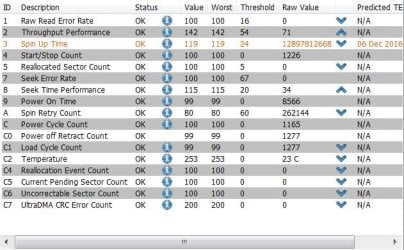
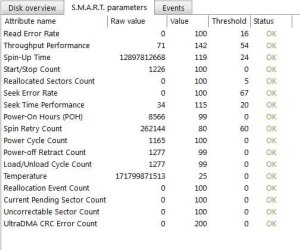
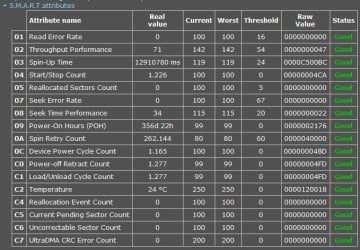
I recently came across a weird situation with one of my drives, which concerned of smart status. For 2 days in a row, since PC startup, i kept receiving warning from BIOS that the drive's status is bad and in OS also, through 3 different programs up to Win 7 itself through error reporting, i kept being notified about the "spin retry count", which usually indicates mechanical or electrical problem.

For those 2 days, the value i had was same as threshold, 60. Now that this value has exceeded, although lower is considered better, BIOS has stopped alt to notify and smart status report in OS is always.....OK !

Of course in my worry to avoid lose data, i already bought another drive to backup my backup, but i'm still confused about the current values of all smart attributes of smart. I'd like few more opinions from people who have dealt somethin similar and know about the matter.

Below u can see 3 reports for yourself.
 

Attachments
  • speccy.JPG
    speccy.JPG
    71.1 KB · Views: 20
  • diskcheckup.JPG
    diskcheckup.JPG
    57.1 KB · Views: 21
  • acronis.JPG
    acronis.JPG
    39.9 KB · Views: 21

My Computer

Computer type
PC/Desktop
Computer Manufacturer/Model Number
Custom
OS
win 7 64bit
CPU
AMD FX-6300
Motherboard
Asrock 980DE3/U3S3
Memory
8GB DDR3 1600Mhz
Graphics Card(s)
GTX-650 1GB
Sound Card
Onboard realtek
Monitor(s) Displays
Samsung 2043NWX
Screen Resolution
1680x1050
Hard Drives
1x SSD Kingston 240GB
1X HDD 1TB TOSHIBA 7200
PSU
550W LAMTECH
Antivirus
Avast
Browser
IE 11-Firefox-Chrome
I had a drive that the BIOS flagged as failing. I pulled it out and placed it in an external USB case. It was still showing the SMART status as failing in SPECCY. I reformatted the drive and now the SMART status is "GOOD" and the BIOS is not flagging it as failing.
 

My Computer

Computer type
PC/Desktop
Computer Manufacturer/Model Number
My Own Build
OS
Windows 10 64 bit
CPU
Intel i7 6700K
Motherboard
ASUS ROG Maximus VIII Hero
Memory
16GB Corsair Dominator
Graphics Card(s)
Intel CPU Graphics
Sound Card
RealTek
Monitor(s) Displays
27" Dell S2719dgf
Screen Resolution
2560X1440
Hard Drives
1 TB Samsung 850 EVO SSD for Win 10 Pro
500GB Samsung 850 EVO SSD for Win 10 Insider
2 TB drive for backup
PSU
EVGA Supernova 750G2
Case
BeQuiet Silent Base 600
Cooling
Deepcool Captain 120EX
Keyboard
Microsoft Wireless 2000
Mouse
Microsoft wireless
Internet Speed
100 MB/sec (Cable)
Antivirus
Microsoft Defender and Malwarebytes
Browser
Edge/Firefox
Other Info
Cakewalk (Sonar) by BandLab and Studio One 4.1 Pro recording studio software. MOTU 896Mk3 Hybrid recording interface, Frontier Tranzport wireless control unit, Behringer X-Touch Control Surface.
Five USB connected optical drives for CD Audio production using Nero BurningROM
Schedule a check disk: chkdsk c: /f
 

My Computers

System One System Two

  • Computer type
    PC/Desktop
    Computer Manufacturer/Model Number
    custom build
    OS
    Windows 7 HP 64
    CPU
    i5 6600K - 800MHz to 4200MHz
    Motherboard
    GA-Z170-HD3P
    Memory
    4+4G GSkill DDR4 3000
    Graphics Card(s)
    IG - Intel 530
    Monitor(s) Displays
    Samsung 226BW
    Screen Resolution
    1680x1050
    Hard Drives
    (1) -1 SM951 – 128GB M.2 AHCI PCIe SSD drive for Windows 7 and Lubuntu
    (2) -1 WD SATA 3 - 1T for Data
    (3) -1 WD SATA 3 - 1T for backup
    PSU
    Thermaltake 450W TR2 gold
    Keyboard
    Old and good Chicony mechanical keyboard
    Mouse
    Logitech mX performance - 9 buttons (had to disable some)
    Internet Speed
    500Mb/s
    Browser
    Firefox 64
    Other Info
    TinyWall firewall
  • Computer type
    Laptop
    System Manufacturer/Model Number
    Asus Q550LF
    OS
    Windows 7 Pro
    CPU
    i7-4500U 800MHz to 3.0GHz
    Motherboard
    Asus Q550LF
    Memory
    (4+4)G DDR3 1600
    Graphics Card(s)
    IG intel 4400 + NVIDIA GeForce GT 745M
    Sound Card
    Realtek
    Monitor(s) Displays
    LG Display LP156WF4-SPH1
    Screen Resolution
    1920 x 1080
    Hard Drives
    BX500 120G SSD for Windows and programs +
    1T HDD for data
    Internet Speed
    500 Mb/s
    Browser
    Firefox
    Other Info
    TinyWall firewall
I agree to run chkdsk only I would use the /r switch. The /r does the same thing as (includes) /f, but also locates bad sectors and attempts to recover any lost data.

Note that on a large disk (especially if problems found) chkdsk can take a very long time (even more than 24 hours) and appear to be hung up. Just let it run, it will finish, eventually.

Note too that SMART errors indicate potential problems giving users the opportunity to (1) make sure they have good backups of their data and (2) give users time to buy a replacement disk BEFORE the drive fails completely. The thing is, potential does not mean inevitable or impending doom. I have seen disks with SMART errors last for years. And others for just a couple days.

You might also (or instead of running chkdsk) visit the drive maker's website and download and run their diagnostics utility. They all have one. If the drive is still under warranty and fails their own diagnostics, they typically don't hesitate to offer a RMA.
 

My Computer

Computer Manufacturer/Model Number
BrightWorks Systems B4
OS
Windows 7 Profession 64-bit
CPU
Intel Core i7-860 Quad
Motherboard
Gigabyte P55-UD4P
Memory
Mushkin 4x2Gb PC12800
Graphics Card(s)
Gigabyte GTX260 896Mb
Sound Card
Integrated 7.1 HD Dolby
Monitor(s) Displays
2 Samsung 2220wm-HAS 22"
Screen Resolution
1680 x 1050 | 1680 x 1050
Hard Drives
WD HE 1Tb
PSU
Corsair TX-750W
Case
Ultra M998
Cooling
OEM
Keyboard
MS Wireless Comfort 5000
Mouse
MS Wireless 5000
Internet Speed
Cable and pretty darn fast
Back
Top