
Snap a Window to a Side

How to Use Aero Snap to Snap a Window to a Screen Side in Windows 7

   Information
This will show you how to use Aero Snap to snap a window to the side to fill the left or right half of the desktop screen by using Drag and Drop in Windows 7.
   Tip

KEYBOARD SHORTCUTS:

NOTE: On multiple monitors, continually pressing a keyboard shortcut combination below will have the active window snap to the side and scroll in the direction of the arrow key through multiple monitor screens.

(
orb.png
= Windows-key, RA = Right Arrow, LA = Left Arrow, UA = Up Arrow, DA = Down Arrow)


On a Single Display
  • orb.png
    + LA = Snap the current active window to the left side of the screen, or unsnap a window that is snapped to the right side of the screen.
  • orb.png
    + RA = Snap the current active window to the right side of the screen, or unsnap a window that is snapped to the left side of the screen.
  • orb.png
    + UA = Maximize the current active window to full screen.
  • orb.png
    + DA = Minimize the current active window to the taskbar.
On a Dual Display
  • Active window on right display:
    • orb.png
      + RA = Snap to the right on the right display
    • orb.png
      + LA = Snap to the left on the right display
    • orb.png
      + LA + LA (LA two times) = Snap to the right on the left display (change display)
  • Active window on left display:
    • orb.png
      + LA = Snap to the left on the left display
    • orb.png
      + RA = Snap to the right o the left display
    • orb.png
      + RA + RA (RA two times) = Snap to the left on the right display (change display)
   Note
Multiple monitors are treated as one large monitor. For example, if you have two monitors (A-left and B-right), then the far left side would be on the left side of monitor A and the far right side would be on the right side of minitor B. If you want the window to snap to the side that crosses over to the other monitor, then you can only use the keyboard shortcuts above to do so.
   Warning
Aero Requirements to be Enabled in Windows 7

NOTE: If Aero is not enabled, then Aero Snap will not work even when turned on.
  • Aero is not included in Windows 7 Home Basic or Windows 7 Starter editions.
  • 1 GHz 32-bit or 64-bit processor
  • 1 GB of system memory
  • Support for DirectX 9 graphics with 128 MB memory (in order to enable Aero theme)
  • You must be have True Color (32 bit) set instead of High Color (16 bit).
  • The desktop composition and Animate controls and elements inside windows options need to be enabled in Visual Effects.
  • The Desktop Window Manager Session Manager and Themes Services need to be set as Started and Automatic.
  • Refresh or update your WEI score. You will need an WEI score minimum of 2.0 in both Graphics & Gaming graphics in order for Aero to be activated.


Here's How:
1. To Snap a Window to the Left
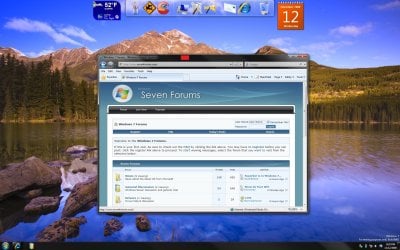
A) Left click and hold on the Title Bar of the window you want to snap to the left. (See screenshot below)
Normal.jpg
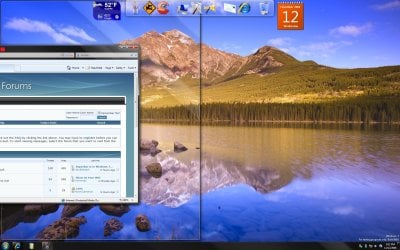
B) Drag the window to the left edge of the screen and drop (release left click) it when you see the border outline appear that the window will fill. (See screenshot below)
NOTE: If you have multiple monitors and want the window to snap to the side that crosses over to the other monitor, then you can only use the keyboard shortcuts above to do so.
Drag-to-left.jpg
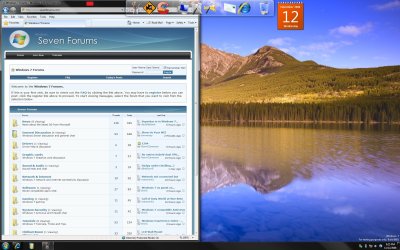
C) The window is now snapped to the left. (See screenshot below)
Left-Side.jpg
2. To Snap a Window to the Right
A) Left click and hold on the Title Bar of the window you want to snap to the right. (See screenshot below)
Normal.jpg
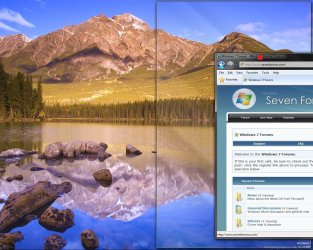
B) Drag the window to the right edge of the screen and drop (release left click) it when you see the border outline appear. (See screenshot below)
NOTE: Since I have multiple monitors (two), this example is on the far right side of my second monitor. If you have multiple monitors and want the window to snap to the side that crosses over to the other monitor, then you can only use the keyboard shortcuts above to do so.
Drag-to-right.jpg
C) The window is now snapped to the right. (See screenshot below)
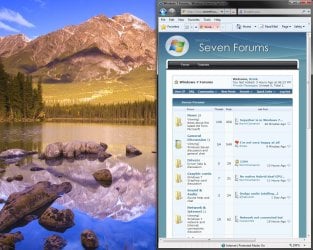
Right-Side.jpg
3. To Unsnap the Window
A) Left click and hold on the Title Bar of the window snapped to the left or right, and drag it down a bit until the window is unsnapped.
That's it,
Shawn


Last edited:
What's its use?
 

My Computer

Computer Manufacturer/Model Number
Samsung NP530U4B-S02IN
OS
Windows® 8 Pro (64-bit)
CPU
Intel® Core™ i5 Processor 2467M (1.60GHz, 3MB L3 Cache)
Motherboard
Samsung Electronics
Memory
6GB DDR3 System Memory at 1,333MHz (on BD 4GB + 2GB x 1)
Graphics Card(s)
AMD Radeon™ HD7550M 1GB DDR3 (Ext. Graphic)
Sound Card
Realtek High Definition Audio
Monitor(s) Displays
35.56cm (14.0) SuperBright 300nit HD LED Display
Screen Resolution
1366x768
Hard Drives
1TB S-ATA II Hard Drive (5400RPM) with ExpressCache 16GB SSD
Internet Speed
sucks
Antivirus
Microsoft Security Essentials
Browser
Google Chrome (Sync enabled)
Hello Dinesh,

It's used to help see two windows side by side on the desktop, or to just simply have one window on either side of the desktop. :)

Shawn
 

My Computer

Computer type
PC/Desktop
Computer Manufacturer/Model Number
Self built custom
OS
64-bit Windows 11 Pro for Workstations
CPU
Intel i7-8700K OC'd to 5 GHz
Motherboard
ASUS ROG Maximus XI Formula Z390
Memory
64 GB (4x16GB) G.SKILL TridentZ RGB DDR4 3600 MHz
Graphics Card(s)
ASUS ROG-STRIX-GTX1080TI-O11G-GAMING
Sound Card
Integrated
Monitor(s) Displays
2 x Samsung Odyssey G7 27"
Screen Resolution
2560x1440
Hard Drives
1TB Samsung 990 PRO M.2,
4TB Samsung 990 PRO PRO M.2,
TerraMaster F8 SSD Plus NAS
PSU
Seasonic Prime Titanium 850W
Case
Thermaltake Core P3
Cooling
Corsair Hydro H115i
Keyboard
Logitech wireless K800
Mouse
Logitech MX Master 4
Internet Speed
2 Gb/s Download and 100 Mb/s Upload
Antivirus
Malwarebyte Anti-Malware Premium
Browser
Google Chrome
Other Info
Logitech Z625 speaker system,
Logitech BRIO 4K Pro webcam,
HP Color LaserJet Pro MFP M477fdn,
APC SMART-UPS RT 1000 XL - SURT1000XLI,
Galaxy S23 Plus phone
I really hate how dual monitors is treated as one large monitor for that snapping "feature".
 

My Computer

Computer Manufacturer/Model Number
HP dv7-3080us
OS
Microsoft Windows 7 x64 Ultimate
CPU
Intel Core i7 720M 1.6-2.8GHz
Motherboard
HP dv7-3080us
Memory
6GB DDR3 1066MHz RAM
Graphics Card(s)
NVIDIA GeForce 230M
Sound Card
HP dv7-3080us
Monitor(s) Displays
17.3" BrightView LED/LCD (1650x900) ViewSonic 22" LCD 1080p
Screen Resolution
17.3" BrightView LED/LCD (1650x900) ViewSonic 22" LCD 1080p
Hard Drives
500GB OS Drive
100GB OS Partition
400GB Media Partition

640GB Secondary Drive for Movies
PSU
HP dv7-3080us
Case
HP dv7-3080us
Cooling
HP dv7-3080us
Keyboard
HP dv7-3080us - Microsoft Wireless Keyboard 6000 v3.0
Mouse
Logitech G7
Hello I2aMpAnt,

Please send feedback about this to Microsoft. If they get enough requests for it, they may decide to do something about it. :)
 

My Computer

Computer type
PC/Desktop
Computer Manufacturer/Model Number
Self built custom
OS
64-bit Windows 11 Pro for Workstations
CPU
Intel i7-8700K OC'd to 5 GHz
Motherboard
ASUS ROG Maximus XI Formula Z390
Memory
64 GB (4x16GB) G.SKILL TridentZ RGB DDR4 3600 MHz
Graphics Card(s)
ASUS ROG-STRIX-GTX1080TI-O11G-GAMING
Sound Card
Integrated
Monitor(s) Displays
2 x Samsung Odyssey G7 27"
Screen Resolution
2560x1440
Hard Drives
1TB Samsung 990 PRO M.2,
4TB Samsung 990 PRO PRO M.2,
TerraMaster F8 SSD Plus NAS
PSU
Seasonic Prime Titanium 850W
Case
Thermaltake Core P3
Cooling
Corsair Hydro H115i
Keyboard
Logitech wireless K800
Mouse
Logitech MX Master 4
Internet Speed
2 Gb/s Download and 100 Mb/s Upload
Antivirus
Malwarebyte Anti-Malware Premium
Browser
Google Chrome
Other Info
Logitech Z625 speaker system,
Logitech BRIO 4K Pro webcam,
HP Color LaserJet Pro MFP M477fdn,
APC SMART-UPS RT 1000 XL - SURT1000XLI,
Galaxy S23 Plus phone
Hello I2aMpAnt,

Please send feedback about this to Microsoft. If they get enough requests for it, they may decide to do something about it. :)

I shall when I reinstall Windows 7.
 

My Computer

Computer Manufacturer/Model Number
HP dv7-3080us
OS
Microsoft Windows 7 x64 Ultimate
CPU
Intel Core i7 720M 1.6-2.8GHz
Motherboard
HP dv7-3080us
Memory
6GB DDR3 1066MHz RAM
Graphics Card(s)
NVIDIA GeForce 230M
Sound Card
HP dv7-3080us
Monitor(s) Displays
17.3" BrightView LED/LCD (1650x900) ViewSonic 22" LCD 1080p
Screen Resolution
17.3" BrightView LED/LCD (1650x900) ViewSonic 22" LCD 1080p
Hard Drives
500GB OS Drive
100GB OS Partition
400GB Media Partition

640GB Secondary Drive for Movies
PSU
HP dv7-3080us
Case
HP dv7-3080us
Cooling
HP dv7-3080us
Keyboard
HP dv7-3080us - Microsoft Wireless Keyboard 6000 v3.0
Mouse
Logitech G7
Weirdly, I can Snap via keyboard, but it is not working via mouse. And this is a feature that is quite interesting with the mouse. Help, please. Thanks.

PS: I've read how to activate it, and everything seems OK.
 

My Computer

Computer Manufacturer/Model Number
Dell Precision M4400
OS
Windows 7 Ultimate (64-Bit)
I really hate how dual monitors is treated as one large monitor for that snapping "feature".

Well, the problem with that is it doesnt even treat it as one big monitor, you can fill half of one screen, then half of the other..
 

My Computer

Computer Manufacturer/Model Number
Custom Built
OS
Windows 7 Ultimate x64
CPU
AMD Athlon II X4 640 3.0GHz
Motherboard
GA-990FXA-UD5
Memory
8.0 GB 1600MHz DDR3
Graphics Card(s)
ATI Radeon HD 5770 x2
Monitor(s) Displays
Acer p221w x2
Screen Resolution
1680x1050 x3
Hard Drives
OCZ Agility 3 60gb SSD
(3)Western Digital Caviar Black 7200RPM 500gb
PSU
OCZ Fatal1ty Modular 550w
Case
Antec P180 (with modded wire management)
Cooling
Cooler Master v8
Keyboard
Microsoft Sidewinder x4
Mouse
Logitech Performance MX
If you use the Keyboard you can fill the four sides of the two monitors. You can even move your window from one side of the monitor to the far side of the other. Use: "Windows + arrows" (left and right arrows in this case)
 

My Computer

Computer Manufacturer/Model Number
Dell Precision M4400
OS
Windows 7 Ultimate (64-Bit)
I am using two monitors and now I seem to understand how it works with the mouse.

- Between screens it only works via Keyboard.

- On the outer lateral sides, I have to drag the window past the frame (part of window "disappears, goes out of the screen") then the Peek highlight appears and if I drop the window it is resized to fit the half screen.

- Upper Peek (which seems most unnecessary as double click is faster to maximize window for me) I have to drag for a longer length the upper part of the window touching the upper frame of the screen for peek to activate.
 

My Computer

Computer Manufacturer/Model Number
Dell Precision M4400
OS
Windows 7 Ultimate (64-Bit)
Yep, it activates at the point where the mouse point is at on the window when it reaches the for border as if the two monitors was one instead. :)
 

My Computer

Computer type
PC/Desktop
Computer Manufacturer/Model Number
Self built custom
OS
64-bit Windows 11 Pro for Workstations
CPU
Intel i7-8700K OC'd to 5 GHz
Motherboard
ASUS ROG Maximus XI Formula Z390
Memory
64 GB (4x16GB) G.SKILL TridentZ RGB DDR4 3600 MHz
Graphics Card(s)
ASUS ROG-STRIX-GTX1080TI-O11G-GAMING
Sound Card
Integrated
Monitor(s) Displays
2 x Samsung Odyssey G7 27"
Screen Resolution
2560x1440
Hard Drives
1TB Samsung 990 PRO M.2,
4TB Samsung 990 PRO PRO M.2,
TerraMaster F8 SSD Plus NAS
PSU
Seasonic Prime Titanium 850W
Case
Thermaltake Core P3
Cooling
Corsair Hydro H115i
Keyboard
Logitech wireless K800
Mouse
Logitech MX Master 4
Internet Speed
2 Gb/s Download and 100 Mb/s Upload
Antivirus
Malwarebyte Anti-Malware Premium
Browser
Google Chrome
Other Info
Logitech Z625 speaker system,
Logitech BRIO 4K Pro webcam,
HP Color LaserJet Pro MFP M477fdn,
APC SMART-UPS RT 1000 XL - SURT1000XLI,
Galaxy S23 Plus phone
Oh, now I see. It is when the mouse pointer reaches the border of the screen. Thanks. Now the upper Maximization starts to make a lot more sense. But where the two screens "connect" only with keyboard, right?
 

My Computer

Computer Manufacturer/Model Number
Dell Precision M4400
OS
Windows 7 Ultimate (64-Bit)
Yeah, you have to use the keyboard on the border that the two monitors share. Otherwise it'll just continue on to the other screen.
 

My Computer

Computer type
PC/Desktop
Computer Manufacturer/Model Number
Self built custom
OS
64-bit Windows 11 Pro for Workstations
CPU
Intel i7-8700K OC'd to 5 GHz
Motherboard
ASUS ROG Maximus XI Formula Z390
Memory
64 GB (4x16GB) G.SKILL TridentZ RGB DDR4 3600 MHz
Graphics Card(s)
ASUS ROG-STRIX-GTX1080TI-O11G-GAMING
Sound Card
Integrated
Monitor(s) Displays
2 x Samsung Odyssey G7 27"
Screen Resolution
2560x1440
Hard Drives
1TB Samsung 990 PRO M.2,
4TB Samsung 990 PRO PRO M.2,
TerraMaster F8 SSD Plus NAS
PSU
Seasonic Prime Titanium 850W
Case
Thermaltake Core P3
Cooling
Corsair Hydro H115i
Keyboard
Logitech wireless K800
Mouse
Logitech MX Master 4
Internet Speed
2 Gb/s Download and 100 Mb/s Upload
Antivirus
Malwarebyte Anti-Malware Premium
Browser
Google Chrome
Other Info
Logitech Z625 speaker system,
Logitech BRIO 4K Pro webcam,
HP Color LaserJet Pro MFP M477fdn,
APC SMART-UPS RT 1000 XL - SURT1000XLI,
Galaxy S23 Plus phone
Thanks for the useful tutorial! I was wondering if there was a way to get it working with the main monitor in a multi-setup, looks like there is :)
 

My Computer

OS
Windows 7
You're welcome Merlin. :)
 

My Computer

Computer type
PC/Desktop
Computer Manufacturer/Model Number
Self built custom
OS
64-bit Windows 11 Pro for Workstations
CPU
Intel i7-8700K OC'd to 5 GHz
Motherboard
ASUS ROG Maximus XI Formula Z390
Memory
64 GB (4x16GB) G.SKILL TridentZ RGB DDR4 3600 MHz
Graphics Card(s)
ASUS ROG-STRIX-GTX1080TI-O11G-GAMING
Sound Card
Integrated
Monitor(s) Displays
2 x Samsung Odyssey G7 27"
Screen Resolution
2560x1440
Hard Drives
1TB Samsung 990 PRO M.2,
4TB Samsung 990 PRO PRO M.2,
TerraMaster F8 SSD Plus NAS
PSU
Seasonic Prime Titanium 850W
Case
Thermaltake Core P3
Cooling
Corsair Hydro H115i
Keyboard
Logitech wireless K800
Mouse
Logitech MX Master 4
Internet Speed
2 Gb/s Download and 100 Mb/s Upload
Antivirus
Malwarebyte Anti-Malware Premium
Browser
Google Chrome
Other Info
Logitech Z625 speaker system,
Logitech BRIO 4K Pro webcam,
HP Color LaserJet Pro MFP M477fdn,
APC SMART-UPS RT 1000 XL - SURT1000XLI,
Galaxy S23 Plus phone
You can also get it to snap in any direction, by holding down the Windows Key and
selecting the Arrow Keys.
 

My Computer

Computer Manufacturer/Model Number
Self Build 64bit
OS
Vista Ult64, Win7600
CPU
Intel Core 2 Quad Q6600 @ 2400 MHz 64bit OS
Motherboard
Asus P5E3 Deluxe WiFi @p 64 bit OS
Memory
4096 MB DDR3-SDRAM
Graphics Card(s)
ATI Radeon HD 3870 Series x2 Crossfired
Sound Card
Realtek on board
Monitor(s) Displays
Samsung SyncMaster - 23 inches
Screen Resolution
1680x1050 pixels at 60 Hz in True Colors
Hard Drives
Hitachi (250 GB)/Samsung 750 GB. /Barracuda 160 GB.
My Book 1 TB external..
PSU
Cooler Master 1000w
Case
Cooler Master Cosmos 1000.
Cooling
Fans and fresh air,
Keyboard
Wireless
Mouse
Wireless
Internet Speed
Never fast enough
Other Info
I use a Magnum.
Back
Top