Snipping tool not able to capture menus in win 7

itinva

New member
Local time
7:11 PM
Messages
10
When I open the Snipping Tool I am able to hit print screen on my Vista computer and capture drop down menus or the start menu without a problem. When I use the Snipping Tool in Windows 7 I'm not able to use the Print Screen button because I have to use the Fn Key to activate Print screen which is non-responsive on the Win 7 side. It works on the Vista side on the same laptop just not on the Win 7 side. Just as a side not I can capture using Win 7 just can't get the screen shots of menus because they go away when the capture because available.
 

My Computer My Computer

At a glance

win 7AMD Turion 64 Xs Mobile TL-60 2 ghz4 GB InstalledNVIDA 6150
Computer Manufacturer/Model Number
HP Tablet PC 1320us
OS
win 7
CPU
AMD Turion 64 Xs Mobile TL-60 2 ghz
Memory
4 GB Installed
Graphics Card(s)
NVIDA 6150
Hello itinva, and welcome to Seven Forums.

You can use Paint that is included in Windows 7 to do so instead.

Hope this helps,
Shawn
 

My Computer My Computer

At a glance

64-bit Windows 11 Pro for WorkstationsIntel i7-8700K OC'd to 5 GHz64 GB (4x16GB) G.SKILL TridentZ RGB DDR4 3600...ASUS ROG-STRIX-GTX1080TI-O11G-GAMING
Computer type
PC/Desktop
Computer Manufacturer/Model Number
Self built custom
OS
64-bit Windows 11 Pro for Workstations
CPU
Intel i7-8700K OC'd to 5 GHz
Motherboard
ASUS ROG Maximus XI Formula Z390
Memory
64 GB (4x16GB) G.SKILL TridentZ RGB DDR4 3600 MHz
Graphics Card(s)
ASUS ROG-STRIX-GTX1080TI-O11G-GAMING
Sound Card
Integrated
Monitor(s) Displays
2 x Samsung Odyssey G7 27"
Screen Resolution
2560x1440
Hard Drives
1TB Samsung 990 PRO M.2,
4TB Samsung 990 PRO PRO M.2,
TerraMaster F8 SSD Plus NAS
PSU
Seasonic Prime Titanium 850W
Case
Thermaltake Core P3
Cooling
Corsair Hydro H115i
Keyboard
Logitech wireless K800
Mouse
Logitech MX Master 4
Internet Speed
2 Gb/s Download and 100 Mb/s Upload
Antivirus
Malwarebyte Anti-Malware Premium
Browser
Google Chrome
Other Info
Logitech Z625 speaker system,
Logitech BRIO 4K Pro webcam,
HP Color LaserJet Pro MFP M477fdn,
APC SMART-UPS RT 1000 XL - SURT1000XLI,
Galaxy S23 Plus phone
Thanks for the quick reply. The problem is when using a laptop I am not able to capture the Start Menu or any menus in MS Office when they appear because they don't remain on the screen when the cross hair appears to capture the screen. It works on my PC keyboard using Vista just not on my laptops running Win 7. I can capture and maniplute images just fine, just menus like the Start menu or when you press the File to choose print screen. Keyboard works laptops can't capture hidden menus once they are revealed.
 

My Computer My Computer

At a glance

win 7AMD Turion 64 Xs Mobile TL-60 2 ghz4 GB InstalledNVIDA 6150
Computer Manufacturer/Model Number
HP Tablet PC 1320us
OS
win 7
CPU
AMD Turion 64 Xs Mobile TL-60 2 ghz
Memory
4 GB Installed
Graphics Card(s)
NVIDA 6150
Hi itinva,

This may sound like a silly question but have tried the conventional [Ctrl]+[Prt Sc] ?

Works every time on my Laptop running Windows 7
 

My Computer My Computer

At a glance

Windows 7 Ultimate x64AMD Sempron Dual Core3GBNVIDIA GeForce 6150SE nForce 430
Computer Manufacturer/Model Number
Compaq Desktop
OS
Windows 7 Ultimate x64
CPU
AMD Sempron Dual Core
Memory
3GB
Graphics Card(s)
NVIDIA GeForce 6150SE nForce 430
Screen Resolution
1024x768
Hard Drives
150GB Sata
Print Screen works for basic screen shots, but are you able to capture just the Start menu options that are seen when you press the Windows Key? I can make screen captures of the desktop, but can not get the Snipping tool to do a screen capture of the Start menu or show how to to go to Start --> Programs using the Snipping tool. Using my PC it will work just not on my two HP laptops.
 

My Computer My Computer

At a glance

win 7AMD Turion 64 Xs Mobile TL-60 2 ghz4 GB InstalledNVIDA 6150
Computer Manufacturer/Model Number
HP Tablet PC 1320us
OS
win 7
CPU
AMD Turion 64 Xs Mobile TL-60 2 ghz
Memory
4 GB Installed
Graphics Card(s)
NVIDA 6150
itinva,

You will not be able to take screenshots of menus with the Snipping Tool. You can use Paint to take a full screen screenshot with the menus included, then crop the image as needed to have only what you like out of it for the screenshot.

Hope this helps,
Shawn
 

My Computer My Computer

At a glance

64-bit Windows 11 Pro for WorkstationsIntel i7-8700K OC'd to 5 GHz64 GB (4x16GB) G.SKILL TridentZ RGB DDR4 3600...ASUS ROG-STRIX-GTX1080TI-O11G-GAMING
Computer type
PC/Desktop
Computer Manufacturer/Model Number
Self built custom
OS
64-bit Windows 11 Pro for Workstations
CPU
Intel i7-8700K OC'd to 5 GHz
Motherboard
ASUS ROG Maximus XI Formula Z390
Memory
64 GB (4x16GB) G.SKILL TridentZ RGB DDR4 3600 MHz
Graphics Card(s)
ASUS ROG-STRIX-GTX1080TI-O11G-GAMING
Sound Card
Integrated
Monitor(s) Displays
2 x Samsung Odyssey G7 27"
Screen Resolution
2560x1440
Hard Drives
1TB Samsung 990 PRO M.2,
4TB Samsung 990 PRO PRO M.2,
TerraMaster F8 SSD Plus NAS
PSU
Seasonic Prime Titanium 850W
Case
Thermaltake Core P3
Cooling
Corsair Hydro H115i
Keyboard
Logitech wireless K800
Mouse
Logitech MX Master 4
Internet Speed
2 Gb/s Download and 100 Mb/s Upload
Antivirus
Malwarebyte Anti-Malware Premium
Browser
Google Chrome
Other Info
Logitech Z625 speaker system,
Logitech BRIO 4K Pro webcam,
HP Color LaserJet Pro MFP M477fdn,
APC SMART-UPS RT 1000 XL - SURT1000XLI,
Galaxy S23 Plus phone
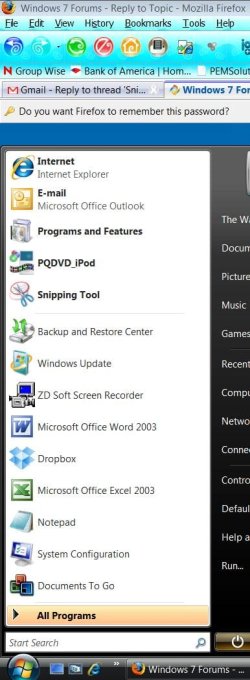
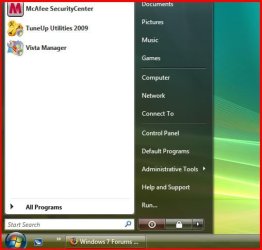
Attached is what I can do with the Snipping Tool in Vista using a PC keyboard. I can not do this using a laptop. The Snipping Tool does have the ability to capture menus. Just not on laptops. I even changed the short cut for Print Screen to Ctrl + Alt + Insert, no luck.
moz-screenshot.jpg
 

Attachments

  • Capture.JPG
    Capture.JPG
    69.2 KB · Views: 167

My Computer My Computer

At a glance

win 7AMD Turion 64 Xs Mobile TL-60 2 ghz4 GB InstalledNVIDA 6150
Computer Manufacturer/Model Number
HP Tablet PC 1320us
OS
win 7
CPU
AMD Turion 64 Xs Mobile TL-60 2 ghz
Memory
4 GB Installed
Graphics Card(s)
NVIDA 6150
JUST USE PAINT.
Why are you ignoring Brink's help?
 

My Computer My Computer

At a glance

Win 7 (7100 x64); OS X 10.5.6Intel Pentium D 915 - 2.8Ghz x 24GB DDR2 PC2-6400nVidia XFX GeForce 9600GT
Computer Manufacturer/Model Number
Dell DM061 (E520)
OS
Win 7 (7100 x64); OS X 10.5.6
CPU
Intel Pentium D 915 - 2.8Ghz x 2
Motherboard
Dell 0WG864
Memory
4GB DDR2 PC2-6400
Graphics Card(s)
nVidia XFX GeForce 9600GT
Monitor(s) Displays
Acer P223W; Acer X223W
Screen Resolution
3360x1050
Hard Drives
Seagate 150GB; Western Digital 150GB; Western Digital 500GB; WD MyBook World Edition 1TB (NAS)
PSU
OCZ StealthXstream 400W
Case
Dell E520 (lol)
Keyboard
Dell Multimedia Keyboard
Mouse
Dell
Internet Speed
128KB/s :(
Itinva, right click on snipping tool icon in the start menu, click on properties then assign a keyboard shortcut for it; eg. Ctrl+F5 or something like that. Then open up any menu, then press Ctrl+F5 and it works.

Hope this helps,
C.Guy
 

My Computer My Computer

At a glance

Windows 8 x64Intel Core i7 3630QMSamsung 8 GB DDR3 800 MhzATI Radeon HD Graphics 7670M + Intel HD Graph...
Computer type
Laptop
Computer Manufacturer/Model Number
Samsung
OS
Windows 8 x64
CPU
Intel Core i7 3630QM
Motherboard
Intel HM76
Memory
Samsung 8 GB DDR3 800 Mhz
Graphics Card(s)
ATI Radeon HD Graphics 7670M + Intel HD Graphics 4000
Screen Resolution
1366x768
Hard Drives
SAMSUNG Spinpoint M8 1TB
Internet Speed
4 Mb/sDownload Speed, 2 Mb/s Upload Speed
Antivirus
avast!
The Snipping tool will not allow for capture of menus (start/context) as they are application sensitive. The Ctrl+Prt Sc is the only way to capture any menu in action.

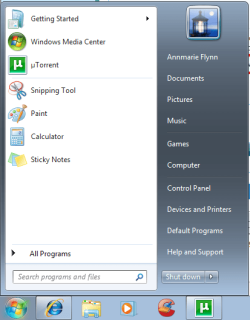
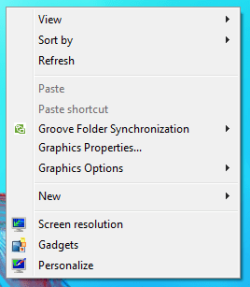
Start Menu & Context menu captured using 'Print Screen' then editing in Paint as Brink suggested.
Untitled.pngUntitled 1.png
 

My Computer My Computer

At a glance

Windows 7 Ultimate x64AMD Sempron Dual Core3GBNVIDIA GeForce 6150SE nForce 430
Computer Manufacturer/Model Number
Compaq Desktop
OS
Windows 7 Ultimate x64
CPU
AMD Sempron Dual Core
Memory
3GB
Graphics Card(s)
NVIDIA GeForce 6150SE nForce 430
Screen Resolution
1024x768
Hard Drives
150GB Sata
Itinva, right click on snipping tool icon in the start menu, click on properties then assign a keyboard shortcut for it; eg. Ctrl+F5 or something like that. Then open up any menu, then press Ctrl+F5 and it works.

Hope this helps,
C.Guy

How did you achieve that as it wont let me assign a KB shortcut despite being signed in as an Admin.

Edit: Ignore - I did it and it works, thanks very much.
 
Last edited:

My Computer My Computer

At a glance

Win 7 Ult SP1/Win 10 Pro (all x64)Intel® Core™ i7-975 Extreme O/C to 4.02 GHz, ...24GB Corsair Vengeance DDR3 SDRAM at 1600MHz ...1792 MB NVIDIA® GeForce® GTX 295 Dual Core
Computer type
PC/Desktop
Computer Manufacturer/Model Number
Alienware® ALX X58
OS
Win 7 Ult SP1/Win 10 Pro (all x64)
CPU
Intel® Core™ i7-975 Extreme O/C to 4.02 GHz, 8MB Cache
Motherboard
Asus® P6T Deluxe V2 X58 LGA1366
Memory
24GB Corsair Vengeance DDR3 SDRAM at 1600MHz - 6 x 4096MB
Graphics Card(s)
1792 MB NVIDIA® GeForce® GTX 295 Dual Core
Sound Card
Onboard Soundmax® High-Definition 7.1 Performance Audio
Monitor(s) Displays
Samsung XL2370 LED backlit 23" W/S 2ms response time
Screen Resolution
1920 X 1080
Hard Drives
2 x 500gb SATA II
1 x 1TB SATA II
1 external eSATA LaCie 3TB
(Non-RAID)
PSU
Alienware® 1200 Watt Multi-GPU
Case
Alienware® P2 ALX Chassis with AlienIce™ 3.0 Video Cooling
Cooling
Alienware® High-Perf. Liquid Cooling + Acoustic Dampening
Keyboard
Microsoft® Wireless Entertainment 8000 + Logitech® G15 Wired
Mouse
Microsoft® Wireless Laser 8000 + Logitech® G9 Wired
Internet Speed
1Gb/s
Antivirus
McAfee LiveSafe
Browser
Firefox - latest
Other Info
Using non-RAID on purpose as I find RAID to be too temperamental.
Now set to AHCI
Hello itinva,

Although as the others have said you can get around the limitations of the snipping tool by editing a full screen to show only that which you require, I can understand that it may be frustrating if you have a lot of captures to perform. I normally advise that you use the native tools where possible but sometimes you may need to look at external programs

What you require is I believe available in Faststone Capture (and others) which is available as freeware for personal use and is also available as a portable application. (does not write to registry etc.)

A+ Freeware - Multimedia & Design - FastStone Capture 5.3 (last freeware version)

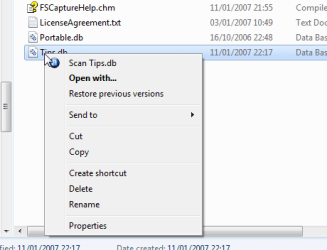
An example is included

2009-05-31_143818.png
 
Last edited:

My Computers My Computers

  • At a glance

    Windows 11 Pro x64 [Latest Release and Releas...Ryzen 9 5950X, 3.8 - 5.2 MHz64GB [2 x 32GB] DDR4 3200MHz4GB NVIDIA GEFORCE GTX 1650 Ti
    Computer type
    PC/Desktop
    Computer Manufacturer/Model Number
    ChillBlast - Custom to my design
    OS
    Windows 11 Pro x64 [Latest Release and Release Preview]
    CPU
    Ryzen 9 5950X, 3.8 - 5.2 MHz
    Motherboard
    Asus Prime X570-Pro
    Memory
    64GB [2 x 32GB] DDR4 3200MHz
    Graphics Card(s)
    4GB NVIDIA GEFORCE GTX 1650 Ti
    Sound Card
    On-board SPDIF to 5.1 System + HDMI [5.1 system]
    Monitor(s) Displays
    32" UHD 32 Bit HDR Monitor + 43" UHD 4K 32Bit HDR TV
    Screen Resolution
    2 x 3840 x 2160 @60Hz
    Hard Drives
    1TB M2 SSD OS, 500GB Fast Access SSD, 2 x 8TB Data + Various Externals from 1TB to 4TB, 10TB NAS
    PSU
    NZXT C750 80 PLUS Gold 750W Modular PSU
    Case
    Workstation Case [Matt Black]
    Cooling
    NZXT Kraken X63 280mm CPU Cooler +2x Quiet Case fans
    Keyboard
    Logitech Wireless MX Keys & K400 + others
    Mouse
    Logitech Wireless MX Master 3S
    Internet Speed
    920 MB Down 50 MB Up
    Antivirus
    BitDefender Total Security Pro
    Browser
    Chrome (always run latest Non-Beta)
    Other Info
    Also run ...
    Laptop - Quad 8GB - Windows 10 Pro x64
    Nexus 7 Android tablet x2
    Samsung 10.2" tablet
    Blackview TAB 8 4G Android Tablet c/w Keyboard
    Wacom Intuos Pro Medium Pen Pad
    Wacom Intuos Pro Small Pen Pad
    Wacom Expresskeys Remote
    Loopdeck+ Graphics Controller
    Shuttle Pro v2 Control
  • At a glance

    Windows 11 Pro x64 Latest RPIntel I7 10750H 5.0GHz32GB [2x16GB] DDR4 2933 MHznVidia GTX1650Ti 4 GB GDDR6
    Computer type
    Laptop
    System Manufacturer/Model Number
    Dell XPS 17 10750H
    OS
    Windows 11 Pro x64 Latest RP
    CPU
    Intel I7 10750H 5.0GHz
    Motherboard
    Dell XPS
    Memory
    32GB [2x16GB] DDR4 2933 MHz
    Graphics Card(s)
    nVidia GTX1650Ti 4 GB GDDR6
    Sound Card
    Stock [Realtek] 4 Speaker
    Monitor(s) Displays
    17" IPS UHD+ Infinity Edge Touchscreen
    Screen Resolution
    3840 x 2400
    Hard Drives
    2TB M2 NVMe, 4TB External + various 500GB & 1TB External NVMe (also have access to spinner HDD from
    PSU
    Stock
    Case
    Stock XPS Aluminium & Carbon Fibre
    Cooling
    Stock - Active Fan Control
    Keyboard
    Backlit + Various Logitech
    Mouse
    Stock Track Pad + Logitech MX Trackball
    Internet Speed
    72 MB Down 18MB Up
    Browser
    Chrome
    Other Info
    Also run ...
    Laptop - Quad 8GB - Windows 10 Pro x64
    Nexus 7 Android tablet x2
    10.2" tablet
    Sony Z3 Android Smartphone
    Wacom Intuos Pro Medium Pen Pad
    Wacom Intuos Pro Small Pen Pad
    Wacom Expresskeys Remote
    Loopdeck+ Graphics Controller
    Shuttle Pro v2 Control Pad
    10TB NAS
The Cool Guy's solution works fine.
 

My Computer My Computer

At a glance

Win 7 Ult SP1/Win 10 Pro (all x64)Intel® Core™ i7-975 Extreme O/C to 4.02 GHz, ...24GB Corsair Vengeance DDR3 SDRAM at 1600MHz ...1792 MB NVIDIA® GeForce® GTX 295 Dual Core
Computer type
PC/Desktop
Computer Manufacturer/Model Number
Alienware® ALX X58
OS
Win 7 Ult SP1/Win 10 Pro (all x64)
CPU
Intel® Core™ i7-975 Extreme O/C to 4.02 GHz, 8MB Cache
Motherboard
Asus® P6T Deluxe V2 X58 LGA1366
Memory
24GB Corsair Vengeance DDR3 SDRAM at 1600MHz - 6 x 4096MB
Graphics Card(s)
1792 MB NVIDIA® GeForce® GTX 295 Dual Core
Sound Card
Onboard Soundmax® High-Definition 7.1 Performance Audio
Monitor(s) Displays
Samsung XL2370 LED backlit 23" W/S 2ms response time
Screen Resolution
1920 X 1080
Hard Drives
2 x 500gb SATA II
1 x 1TB SATA II
1 external eSATA LaCie 3TB
(Non-RAID)
PSU
Alienware® 1200 Watt Multi-GPU
Case
Alienware® P2 ALX Chassis with AlienIce™ 3.0 Video Cooling
Cooling
Alienware® High-Perf. Liquid Cooling + Acoustic Dampening
Keyboard
Microsoft® Wireless Entertainment 8000 + Logitech® G15 Wired
Mouse
Microsoft® Wireless Laser 8000 + Logitech® G9 Wired
Internet Speed
1Gb/s
Antivirus
McAfee LiveSafe
Browser
Firefox - latest
Other Info
Using non-RAID on purpose as I find RAID to be too temperamental.
Now set to AHCI
The Snipping tool will not allow for capture of menus (start/context) as they are application sensitive. The Ctrl+Prt Sc is the only way to capture any menu in action.

Start Menu & Context menu captured using 'Print Screen' then editing in Paint as Brink suggested.
View attachment 12634View attachment 12635

You are wrong, Orbital Shark. I can prove it (I took these from Vista cause I'm currently booted into Vista's partition; if it does work on Vista, it should work on Win7)

dd.PNG

ddd.jpg
 

My Computer My Computer

At a glance

Windows 8 x64Intel Core i7 3630QMSamsung 8 GB DDR3 800 MhzATI Radeon HD Graphics 7670M + Intel HD Graph...
Computer type
Laptop
Computer Manufacturer/Model Number
Samsung
OS
Windows 8 x64
CPU
Intel Core i7 3630QM
Motherboard
Intel HM76
Memory
Samsung 8 GB DDR3 800 Mhz
Graphics Card(s)
ATI Radeon HD Graphics 7670M + Intel HD Graphics 4000
Screen Resolution
1366x768
Hard Drives
SAMSUNG Spinpoint M8 1TB
Internet Speed
4 Mb/sDownload Speed, 2 Mb/s Upload Speed
Antivirus
avast!
Yes, since I realised that to enter something in that Shortcut Key slot you actually have to click the keys you want in there...LOL and yet another Doh! moment for me.


Thanks.
 

My Computer My Computer

At a glance

Win 7 Ult SP1/Win 10 Pro (all x64)Intel® Core™ i7-975 Extreme O/C to 4.02 GHz, ...24GB Corsair Vengeance DDR3 SDRAM at 1600MHz ...1792 MB NVIDIA® GeForce® GTX 295 Dual Core
Computer type
PC/Desktop
Computer Manufacturer/Model Number
Alienware® ALX X58
OS
Win 7 Ult SP1/Win 10 Pro (all x64)
CPU
Intel® Core™ i7-975 Extreme O/C to 4.02 GHz, 8MB Cache
Motherboard
Asus® P6T Deluxe V2 X58 LGA1366
Memory
24GB Corsair Vengeance DDR3 SDRAM at 1600MHz - 6 x 4096MB
Graphics Card(s)
1792 MB NVIDIA® GeForce® GTX 295 Dual Core
Sound Card
Onboard Soundmax® High-Definition 7.1 Performance Audio
Monitor(s) Displays
Samsung XL2370 LED backlit 23" W/S 2ms response time
Screen Resolution
1920 X 1080
Hard Drives
2 x 500gb SATA II
1 x 1TB SATA II
1 external eSATA LaCie 3TB
(Non-RAID)
PSU
Alienware® 1200 Watt Multi-GPU
Case
Alienware® P2 ALX Chassis with AlienIce™ 3.0 Video Cooling
Cooling
Alienware® High-Perf. Liquid Cooling + Acoustic Dampening
Keyboard
Microsoft® Wireless Entertainment 8000 + Logitech® G15 Wired
Mouse
Microsoft® Wireless Laser 8000 + Logitech® G9 Wired
Internet Speed
1Gb/s
Antivirus
McAfee LiveSafe
Browser
Firefox - latest
Other Info
Using non-RAID on purpose as I find RAID to be too temperamental.
Now set to AHCI
Hi Guys,

I've tried a few times to do this in Windows 7 and cannot get it to work (rc 7100 x64).

What I get is I open a right click menu and press my assigned hotkey, (Ctrl-F5), and the snipping tools opens, but the right click menu is closed :(

Of course this may be a "feature" of the 7100 build that is not present in others.

I think as has been said this was not the case with vista, for odd captures the print screen and edit method is fine but if you have a lot to do I believe a 3rd party solution may be better.

At least the choice is there :D
 

My Computers My Computers

  • At a glance

    Windows 11 Pro x64 [Latest Release and Releas...Ryzen 9 5950X, 3.8 - 5.2 MHz64GB [2 x 32GB] DDR4 3200MHz4GB NVIDIA GEFORCE GTX 1650 Ti
    Computer type
    PC/Desktop
    Computer Manufacturer/Model Number
    ChillBlast - Custom to my design
    OS
    Windows 11 Pro x64 [Latest Release and Release Preview]
    CPU
    Ryzen 9 5950X, 3.8 - 5.2 MHz
    Motherboard
    Asus Prime X570-Pro
    Memory
    64GB [2 x 32GB] DDR4 3200MHz
    Graphics Card(s)
    4GB NVIDIA GEFORCE GTX 1650 Ti
    Sound Card
    On-board SPDIF to 5.1 System + HDMI [5.1 system]
    Monitor(s) Displays
    32" UHD 32 Bit HDR Monitor + 43" UHD 4K 32Bit HDR TV
    Screen Resolution
    2 x 3840 x 2160 @60Hz
    Hard Drives
    1TB M2 SSD OS, 500GB Fast Access SSD, 2 x 8TB Data + Various Externals from 1TB to 4TB, 10TB NAS
    PSU
    NZXT C750 80 PLUS Gold 750W Modular PSU
    Case
    Workstation Case [Matt Black]
    Cooling
    NZXT Kraken X63 280mm CPU Cooler +2x Quiet Case fans
    Keyboard
    Logitech Wireless MX Keys & K400 + others
    Mouse
    Logitech Wireless MX Master 3S
    Internet Speed
    920 MB Down 50 MB Up
    Antivirus
    BitDefender Total Security Pro
    Browser
    Chrome (always run latest Non-Beta)
    Other Info
    Also run ...
    Laptop - Quad 8GB - Windows 10 Pro x64
    Nexus 7 Android tablet x2
    Samsung 10.2" tablet
    Blackview TAB 8 4G Android Tablet c/w Keyboard
    Wacom Intuos Pro Medium Pen Pad
    Wacom Intuos Pro Small Pen Pad
    Wacom Expresskeys Remote
    Loopdeck+ Graphics Controller
    Shuttle Pro v2 Control
  • At a glance

    Windows 11 Pro x64 Latest RPIntel I7 10750H 5.0GHz32GB [2x16GB] DDR4 2933 MHznVidia GTX1650Ti 4 GB GDDR6
    Computer type
    Laptop
    System Manufacturer/Model Number
    Dell XPS 17 10750H
    OS
    Windows 11 Pro x64 Latest RP
    CPU
    Intel I7 10750H 5.0GHz
    Motherboard
    Dell XPS
    Memory
    32GB [2x16GB] DDR4 2933 MHz
    Graphics Card(s)
    nVidia GTX1650Ti 4 GB GDDR6
    Sound Card
    Stock [Realtek] 4 Speaker
    Monitor(s) Displays
    17" IPS UHD+ Infinity Edge Touchscreen
    Screen Resolution
    3840 x 2400
    Hard Drives
    2TB M2 NVMe, 4TB External + various 500GB & 1TB External NVMe (also have access to spinner HDD from
    PSU
    Stock
    Case
    Stock XPS Aluminium & Carbon Fibre
    Cooling
    Stock - Active Fan Control
    Keyboard
    Backlit + Various Logitech
    Mouse
    Stock Track Pad + Logitech MX Trackball
    Internet Speed
    72 MB Down 18MB Up
    Browser
    Chrome
    Other Info
    Also run ...
    Laptop - Quad 8GB - Windows 10 Pro x64
    Nexus 7 Android tablet x2
    10.2" tablet
    Sony Z3 Android Smartphone
    Wacom Intuos Pro Medium Pen Pad
    Wacom Intuos Pro Small Pen Pad
    Wacom Expresskeys Remote
    Loopdeck+ Graphics Controller
    Shuttle Pro v2 Control Pad
    10TB NAS
Hello itinva,

Although as the others have said you can get around the limitations of the snipping tool by editing a full screen to show only that which you require, I can understand that it may be frustrating if you have a lot of captures to perform. I normally advise that you use the native tools where possible but sometimes you may need to look at external programs

What you require is I believe available in Fastone Capture (and others) which is available as freeware for personal use and is also available as a portable application. (does not write to registry etc.)

A+ Freeware - Multimedia & Design - FastStone Capture 5.3 (last freeware version)

An example is included

View attachment 12644


Barman's solution is another option for people out there if they didn't get my option to work. ;)
 

My Computer My Computer

At a glance

Windows 8 x64Intel Core i7 3630QMSamsung 8 GB DDR3 800 MhzATI Radeon HD Graphics 7670M + Intel HD Graph...
Computer type
Laptop
Computer Manufacturer/Model Number
Samsung
OS
Windows 8 x64
CPU
Intel Core i7 3630QM
Motherboard
Intel HM76
Memory
Samsung 8 GB DDR3 800 Mhz
Graphics Card(s)
ATI Radeon HD Graphics 7670M + Intel HD Graphics 4000
Screen Resolution
1366x768
Hard Drives
SAMSUNG Spinpoint M8 1TB
Internet Speed
4 Mb/sDownload Speed, 2 Mb/s Upload Speed
Antivirus
avast!
Actually - I qualify my earlier statement. The Cool Guy's solution worked fine in Vista where I was booted at the time, but in Windows 7, although I've set it up the same way, when the Snipping Tool appears with a menu already on the screen it doesn't grey out the screen as it would normally do, so the menu isn't "frozen in time" like it was in Vista and I can't capture it that way.

Now the mystery is, why?
 

My Computer My Computer

At a glance

Win 7 Ult SP1/Win 10 Pro (all x64)Intel® Core™ i7-975 Extreme O/C to 4.02 GHz, ...24GB Corsair Vengeance DDR3 SDRAM at 1600MHz ...1792 MB NVIDIA® GeForce® GTX 295 Dual Core
Computer type
PC/Desktop
Computer Manufacturer/Model Number
Alienware® ALX X58
OS
Win 7 Ult SP1/Win 10 Pro (all x64)
CPU
Intel® Core™ i7-975 Extreme O/C to 4.02 GHz, 8MB Cache
Motherboard
Asus® P6T Deluxe V2 X58 LGA1366
Memory
24GB Corsair Vengeance DDR3 SDRAM at 1600MHz - 6 x 4096MB
Graphics Card(s)
1792 MB NVIDIA® GeForce® GTX 295 Dual Core
Sound Card
Onboard Soundmax® High-Definition 7.1 Performance Audio
Monitor(s) Displays
Samsung XL2370 LED backlit 23" W/S 2ms response time
Screen Resolution
1920 X 1080
Hard Drives
2 x 500gb SATA II
1 x 1TB SATA II
1 external eSATA LaCie 3TB
(Non-RAID)
PSU
Alienware® 1200 Watt Multi-GPU
Case
Alienware® P2 ALX Chassis with AlienIce™ 3.0 Video Cooling
Cooling
Alienware® High-Perf. Liquid Cooling + Acoustic Dampening
Keyboard
Microsoft® Wireless Entertainment 8000 + Logitech® G15 Wired
Mouse
Microsoft® Wireless Laser 8000 + Logitech® G9 Wired
Internet Speed
1Gb/s
Antivirus
McAfee LiveSafe
Browser
Firefox - latest
Other Info
Using non-RAID on purpose as I find RAID to be too temperamental.
Now set to AHCI

My Computer My Computer

At a glance

Windows 8 x64Intel Core i7 3630QMSamsung 8 GB DDR3 800 MhzATI Radeon HD Graphics 7670M + Intel HD Graph...
Computer type
Laptop
Computer Manufacturer/Model Number
Samsung
OS
Windows 8 x64
CPU
Intel Core i7 3630QM
Motherboard
Intel HM76
Memory
Samsung 8 GB DDR3 800 Mhz
Graphics Card(s)
ATI Radeon HD Graphics 7670M + Intel HD Graphics 4000
Screen Resolution
1366x768
Hard Drives
SAMSUNG Spinpoint M8 1TB
Internet Speed
4 Mb/sDownload Speed, 2 Mb/s Upload Speed
Antivirus
avast!
Hi there
Another simple way.

1) PRTSCRN
2) Open Wordpad
3) PASTE
4) expand picture to size you want
5) now run the snip tool against the picture in Wordpad
6) save as PNG or JPG file

Cheers
jimbo
 

My Computer My Computer

At a glance

Linux CENTOS 7 / various Windows OS'es and se...Intel i7 Intel i58GB, 16GBOn Motherboard
Computer type
PC/Desktop
Computer Manufacturer/Model Number
Custom built, several laptops HP/ASUS
OS
Linux CENTOS 7 / various Windows OS'es and servers
CPU
Intel i7 Intel i5
Memory
8GB, 16GB
Graphics Card(s)
On Motherboard
Sound Card
Realtek HD audio
Monitor(s) Displays
Apple Cinema display, Samsung LCD
Screen Resolution
1920 X 1080
Hard Drives
4 X 1TB SATA
Mouse
Toshiba wireless laser
Internet Speed
> 20MB up
Back
Top