Solved Software to rotate a picture ?

The bloatware Adobe reader comes with free PDF. And no, I also do not know how to rotate stuffs in PDF. I am not aware PDF(the free version) does that. My online banking uses it and there is no need to rotate anything in banking matters(mostly statements).

Meanwhile, anything that can be screenshot(or window snipped) and saved to your Pictures folder can be rotated, modified to smaller or bigger size and even changed colors, contrast, brightness, etc.

All these came as default programs with W7...any version, I suppose.
 

My Computer My Computer

Computer type
Laptop
Computer Manufacturer/Model Number
HP Pavilion dv7-2173cl Entertainment Notebook PC
OS
W7 pro 32-bit.
Memory
4GB
Graphics Card(s)
ATI Mobility Radeon HD 4650 (M96)
Sound Card
•Altec Lansing with SRS Premium Sound and Sub-Woofer
Monitor(s) Displays
17.3” Diagonal HD+ High-Definition HP LED BrightView W
Screen Resolution
1600 x 900
Hard Drives
500GB (5400RPM)
Keyboard
101-key compatible with full size keyboard
Antivirus
MSE
Browser
IE 11

My Computer My Computer

Computer type
Laptop
Computer Manufacturer/Model Number
Sager NP9170
OS
Win 7 Pro x64 / Win 10 Pro
CPU
Intel(R) Core(TM) i7-3630QM CPU @ 2.40GHz
Motherboard
CLEVO P170EM
Memory
12 GB
Graphics Card(s)
(1) Intel(R) HD Graphics 4000 (2) NVIDIA GeForce GTX 675M
Sound Card
(1) Realtek High Definition Audio (2) Intel(R) Display Aud
Monitor(s) Displays
17.3
Screen Resolution
1920x1080
Hard Drives
(1) Samsung 860 EVO 500GB(OS) (1) Samsung 860 EVO 500GB(Data)
Keyboard
Backlite
Antivirus
MSE, Malwarebytes Pro
Browser
Firefox
Other Info
DESKTOP: Custom-built.
OS: Win 10 Pro x64.
CASE: Rosewill R5.
CPU: Intel I5 4670K CPU @ 3.40GHz.
CPU COOLER: Cool Master Hyper 212 EVO.
MOTHERBOARD: Asus Z87-A.
MEMORY: Kingston HyperX 2x4 GB.
GPU: Nvidia Geforce 650 TI.
PSU: Corsair TX750.
DRIVES: (1) Samsung 840 120 GB SSD (2) Western Digital blue 500 GB 7200 RPM.
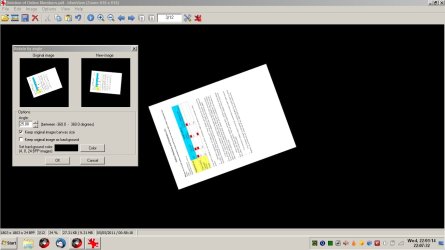
How to rotate PDF

Hi,

Here's what I use to rotate PDF's.

Installed Irfanview but did not associate any file types on set up.

Installed all Irfanview Plugins as per instuctions on the website.

Installed Ghostscript 32 bit (gs909w32.exe)

Irfanview requires 32bit plugin.

Then open PDF in Irfanview.

Start Irfanview.

File> Open> browse to PDF

Then rotate. (Choose custom fine rotation from the Image drop down menu).

Image> Rotate.

Then save.

PDF Rotate.jpg
 
Last edited:

My Computer My Computer

Computer type
Laptop
Computer Manufacturer/Model Number
ASUS
OS
Microsoft Windows 7 Home Premium 64-bit 7601 Multiprocessor Free Service Pack 1
CPU
AMD C-60 APU with Radeon(tm) HD Graphics
Motherboard
ASUSTeK COMPUTER INC. X501U
Memory
4.00 GB
Graphics Card(s)
AMD Radeon HD 6290 Graphics
Sound Card
(1) AMD High Definition Audio Device (2) Realtek High Defi
Screen Resolution
1366 x 768 x 32 bits (4294967296 colors) @ 60 Hz
Hard Drives
Hitachi HTS545050A7E380 SATA Disk Device
Antivirus
Comodo CIS & FW, SecureAplus App Whitelisting, Threatfire
Browser
Cyberfox 64bit, Opera 64bit, Airfox
Other Info
Spy-The-Spy, HitmanPro.Alert, Norton Connect Safe, MJRegWatcher, BitDefender TrafficLight, Voodoo Shield, Zemana AntiMalware
Jerry,

It seems that PDF Reader 7 opens the pdf file
 

Attachments

My Computer My Computer

Computer Manufacturer/Model Number
HPE h8-1010 PC
OS
Windows 7 Home Premium 64bit
Memory
8 GB
Graphics Card(s)
Radeon HD 6450
I opened your PDF with no problem and I don't see why it needs rotated as he reads the way it is just fine, unless you're trying to do something else please explain.

I exported the PDF to a .jpg image for you and put it in a zip folder at the bottom of this post if you need something else let us know.

It is a big image 7199 pixels by 21,600 pixels.

Jerry
 
Last edited:

My Computer My Computer

Computer type
Laptop
Computer Manufacturer/Model Number
Sager NP9170
OS
Win 7 Pro x64 / Win 10 Pro
CPU
Intel(R) Core(TM) i7-3630QM CPU @ 2.40GHz
Motherboard
CLEVO P170EM
Memory
12 GB
Graphics Card(s)
(1) Intel(R) HD Graphics 4000 (2) NVIDIA GeForce GTX 675M
Sound Card
(1) Realtek High Definition Audio (2) Intel(R) Display Aud
Monitor(s) Displays
17.3
Screen Resolution
1920x1080
Hard Drives
(1) Samsung 860 EVO 500GB(OS) (1) Samsung 860 EVO 500GB(Data)
Keyboard
Backlite
Antivirus
MSE, Malwarebytes Pro
Browser
Firefox
Other Info
DESKTOP: Custom-built.
OS: Win 10 Pro x64.
CASE: Rosewill R5.
CPU: Intel I5 4670K CPU @ 3.40GHz.
CPU COOLER: Cool Master Hyper 212 EVO.
MOTHERBOARD: Asus Z87-A.
MEMORY: Kingston HyperX 2x4 GB.
GPU: Nvidia Geforce 650 TI.
PSU: Corsair TX750.
DRIVES: (1) Samsung 840 120 GB SSD (2) Western Digital blue 500 GB 7200 RPM.
I opened your PDF with no problem and I don't see why it needs rotated as he reads the way it is just fine, unless you're trying to do something else please explain.

I exported the PDF to a .jpg image for you and put it in a zip folder at the bottom of this post if you need something else let us know.

It is a big image 7199 pixels by 21,600 pixels.

Jerry

Jerry,

I did the same thing... ha ha. How long did it take you? Because my system isn't the most powerful, GIMP and the image size slowed things down. Layering the snips and stitching probably took an hour for me.

I think that is exactly what Carver wanted, but will await a reply from him. The next step I think he wants to do is put the image into a video. As you said, it's a big image and I'm not sure it will be very clear after pasting it in to Movie maker or another video app. That's what I was trying to get to in post# 10 - but that post got buried.

Well, Carver wanted to learn, now he can take the image manipulate it to look best in a video and WOW his family. I attached my version just for prosperity sake - ha ha.

Carver: I think either version will meet your needs, use Jerry's - he beat me to it.
Claudine somebody lived a very long time 1860-1969 (it just happened to be at a stitch)
 
Last edited:

My Computer My Computer

Computer type
Laptop
Computer Manufacturer/Model Number
HP Pavilion dv6-6c10us
OS
x64 (6.3.9600) Win8.1 Pro & soon dual boot x64 (6.1.7601) Win7_SP1 HomePrem
CPU
AMD A6-3420M APU with Radeon(tm) HD Graphics
Motherboard
Hewlett-Packard 1805
Memory
6.00 GB
Graphics Card(s)
AMD Radeon(TM) HD 6520G
Sound Card
(1) AMD High Definition Audio Device (2) IDT High Definiti
Monitor(s) Displays
HP W2072a 20" LCD (1600 x 900) @ 60 Hz
Screen Resolution
1366 x 768 x 32 bits (4294967296 colors) @ 60 Hz
Hard Drives
ST640LM0 00 HM641JI SATA Disk Device
Keyboard
Logitech k520 wireless KB
Mouse
Logitech m320 wireless mouse (bundled with KB)
Internet Speed
15/5 | 54 MB Wireless 'n'
Antivirus
Realtime: Defender or Avast | On-demand: Malwarebytes, ESET
Browser
IE 11 on Win8, IE 10 on win 7
Other Info
Media: [Gimp, Audacity, VLC] || Comm: [WEmail 2012, Skype] || Productivity: [OpenOffice,| Textpad] || Utils: [Sysinternals, cCleaner, Speccy, Defraggler]
Bill it didn't take too long to open I got a pretty fast and powerful laptop, though I do use a different image viewer(Moo0 ImageViewer) it was so big it wouldn't even open it so I ended up using the built-in Windows image viewer.
 

My Computer My Computer

Computer type
Laptop
Computer Manufacturer/Model Number
Sager NP9170
OS
Win 7 Pro x64 / Win 10 Pro
CPU
Intel(R) Core(TM) i7-3630QM CPU @ 2.40GHz
Motherboard
CLEVO P170EM
Memory
12 GB
Graphics Card(s)
(1) Intel(R) HD Graphics 4000 (2) NVIDIA GeForce GTX 675M
Sound Card
(1) Realtek High Definition Audio (2) Intel(R) Display Aud
Monitor(s) Displays
17.3
Screen Resolution
1920x1080
Hard Drives
(1) Samsung 860 EVO 500GB(OS) (1) Samsung 860 EVO 500GB(Data)
Keyboard
Backlite
Antivirus
MSE, Malwarebytes Pro
Browser
Firefox
Other Info
DESKTOP: Custom-built.
OS: Win 10 Pro x64.
CASE: Rosewill R5.
CPU: Intel I5 4670K CPU @ 3.40GHz.
CPU COOLER: Cool Master Hyper 212 EVO.
MOTHERBOARD: Asus Z87-A.
MEMORY: Kingston HyperX 2x4 GB.
GPU: Nvidia Geforce 650 TI.
PSU: Corsair TX750.
DRIVES: (1) Samsung 840 120 GB SSD (2) Western Digital blue 500 GB 7200 RPM.
Bongo: I guess this is part of the learning process Carver is looking to find here on the forum.

I used Nitro PDF - no problem opening the file Carver supplied.
Then I used the snapshot select tool in Nitro to grab pieces of the chart - it would have been easier if the Nitro snapshot select scrolled the page, but I had to grab a page at a time. Really only a partial page since the select was bounded by the visible window.

I selected the visible data and pasted that into Paint and saved it
Continuing this process until I got to the furthest right and furthest down - 9 snips in all

Then I stitched the snips into one image using GIMP.

The lines in the chart made it fairly easy - it just took time.

I knew it was going to be big when I posted before.

I'm back to watching this thread - thanks for what you did.

Bill
-
 

My Computer My Computer

Computer type
Laptop
Computer Manufacturer/Model Number
HP Pavilion dv6-6c10us
OS
x64 (6.3.9600) Win8.1 Pro & soon dual boot x64 (6.1.7601) Win7_SP1 HomePrem
CPU
AMD A6-3420M APU with Radeon(tm) HD Graphics
Motherboard
Hewlett-Packard 1805
Memory
6.00 GB
Graphics Card(s)
AMD Radeon(TM) HD 6520G
Sound Card
(1) AMD High Definition Audio Device (2) IDT High Definiti
Monitor(s) Displays
HP W2072a 20" LCD (1600 x 900) @ 60 Hz
Screen Resolution
1366 x 768 x 32 bits (4294967296 colors) @ 60 Hz
Hard Drives
ST640LM0 00 HM641JI SATA Disk Device
Keyboard
Logitech k520 wireless KB
Mouse
Logitech m320 wireless mouse (bundled with KB)
Internet Speed
15/5 | 54 MB Wireless 'n'
Antivirus
Realtime: Defender or Avast | On-demand: Malwarebytes, ESET
Browser
IE 11 on Win8, IE 10 on win 7
Other Info
Media: [Gimp, Audacity, VLC] || Comm: [WEmail 2012, Skype] || Productivity: [OpenOffice,| Textpad] || Utils: [Sysinternals, cCleaner, Speccy, Defraggler]
Software to rotate a picture

Bill,

I received a Private Massage which I was not able to open so I am not sure who sent it, but in the notifying email it said that a PM saying that the family tree should be removed from the forum for family security reasons, from Bill.

If that was from you, thank you. I agree whole-heartedly. How can that be done?
 

My Computer My Computer

Computer Manufacturer/Model Number
HPE h8-1010 PC
OS
Windows 7 Home Premium 64bit
Memory
8 GB
Graphics Card(s)
Radeon HD 6450
Open the post where you attached it, click the Paper Clip/Manage attachments, then Remove.
 

My Computer My Computer

Computer type
PC/Desktop
Computer Manufacturer/Model Number
Home Built Desktop By DataTech
OS
Windows 7 Ultimate X64 SP1
CPU
Intel i5-2550K, Differing ~4.4-4.8GHz No built in GPU
Motherboard
ASUS P8Z68-V PRO/GEN3
Memory
16GB G.Skill Sniper 1866MHz @ 2133MHz 2x8GB
Graphics Card(s)
ASUS GTX650TIB-DC2OC-2GD5, (650TI Boost)
Sound Card
Onboard Realtek 5-1
Monitor(s) Displays
Samsung P2570HD
Screen Resolution
1920x1080
Hard Drives
Samsung 840 Pro 256GB SSD for OS, 500GB Seagate Constellation (Enterprise drive) for Data
PSU
Corsair HX650W
Case
Inwin Dragon Rider
Cooling
Hyper 212 EVO w/two Noctua fans, push-pull, @1300 RPM
Keyboard
E-Z Eyes, bright yellow keys with large characters
Mouse
steelseries SENSEI Laser Pro Gaming
Internet Speed
48-51Mbs Mbs down, 11 Mbs up Xfinity Cable
Antivirus
Norton Internet Security 2013
Browser
IE 10, Opera, Pale Moon if needed
Other Info
4 case fans, LG BluRay-RE, ASUS DVD-RW, Mr. Fusion power supply, 1.21 gigawatts.
Jerry,

Thank you very much for that jpg version., I can use that with Paint.Net to make small segments and use Photo Story for Windows to convert it to a .wmv file to use in Windows Movie Maker.

How did you "export it as a jpg?" I really do not have a good pdf reader. I have been taking screen shots of the original chart and importing them to Paint.Net but I had no luck the resulting jpg files after saving them. But I am able to easily resize the segments of the jpg file you sent. I am really pleased with that.

I had the original family tree trellis chart file printed on a heavy glossy 24" x 82" stock. It showed each generation of the family next to each other. The printer had rotated the tree to make it a horizontal poster. I wanted to take a picture of that "poster" to include in a video but have had no luck because of glare on the poster and my lack of advanced photographic skills. It seemed to me that since the poster was a pint of the segments of the .pdf file that if I could rotate those files as the printer did I could recreate a copy of the poster and use it in the video rather than a photo. That is why I asked for help on this forum.

I am really very pleased with all of the help and advice I have received. Thanks to all of you.
 

My Computer My Computer

Computer Manufacturer/Model Number
HPE h8-1010 PC
OS
Windows 7 Home Premium 64bit
Memory
8 GB
Graphics Card(s)
Radeon HD 6450
Carver: Yes, that msg came from me.

On your post, click edit
then click the paperclip / manage attachments
this brings up what looks like a upload screen, but if you look further down, you can remove attachments

Let me know if that makes sense or you get stuck with removing the attachment

As side note re: Jerry's image. When I looked at his, I thought I saw the entire tree, but when I looked a 2nd time I thought I saw only the 1st page. If the whole tree is there, excuse my poor eyesight. If not, take a look at Maple.zip on the my post following Jerry's

Once you have what you need - we all agree to remove the attachments. So let us know that you don't need the images. It was a bit of work for me given my PDF reader (I'll ask Jerry about what he uses) and then stitching it together so I don't want to delete anything until you give the go ahead.
 

My Computer My Computer

Computer type
Laptop
Computer Manufacturer/Model Number
HP Pavilion dv6-6c10us
OS
x64 (6.3.9600) Win8.1 Pro & soon dual boot x64 (6.1.7601) Win7_SP1 HomePrem
CPU
AMD A6-3420M APU with Radeon(tm) HD Graphics
Motherboard
Hewlett-Packard 1805
Memory
6.00 GB
Graphics Card(s)
AMD Radeon(TM) HD 6520G
Sound Card
(1) AMD High Definition Audio Device (2) IDT High Definiti
Monitor(s) Displays
HP W2072a 20" LCD (1600 x 900) @ 60 Hz
Screen Resolution
1366 x 768 x 32 bits (4294967296 colors) @ 60 Hz
Hard Drives
ST640LM0 00 HM641JI SATA Disk Device
Keyboard
Logitech k520 wireless KB
Mouse
Logitech m320 wireless mouse (bundled with KB)
Internet Speed
15/5 | 54 MB Wireless 'n'
Antivirus
Realtime: Defender or Avast | On-demand: Malwarebytes, ESET
Browser
IE 11 on Win8, IE 10 on win 7
Other Info
Media: [Gimp, Audacity, VLC] || Comm: [WEmail 2012, Skype] || Productivity: [OpenOffice,| Textpad] || Utils: [Sysinternals, cCleaner, Speccy, Defraggler]

My Computer My Computer

Computer type
Laptop
Computer Manufacturer/Model Number
Sager NP9170
OS
Win 7 Pro x64 / Win 10 Pro
CPU
Intel(R) Core(TM) i7-3630QM CPU @ 2.40GHz
Motherboard
CLEVO P170EM
Memory
12 GB
Graphics Card(s)
(1) Intel(R) HD Graphics 4000 (2) NVIDIA GeForce GTX 675M
Sound Card
(1) Realtek High Definition Audio (2) Intel(R) Display Aud
Monitor(s) Displays
17.3
Screen Resolution
1920x1080
Hard Drives
(1) Samsung 860 EVO 500GB(OS) (1) Samsung 860 EVO 500GB(Data)
Keyboard
Backlite
Antivirus
MSE, Malwarebytes Pro
Browser
Firefox
Other Info
DESKTOP: Custom-built.
OS: Win 10 Pro x64.
CASE: Rosewill R5.
CPU: Intel I5 4670K CPU @ 3.40GHz.
CPU COOLER: Cool Master Hyper 212 EVO.
MOTHERBOARD: Asus Z87-A.
MEMORY: Kingston HyperX 2x4 GB.
GPU: Nvidia Geforce 650 TI.
PSU: Corsair TX750.
DRIVES: (1) Samsung 840 120 GB SSD (2) Western Digital blue 500 GB 7200 RPM.
Bill,

Thank you for those instructions. I will remove the chart tomorrow morning.

Thank you also for also for all of the work you did to convert the chart and stitch it back together. Unfortunately, the png file that you sent does not resize well in Paint.Net. After the third increase in size the lettering is not readable and I need good clear, lettering for the video. The jpg file that Jerry sent increased very well in Paint.Net (and when I just right-clickéd on the jpeg file. Unfortunately, that jpg file has already been removed so I cannot return to it.

I plan to download and use the free pdf file that Jerry sent. So I should be okay now. Thank you very much. I appreciate all of the work that Jerry and you did to help me.
 

My Computer My Computer

Computer Manufacturer/Model Number
HPE h8-1010 PC
OS
Windows 7 Home Premium 64bit
Memory
8 GB
Graphics Card(s)
Radeon HD 6450
Carver: You're welcome

Yep, been there, done that. Placing detailed images in video is tricky.

If you have the same PDF viewer as Jerry used, you should be able to follow the same steps he took and get both pages in a format that you can work with.

I removed Maple.zip - you already have it, but it doesn't resize.

So..... did you learn anything? Too much? ha ha

GIMP has a lot of power, you might think about downloading and using it at some point. There is a learning curve though.

Bill
 

My Computer My Computer

Computer type
Laptop
Computer Manufacturer/Model Number
HP Pavilion dv6-6c10us
OS
x64 (6.3.9600) Win8.1 Pro & soon dual boot x64 (6.1.7601) Win7_SP1 HomePrem
CPU
AMD A6-3420M APU with Radeon(tm) HD Graphics
Motherboard
Hewlett-Packard 1805
Memory
6.00 GB
Graphics Card(s)
AMD Radeon(TM) HD 6520G
Sound Card
(1) AMD High Definition Audio Device (2) IDT High Definiti
Monitor(s) Displays
HP W2072a 20" LCD (1600 x 900) @ 60 Hz
Screen Resolution
1366 x 768 x 32 bits (4294967296 colors) @ 60 Hz
Hard Drives
ST640LM0 00 HM641JI SATA Disk Device
Keyboard
Logitech k520 wireless KB
Mouse
Logitech m320 wireless mouse (bundled with KB)
Internet Speed
15/5 | 54 MB Wireless 'n'
Antivirus
Realtime: Defender or Avast | On-demand: Malwarebytes, ESET
Browser
IE 11 on Win8, IE 10 on win 7
Other Info
Media: [Gimp, Audacity, VLC] || Comm: [WEmail 2012, Skype] || Productivity: [OpenOffice,| Textpad] || Utils: [Sysinternals, cCleaner, Speccy, Defraggler]
Software to rotate a picture

Bill,

Thank you. I did learn quit a bit. Quite a bit to absorb. I also downloaded Nitro - PDF Reader, sand The Gimp. Now I have to learn to use them. At 86 I am not the swiftest learner, memories not too good either but Ill get around to learning them. I am glad that I asked the Forum for help. Thanks for your help.
 

My Computer My Computer

Computer Manufacturer/Model Number
HPE h8-1010 PC
OS
Windows 7 Home Premium 64bit
Memory
8 GB
Graphics Card(s)
Radeon HD 6450
Hi Jerry,

Thanks for the link. I downloaded and installed Nitro - PDF Reader. It looks good and user-friendly. I am sure that it will be very helpful when I learn to use it, but when I tried to rotate the chart I could not get it to turn anything but quarter turns. Can I use it to rotate the chart manually? Also when I tried to Export the .pdf file as jpg. I could not find that option. I am a slow learner so I will eventually get it, but any tips you could share would be most welcome.
 

My Computer My Computer

Computer Manufacturer/Model Number
HPE h8-1010 PC
OS
Windows 7 Home Premium 64bit
Memory
8 GB
Graphics Card(s)
Radeon HD 6450
Software to rotate a picture

When I returned t the post here I had attached the chart, I did not a paperclip to use to start removing the chart. I hope that I have attached a screenshot showing that original chart.
 

Attachments

  • Screenshot - Original Post with link to chart.png
    Screenshot - Original Post with link to chart.png
    9.7 KB · Views: 0

My Computer My Computer

Computer Manufacturer/Model Number
HPE h8-1010 PC
OS
Windows 7 Home Premium 64bit
Memory
8 GB
Graphics Card(s)
Radeon HD 6450
Open the post where you attached it, click the Paper Clip/Manage attachments, then Remove.


When I returned t the post here I had attached the chart, I did not a paperclip to use to start removing the chart. I hope that I have attached a screenshot showing that original chart.
Sorry buddy, I should have said go to the post and click edit, then do as I have said in my quote above.
 

My Computer My Computer

Computer type
PC/Desktop
Computer Manufacturer/Model Number
Home Built Desktop By DataTech
OS
Windows 7 Ultimate X64 SP1
CPU
Intel i5-2550K, Differing ~4.4-4.8GHz No built in GPU
Motherboard
ASUS P8Z68-V PRO/GEN3
Memory
16GB G.Skill Sniper 1866MHz @ 2133MHz 2x8GB
Graphics Card(s)
ASUS GTX650TIB-DC2OC-2GD5, (650TI Boost)
Sound Card
Onboard Realtek 5-1
Monitor(s) Displays
Samsung P2570HD
Screen Resolution
1920x1080
Hard Drives
Samsung 840 Pro 256GB SSD for OS, 500GB Seagate Constellation (Enterprise drive) for Data
PSU
Corsair HX650W
Case
Inwin Dragon Rider
Cooling
Hyper 212 EVO w/two Noctua fans, push-pull, @1300 RPM
Keyboard
E-Z Eyes, bright yellow keys with large characters
Mouse
steelseries SENSEI Laser Pro Gaming
Internet Speed
48-51Mbs Mbs down, 11 Mbs up Xfinity Cable
Antivirus
Norton Internet Security 2013
Browser
IE 10, Opera, Pale Moon if needed
Other Info
4 case fans, LG BluRay-RE, ASUS DVD-RW, Mr. Fusion power supply, 1.21 gigawatts.
Carver: You are welcome. It was my pleasure helping you. If you get stuck with this stuff, post something here, but I think you'll do fine once you get Jerry's PDF viewer.

Jerry uses a different PDF viewer - I'm not sure which one. I read through the posts because the export menu pick in the app he uses would have made my job a lot easier.

I use Nitro PDF and there is no export menu option that I know of, I think you confirmed that.

The easiest thing to to is left click on Bongo (the name, not the avatar pic) on any of his posts and send him a PM asking him which PDF viewer he used to export the tree to jpeg. If you wouldn't mind posting that info back here, I'd appreciate it.

I see Britton30 is helping you remove your attachment, thanks Gary.

Bill
 
Last edited:

My Computer My Computer

Computer type
Laptop
Computer Manufacturer/Model Number
HP Pavilion dv6-6c10us
OS
x64 (6.3.9600) Win8.1 Pro & soon dual boot x64 (6.1.7601) Win7_SP1 HomePrem
CPU
AMD A6-3420M APU with Radeon(tm) HD Graphics
Motherboard
Hewlett-Packard 1805
Memory
6.00 GB
Graphics Card(s)
AMD Radeon(TM) HD 6520G
Sound Card
(1) AMD High Definition Audio Device (2) IDT High Definiti
Monitor(s) Displays
HP W2072a 20" LCD (1600 x 900) @ 60 Hz
Screen Resolution
1366 x 768 x 32 bits (4294967296 colors) @ 60 Hz
Hard Drives
ST640LM0 00 HM641JI SATA Disk Device
Keyboard
Logitech k520 wireless KB
Mouse
Logitech m320 wireless mouse (bundled with KB)
Internet Speed
15/5 | 54 MB Wireless 'n'
Antivirus
Realtime: Defender or Avast | On-demand: Malwarebytes, ESET
Browser
IE 11 on Win8, IE 10 on win 7
Other Info
Media: [Gimp, Audacity, VLC] || Comm: [WEmail 2012, Skype] || Productivity: [OpenOffice,| Textpad] || Utils: [Sysinternals, cCleaner, Speccy, Defraggler]
Back
Top