Solid State Drives

I have 2 SSDs (for 2 different systems) - one Intel 80GB and one OCZ 60GB. In my book there is nothing that can speed up your system as much as an SSD for the same amount of Dollars. The OCZ Vertex 30GB was on sale at Newegg for $99. That is a wonderful disk and completely sufficient for the Windows7 OS. Just put your data on the HDD.
Win7 supports Trim and also a few tweaks like alignment and service disabling (e.g. superfetch). So you really need not do much tweaking yourself. I would not want to go back to HDDs for the OS.

+1


The OCZ 30Gb Vertex is a excellent drive, based on the Indulux controller.
Not to mention, a great entry level point to the SSD world, without breaking the bank.
(At the price these sell for, I honestly dont think there is a better SSD, TBH)

Downside, it'll only take the OS, but non-the-less will still speed everything up overall :)
Even with most DATA on spinning drives.
 

My Computer

Computer Manufacturer/Model Number
Custom (Self Build)
OS
Windows 7 Home Premium 64bit
CPU
Intel Core i7 2700k
Motherboard
eVGA P67 SLI
Memory
8GB Mushkin Redline Ridgebacks @1866
Graphics Card(s)
EVGA GTX570 SC
Sound Card
XiFi Titanium HD
Monitor(s) Displays
LG W2453V
Screen Resolution
1920x1080
Hard Drives
Intel 320 80GB -- Intel X25-V 40GB --WD Black 1TB x2 -- WD Blue 640GB
PSU
Seasonic x750
Case
Corsair 600T SE White
Cooling
eVGA Superclocked CPU Cooler
Keyboard
Saitek Cyborg
Antivirus
Kaspersky
Browser
IE
Other Info
LG BD/DVD
A question though.
when I installed Home Premium (from my mom's disk - so i just need to activate it and install drivers when I get my kit) onto the main partition, I noticed it only used 8gb instead of 16gb for Enterprise. why is that?
and following that if I have that plus ten applications/addons the biggest one is openoffice, and 1gb of music and some documents, 30gb will be just hunky-dory. correct?
 

My Computer

Computer type
PC/Desktop
Computer Manufacturer/Model Number
Apple 17" iMac MA199LL (Early 2006)
OS
Windows 8 Pro (32-bit)
CPU
1.83GHz Intel Core Duo
Memory
2GB 667MHz DDR2 SDRAM (PC2-5300) (upgrade)
Graphics Card(s)
ATI Radeon X1600 with 128MB GDDR3 memory
Monitor(s) Displays
17-inch TFT active-matrix LCD, millions of colors
Screen Resolution
1440 x 900
Hard Drives
Hitachi 320GB HDT721032SLA360 7200RPM SATA II (upgrade)
Keyboard
Microsoft Wired Keyboard 600
Mouse
Microsoft Basic Optical Mouse v2.0
Internet Speed
4 Mbps
Antivirus
Microsoft Security Essentials
Browser
Google Chrome
Other Info
WEI:
Base Score: 3.9 Processor: 4.4 Memory 4.7
Graphics: 3.9 Gaming Graphics: 4.1 Primary HD: 5.9
A question though.
when I installed Home Premium (from my mom's disk - so i just need to activate it and install drivers when I get my kit) onto the main partition, I noticed it only used 8gb instead of 16gb for Enterprise. why is that?
and following that if I have that plus ten applications/addons the biggest one is openoffice, and 1gb of music and some documents, 30gb will be just hunky-dory. correct?


With a 30GB Vertex, this is how i set mine up:

MOVED: Documents, pictures, music, videos to a spinning drive
MOVED: IE cache and Firefox Cache to a spinning drive
MOVED: TEMP folder to a spinning drive

Disabled and deleted the HIBERFILE
Disabled PAGEFILE (this can also just be moved a spinning drive)
Disabled System Restore ... ((Note: I wouldnt do this unless you make constant(weekly) Full backups with either Windows, Acronis, Paragon .. whatever -- others may frown on this, but this is how I do it --- backups will be soley on you!))

Disabled Windows Defrag and Turned off its Scheduling

After Doing all of this, My Windows 7 64bit + all my programs uses approx 14GB space now.

I also have a GAMES folder on a WD 640GB drive that i install all games too.


This how i done my 30GB.

If you want music, games, or any other DATA (excluding programs) on the SSD, then you will need larger one IMO.
the 30GB vertex is without a doubt a awesome drive for the money, but its also only intended as a boot/OS drive. not really for DATA storage.

how you decide to do it is your call, but generally speaking, reducing the amount of writes is a common practice for most
 

My Computer

Computer Manufacturer/Model Number
Custom (Self Build)
OS
Windows 7 Home Premium 64bit
CPU
Intel Core i7 2700k
Motherboard
eVGA P67 SLI
Memory
8GB Mushkin Redline Ridgebacks @1866
Graphics Card(s)
EVGA GTX570 SC
Sound Card
XiFi Titanium HD
Monitor(s) Displays
LG W2453V
Screen Resolution
1920x1080
Hard Drives
Intel 320 80GB -- Intel X25-V 40GB --WD Black 1TB x2 -- WD Blue 640GB
PSU
Seasonic x750
Case
Corsair 600T SE White
Cooling
eVGA Superclocked CPU Cooler
Keyboard
Saitek Cyborg
Antivirus
Kaspersky
Browser
IE
Other Info
LG BD/DVD
yeah I was just wondering because this laptop only has room for one drive so I would like to have documents and music on it; should only be about 1gb. I'm planning to have my 60GB video collection on my old drive in an enclosure though.
 

My Computer

Computer type
PC/Desktop
Computer Manufacturer/Model Number
Apple 17" iMac MA199LL (Early 2006)
OS
Windows 8 Pro (32-bit)
CPU
1.83GHz Intel Core Duo
Memory
2GB 667MHz DDR2 SDRAM (PC2-5300) (upgrade)
Graphics Card(s)
ATI Radeon X1600 with 128MB GDDR3 memory
Monitor(s) Displays
17-inch TFT active-matrix LCD, millions of colors
Screen Resolution
1440 x 900
Hard Drives
Hitachi 320GB HDT721032SLA360 7200RPM SATA II (upgrade)
Keyboard
Microsoft Wired Keyboard 600
Mouse
Microsoft Basic Optical Mouse v2.0
Internet Speed
4 Mbps
Antivirus
Microsoft Security Essentials
Browser
Google Chrome
Other Info
WEI:
Base Score: 3.9 Processor: 4.4 Memory 4.7
Graphics: 3.9 Gaming Graphics: 4.1 Primary HD: 5.9
In that case, youd be very crammped for space Im afraid, or at least would be extremely limited.

In your case, you may want to try at least a 60GB.

Or at least, i would if only had the option of 1 drive.

the 30GB really only makes sense if have other spinning drives to house all your other DATA.

but in the end, its your call.
you know more than anyone else how much total space you'll need :)
but you need to think of the future to, as you aquire more things, as the 30GB will severly limit your ability to expand
 

My Computer

Computer Manufacturer/Model Number
Custom (Self Build)
OS
Windows 7 Home Premium 64bit
CPU
Intel Core i7 2700k
Motherboard
eVGA P67 SLI
Memory
8GB Mushkin Redline Ridgebacks @1866
Graphics Card(s)
EVGA GTX570 SC
Sound Card
XiFi Titanium HD
Monitor(s) Displays
LG W2453V
Screen Resolution
1920x1080
Hard Drives
Intel 320 80GB -- Intel X25-V 40GB --WD Black 1TB x2 -- WD Blue 640GB
PSU
Seasonic x750
Case
Corsair 600T SE White
Cooling
eVGA Superclocked CPU Cooler
Keyboard
Saitek Cyborg
Antivirus
Kaspersky
Browser
IE
Other Info
LG BD/DVD
yeah I was just wondering because this laptop only has room for one drive so I would like to have documents and music on it; should only be about 1gb. I'm planning to have my 60GB video collection on my old drive in an enclosure though.


I think Wishmaster is correct. For a laptop, 30GB is too tight. That will be no fun. You should at least go with this one ( Newegg.com - OCZ Vertex Turbo OCZSSD2-1VTXT60G 2.5" 60GB SATA II MLC Internal Solid State Drive (SSD) - Solid State Disks ). But that is, of course, a good jump in price. Just make sure the drive comes with Firmware level 1.4. This is the one with Trim. Windows 7 supports Trim and it also does all the adjustments for the disk (alignment) and the OS (shutting off functions like superfetch, defrag, etc.) at installation. Else the measures that Wishmaster described are all very useful.
 

My Computer

Computer Manufacturer/Model Number
HP, Dell, Gateway, Toshiba - 4 laptops and 2 desktops
OS
Vista, Windows7, Mint Mate, Zorin, Windows 8
CPU
from 1.6GHz Duo to i7
Monitor(s) Displays
2x HP w2207
Hard Drives
5x HDD, 7x SSD, 12x Externals
Keyboard
with trackball - no mices
Mouse
Trackball mice
Internet Speed
DSL 6000
the OCZ you linked to definately sounds good and has over 80% 5 out of 5 rating. alas it's only $100 less than my laptop (bargain bin special), and I'm not entirely sure if The difference will be as noticeable compared to cheaper ssds because I have an Atom processor.
these are kinda what I'm looking at.
64GB SATA II $100-$200 search
I'm looking at the PQI because it seems to have the fastest reads, but I need to find real reviews.
 

My Computer

Computer type
PC/Desktop
Computer Manufacturer/Model Number
Apple 17" iMac MA199LL (Early 2006)
OS
Windows 8 Pro (32-bit)
CPU
1.83GHz Intel Core Duo
Memory
2GB 667MHz DDR2 SDRAM (PC2-5300) (upgrade)
Graphics Card(s)
ATI Radeon X1600 with 128MB GDDR3 memory
Monitor(s) Displays
17-inch TFT active-matrix LCD, millions of colors
Screen Resolution
1440 x 900
Hard Drives
Hitachi 320GB HDT721032SLA360 7200RPM SATA II (upgrade)
Keyboard
Microsoft Wired Keyboard 600
Mouse
Microsoft Basic Optical Mouse v2.0
Internet Speed
4 Mbps
Antivirus
Microsoft Security Essentials
Browser
Google Chrome
Other Info
WEI:
Base Score: 3.9 Processor: 4.4 Memory 4.7
Graphics: 3.9 Gaming Graphics: 4.1 Primary HD: 5.9
Sorry ICEFIRE, i would love to give advice on those, but I know nothing about them and couldn't say anything good or bad, on those particular drives, on how well they perform :(
Perhaps someone else can help.

I only know about the OCZ Vertex series drives myself.
 
Last edited:

My Computer

Computer Manufacturer/Model Number
Custom (Self Build)
OS
Windows 7 Home Premium 64bit
CPU
Intel Core i7 2700k
Motherboard
eVGA P67 SLI
Memory
8GB Mushkin Redline Ridgebacks @1866
Graphics Card(s)
EVGA GTX570 SC
Sound Card
XiFi Titanium HD
Monitor(s) Displays
LG W2453V
Screen Resolution
1920x1080
Hard Drives
Intel 320 80GB -- Intel X25-V 40GB --WD Black 1TB x2 -- WD Blue 640GB
PSU
Seasonic x750
Case
Corsair 600T SE White
Cooling
eVGA Superclocked CPU Cooler
Keyboard
Saitek Cyborg
Antivirus
Kaspersky
Browser
IE
Other Info
LG BD/DVD
Hi all

PLEASE PLEASE do a bit of research before posting stuff which is misleading -- especially in regard to new technology that you haven't actually tried on your own machines yet.

First in most typical computers running Windows (and that's about 90% of Windows machines) the MAJOR BOTTLENECK isn't actually the RAM or even the Graphics cards but it's the hideousely slow I/O subsystem.

Modern CPU's have more than enough power to overcome problems of not enough RAM (within reason) but slow Disks will kill any machine STONE DEAD.

(Of course if you have a stupidly small amount of RAM then no solution will help other than increasing the RAM - however W7 will run quite nicely even on a 1GB RAM netbook provided you aren't running too many apps concurrently).

SSD's ARE very much used when you want to increase performance - especially if you can load the OS on them and don't have a heavy duty read / write cycle.

The next generation will address some of the long term degradation issues and will of course come down very much in price -- like "conventional" HDD's.

Expect to see a proliferation of these devices at affordable prices this year.

If you want to speed up even an older machine -- faster disks will yield better performance than almost any other trick you can do to optimize your machine.

Cheers
jimbo
 

My Computer

Computer type
PC/Desktop
Computer Manufacturer/Model Number
Custom built, several laptops HP/ASUS
OS
Linux CENTOS 7 / various Windows OS'es and servers
CPU
Intel i7 Intel i5
Memory
8GB, 16GB
Graphics Card(s)
On Motherboard
Sound Card
Realtek HD audio
Monitor(s) Displays
Apple Cinema display, Samsung LCD
Screen Resolution
1920 X 1080
Hard Drives
4 X 1TB SATA
Mouse
Toshiba wireless laser
Internet Speed
> 20MB up
PLEASE PLEASE do a bit of research before posting stuff which is misleading -- especially in regard to new technology that you haven't actually tried on your own machines yet.

Jimbo, what is that supposed to mean. I am running an OCZ Vertex SSD on one machine and an Intel SSD on another machine. I am very well aware of what it can and what it can't do. After nearly a year of experimenting with them I know they can speed up your system significantly - especially with Windows7 if the SSD has Trim support.
Your points on RAM, etc. are well taken and I agree that the system has to be somehow balanced. But even with RAM constraints, you should get a good performance boost because having the page file on the SSD should speed things up significantly. That, however, I have not experienced myself because my systems have plenty of RAM.
 

My Computer

Computer Manufacturer/Model Number
HP, Dell, Gateway, Toshiba - 4 laptops and 2 desktops
OS
Vista, Windows7, Mint Mate, Zorin, Windows 8
CPU
from 1.6GHz Duo to i7
Monitor(s) Displays
2x HP w2207
Hard Drives
5x HDD, 7x SSD, 12x Externals
Keyboard
with trackball - no mices
Mouse
Trackball mice
Internet Speed
DSL 6000
IceFire, I was not aware that we are talking about a netbook (or laptop) with an Atom processor. That obviously puts major constraints on the overall performance of your system. The SSD will probably still help to boost it, but do not expect wonders.
I am not familiar with the Intel SSD that you linked. The main question here would be whether it has a firmware that supports Trim (which I doubt) and whether you will be running Windows7. Since this would be your only disk, Trim is more importent because you would do a lot of write operations on the disk. The way that Wishmaster and myself are using the SSD, that is not the case because we move our own data to an HDD. And in my case I know that even the system hardly ever writes to the SSD because I have plenty of RAM and my hard faults (page faults) are practically always zero. Maybe you can find some more information about this SSD and then we can take a look at it.
 

My Computer

Computer Manufacturer/Model Number
HP, Dell, Gateway, Toshiba - 4 laptops and 2 desktops
OS
Vista, Windows7, Mint Mate, Zorin, Windows 8
CPU
from 1.6GHz Duo to i7
Monitor(s) Displays
2x HP w2207
Hard Drives
5x HDD, 7x SSD, 12x Externals
Keyboard
with trackball - no mices
Mouse
Trackball mice
Internet Speed
DSL 6000
I have 2 SSDs (for 2 different systems) - one Intel 80GB and one OCZ 60GB. In my book there is nothing that can speed up your system as much as an SSD for the same amount of Dollars. The OCZ Vertex 30GB was on sale at Newegg for $99. That is a wonderful disk and completely sufficient for the Windows7 OS. Just put your data on the HDD.
Win7 supports Trim and also a few tweaks like alignment and service disabling (e.g. superfetch). So you really need not do much tweaking yourself. I would not want to go back to HDDs for the OS.

unlike in 98, 98se, 98me, xp, vista in 7 for some reason when you change the default path to another drive in stead of c for users, program files, and program data 7 still puts a exact copy on c. in vista i had my 64gig ssd as c and through the os set it up to to install my programs, user files and the page file to d. to test it i would install all the apps i wanted then check the programs file folders size on both c and d. c would be around 400mb to 1gig and d at least 30gigs telling me that the redirect worked. now in 7 when i check both program files folders they are the same size. this tells me that for some reason 7 is making copies of everything that should be going to the programs file folder on d to the programs file folder on c. this is why i recommend a 60gig drive or above.
 

My Computer

OS
windows seven
I have 2 SSDs (for 2 different systems) - one Intel 80GB and one OCZ 60GB. In my book there is nothing that can speed up your system as much as an SSD for the same amount of Dollars. The OCZ Vertex 30GB was on sale at Newegg for $99. That is a wonderful disk and completely sufficient for the Windows7 OS. Just put your data on the HDD.
Win7 supports Trim and also a few tweaks like alignment and service disabling (e.g. superfetch). So you really need not do much tweaking yourself. I would not want to go back to HDDs for the OS.

unlike in 98, 98se, 98me, xp, vista in 7 for some reason when you change the default path to another drive in stead of c for users, program files, and program data 7 still puts a exact copy on c. in vista i had my 64gig ssd as c and through the os set it up to to install my programs, user files and the page file to d. to test it i would install all the apps i wanted then check the programs file folders size on both c and d. c would be around 400mb to 1gig and d at least 30gigs telling me that the redirect worked. now in 7 when i check both program files folders they are the same size. this tells me that for some reason 7 is making copies of everything that should be going to the programs file folder on d to the programs file folder on c. this is why i recommend a 60gig drive or above.

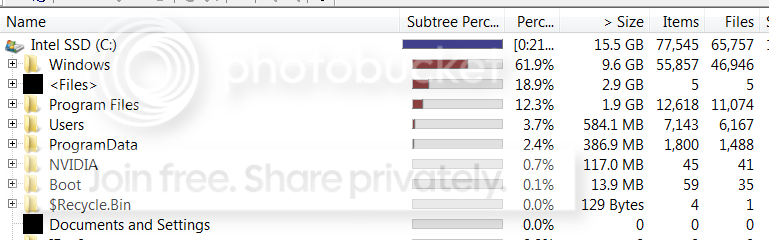
Hmm, that's interesting. I never moved the Program files folder to another drive - just my user folders. But even with the program files folders on the SSD, my Windows 7 is only 15.5GB (13GB respectively on another system) with a good selection of programs that I installed (over 11.000 files in the program files folder). The programs are usually not that big - about 2GB for the whole folder in my cases.

Here is what WinDirStat says for the SSD on this system:

SSDfiles.png
 

My Computer

Computer Manufacturer/Model Number
HP, Dell, Gateway, Toshiba - 4 laptops and 2 desktops
OS
Vista, Windows7, Mint Mate, Zorin, Windows 8
CPU
from 1.6GHz Duo to i7
Monitor(s) Displays
2x HP w2207
Hard Drives
5x HDD, 7x SSD, 12x Externals
Keyboard
with trackball - no mices
Mouse
Trackball mice
Internet Speed
DSL 6000
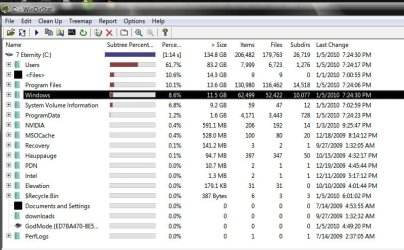
this is what i currently get. the user file is actually 10.7gigs not 83.2gigs once i file away everything in one folder on the desktop.
 

Attachments

  • windirstat view.jpg
    windirstat view.jpg
    69.3 KB · Views: 14

My Computer

OS
windows seven
That's a LOT of program files. I probably would not know what to do with all those programs - LOL. I uninstall all programs that I do not use, especially all the junk that comes with the system (.eg. all the HP or Dell help stuff, works, etc.).
 

My Computer

Computer Manufacturer/Model Number
HP, Dell, Gateway, Toshiba - 4 laptops and 2 desktops
OS
Vista, Windows7, Mint Mate, Zorin, Windows 8
CPU
from 1.6GHz Duo to i7
Monitor(s) Displays
2x HP w2207
Hard Drives
5x HDD, 7x SSD, 12x Externals
Keyboard
with trackball - no mices
Mouse
Trackball mice
Internet Speed
DSL 6000
That's a LOT of program files. I probably would not know what to do with all those programs - LOL. I uninstall all programs that I do not use, especially all the junk that comes with the system (.eg. all the HP or Dell help stuff, works, etc.).


not really not when you consider the size of some programs. i build my own systems and i do disable or set a lot of services to manual. after building my first system under win 95 i would never own a prebuilt again, with the exception of a laptop. even then i would remove everything including the hidden partitions from the maker and do a clean install of 7. my concern is the user file compared to yours.
 

My Computer

OS
windows seven
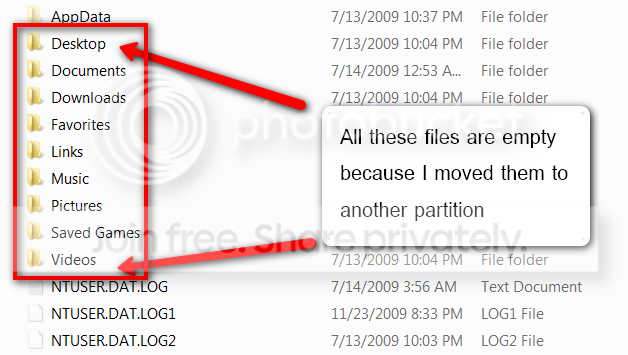
in "Users", you probably have all your own files whilst I moved mine to a seperate partition. Only AppData has the usual stuff in it. If you moved yours too, tell me how you did that. Maybe you used the wrong method.

User.png
 

My Computer

Computer Manufacturer/Model Number
HP, Dell, Gateway, Toshiba - 4 laptops and 2 desktops
OS
Vista, Windows7, Mint Mate, Zorin, Windows 8
CPU
from 1.6GHz Duo to i7
Monitor(s) Displays
2x HP w2207
Hard Drives
5x HDD, 7x SSD, 12x Externals
Keyboard
with trackball - no mices
Mouse
Trackball mice
Internet Speed
DSL 6000
To the OP:

I you haven't read this yet, things are changing in SSDs....right now you need to go with Intel or an Indilinx controlled SSD. Now there are "SandForce" controllers. These are fast becoming the best. Even to Intel's standards. I would read this and Anand's other articles. You will learn more than you could ever imagine.

AnandTech: OCZ's Vertex 2 Pro Preview: The Fastest MLC SSD We've Ever Tested
 

My Computer

Computer Manufacturer/Model Number
Keeps changing - (Custom)
OS
Windows 7 Professional x64
CPU
Intel Core i7 860
Motherboard
Gigabyte GA-P55-UD4P
Memory
4GB DDR3 Mushkin 1600Mhz @ 7-8-7-20
Graphics Card(s)
MSI GTS250 1GB DDR3 Twin Frozr
Sound Card
Onboard realtek
Monitor(s) Displays
Samsung SyncMaster 24" P2450 + Samsung 20" 2033
Screen Resolution
1920 X 1080 and 1600 X 900 (#2 system 1440 X 900)
Hard Drives
Patriot Inferno 120GB SSD + 3 WD Blue 640GB drives
PSU
Corsair 750 HX Modular
Case
Lancool PC-K62
Cooling
Cooler Master TX3 CPU cooler and 4-140mm and 1-120mm case
Keyboard
Gigabyte USB keyboard
Mouse
Microsoft wireless laser mouse 5000
Internet Speed
7 Mb down 1.5 up
Other Info
System #2: AMD Phenom II X6 1055T (Freezer 7 Pro cooler) - Gigabyte 880GMA-UD2H - WD 500GB Black - 9500GT (1GB) 500W OCZ modular PSU - Antec 200 case. System #3 (LapTop) Core 2 Duo T6670 - 320GB 7200RPM HD - 4GB DDR3 RAM.
To the OP:

I you haven't read this yet, things are changing in SSDs....right now you need to go with Intel or an Indilinx controlled SSD. Now there are "SandForce" controllers. These are fast becoming the best. Even to Intel's standards. I would read this and Anand's other articles. You will learn more than you could ever imagine.

AnandTech: OCZ's Vertex 2 Pro Preview: The Fastest MLC SSD We've Ever Tested


Thanks for the link. I read Anand's articles regularly but i guess with the holidays I missed that one. Things seem to be moving into the right direction.
 

My Computer

Computer Manufacturer/Model Number
HP, Dell, Gateway, Toshiba - 4 laptops and 2 desktops
OS
Vista, Windows7, Mint Mate, Zorin, Windows 8
CPU
from 1.6GHz Duo to i7
Monitor(s) Displays
2x HP w2207
Hard Drives
5x HDD, 7x SSD, 12x Externals
Keyboard
with trackball - no mices
Mouse
Trackball mice
Internet Speed
DSL 6000
IceFire, I was not aware that we are talking about a netbook (or laptop) with an Atom processor. That obviously puts major constraints on the overall performance of your system. The SSD will probably still help to boost it, but do not expect wonders.
I am not familiar with the Intel SSD that you linked. The main question here would be whether it has a firmware that supports Trim (which I doubt) and whether you will be running Windows7. Since this would be your only disk, Trim is more importent because you would do a lot of write operations on the disk. The way that Wishmaster and myself are using the SSD, that is not the case because we move our own data to an HDD. And in my case I know that even the system hardly ever writes to the SSD because I have plenty of RAM and my hard faults (page faults) are practically always zero. Maybe you can find some more information about this SSD and then we can take a look at it.

Yeah as far as i can tell none of the drives support TRIM. but the Kingston, which is also the cheapest, is capable of supporting it in the hardware. unfortunately the firmware currently doesn't support TRIM and it seems like Kingston is dragging their heels in enabling it. Shame because it has a really good rating and I'm pretty sure the bad reviews are because of the lack of TRIM support or the user configured their OS wrong.
Although I'll still wait and see if anything better comes into that price range, because I don't think kingston will enable TRIM for that drive.
However, because i don't believe I will go over 40gb on that drive, I could probably just download an app that cleans the drive once a month or so.
 

My Computer

Computer type
PC/Desktop
Computer Manufacturer/Model Number
Apple 17" iMac MA199LL (Early 2006)
OS
Windows 8 Pro (32-bit)
CPU
1.83GHz Intel Core Duo
Memory
2GB 667MHz DDR2 SDRAM (PC2-5300) (upgrade)
Graphics Card(s)
ATI Radeon X1600 with 128MB GDDR3 memory
Monitor(s) Displays
17-inch TFT active-matrix LCD, millions of colors
Screen Resolution
1440 x 900
Hard Drives
Hitachi 320GB HDT721032SLA360 7200RPM SATA II (upgrade)
Keyboard
Microsoft Wired Keyboard 600
Mouse
Microsoft Basic Optical Mouse v2.0
Internet Speed
4 Mbps
Antivirus
Microsoft Security Essentials
Browser
Google Chrome
Other Info
WEI:
Base Score: 3.9 Processor: 4.4 Memory 4.7
Graphics: 3.9 Gaming Graphics: 4.1 Primary HD: 5.9
Back
Top