
Some icons are displayed bad

Andrew14101

New member
Local time
7:04 AM
Messages
5
Hello, how can I change these icons to originals? Images of those icons are in the ZIP file below. That's not all, but I don't remember more icons which have changed. They are such, because I had tried to install Mac OS X skin on my laptop. I uninstalled that skin but these icons have remained. Help me please... thx so much :) (Sorry for my english, i'm slovak student.)
 

Attachments

My Computer My Computer

Computer type
Laptop
Computer Manufacturer/Model Number
Hewlett-Packard
OS
Windows 7 Home Premium x64
CPU
Intel Pentium B950
Motherboard
Hewlett-Packard
Memory
6GB DDR3 1333 MHz
Graphics Card(s)
Intel HD
Hard Drives
Seagate Momentus 5400 rpm 500GB
Antivirus
ESET NOD32 Antivirus 6
Browser
Google Chrome, Mozilla Firefox, Safari, Internet Explorer
Welcome to the Seven Forums

Do Option 2 of this tutorial http://www.sevenforums.com/tutorials/1538-sfc-scannow-command-system-file-checker.html it will not harm any data or programs you have installed it will try to find and repair any corrupt system files that you have. You may have to do this up to three different times with a reboot after each scan. Any system file that has been changed to give a custom look will change back to the original, if you use the universal theme patcher it will undo that also.

You will also need to do this http://www.sevenforums.com/tutorials/49819-icon-cache-rebuild.html

If the above does not repair it use this it is safe Win7 defalt iconpack installer by ~cutechinu on deviantART

Jerry
 

My Computer My Computer

Computer type
Laptop
Computer Manufacturer/Model Number
Sager NP9170
OS
Win 7 Pro x64 / Win 10 Pro
CPU
Intel(R) Core(TM) i7-3630QM CPU @ 2.40GHz
Motherboard
CLEVO P170EM
Memory
12 GB
Graphics Card(s)
(1) Intel(R) HD Graphics 4000 (2) NVIDIA GeForce GTX 675M
Sound Card
(1) Realtek High Definition Audio (2) Intel(R) Display Aud
Monitor(s) Displays
17.3
Screen Resolution
1920x1080
Hard Drives
(1) Samsung 860 EVO 500GB(OS) (1) Samsung 860 EVO 500GB(Data)
Keyboard
Backlite
Antivirus
MSE, Malwarebytes Pro
Browser
Firefox
Other Info
DESKTOP: Custom-built.
OS: Win 10 Pro x64.
CASE: Rosewill R5.
CPU: Intel I5 4670K CPU @ 3.40GHz.
CPU COOLER: Cool Master Hyper 212 EVO.
MOTHERBOARD: Asus Z87-A.
MEMORY: Kingston HyperX 2x4 GB.
GPU: Nvidia Geforce 650 TI.
PSU: Corsair TX750.
DRIVES: (1) Samsung 840 120 GB SSD (2) Western Digital blue 500 GB 7200 RPM.
Thanks, I will try it. Then I will post the report of this process.
 

My Computer My Computer

Computer type
Laptop
Computer Manufacturer/Model Number
Hewlett-Packard
OS
Windows 7 Home Premium x64
CPU
Intel Pentium B950
Motherboard
Hewlett-Packard
Memory
6GB DDR3 1333 MHz
Graphics Card(s)
Intel HD
Hard Drives
Seagate Momentus 5400 rpm 500GB
Antivirus
ESET NOD32 Antivirus 6
Browser
Google Chrome, Mozilla Firefox, Safari, Internet Explorer
Good let us know how it goes.

Jerry
 

My Computer My Computer

Computer type
Laptop
Computer Manufacturer/Model Number
Sager NP9170
OS
Win 7 Pro x64 / Win 10 Pro
CPU
Intel(R) Core(TM) i7-3630QM CPU @ 2.40GHz
Motherboard
CLEVO P170EM
Memory
12 GB
Graphics Card(s)
(1) Intel(R) HD Graphics 4000 (2) NVIDIA GeForce GTX 675M
Sound Card
(1) Realtek High Definition Audio (2) Intel(R) Display Aud
Monitor(s) Displays
17.3
Screen Resolution
1920x1080
Hard Drives
(1) Samsung 860 EVO 500GB(OS) (1) Samsung 860 EVO 500GB(Data)
Keyboard
Backlite
Antivirus
MSE, Malwarebytes Pro
Browser
Firefox
Other Info
DESKTOP: Custom-built.
OS: Win 10 Pro x64.
CASE: Rosewill R5.
CPU: Intel I5 4670K CPU @ 3.40GHz.
CPU COOLER: Cool Master Hyper 212 EVO.
MOTHERBOARD: Asus Z87-A.
MEMORY: Kingston HyperX 2x4 GB.
GPU: Nvidia Geforce 650 TI.
PSU: Corsair TX750.
DRIVES: (1) Samsung 840 120 GB SSD (2) Western Digital blue 500 GB 7200 RPM.
Thank you so much!! It goes by the last option... I've tried every way you wrote but it's alroght after last option... THANKS... but there's one problem that wasn't solved: icon of videos which are played in WMP... mp3, avi, mp4, etc...
Do you know how can I solve this problem, please??
 

My Computer My Computer

Computer type
Laptop
Computer Manufacturer/Model Number
Hewlett-Packard
OS
Windows 7 Home Premium x64
CPU
Intel Pentium B950
Motherboard
Hewlett-Packard
Memory
6GB DDR3 1333 MHz
Graphics Card(s)
Intel HD
Hard Drives
Seagate Momentus 5400 rpm 500GB
Antivirus
ESET NOD32 Antivirus 6
Browser
Google Chrome, Mozilla Firefox, Safari, Internet Explorer

My Computer My Computer

Computer type
Laptop
Computer Manufacturer/Model Number
Sager NP9170
OS
Win 7 Pro x64 / Win 10 Pro
CPU
Intel(R) Core(TM) i7-3630QM CPU @ 2.40GHz
Motherboard
CLEVO P170EM
Memory
12 GB
Graphics Card(s)
(1) Intel(R) HD Graphics 4000 (2) NVIDIA GeForce GTX 675M
Sound Card
(1) Realtek High Definition Audio (2) Intel(R) Display Aud
Monitor(s) Displays
17.3
Screen Resolution
1920x1080
Hard Drives
(1) Samsung 860 EVO 500GB(OS) (1) Samsung 860 EVO 500GB(Data)
Keyboard
Backlite
Antivirus
MSE, Malwarebytes Pro
Browser
Firefox
Other Info
DESKTOP: Custom-built.
OS: Win 10 Pro x64.
CASE: Rosewill R5.
CPU: Intel I5 4670K CPU @ 3.40GHz.
CPU COOLER: Cool Master Hyper 212 EVO.
MOTHERBOARD: Asus Z87-A.
MEMORY: Kingston HyperX 2x4 GB.
GPU: Nvidia Geforce 650 TI.
PSU: Corsair TX750.
DRIVES: (1) Samsung 840 120 GB SSD (2) Western Digital blue 500 GB 7200 RPM.
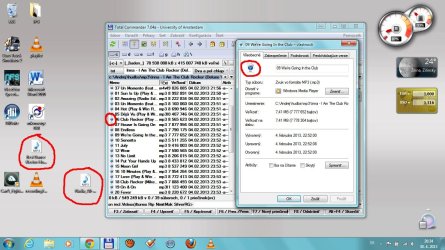
Here you are - that's screen of the problem. I have to tell you that if a file is shown by Explorer - that's normal. But if I show it in Total Commander, then the icon is wrong.
 

Attachments

  • Screehshot.jpg
    Screehshot.jpg
    172.5 KB · Views: 8

My Computer My Computer

Computer type
Laptop
Computer Manufacturer/Model Number
Hewlett-Packard
OS
Windows 7 Home Premium x64
CPU
Intel Pentium B950
Motherboard
Hewlett-Packard
Memory
6GB DDR3 1333 MHz
Graphics Card(s)
Intel HD
Hard Drives
Seagate Momentus 5400 rpm 500GB
Antivirus
ESET NOD32 Antivirus 6
Browser
Google Chrome, Mozilla Firefox, Safari, Internet Explorer
Try uninstalling Total Commander and reinstall it.

Jerry
 

My Computer My Computer

Computer type
Laptop
Computer Manufacturer/Model Number
Sager NP9170
OS
Win 7 Pro x64 / Win 10 Pro
CPU
Intel(R) Core(TM) i7-3630QM CPU @ 2.40GHz
Motherboard
CLEVO P170EM
Memory
12 GB
Graphics Card(s)
(1) Intel(R) HD Graphics 4000 (2) NVIDIA GeForce GTX 675M
Sound Card
(1) Realtek High Definition Audio (2) Intel(R) Display Aud
Monitor(s) Displays
17.3
Screen Resolution
1920x1080
Hard Drives
(1) Samsung 860 EVO 500GB(OS) (1) Samsung 860 EVO 500GB(Data)
Keyboard
Backlite
Antivirus
MSE, Malwarebytes Pro
Browser
Firefox
Other Info
DESKTOP: Custom-built.
OS: Win 10 Pro x64.
CASE: Rosewill R5.
CPU: Intel I5 4670K CPU @ 3.40GHz.
CPU COOLER: Cool Master Hyper 212 EVO.
MOTHERBOARD: Asus Z87-A.
MEMORY: Kingston HyperX 2x4 GB.
GPU: Nvidia Geforce 650 TI.
PSU: Corsair TX750.
DRIVES: (1) Samsung 840 120 GB SSD (2) Western Digital blue 500 GB 7200 RPM.
When I'm using 64-bit TC icons are right but when I'm using 32-bit that's working wrong. I'll try to reinstall TC.
 

My Computer My Computer

Computer type
Laptop
Computer Manufacturer/Model Number
Hewlett-Packard
OS
Windows 7 Home Premium x64
CPU
Intel Pentium B950
Motherboard
Hewlett-Packard
Memory
6GB DDR3 1333 MHz
Graphics Card(s)
Intel HD
Hard Drives
Seagate Momentus 5400 rpm 500GB
Antivirus
ESET NOD32 Antivirus 6
Browser
Google Chrome, Mozilla Firefox, Safari, Internet Explorer
just go to Configuration > Icons and select "All associated"

35d2qys.jpg
 

My Computer My Computer

Computer type
PC/Desktop
Computer Manufacturer/Model Number
custom build
OS
Windows 7 Ultimate x64
CPU
Core i7
Motherboard
Asus
Memory
16 GB
Graphics Card(s)
SAPHIRE
Hard Drives
2TB + 3 TB
Antivirus
none
Browser
Firefox
Welcome to Seven Forums resplandor. Nice addition ;)

A Guy
 

My Computer My Computer

Computer type
PC/Desktop
OS
Windows 10 Home x64
CPU
INTEL Core i5-750 Quad-Core 3.37GHz
Motherboard
ASUS P7P55D
Memory
HyperX Fury Black Series 8GB (2 x 4GB) 1866Mhz
Graphics Card(s)
EVGA GeForce GTX 750 Superclocked 1GB 128-Bit GDDR5
Monitor(s) Displays
LG 32MA68HY 32" IPS
Screen Resolution
1920 x 1080
Hard Drives
Samsung 840 Evo 120GB, SEAGATE 500GB Barracuda® 7200.12, SATA 3 Gb/s, 7200 RPM, 16MB cache
PSU
ANTEC TruePower New TP-550, 80 PLUS, 550W
Case
ANTEC Three Hundred Illusion
Cooling
COOLER MASTER Hyper 212 Plus, 4 x 120mm 1 x 140mm Noctua's
Internet Speed
85 + Mbps
Antivirus
Avast
Browser
Vivaldi
Back
Top