"Some items may be hidden..."

Phrixos

New member
Local time
4:14 AM
Messages
8
Hello,

I've only recently upgraded from Vista to Windows 7 (Ultimate), so I'm just getting used to it. It's not as easy as I expected it to be.

Anyway, my problem at the moment is Windows Live Mail—i.e., importing email messages from my old Vista "Email Store Folder." I've succeeded in doing that—I think! I say "I think," because the folders are there, but none of the actual messages. Instead, each folder contains the message.

"There are no items in this view. Some items may be hidden because a view is applied."

I've searched for MS help on "view", but can't find any because the term is too wide. Other than the obvious meaning in the first sentence, does anybody know what's going on there, and how to fix it?

(And if it turns out that there ARE no messages, that I've done the import process wrong, can someone fill me in on how to do it right?)

regards,
Phrixos
 

My Computer

Computer Manufacturer/Model Number
self-built
OS
Windows 7 ultimate; 32 bit
CPU
Intel quad core 6600
Motherboard
Asus P5E
Memory
4GB
Graphics Card(s)
Radeon
Sound Card
on-board
Monitor(s) Displays
Dell 2410
Hard Drives
Twin Samsung Spinpoint F3, 1TB
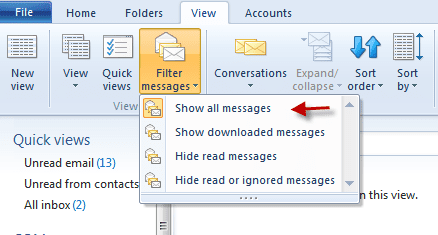
Go to WLM>Views>show all messages. See snip
 

Attachments

  • 2-24-2012 2-46-42 PM.png
    2-24-2012 2-46-42 PM.png
    13.6 KB · Views: 36

My Computer

Computer Manufacturer/Model Number
HP Pavillion dv-7 1005 Tx
OS
Win 8 Release candidate 8400
CPU
[email protected]
Memory
4 gigs
Graphics Card(s)
Nvidia 9600M
Sound Card
HD built-in
Monitor(s) Displays
17" Wxga
Screen Resolution
1440x900
Cooling
none
Internet Speed
45Mb down 5Mb up
Hello Zigzag3143,

I have done as you recommended. Thanks, but it seems to be as I feared. The folders are there, but there are no messages in them. Very odd.

Any recommendations on where to do to get good clear instructions on how to do it right?
 

My Computer

Computer Manufacturer/Model Number
self-built
OS
Windows 7 ultimate; 32 bit
CPU
Intel quad core 6600
Motherboard
Asus P5E
Memory
4GB
Graphics Card(s)
Radeon
Sound Card
on-board
Monitor(s) Displays
Dell 2410
Hard Drives
Twin Samsung Spinpoint F3, 1TB
Hello Zigzag3143,

I have done as you recommended. Thanks, but it seems to be as I feared. The folders are there, but there are no messages in them. Very odd.

Any recommendations on where to do to get good clear instructions on how to do it right?

What email client on Vista?
 

My Computer

Computer Manufacturer/Model Number
HP Pavillion dv-7 1005 Tx
OS
Win 8 Release candidate 8400
CPU
[email protected]
Memory
4 gigs
Graphics Card(s)
Nvidia 9600M
Sound Card
HD built-in
Monitor(s) Displays
17" Wxga
Screen Resolution
1440x900
Cooling
none
Internet Speed
45Mb down 5Mb up
Windows Mail
 

My Computer

Computer Manufacturer/Model Number
self-built
OS
Windows 7 ultimate; 32 bit
CPU
Intel quad core 6600
Motherboard
Asus P5E
Memory
4GB
Graphics Card(s)
Radeon
Sound Card
on-board
Monitor(s) Displays
Dell 2410
Hard Drives
Twin Samsung Spinpoint F3, 1TB
Ever more desperately in need of help, let me restate the issue.

Donkey's years ago, when changing from XP to Vista, retrieving all my old emails was as easy as copy and paste. All I had to do to was a straightforward import of the Email Store Folder. It took two minutes. Imagine my surprise to find that in the "progression" to Windows 7, this seems no longer possible. An Import did not work, it having, oddly, imported empty folders.(0 files).

WEEKS of hair pulling later, my surprise has now turned to horror at the prospect of never seeing my old emails again—many of which are extremely important documents.

My problem lay in my having switched internet providers at the same time as I switched to Windows 7—so I can no longer retrieve them from source. All I have is my old Vista (Windows Mail) Email Store Folder (on a separate drive).

Of the advice I have found, the first step usually says something like,

"Export your Windows Mail messages from inside Vista into a empty new folder (ex: Messages) on your Vista Desktop."

In short, a user are supposed to know, ahead of time, that having a copy of your emails in Windows own Email Store Folder is not the same as having an "exported" copy. Thanks for the afterthought, Microsoft!

Can ANYBODY pull me out of this dreadful swamp?
 

My Computer

Computer Manufacturer/Model Number
self-built
OS
Windows 7 ultimate; 32 bit
CPU
Intel quad core 6600
Motherboard
Asus P5E
Memory
4GB
Graphics Card(s)
Radeon
Sound Card
on-board
Monitor(s) Displays
Dell 2410
Hard Drives
Twin Samsung Spinpoint F3, 1TB
Ever more desperately in need of help, let me restate the issue.

Donkey's years ago, when changing from XP to Vista, retrieving all my old emails was as easy as copy and paste. All I had to do to was a straightforward import of the Email Store Folder. It took two minutes. Imagine my surprise to find that in the "progression" to Windows 7, this seems no longer possible. An Import did not work, it having, oddly, imported empty folders.(0 files).

WEEKS of hair pulling later, my surprise has now turned to horror at the prospect of never seeing my old emails again—many of which are extremely important documents.

My problem lay in my having switched internet providers at the same time as I switched to Windows 7—so I can no longer retrieve them from source. All I have is my old Vista (Windows Mail) Email Store Folder (on a separate drive).

Of the advice I have found, the first step usually says something like,

"Export your Windows Mail messages from inside Vista into a empty new folder (ex: Messages) on your Vista Desktop."

In short, a user are supposed to know, ahead of time, that having a copy of your emails in Windows own Email Store Folder is not the same as having an "exported" copy. Thanks for the afterthought, Microsoft!

Can ANYBODY pull me out of this dreadful swamp?


http://www.sevenforums.com/tutorials/3798-windows-live-mail-import-windows-mail-messages.html
 

My Computer

Computer Manufacturer/Model Number
HP Pavillion dv-7 1005 Tx
OS
Win 8 Release candidate 8400
CPU
[email protected]
Memory
4 gigs
Graphics Card(s)
Nvidia 9600M
Sound Card
HD built-in
Monitor(s) Displays
17" Wxga
Screen Resolution
1440x900
Cooling
none
Internet Speed
45Mb down 5Mb up
Hello Zigzag3143,

You quoted my entire message but appear to have left no comment after it.
 

My Computer

Computer Manufacturer/Model Number
self-built
OS
Windows 7 ultimate; 32 bit
CPU
Intel quad core 6600
Motherboard
Asus P5E
Memory
4GB
Graphics Card(s)
Radeon
Sound Card
on-board
Monitor(s) Displays
Dell 2410
Hard Drives
Twin Samsung Spinpoint F3, 1TB
Hello Zigzag3143,

You quoted my entire message but appear to have left no comment after it.


Did you not see the blue link below the box?????? it tells you exactly how to do it

Look closer
 

My Computer

Computer Manufacturer/Model Number
HP Pavillion dv-7 1005 Tx
OS
Win 8 Release candidate 8400
CPU
[email protected]
Memory
4 gigs
Graphics Card(s)
Nvidia 9600M
Sound Card
HD built-in
Monitor(s) Displays
17" Wxga
Screen Resolution
1440x900
Cooling
none
Internet Speed
45Mb down 5Mb up
Oops. Sorry. A newcomer to this forum, I didn't instinctively recognize light blue text as a link.

Thanks
 

My Computer

Computer Manufacturer/Model Number
self-built
OS
Windows 7 ultimate; 32 bit
CPU
Intel quad core 6600
Motherboard
Asus P5E
Memory
4GB
Graphics Card(s)
Radeon
Sound Card
on-board
Monitor(s) Displays
Dell 2410
Hard Drives
Twin Samsung Spinpoint F3, 1TB
Uh,... that's kinda' the problem. If I no longer have Vista installed, I can't, as your recommended page instructs (I've been to it before), "...export my Windows Mail messages from inside Vista (and then copy it to my Windows 7 Desktop)" All I have is the old Windows Mail Store Folder.

I'm assuming you may be thinking I should just ignore that bit and import that Store Folder into Windows Live Mail, but that doesn't work.
 

My Computer

Computer Manufacturer/Model Number
self-built
OS
Windows 7 ultimate; 32 bit
CPU
Intel quad core 6600
Motherboard
Asus P5E
Memory
4GB
Graphics Card(s)
Radeon
Sound Card
on-board
Monitor(s) Displays
Dell 2410
Hard Drives
Twin Samsung Spinpoint F3, 1TB
Back
Top