My problem seems a very simple one but I can't seem to be able to solve it in Win7.
I have a set of folders on the desktop screen which contain icons for programs I use in various categories. In WinXP I would set them to show only these icons without any other display (no navigation pane).
If I use Windows explorer I like to have a navigation pane for convenience with files shown in detail. So I use two basic types of folder display - one with a navigation pane and the other without.
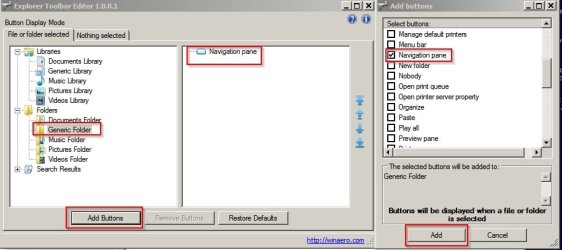
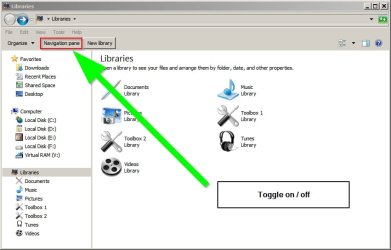
Now I can set my folders with the program shortcuts to display only the icons as I want. But then if click on the taskbar icon for Windows Explorer I will get a display without the navigation pane. If I then add the navigation pane to that display I find that all the other folders have a navigation pane which I don't want. I have tried the 'Customize' feature but that doesn't seem to make any difference. Whenever I add or subtract the Navigation Pane in one folder it happens to all the other folders.
What's the trick to overcome this problem?
I have a set of folders on the desktop screen which contain icons for programs I use in various categories. In WinXP I would set them to show only these icons without any other display (no navigation pane).
If I use Windows explorer I like to have a navigation pane for convenience with files shown in detail. So I use two basic types of folder display - one with a navigation pane and the other without.
Now I can set my folders with the program shortcuts to display only the icons as I want. But then if click on the taskbar icon for Windows Explorer I will get a display without the navigation pane. If I then add the navigation pane to that display I find that all the other folders have a navigation pane which I don't want. I have tried the 'Customize' feature but that doesn't seem to make any difference. Whenever I add or subtract the Navigation Pane in one folder it happens to all the other folders.
What's the trick to overcome this problem?
My Computer
At a glance
windows 7 professional
- Computer type
- PC/Desktop
- OS
- windows 7 professional