Something on my computer taking up 3.5gb of ram

Jemjem787

New member
Member
VIP
Local time
6:39 AM
Messages
277
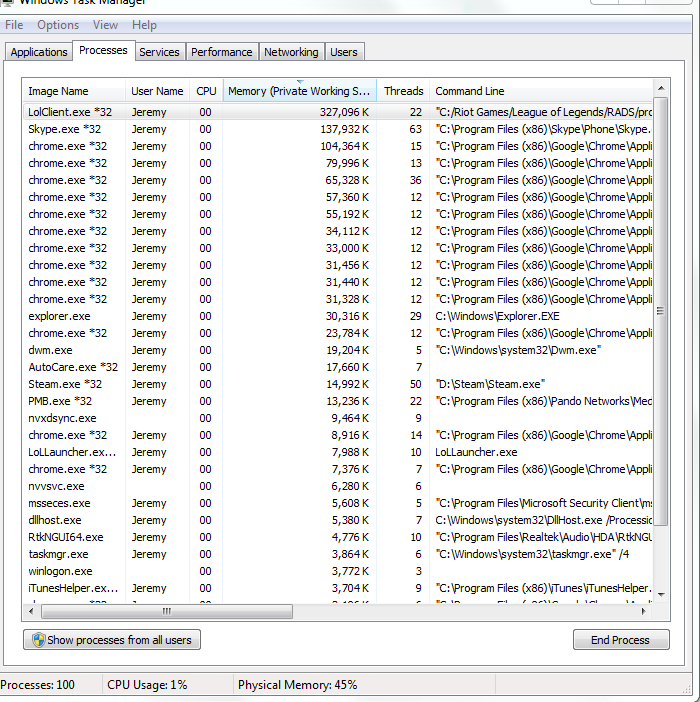
For some reason my computer is using 3.5gb of ram, and i cannot seem to find what it is using it on. Also my computer is running super slow and it is really noisy.
d9bf404a7c25bf590d2973fc12ea7d3f.png

284994743ac612329f042c467a9e90b0.png
 

My Computer My Computer

At a glance

MS Windows 7 Home Premium 64-bit SP1Intel Core i7 3770K @ 3.50GHz8.00 GB Dual-Channel DDR3 @ 679MHzEVGA GeForce GTX 760 Graphic Card - 1085MHz C...
Computer type
PC/Desktop
Computer Manufacturer/Model Number
Custom Build
OS
MS Windows 7 Home Premium 64-bit SP1
CPU
Intel Core i7 3770K @ 3.50GHz
Motherboard
ASUSTeK COMPUTER INC. P8Z77-V LX (LGA1155)
Memory
8.00 GB Dual-Channel DDR3 @ 679MHz
Graphics Card(s)
EVGA GeForce GTX 760 Graphic Card - 1085MHz Core - 4GB GDDR5
Sound Card
Realtek High Definition Audio
Monitor(s) Displays
2 Acer and 1 Asus
Screen Resolution
1920x1080 and 1280x1024 ans 1280x800
Hard Drives
120GB Kingston HyperX SSD
1.8TB Western Digital
932GB Western Digital
PSU
750W Coolermaster
Case
Coolermaster 912
Cooling
3 Fans, an Extreme CoolerMaster CPU Heatsink
Keyboard
G110 Logitect Black USB Backlighting Keyboard
Mouse
Synaptics PS/2 Port TouchPad
Internet Speed
60MB p/s
Antivirus
Microsoft Security Essentials
Browser
Chrome
!. Click on the Resource Monitor button in Task Manager (see button bottom right in your picture). That gives you a nice grapg in the Memory tab.

2. You have an awful lot of processes running (100) - 50 to 60 is more normal.

3. Disable ALL startup programs except the AV program (if it shows in the startups) and see whether that helps. It may not help with performance though because your CPU usage is only 1%.

PS: You did not even show all processes. You have to click the button on the bottom left " Show processes for all users ".
 

My Computer My Computer

At a glance

Vista, Windows7, Mint Mate, Zorin, Windows 8from 1.6GHz Duo to i7
Computer Manufacturer/Model Number
HP, Dell, Gateway, Toshiba - 4 laptops and 2 desktops
OS
Vista, Windows7, Mint Mate, Zorin, Windows 8
CPU
from 1.6GHz Duo to i7
Monitor(s) Displays
2x HP w2207
Hard Drives
5x HDD, 7x SSD, 12x Externals
Keyboard
with trackball - no mices
Mouse
Trackball mice
Internet Speed
DSL 6000
Adding up the items in the memory usage column rarely provides useful information. The "Memory (Private Working Set)" column does not show full usage of the process and there are multiple and significant users of memory that are not processes. These other uses include the non-paged pool, the resident portion of the paged pool, the file cache, and more. And in this case not all processes are shown. Aside from the rather large number of processes running I see nothing unusual or abnormal.

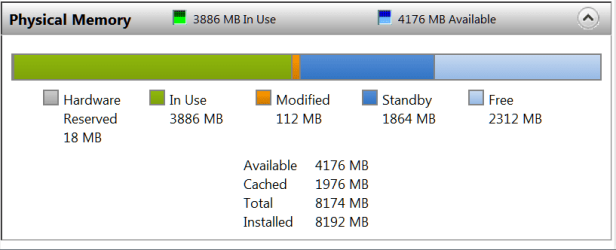
Considering that there is 4507 MB RAM available (more than half) and 1796 MB Free it would seem highly unlikely that the problem is memory related.
 

My Computer My Computer

At a glance

Windows 7 Pro 64 bitXeon W35208 GBNvidia Geforce 210
Computer type
PC/Desktop
Computer Manufacturer/Model Number
HP
OS
Windows 7 Pro 64 bit
CPU
Xeon W3520
Memory
8 GB
Graphics Card(s)
Nvidia Geforce 210
It's not unusual

As LMiller7 says - that's not unusual.

RamMap.jpg

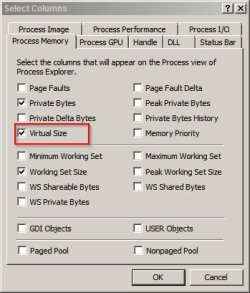
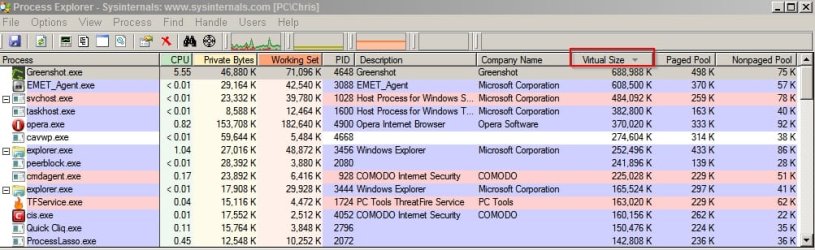
If you've got Process Explorer installed then you can see more info by running the program then selecting View> Choose Columns and check the box for Virtual Size.

Select Columns.jpg

Virtual Size.jpg
 
Last edited:

My Computer My Computer

At a glance

Microsoft Windows 7 Home Premium 64-bit 7601 ...AMD C-60 APU with Radeon(tm) HD Graphics4.00 GBAMD Radeon HD 6290 Graphics
Computer type
Laptop
Computer Manufacturer/Model Number
ASUS
OS
Microsoft Windows 7 Home Premium 64-bit 7601 Multiprocessor Free Service Pack 1
CPU
AMD C-60 APU with Radeon(tm) HD Graphics
Motherboard
ASUSTeK COMPUTER INC. X501U
Memory
4.00 GB
Graphics Card(s)
AMD Radeon HD 6290 Graphics
Sound Card
(1) AMD High Definition Audio Device (2) Realtek High Defi
Screen Resolution
1366 x 768 x 32 bits (4294967296 colors) @ 60 Hz
Hard Drives
Hitachi HTS545050A7E380 SATA Disk Device
Antivirus
Comodo CIS & FW, SecureAplus App Whitelisting, Threatfire
Browser
Cyberfox 64bit, Opera 64bit, Airfox
Other Info
Spy-The-Spy, HitmanPro.Alert, Norton Connect Safe, MJRegWatcher, BitDefender TrafficLight, Voodoo Shield, Zemana AntiMalware
It really depends what you are doing. Mine is pretty big right now too, but that is because I am also running a virtual system.
 

Attachments

  • 2014-02-01_1447.png
    2014-02-01_1447.png
    8.1 KB · Views: 0

My Computer My Computer

At a glance

Vista, Windows7, Mint Mate, Zorin, Windows 8from 1.6GHz Duo to i7
Computer Manufacturer/Model Number
HP, Dell, Gateway, Toshiba - 4 laptops and 2 desktops
OS
Vista, Windows7, Mint Mate, Zorin, Windows 8
CPU
from 1.6GHz Duo to i7
Monitor(s) Displays
2x HP w2207
Hard Drives
5x HDD, 7x SSD, 12x Externals
Keyboard
with trackball - no mices
Mouse
Trackball mice
Internet Speed
DSL 6000
Back
Top