Sony Camcorder not connecting through 1394 connection

3714

New member
Local time
3:47 AM
Messages
7
Hello all,

Please be patient with me as my PC knowledge is limited. I will do my best to get all info in here.

I recently bought a Sony TRV-120 Digital 8 camcorder to transfer some old HI8 tapes to my pc for editing and then to burn to a dvd.

The bottom line issue i am having is that when i plug the camcorder into the 1394 port it does not show up in my computer and is not connecting so i am unable to capture my video.

I recently added the following port to my PC: "2 Port PCI Express 1394a FireWire Card" Part#PEX1394A2 from Startech. As far as i know it installed correctly. When i go to my device manager i see the following:

1394 Bus Host Controllers
> 1394 OHCI Compliant Host Controller (Legacy)

Now, i thought i might have a bad 1394 cable. I do NOT have any other devices that i can plug in and test the connection. I did notice that when i connect my cable into the pc the DV IN appears on my camera display.....so apparently a connection is being made between the two.

I am just so frustrated as i just paid a couple hundred bones for the camera and 40 for the card. I don't mind investing some cash to get my old tapes transferred and backed up, but i just don't want to keep buying things that are incompatible.

Would you guys recommend that i skip trying to get this thing to connect to windows and just go with a SONY VRD-MC6 and just get the footage captured directly to a dvd and then import and edit from there??? Thanks for the help. I would love to capture this on my pc and edit, but i'm running in circles trying to figure this out.
 

My Computer My Computer

At a glance

Windows 7 Professional 64 bitIntel Core i5-3450 CPU @ 3.10 ghz 3.104 GBIntel HD Graphics
Computer type
PC/Desktop
Computer Manufacturer/Model Number
Dell Optiplex 3010
OS
Windows 7 Professional 64 bit
CPU
Intel Core i5-3450 CPU @ 3.10 ghz 3.10
Memory
4 GB
Graphics Card(s)
Intel HD Graphics
What program are you using to capture. Movie Maker?

Welcome to the Forum.
 

My Computer My Computer

At a glance

Windows 10 Pro x64, Windows 8.1 Pro x64, Wind...INTEL i9-7920X LGA 206664 GB (4 X 16 GB) G-Skill V Series DDR4 3200 ...EVGA GTX 1060 SC 3 GB
Computer type
PC/Desktop
Computer Manufacturer/Model Number
Custom Built
OS
Windows 10 Pro x64, Windows 8.1 Pro x64, Windows 7 Ultimate x64 SP1,
CPU
INTEL i9-7920X LGA 2066
Motherboard
Gigabyte X299-WU8 F3
Memory
64 GB (4 X 16 GB) G-Skill V Series DDR4 3200 Quad Channel
Graphics Card(s)
EVGA GTX 1060 SC 3 GB
Sound Card
Realtek Onboard ALC1220
Monitor(s) Displays
2 x Samsung S27E310
Screen Resolution
1920x1080
Hard Drives
Samsung 2 x 970 EVO Plus 500 GB NVMe
1 x 6TB WD 6003FZBX SATA
1 x 6TB WD 60EFRX SATA
12 x 3TB WD 30EFRX SATA
PSU
Seasonic X-1050
Case
Thermaltake Armor+
Cooling
Corsair H80i V2 Liquid AOI Cooler
Keyboard
Logitech G510s
Mouse
Logitech MX Master 2S
Internet Speed
200 Mb/s
Antivirus
ESET NOD32 13.1
Browser
EDGE (Dev, Canary, Beta), Chrome
Other Info
ASUS RT-AC68U router
Malwarebytes 4.0.4
I have tried windv, virtual dub and exsate dv capture live....but none of them are showing a device is connected. I am headed over to a friends house. He has a mac and i am going to connect and see if the mac will detect the camera. If that works then it's either a driver/compatibility issue or the 1394 card i installed is not working. I am just trying right now to diagnose if it's on the pc end or the camera/wire end.
 

My Computer My Computer

At a glance

Windows 7 Professional 64 bitIntel Core i5-3450 CPU @ 3.10 ghz 3.104 GBIntel HD Graphics
Computer type
PC/Desktop
Computer Manufacturer/Model Number
Dell Optiplex 3010
OS
Windows 7 Professional 64 bit
CPU
Intel Core i5-3450 CPU @ 3.10 ghz 3.10
Memory
4 GB
Graphics Card(s)
Intel HD Graphics
ok, that did not work. His mac had a 6pin connection. I only have a 6-4 pin cable. Oh well, still trying to figure this out for my pc.
 

My Computer My Computer

At a glance

Windows 7 Professional 64 bitIntel Core i5-3450 CPU @ 3.10 ghz 3.104 GBIntel HD Graphics
Computer type
PC/Desktop
Computer Manufacturer/Model Number
Dell Optiplex 3010
OS
Windows 7 Professional 64 bit
CPU
Intel Core i5-3450 CPU @ 3.10 ghz 3.10
Memory
4 GB
Graphics Card(s)
Intel HD Graphics
I'm giving up on this. I have no more ideas. I tried reinstalling the 1394 card. It installed correctly. When i plug the 1394 cable into the pc a DV IN appears on the camcorder monitor so there's obviously a connection. I wish capturing video from older cameras was simpler than this. :(
 

My Computer My Computer

At a glance

Windows 7 Professional 64 bitIntel Core i5-3450 CPU @ 3.10 ghz 3.104 GBIntel HD Graphics
Computer type
PC/Desktop
Computer Manufacturer/Model Number
Dell Optiplex 3010
OS
Windows 7 Professional 64 bit
CPU
Intel Core i5-3450 CPU @ 3.10 ghz 3.10
Memory
4 GB
Graphics Card(s)
Intel HD Graphics
...one last thing before i am completely out of ideas. I noticed that in the user manual for the trv120 it said to connect with a 4-4 pin cable. I am connecting with a 6-4 pin......anyone think this might be the issue? Should i try getting a 1394 card with a 6 pin connection??? is there even a difference?
 
Last edited:

My Computer My Computer

At a glance

Windows 7 Professional 64 bitIntel Core i5-3450 CPU @ 3.10 ghz 3.104 GBIntel HD Graphics
Computer type
PC/Desktop
Computer Manufacturer/Model Number
Dell Optiplex 3010
OS
Windows 7 Professional 64 bit
CPU
Intel Core i5-3450 CPU @ 3.10 ghz 3.10
Memory
4 GB
Graphics Card(s)
Intel HD Graphics
Hello 3714,

I have a Sony Digital 8 camcorder model DCR-TRV320 that I keep around for the reason that you stated, namely transferring tapes into the PC. I haven't actually done much, maybe one of these days. :)


It has never been plugged into this PC so I just now tried it, seems to work fine.

I used a 6 pin to 4 pin cable to connect the camcorder to the PC. I visually confirmed this, 6 pins on the PC end and 4 pins on the camcorder end (I have successfully used a Firewire 400/800 adapter with a MacBook Pro and this same camera).

After connecting them together, I switched the camcorder to VTR.

Windows recognized the connection and began loading the drivers.

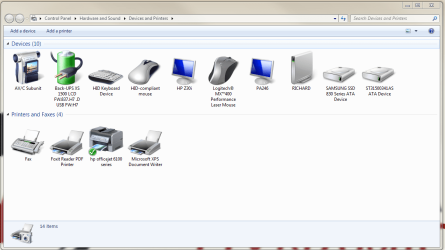
When the driver load was complete, I checked "Devices and Printers" to see if the camcorder showed up, it did (see screenshot, camcorder is the first item in the top line).

With a tape in the camcorder I opened Sony Movie Studio Platinum and selected "capture video."

When I clicked the "Play" icon in Movie Studio the camcorder began to play and I could see the video on the PC screen and hear the audio.

The main difference I see between our setups is that the 1394 hub is built in to the Motherboard of my PC (but I have in the distant past used a PCI 1394 card).

What I would suspect (most likely to least likely) is the 1394 cable, the 1394 card, the port on the camcorder.

Without having multiples of each item it is difficult to troubleshoot this problem.

Wish I could be of more help. :(

If there is something you'd like for me to try with my setup, don't hesitate to ask.
 

Attachments

  • Camcorder.PNG
    Camcorder.PNG
    58 KB · Views: 0

My Computer My Computer

At a glance

Windows 7 Home Premium x64Intel Core i7 5960X @3.0 GHz4 x 4 GB G.Skill Ripjaws4 DDR4-2400PNY GTX 780
Computer type
PC/Desktop
Computer Manufacturer/Model Number
Custom Build
OS
Windows 7 Home Premium x64
CPU
Intel Core i7 5960X @3.0 GHz
Motherboard
Gigabyte GA-X99-SOC Force
Memory
4 x 4 GB G.Skill Ripjaws4 DDR4-2400
Graphics Card(s)
PNY GTX 780
Sound Card
Realtek on-board ALC1150
Monitor(s) Displays
HP Z30i + Asus PA246Q + Dell U2412M
Screen Resolution
2560x1600 + 1920x1200 + 1920x1200
Hard Drives
Samsung 830 256GB
PSU
Antec EarthWatts 650W
Case
Cooler Master HAF 932
Cooling
Corsair Hydro Series H105
Keyboard
Razer BlackWidow Tournament Edition Stealth
Mouse
Razer Naga
another layer of mystery added. I found an old hp laptop, xp sp3 with a built in 1394 4 pin. Plug the trv120 in, pc does NOT connect the camera.....but heres the thing: when i switch to vtr mode my mouse cursor lags. The second i power off its fine......theres an obvious connection here but still no luck.
 

My Computer My Computer

At a glance

Windows 7 Professional 64 bitIntel Core i5-3450 CPU @ 3.10 ghz 3.104 GBIntel HD Graphics
Computer type
PC/Desktop
Computer Manufacturer/Model Number
Dell Optiplex 3010
OS
Windows 7 Professional 64 bit
CPU
Intel Core i5-3450 CPU @ 3.10 ghz 3.10
Memory
4 GB
Graphics Card(s)
Intel HD Graphics
This is really bizarre. I found out that a lot of people have had issues with their 1394 connections post SP1 update. Like i said my camera is clearly talking to my pc.....when the cable is connected the mouse lags every few seconds when in VTR mode. If i turn the camera off...no more cursor lag.

Here is another quick question i have. I notice that as SOON as i plug my cable in the camer lcd display says DV IN. My manual however says that i should see the following on my LCD screen: AV>DV Out

Page 66 ( https://docs.sony.com/release/DCRTRV120.PDF )

It only says DV in...i can't for the LIFE of me get this thing to say AV>DV OUT.....perhaps THIS is the main problem????

thanks guys
 

My Computer My Computer

At a glance

Windows 7 Professional 64 bitIntel Core i5-3450 CPU @ 3.10 ghz 3.104 GBIntel HD Graphics
Computer type
PC/Desktop
Computer Manufacturer/Model Number
Dell Optiplex 3010
OS
Windows 7 Professional 64 bit
CPU
Intel Core i5-3450 CPU @ 3.10 ghz 3.10
Memory
4 GB
Graphics Card(s)
Intel HD Graphics
it may be a driver issue or it may be the camera you never know:)
 

My Computer My Computer

At a glance

Windows 7 Home Premium x64Intel Core i78GB DDR3 MemoryNVIDIA GeForce GT 520
Computer type
PC/Desktop
Computer Manufacturer/Model Number
Custom Build
OS
Windows 7 Home Premium x64
CPU
Intel Core i7
Motherboard
PEGATRON
Memory
8GB DDR3 Memory
Graphics Card(s)
NVIDIA GeForce GT 520
Sound Card
Motherboard Sound
Monitor(s) Displays
HP L1706
Screen Resolution
1280x1024
Hard Drives
1TB HDD
PSU
Power Man 400Watts
Case
IN WIN C583
Cooling
Stock Cooling
Keyboard
Logitech Internet Keyboard
Mouse
Logitech M90 Mouse
Internet Speed
16Mb/s
Antivirus
Avast Antivirus
Browser
Internet Explorer 11
Back
Top