svlehtinen
New member
- Local time
- 4:22 PM
- Messages
- 3
Hello Everybody,
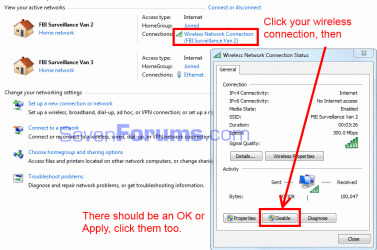
On my laptop at home I normally connect to the internet through my wireless internet in the house. I now have an ethernet cable running directly into the laptop. I noticed that the computer would still connect to the wireless network automatically, which I didn't want. So, I went into the wireless settings and unchecked "connect automatically", rebooted and tried again. It still connected automatically. I checked wireless settings again and "connect automatically" was selected again. This time I unchecked "connect automatically" AND deleted the wireless network from the list of wireless networks in Network and Sharing Center. Rebooted again, and same problem. Connected automatically. This time I went into Change Adapter Settings and went into the Advanced Settings and changed the connect order so that the computer was selecting the LAN over the wireless. Then I repeated the other steps and quickly turned off the computer. Rebooted it again, and still have the problem.
So, just before the reboot, the computer is supposed to choose the LAN first, I've deleted the wireless network from the list, and I've unchecked the "connect automatically" box just in case. Yet, it still connects to the wireless network when I start up the computer again.
What's going on here?
Using:
- Windows 7
- Alienware M17X laptop
I don't want to always have to remember to push the wireless button to disable and enable it, so I'm hoping there's another solution.
Thank you all for your help.
- Steve
On my laptop at home I normally connect to the internet through my wireless internet in the house. I now have an ethernet cable running directly into the laptop. I noticed that the computer would still connect to the wireless network automatically, which I didn't want. So, I went into the wireless settings and unchecked "connect automatically", rebooted and tried again. It still connected automatically. I checked wireless settings again and "connect automatically" was selected again. This time I unchecked "connect automatically" AND deleted the wireless network from the list of wireless networks in Network and Sharing Center. Rebooted again, and same problem. Connected automatically. This time I went into Change Adapter Settings and went into the Advanced Settings and changed the connect order so that the computer was selecting the LAN over the wireless. Then I repeated the other steps and quickly turned off the computer. Rebooted it again, and still have the problem.
So, just before the reboot, the computer is supposed to choose the LAN first, I've deleted the wireless network from the list, and I've unchecked the "connect automatically" box just in case. Yet, it still connects to the wireless network when I start up the computer again.
What's going on here?
Using:
- Windows 7
- Alienware M17X laptop
I don't want to always have to remember to push the wireless button to disable and enable it, so I'm hoping there's another solution.
Thank you all for your help.
- Steve
My Computer
At a glance
Windows 7 Home Premium 32bit
- OS
- Windows 7 Home Premium 32bit