Sony Vaio Aero not working! ):

mrthomasbeckwit

New member
Local time
7:26 AM
Messages
9
error 1.PNG
error 2.PNG
error 3.PNG
error 4.PNG

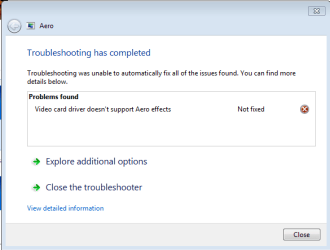
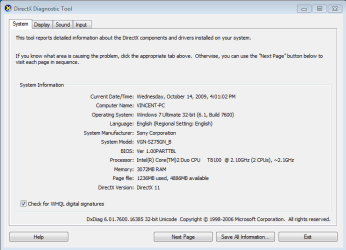
hey guys. my friend's using sony vaio, and right after installation of windows 7, everything was working fine, until the installation of the intel(r) 965 chipset driver, and windows began giving the error and the task bar is no longer transparent. I tried installing the driver from the intel website, but they kept directing me to my manufacturer, but when i downloaded from the manufacturer, their drivers only work with windows vista and they dont allow me to install it. i also tried uninstalling and installing the chipset driver, but the problem still exist. hope someone will be able to help! (:
 

My Computer My Computer

OS
windows7
Hi there
I'm surprised you got AERO to work in the first place on the sony vaio.
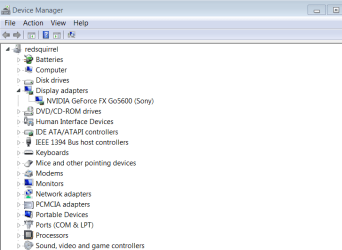
What's the Video card you use in it -- Some VAIO's used the Nvidio GeForce drivers -- try looking to see in device management what the display adapter is.

If it's a Nvidia then go to their site.

I've got an old resurrected VAIO GRT816S laptop - beautiful screen but not AERO capable -- doesn't matter on that laptop. Only 1GB RAM but I DO like the HUGE screen on it. They don't make them like that anymore -- but weighs a ton and has energy consumption that would send the Green Party with a hunting posse to shoot me.

Video is Nvidia GeForce Go5600 (Sony) quite old of course.

Enc screenshot of the video device

Note also that if the laptop doesn't have enough RAM you probably won't be able to turn AERO on anyway.

Cheers
jimbo
 

Attachments

  • vid.png
    vid.png
    15.7 KB · Views: 80

My Computer My Computer

Computer type
PC/Desktop
Computer Manufacturer/Model Number
Custom built, several laptops HP/ASUS
OS
Linux CENTOS 7 / various Windows OS'es and servers
CPU
Intel i7 Intel i5
Memory
8GB, 16GB
Graphics Card(s)
On Motherboard
Sound Card
Realtek HD audio
Monitor(s) Displays
Apple Cinema display, Samsung LCD
Screen Resolution
1920 X 1080
Hard Drives
4 X 1TB SATA
Mouse
Toshiba wireless laser
Internet Speed
> 20MB up
At first time there were drivers from windows update instaled? Then you installed intel ones but looks like old. check here Chipsets - Intel® 965 Express Chipset family information and downloads

Its definitely drivers issue. If there are no intel drivers for seven (yet) use vista's with compatibility mode. Or revert to the fist state after installation. Restore point or back to previous drivers in device manager.

Following jimbo hint, go to BIOS and assign more ram to chipset graphic. 256MB would satisfy you for sure.
 

My Computer My Computer

OS
Win Xp/7
CPU
Sempron 2600 1.8 Gh
Motherboard
Asus A7N8X-X nForce2
Memory
1GB DDR
Graphics Card(s)
Asus AH HD3450 AGP
Sound Card
Integrated
Monitor(s) Displays
CRT :)
Hard Drives
80GB WD Caviar
PSU
300W
Internet Speed
1Mbit

My Computer My Computer

Computer Manufacturer/Model Number
Sony Vaio FZ21Z
OS
Windows 7 Ultimate x64 ®™
CPU
Intel Core 2 Duo (2.2 GHz)
Motherboard
Sony (Intel Chipset)
Memory
2x 2GB Corsair (667 MHz)
Graphics Card(s)
NVIDIA 8600M GS (256MB)
Sound Card
Sigmatel
Monitor(s) Displays
15.4" TFT X-Black
Screen Resolution
1280x800
Hard Drives
Western Digital 300GB Scorpio Black (7200rpm)
Mouse
Logitech Anywhere MX
Internet Speed
Sky 5MB
Back
Top