Sound crackling is driving me insane.

Vicious Parker

New member
Local time
8:56 PM
Messages
7
Based on my research, I appear to be another victim of windows 7 sound glitches. My specific problem seems to only happen when playing music. Or, at least, I have yet to truly notice it while playing a game or watching video. I've been trying to find a solution for a couple of weeks, including reading several posts on this forum, and I have only just now found a potential solution (though not an ideal solution, in my opinion).

First, the basics. I just built a new PC using almost entirely new parts. My old set up used windows 7 32 bit, but almost entirely the same software otherwise. I never had this problem before. Here's what I have now:

Windows 7 Home Premium 64 bit
AMD Phenom 965 Deneb 3.4 ghz
EVGA GeForce GTX 460 1gb
4 gigs of ram
ASUS M4N75TD with integrated VIA VT1708S

A few other details can be found in my profile, but that's probably the important stuff for now.

I have been using this Mp3 to test this out (you can download it for free), because for some reason I seem to notice it on this song more than others: Camphor - Enjoy The Struggle | RCRD LBL | Free MP3 Downloads . I'm certain it's not that song, however, as I often notice it on anything else that I play, and never noticed it on that song until recently.

I also have a sound blaster audigy 2 zs, which I installed after first noticing the problem (I was originally intending to just leave it in my old pc). I tried it with the latest drivers from creative, as well as the audigy series support pack, found on this forum, using the cleanest installs and uninstalls that I know how to do. Neither worked, and the card annoys me (Seriously, no front jacks on any creative cards? Silliness), so I decided to just keep using my integrated card.

I've tried disabling as many background processes as I can. I've disabled microsoft security essentials. I watch audiodg.exe in the resource manager, but it never uses more than 12mb of ram, and even when doing typical web surfing and listening, my CPU usage rarely seems to go over 50%, and usually idles much lower.

One post suggested that windows 7 prioritizes network processes over audio processes. This could potentially be my issue. I'm using an outdated linksys wireless adapter, Linksys by Cisco - WUSB54G Support , which I unfortunately discovered does not work with 64 bit windows. (I assumed I would have no issues since it worked so well in win 7 32 bit). It is currently working for me thanks to this driver: Linksys WUSB54G V4 Driver Download for Windows 7 x64 bit & Vista | Social Web, Small Business Marketing & IBM . All networking seems to be working fine.

To attempt to rule this out, I disconnected the adapter, rebooted, and listened. It didn't help. I know it doesn't completely rule it out, but I can't quite think of any other way to test this without too much fiddling and uninstalling. I would personally prefer not to have to buy a new adapter, unless I absolutely have to.


Now, I did say that I have found a potential solution. My preferred player is Winamp, but to troubleshoot, I tried everything I have installed that can play music. Windows Media Player has glitches... but Media Player Classic does not seem to. At all. I recently installed AIMP 2 as suggested on another site, and playback seems to be fine in this program, too. I just... don't like the program. I like winamp :(. I suppose I might be willing to give up winamp, which I have been using for YEARS, if that is the only solution. However, I was hoping the lovely people of this forum could help me figure out a more preferred solution. Sorry to go on for so long :).
 

My Computer My Computer

At a glance

Windows 7 Home Premium 64bitAMD Phenom II X4 965 Black Edition Deneb 3.4GHzG.SKILL 4GB 240-Pin DDR3 SDRAMEVGA GeForce GTX 460 (Fermi) Superclocked EE 1gb
Computer Manufacturer/Model Number
Homebrew
OS
Windows 7 Home Premium 64bit
CPU
AMD Phenom II X4 965 Black Edition Deneb 3.4GHz
Motherboard
ASUS M4N75TD AM3 NVIDIA nForce 750a
Memory
G.SKILL 4GB 240-Pin DDR3 SDRAM
Graphics Card(s)
EVGA GeForce GTX 460 (Fermi) Superclocked EE 1gb
Sound Card
VIA VT1708S (Integrated)
Monitor(s) Displays
Acer 21.5" Widescreen LCD
Screen Resolution
1920x1080
Hard Drives
Western Digital 640 gig
PSU
Antec Earthwatts 650w
Case
Rosewill Challenger
Cooling
Cold Ass Michigan Night Air
If you don't use 'Line-In' try muting that. It got rid of a hissing problem for me a while back.
 

My Computer My Computer

At a glance

Windows 7 Home Premium x64AMD Phenom II X6 1600T16GB PC3-10700 (1342MHz)ATI Radeon 5770 HD (x2) CrossFire
Computer Manufacturer/Model Number
OEM - Me
OS
Windows 7 Home Premium x64
CPU
AMD Phenom II X6 1600T
Motherboard
GigaByte GZ-990FXA-UD3
Memory
16GB PC3-10700 (1342MHz)
Graphics Card(s)
ATI Radeon 5770 HD (x2) CrossFire
Sound Card
On-board RealTek chipset
Monitor(s) Displays
3x Hanns-G 1920x1080 Monitors
Screen Resolution
3x Hanns-G 1920x1080 Monitors
Hard Drives
Intel 25-V SSD 40GB: 218 MB/s AT: 0.1ms
Intel X-25M SSD 80GB: 230MB/s AT: 0.1ms
Seagate 750GB: 133 MB/s AT: 13ms (perpendicular storage)
Buffalo HD-PCTU3 1TB External drive
PSU
OCZ Stealth X Stream 750W
Case
Cheap (unknown)
Cooling
Stock
Keyboard
HP USB
Mouse
LogiTech USB
Internet Speed
1.5 Mbps - Slow - At the tail-end of a rural network
Other Info
Printer: Epson Stylus C-84
Scanner: HP 3500C Flatbed
DVD-RW: Plextor
DVD-ROM: Unknown
WEI: 7.4
Try booting in your bios and check the pci latency timer from what i read alot of crackling and hissing noiSe can come from to high of a setting try lowering the pci latency and see what happens
 

My Computer My Computer

At a glance

Windows 10 Home Premium 64bit sp1Intel I7-6700K @ 4.6 Ghz 1.344 volts everyday OC32GB G-Skill TridentZ 3200mhz 16-18-18-38 DDR4Sli Gigabyte Windforce GTX 980 G1
Computer type
PC/Desktop
Computer Manufacturer/Model Number
CoreI7-6700K MrFingerIII Special Builds
OS
Windows 10 Home Premium 64bit sp1
CPU
Intel I7-6700K @ 4.6 Ghz 1.344 volts everyday OC
Motherboard
Asrock Fatality K6 Z170 Socket 1151
Memory
32GB G-Skill TridentZ 3200mhz 16-18-18-38 DDR4
Graphics Card(s)
Sli Gigabyte Windforce GTX 980 G1
Sound Card
AC97 Creative Rage Tactic 3D Headphones Bluetooth
Monitor(s) Displays
27" Asus ROG Swift PG278Q G-Sync 48" Vizio Smart HD TV
Screen Resolution
2560x1440p 27"- 48" Currently Gaming at 2560x1440p Res 2K
Hard Drives
250GB Samsung Evo840SSD Seagate baracuda 500 GB WD Mybook 500Gb 1TB Seagate Barracuda
PSU
HX1050w Corsair Silver 80plus certified crosfire/sli
Case
Enthod Pro Full Tower
Cooling
Corsair H110i GT 280 mm High Performance WaterBlock
Keyboard
Logitech wireless keyboard
Mouse
Logitech wireless mouse
Internet Speed
Cox Cable 100+ mb
Antivirus
WebRoot Spysweeper with Antivirus
Browser
IE-10, Chrome, Opera
Other Info
My Other Rig is a AMD FX8320E @4.6Ghz 16GB Ballistic Sport Ram
Mobo Asrock Fatality 990FX 120GB OCZ SSD 1TB Seagate Barracuda Corsair H75 Cooling PSU Corsair CX750
GPU GTX Gigabyte 970G1
Does Winamp have built in effects? (I use the old WinAmp Classic 2.95)
Perhaps it is one of the plugins that Winamp uses or.... that it needs to be set to the correct driver mode.. which is not "direct sound output" but rather "waveOutput".

The difference in some media players might depend on the output driver model they're using.

Ap
 

My Computer My Computer

At a glance

Windows 7 Home PremiumIntel Core 2 Duo @ 3.00gHz4 GBATI Radeon HD 2600 XT
Computer Manufacturer/Model Number
Assembled in my workshop
OS
Windows 7 Home Premium
CPU
Intel Core 2 Duo @ 3.00gHz
Motherboard
Gigabyte GA-P35-S3G
Memory
4 GB
Graphics Card(s)
ATI Radeon HD 2600 XT
Sound Card
RME 24/96 Card, Realtek Internal Audio PreSonus FireStudio
Monitor(s) Displays
Acer 1917 (x2)
Screen Resolution
1280 x 1024 on both monitors
Hard Drives
Three 250GB Seagate SATA Barracuda 7200rpm
PSU
Rosewill 500-watt
Case
Rosewill mid-tower
Cooling
Noctua NH-U9B (CPU), PwrSupply fan + single large case Fan
Keyboard
Macally w/2/USB ports.
Mouse
Trackman Wheel
Other Info
Event 20/20 bas studio monitors, Yamaha sub.
Rackmount Korg/Roland/Yamaha synthesizers,
Cubase MIDI/audio recording. Sony Soundforge audio/mastering software. CD Architect Mastering. RME & Presonus audio interfaces.
A couple of comments. (1) Wireless cards and connections have been known to cause popping and crackling in sound. Also cordless phones and cell phones near the PC and/or Speakers.

(2) The Audigy 2 ZS is an old sound card. The "retail" version of the card did not have the connections for the front panel (and the ATX connections standards were not set yet). The Dell custom version of the card that Dell sold as an option did have front panel connection but it was a Dell proprietary connection. All SoundBlaster sound cards, now, have the ATX standard front panel connection on the card. If your case is a standard ATX case it will have the cable and connector(s) for this.

(3) there have been issues with SOME systems that have over 3 GB of RAM causing noise problems in audio. This was mainly in early SoundBlaster Xfi cards and SoundBlaster eventually issued a driver that fixed it. However, as the popping crackling noise problems can have many different caused, temporarily remove some memory so you have 3GB or less and then see if you have the noise.
 

My Computer My Computer

At a glance

Windows 10 64 bitIntel i7 6700K16GB Corsair DominatorIntel CPU Graphics
Computer type
PC/Desktop
Computer Manufacturer/Model Number
My Own Build
OS
Windows 10 64 bit
CPU
Intel i7 6700K
Motherboard
ASUS ROG Maximus VIII Hero
Memory
16GB Corsair Dominator
Graphics Card(s)
Intel CPU Graphics
Sound Card
RealTek
Monitor(s) Displays
27" Dell S2719dgf
Screen Resolution
2560X1440
Hard Drives
1 TB Samsung 850 EVO SSD for Win 10 Pro
500GB Samsung 850 EVO SSD for Win 10 Insider
2 TB drive for backup
PSU
EVGA Supernova 750G2
Case
BeQuiet Silent Base 600
Cooling
Deepcool Captain 120EX
Keyboard
Microsoft Wireless 2000
Mouse
Microsoft wireless
Internet Speed
100 MB/sec (Cable)
Antivirus
Microsoft Defender and Malwarebytes
Browser
Edge/Firefox
Other Info
Cakewalk (Sonar) by BandLab and Studio One 4.1 Pro recording studio software. MOTU 896Mk3 Hybrid recording interface, Frontier Tranzport wireless control unit, Behringer X-Touch Control Surface.
Five USB connected optical drives for CD Audio production using Nero BurningROM
Thank you all for your suggestions. :)

rap33042 said:
If you don't use 'Line-In' try muting that. It got rid of a hissing problem for me a while back.
Doesn't appear to have any effect. :\

Solarstarshines said:
Try booting in your bios and check the pci latency timer from what i read alot of crackling and hissing noiSe can come from to high of a setting try lowering the pci latency and see what happens
I've never had a motherboard with as many options in the bios as this one, but even a after a thorough search, I can't seem to find this setting or anything that sounded remotely close to this. I will look again, though.

Aphelion said:
Does Winamp have built in effects? (I use the old WinAmp Classic 2.95)
Perhaps it is one of the plugins that Winamp uses or.... that it needs to be set to the correct driver mode.. which is not "direct sound output" but rather "waveOutput".

The difference in some media players might depend on the output driver model they're using.
Though I haven't tried switching between direct sound and waveoutput, my installations of winamp tend to be bare-minimum of the features that I want (one reason I love winamp--custom installation). The thought occurred to me, though the one thing that kept me from testing it at the time was the description of waveoutput as "outdated" in the preferences. That doesn't mean it isn't worth testing...

The problem also exists with Windows Media Player. I wonder what they might have in common to cause this.

Though, if using and older version of Winamp is a possible solution, I may just stick with it. I always did like the older versions...

fireberd said:
A couple of comments. (1) Wireless cards and connections have been known to cause popping and crackling in sound. Also cordless phones and cell phones near the PC and/or Speakers.

(2) The Audigy 2 ZS is an old sound card. The "retail" version of the card did not have the connections for the front panel (and the ATX connections standards were not set yet). The Dell custom version of the card that Dell sold as an option did have front panel connection but it was a Dell proprietary connection. All SoundBlaster sound cards, now, have the ATX standard front panel connection on the card. If your case is a standard ATX case it will have the cable and connector(s) for this.

(3) there have been issues with SOME systems that have over 3 GB of RAM causing noise problems in audio. This was mainly in early SoundBlaster Xfi cards and SoundBlaster eventually issued a driver that fixed it. However, as the popping crackling noise problems can have many different caused, temporarily remove some memory so you have 3GB or less and then see if you have the noise.

1) As I said, I tested the issue with the wireless adapter unplugged completely from the computer. The router is in another room probably some 20 feet away. It's possible that my cell phone has been causing trouble, as it is often on my desk, but not near my speakers, or subwoofer. I haven't done any testing with my phone, and it is often around the bedroom anyway. I will keep track of it, but this seems unlikely to me, considering my set up.

It looks as though I forgot to mention that this problem occurs on both my headphones and speakers, so it seems unlikely to me that my wireless adapter, which is near my speakers (but not the subwoofer), would be causing this issue while using headphones, which it is nowhere near.

2) K. Anyway, like I said, I wasn't intending to use that card with this build. I had only put it in because I thought there was an issue with the integrated card--since that wasn't the issue, I simply took out the Audigy card. I don't consider it a loss.

3) I do have 4 gigs, so I suppose this could be an issue. Does this only happen with sound blaster cards? Because as I said, I'm currently using my integrated sound. This may be worth testing next time I crack open the case, if I haven't yet solved the issue. Though what's the fun of 64bit windows if I can't use 4gigs or more of ram?


Thanks again for the comments. I'll be sure to post if I get this thing figured out.
 

My Computer My Computer

At a glance

Windows 7 Home Premium 64bitAMD Phenom II X4 965 Black Edition Deneb 3.4GHzG.SKILL 4GB 240-Pin DDR3 SDRAMEVGA GeForce GTX 460 (Fermi) Superclocked EE 1gb
Computer Manufacturer/Model Number
Homebrew
OS
Windows 7 Home Premium 64bit
CPU
AMD Phenom II X4 965 Black Edition Deneb 3.4GHz
Motherboard
ASUS M4N75TD AM3 NVIDIA nForce 750a
Memory
G.SKILL 4GB 240-Pin DDR3 SDRAM
Graphics Card(s)
EVGA GeForce GTX 460 (Fermi) Superclocked EE 1gb
Sound Card
VIA VT1708S (Integrated)
Monitor(s) Displays
Acer 21.5" Widescreen LCD
Screen Resolution
1920x1080
Hard Drives
Western Digital 640 gig
PSU
Antec Earthwatts 650w
Case
Rosewill Challenger
Cooling
Cold Ass Michigan Night Air
Thank you all for your suggestions. :)
Though I haven't tried switching between direct sound and waveoutput, my installations of winamp tend to be bare-minimum of the features that I want (one reason I love winamp--custom installation). The thought occurred to me, though the one thing that kept me from testing it at the time was the description of waveoutput as "outdated" in the preferences. That doesn't mean it isn't worth testing...

The problem also exists with Windows Media Player. I wonder what they might have in common to cause this.

What they have in common is both will be using the Direct Sound driver, that's why I suggested trying out the waveOut option.

Also, some have reported (me for one) that upgrading the motherboard with the latest BIOS nixed all audio glitches so unless you're running the latest BIOS, might give that a thought.


Ap
 

My Computer My Computer

At a glance

Windows 7 Home PremiumIntel Core 2 Duo @ 3.00gHz4 GBATI Radeon HD 2600 XT
Computer Manufacturer/Model Number
Assembled in my workshop
OS
Windows 7 Home Premium
CPU
Intel Core 2 Duo @ 3.00gHz
Motherboard
Gigabyte GA-P35-S3G
Memory
4 GB
Graphics Card(s)
ATI Radeon HD 2600 XT
Sound Card
RME 24/96 Card, Realtek Internal Audio PreSonus FireStudio
Monitor(s) Displays
Acer 1917 (x2)
Screen Resolution
1280 x 1024 on both monitors
Hard Drives
Three 250GB Seagate SATA Barracuda 7200rpm
PSU
Rosewill 500-watt
Case
Rosewill mid-tower
Cooling
Noctua NH-U9B (CPU), PwrSupply fan + single large case Fan
Keyboard
Macally w/2/USB ports.
Mouse
Trackman Wheel
Other Info
Event 20/20 bas studio monitors, Yamaha sub.
Rackmount Korg/Roland/Yamaha synthesizers,
Cubase MIDI/audio recording. Sony Soundforge audio/mastering software. CD Architect Mastering. RME & Presonus audio interfaces.
good though, I'm surprised I hadn't considered it.

On it.
 

My Computer My Computer

At a glance

Windows 7 Home Premium 64bitAMD Phenom II X4 965 Black Edition Deneb 3.4GHzG.SKILL 4GB 240-Pin DDR3 SDRAMEVGA GeForce GTX 460 (Fermi) Superclocked EE 1gb
Computer Manufacturer/Model Number
Homebrew
OS
Windows 7 Home Premium 64bit
CPU
AMD Phenom II X4 965 Black Edition Deneb 3.4GHz
Motherboard
ASUS M4N75TD AM3 NVIDIA nForce 750a
Memory
G.SKILL 4GB 240-Pin DDR3 SDRAM
Graphics Card(s)
EVGA GeForce GTX 460 (Fermi) Superclocked EE 1gb
Sound Card
VIA VT1708S (Integrated)
Monitor(s) Displays
Acer 21.5" Widescreen LCD
Screen Resolution
1920x1080
Hard Drives
Western Digital 640 gig
PSU
Antec Earthwatts 650w
Case
Rosewill Challenger
Cooling
Cold Ass Michigan Night Air
DPC Latency Checker <-- try that utility, if it spiked Red when it crackles - you have DPC latency issues. If so, open Device manager, click View -> Resource by Connection, scroll down, look for IRQ, now search for things that shares an IRQ, post them here.

zzz2496
 

My Computer My Computer

At a glance

Windows7 Ultimate 64bitIntel Core 2 Quad Q6600DDR2 Adata 4GBNvidia GeForce GTX 285 1024 and Nvidia GeForc...
Computer Manufacturer/Model Number
Self Built
OS
Windows7 Ultimate 64bit
CPU
Intel Core 2 Quad Q6600
Motherboard
Abit IN9-32X-MMAX
Memory
DDR2 Adata 4GB
Graphics Card(s)
Nvidia GeForce GTX 285 1024 and Nvidia GeForce 8800GT 512
Sound Card
Asus Xonar HDAV 1.3
Monitor(s) Displays
Dell 2407WFP and BenQ 2400v and Philips 150v3
Screen Resolution
3840x1200 and 1024x768
Hard Drives
2 WDC 1TB
1 WDC 1.5TB
1 WDC 640GB
1 WDC 320GB
1 Seagate 200GB
PSU
Corsair TX 850W
Case
Cooler Master HAF932
Cooling
Arctic Cooling Freezer Extreme and plenty of fans...
Keyboard
MicrosoftNaturalKeyboard 4000/Apple Alu keyboard/Dinovo mini
Mouse
Logitech G5/MarbleMouseTrackball/PerformanceMX/SpacePilotPRO
Internet Speed
1.5Mbps down/384Kbps up
Other Info
APC SURT 1000XL
Logitech Z-560
Wiimote
Mikrotik Router
Linksys (now Cisco) SD2008 8 port Gigabit switch
Linksys WRT54G (acting as AP)
Apple wireless Aluminium keyboard
Apple Magic Mouse
Xbox360 wired controller
Bios is already latest version. Shame.

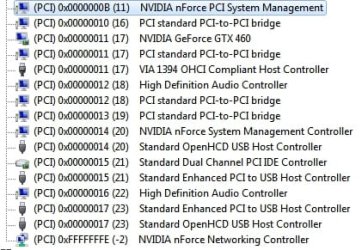
I'm currently working on recreating the problem (like other posters, mine seems to get worse with time), so I'm playing a lot of different files with DPC latency Checker running. Just to save a little time later, if this does turn out to be the problem, here are the devices that share IRQ.

Edit: Crackling has started, and though they aren't consistent, there is definitely an increase in spikes on the DPC latency checker.
 

Attachments

  • sharedirq.jpg
    sharedirq.jpg
    57.8 KB · Views: 38
Last edited:

My Computer My Computer

At a glance

Windows 7 Home Premium 64bitAMD Phenom II X4 965 Black Edition Deneb 3.4GHzG.SKILL 4GB 240-Pin DDR3 SDRAMEVGA GeForce GTX 460 (Fermi) Superclocked EE 1gb
Computer Manufacturer/Model Number
Homebrew
OS
Windows 7 Home Premium 64bit
CPU
AMD Phenom II X4 965 Black Edition Deneb 3.4GHz
Motherboard
ASUS M4N75TD AM3 NVIDIA nForce 750a
Memory
G.SKILL 4GB 240-Pin DDR3 SDRAM
Graphics Card(s)
EVGA GeForce GTX 460 (Fermi) Superclocked EE 1gb
Sound Card
VIA VT1708S (Integrated)
Monitor(s) Displays
Acer 21.5" Widescreen LCD
Screen Resolution
1920x1080
Hard Drives
Western Digital 640 gig
PSU
Antec Earthwatts 650w
Case
Rosewill Challenger
Cooling
Cold Ass Michigan Night Air
Look at IRQ 18... Your sound device's IRQ is being shared with PCI to PCI bridge... That's the recipe for crackle... Everything that needs to go through the bridge will jam the IRQ, and there's a lot going through the bridge...

zzz2496
 

My Computer My Computer

At a glance

Windows7 Ultimate 64bitIntel Core 2 Quad Q6600DDR2 Adata 4GBNvidia GeForce GTX 285 1024 and Nvidia GeForc...
Computer Manufacturer/Model Number
Self Built
OS
Windows7 Ultimate 64bit
CPU
Intel Core 2 Quad Q6600
Motherboard
Abit IN9-32X-MMAX
Memory
DDR2 Adata 4GB
Graphics Card(s)
Nvidia GeForce GTX 285 1024 and Nvidia GeForce 8800GT 512
Sound Card
Asus Xonar HDAV 1.3
Monitor(s) Displays
Dell 2407WFP and BenQ 2400v and Philips 150v3
Screen Resolution
3840x1200 and 1024x768
Hard Drives
2 WDC 1TB
1 WDC 1.5TB
1 WDC 640GB
1 WDC 320GB
1 Seagate 200GB
PSU
Corsair TX 850W
Case
Cooler Master HAF932
Cooling
Arctic Cooling Freezer Extreme and plenty of fans...
Keyboard
MicrosoftNaturalKeyboard 4000/Apple Alu keyboard/Dinovo mini
Mouse
Logitech G5/MarbleMouseTrackball/PerformanceMX/SpacePilotPRO
Internet Speed
1.5Mbps down/384Kbps up
Other Info
APC SURT 1000XL
Logitech Z-560
Wiimote
Mikrotik Router
Linksys (now Cisco) SD2008 8 port Gigabit switch
Linksys WRT54G (acting as AP)
Apple wireless Aluminium keyboard
Apple Magic Mouse
Xbox360 wired controller
Alright, so what is a potential solution to this? I admit to knowing nothing about this, and looking through the options I have available in the device manager, I'm not finding an easy way to fix this.
 

My Computer My Computer

At a glance

Windows 7 Home Premium 64bitAMD Phenom II X4 965 Black Edition Deneb 3.4GHzG.SKILL 4GB 240-Pin DDR3 SDRAMEVGA GeForce GTX 460 (Fermi) Superclocked EE 1gb
Computer Manufacturer/Model Number
Homebrew
OS
Windows 7 Home Premium 64bit
CPU
AMD Phenom II X4 965 Black Edition Deneb 3.4GHz
Motherboard
ASUS M4N75TD AM3 NVIDIA nForce 750a
Memory
G.SKILL 4GB 240-Pin DDR3 SDRAM
Graphics Card(s)
EVGA GeForce GTX 460 (Fermi) Superclocked EE 1gb
Sound Card
VIA VT1708S (Integrated)
Monitor(s) Displays
Acer 21.5" Widescreen LCD
Screen Resolution
1920x1080
Hard Drives
Western Digital 640 gig
PSU
Antec Earthwatts 650w
Case
Rosewill Challenger
Cooling
Cold Ass Michigan Night Air
Alright, so what is a potential solution to this? I admit to knowing nothing about this, and looking through the options I have available in the device manager, I'm not finding an easy way to fix this.


Not sure myself, however, the HD audio device on this machine also shares resources with a few critical components so I'm not 100% convienced that's the answer.

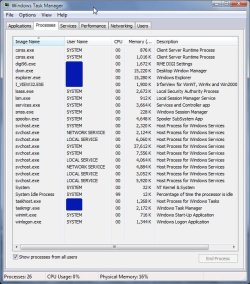
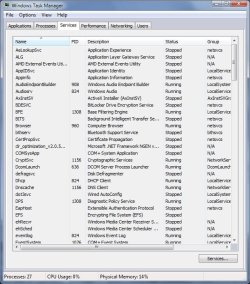
I know you've gone through this but could you post a list of all processes and services you have running at bootup.

Before that... try this.

Start task manager, set it to view all processes, quit -anything- nvidia related, by the same token go into services and stop any nvidia related service.

Off to gig, will check back later-

Ap
 

My Computer My Computer

At a glance

Windows 7 Home PremiumIntel Core 2 Duo @ 3.00gHz4 GBATI Radeon HD 2600 XT
Computer Manufacturer/Model Number
Assembled in my workshop
OS
Windows 7 Home Premium
CPU
Intel Core 2 Duo @ 3.00gHz
Motherboard
Gigabyte GA-P35-S3G
Memory
4 GB
Graphics Card(s)
ATI Radeon HD 2600 XT
Sound Card
RME 24/96 Card, Realtek Internal Audio PreSonus FireStudio
Monitor(s) Displays
Acer 1917 (x2)
Screen Resolution
1280 x 1024 on both monitors
Hard Drives
Three 250GB Seagate SATA Barracuda 7200rpm
PSU
Rosewill 500-watt
Case
Rosewill mid-tower
Cooling
Noctua NH-U9B (CPU), PwrSupply fan + single large case Fan
Keyboard
Macally w/2/USB ports.
Mouse
Trackman Wheel
Other Info
Event 20/20 bas studio monitors, Yamaha sub.
Rackmount Korg/Roland/Yamaha synthesizers,
Cubase MIDI/audio recording. Sony Soundforge audio/mastering software. CD Architect Mastering. RME & Presonus audio interfaces.
Log file from HijackThis:

Logfile of HijackThis v1.99.1
Scan saved at 10:05:51 PM, on 10/28/2010
Platform: Unknown Windows (WinNT 6.01.3504)
MSIE: Internet Explorer v8.00 (8.00.7600.16671)

Running processes:
C:\Program Files (x86)\FSCapture\FSCapture.exe
C:\Program Files (x86)\KatMouse\KatMouse.exe
C:\Program Files (x86)\Winamp\winamp.exe
C:\Program Files (x86)\Mozilla Firefox\firefox.exe
C:\Users\Tony\Downloads\dpclat.exe
C:\Users\Tony\Downloads\Autoruns\autoruns.exe
C:\Program Files\HijackThis\HijackThis.exe
C:\Windows\SysWOW64\DllHost.exe

R1 - HKCU\Software\Microsoft\Internet Explorer\Main,Search Page = Bing
R0 - HKCU\Software\Microsoft\Internet Explorer\Main,Start Page = MSN.com
R1 - HKLM\Software\Microsoft\Internet Explorer\Main,Default_Page_URL = MSN.com
R1 - HKLM\Software\Microsoft\Internet Explorer\Main,Default_Search_URL = Bing
R1 - HKLM\Software\Microsoft\Internet Explorer\Main,Search Page = Bing
R0 - HKLM\Software\Microsoft\Internet Explorer\Main,Start Page = MSN.com
R0 - HKLM\Software\Microsoft\Internet Explorer\Search,SearchAssistant =
R0 - HKLM\Software\Microsoft\Internet Explorer\Search,CustomizeSearch =
R0 - HKLM\Software\Microsoft\Internet Explorer\Main,Local Page = C:\Windows\SysWOW64\blank.htm
R0 - HKCU\Software\Microsoft\Internet Explorer\Toolbar,LinksFolderName =
F2 - REG:system.ini: UserInit=userinit.exe
O2 - BHO: Windows Live ID Sign-in Helper - {9030D464-4C02-4ABF-8ECC-5164760863C6} - C:\Program Files (x86)\Common Files\Microsoft Shared\Windows Live\WindowsLiveLogin.dll
O4 - Startup: FastStone Capture.lnk = C:\Program Files (x86)\FSCapture\FSCapture.exe
O4 - Startup: KatMouse.lnk = C:\Program Files (x86)\KatMouse\KatMouse.exe
O10 - Unknown file in Winsock LSP: c:\windows\system32\nlaapi.dll
O10 - Unknown file in Winsock LSP: c:\windows\system32\napinsp.dll
O10 - Unknown file in Winsock LSP: c:\program files (x86)\common files\microsoft shared\windows live\wlidnsp.dll
O11 - Options group: [INTERNATIONAL] International
O13 - Gopher Prefix:
O16 - DPF: {1E54D648-B804-468d-BC78-4AFFED8E262F} (System Requirements Lab) - http://www.nvidia.com/content/DriverDownload/srl/3.0.0.4/srl_bin/sysreqlab_nvd.cab
O16 - DPF: {E2883E8F-472F-4FB0-9522-AC9BF37916A7} - http://platformdl.adobe.com/NOS/getPlusPlus/1.6/gp.cab
O16 - DPF: {E6F480FC-BD44-4CBA-B74A-89AF7842937D} (SysInfo Class) - http://content.systemrequirementslab.com.s3.amazonaws.com/global/bin/srldetect_cyri_4.3.1.0.cab
O16 - DPF: {F6ACF75C-C32C-447B-9BEF-46B766368D29} - http://ccfiles.creative.com/Web/softwareupdate/su2/ocx/15112/CTPID.cab
O18 - Protocol: wlpg - {E43EF6CD-A37A-4A9B-9E6F-83F89B8E6324} - C:\Program Files (x86)\Windows Live\Photo Gallery\AlbumDownloadProtocolHandler.dll
O23 - Service: @%SystemRoot%\system32\Alg.exe,-112 (ALG) - Unknown owner - C:\Windows\System32\alg.exe (file missing)
O23 - Service: @%SystemRoot%\system32\efssvc.dll,-100 (EFS) - Unknown owner - C:\Windows\System32\lsass.exe (file missing)
O23 - Service: @%systemroot%\system32\fxsresm.dll,-118 (Fax) - Unknown owner - C:\Windows\system32\fxssvc.exe (file missing)
O23 - Service: @keyiso.dll,-100 (KeyIso) - Unknown owner - C:\Windows\system32\lsass.exe (file missing)
O23 - Service: @comres.dll,-2797 (MSDTC) - Unknown owner - C:\Windows\System32\msdtc.exe (file missing)
O23 - Service: @%SystemRoot%\System32\netlogon.dll,-102 (Netlogon) - Unknown owner - C:\Windows\system32\lsass.exe (file missing)
O23 - Service: NVIDIA Display Driver Service (nvsvc) - Unknown owner - C:\Windows\system32\nvvsvc.exe (file missing)
O23 - Service: @%systemroot%\system32\psbase.dll,-300 (ProtectedStorage) - Unknown owner - C:\Windows\system32\lsass.exe (file missing)
O23 - Service: @%SystemRoot%\system32\qwave.dll,-1 (QWAVE) - Unknown owner - %windir%\system32\svchost.exe (file missing)
O23 - Service: @%systemroot%\system32\Locator.exe,-2 (RpcLocator) - Unknown owner - C:\Windows\system32\locator.exe (file missing)
O23 - Service: @%SystemRoot%\system32\samsrv.dll,-1 (SamSs) - Unknown owner - C:\Windows\system32\lsass.exe (file missing)
O23 - Service: @%SystemRoot%\system32\seclogon.dll,-7001 (seclogon) - Unknown owner - %windir%\system32\svchost.exe (file missing)
O23 - Service: @%SystemRoot%\system32\snmptrap.exe,-3 (SNMPTRAP) - Unknown owner - C:\Windows\System32\snmptrap.exe (file missing)
O23 - Service: @%systemroot%\system32\spoolsv.exe,-1 (Spooler) - Unknown owner - C:\Windows\System32\spoolsv.exe (file missing)
O23 - Service: @%SystemRoot%\system32\sppsvc.exe,-101 (sppsvc) - Unknown owner - C:\Windows\system32\sppsvc.exe (file missing)
O23 - Service: Steam Client Service - Valve Corporation - C:\Program Files (x86)\Common Files\Steam\SteamService.exe
O23 - Service: @%SystemRoot%\system32\ui0detect.exe,-101 (UI0Detect) - Unknown owner - C:\Windows\system32\UI0Detect.exe (file missing)
O23 - Service: @%SystemRoot%\system32\vaultsvc.dll,-1003 (VaultSvc) - Unknown owner - C:\Windows\system32\lsass.exe (file missing)
O23 - Service: @%SystemRoot%\system32\vds.exe,-100 (vds) - Unknown owner - C:\Windows\System32\vds.exe (file missing)
O23 - Service: @%systemroot%\system32\vssvc.exe,-102 (VSS) - Unknown owner - C:\Windows\system32\vssvc.exe (file missing)
O23 - Service: @%SystemRoot%\system32\Wat\WatUX.exe,-601 (WatAdminSvc) - Unknown owner - C:\Windows\system32\Wat\WatAdminSvc.exe (file missing)
O23 - Service: @%systemroot%\system32\wbengine.exe,-104 (wbengine) - Unknown owner - C:\Windows\system32\wbengine.exe (file missing)
O23 - Service: @%Systemroot%\system32\wbem\wmiapsrv.exe,-110 (wmiApSrv) - Unknown owner - C:\Windows\system32\wbem\WmiApSrv.exe (file missing)
O23 - Service: @%PROGRAMFILES%\Windows Media Player\wmpnetwk.exe,-101 (WMPNetworkSvc) - Unknown owner - %PROGRAMFILES%\Windows Media Player\wmpnetwk.exe (file missing)
 

My Computer My Computer

At a glance

Windows 7 Home Premium 64bitAMD Phenom II X4 965 Black Edition Deneb 3.4GHzG.SKILL 4GB 240-Pin DDR3 SDRAMEVGA GeForce GTX 460 (Fermi) Superclocked EE 1gb
Computer Manufacturer/Model Number
Homebrew
OS
Windows 7 Home Premium 64bit
CPU
AMD Phenom II X4 965 Black Edition Deneb 3.4GHz
Motherboard
ASUS M4N75TD AM3 NVIDIA nForce 750a
Memory
G.SKILL 4GB 240-Pin DDR3 SDRAM
Graphics Card(s)
EVGA GeForce GTX 460 (Fermi) Superclocked EE 1gb
Sound Card
VIA VT1708S (Integrated)
Monitor(s) Displays
Acer 21.5" Widescreen LCD
Screen Resolution
1920x1080
Hard Drives
Western Digital 640 gig
PSU
Antec Earthwatts 650w
Case
Rosewill Challenger
Cooling
Cold Ass Michigan Night Air
I was thinking more along these lines:

Processes.jpg

I run a minimum of background stuff as this computer serves as a multitrack studio recording system. That's what the RME audio device Digi96 is. A background process can cause similar problems although your description reminds me of serveral others that use 64-bit/AMD/Nvidia based systems.
Can't hurt to take a look at what's running, I'm sure it will be much more than my system which usually runs at 25, the screen capture i_view is process 26. You may have to scroll or else just capture the text.

From the services tab.

Services.jpg

Don't have to post them all but it would help, the active services have a PID number.

Ap
 
Last edited:

My Computer My Computer

At a glance

Windows 7 Home PremiumIntel Core 2 Duo @ 3.00gHz4 GBATI Radeon HD 2600 XT
Computer Manufacturer/Model Number
Assembled in my workshop
OS
Windows 7 Home Premium
CPU
Intel Core 2 Duo @ 3.00gHz
Motherboard
Gigabyte GA-P35-S3G
Memory
4 GB
Graphics Card(s)
ATI Radeon HD 2600 XT
Sound Card
RME 24/96 Card, Realtek Internal Audio PreSonus FireStudio
Monitor(s) Displays
Acer 1917 (x2)
Screen Resolution
1280 x 1024 on both monitors
Hard Drives
Three 250GB Seagate SATA Barracuda 7200rpm
PSU
Rosewill 500-watt
Case
Rosewill mid-tower
Cooling
Noctua NH-U9B (CPU), PwrSupply fan + single large case Fan
Keyboard
Macally w/2/USB ports.
Mouse
Trackman Wheel
Other Info
Event 20/20 bas studio monitors, Yamaha sub.
Rackmount Korg/Roland/Yamaha synthesizers,
Cubase MIDI/audio recording. Sony Soundforge audio/mastering software. CD Architect Mastering. RME & Presonus audio interfaces.
VOID!

Never mind, just redid them and they appeared

Odd, my attachments aren't working.... NO! not those attachments, I mean the ones just posted.

Ap
 
Last edited:

My Computer My Computer

At a glance

Windows 7 Home PremiumIntel Core 2 Duo @ 3.00gHz4 GBATI Radeon HD 2600 XT
Computer Manufacturer/Model Number
Assembled in my workshop
OS
Windows 7 Home Premium
CPU
Intel Core 2 Duo @ 3.00gHz
Motherboard
Gigabyte GA-P35-S3G
Memory
4 GB
Graphics Card(s)
ATI Radeon HD 2600 XT
Sound Card
RME 24/96 Card, Realtek Internal Audio PreSonus FireStudio
Monitor(s) Displays
Acer 1917 (x2)
Screen Resolution
1280 x 1024 on both monitors
Hard Drives
Three 250GB Seagate SATA Barracuda 7200rpm
PSU
Rosewill 500-watt
Case
Rosewill mid-tower
Cooling
Noctua NH-U9B (CPU), PwrSupply fan + single large case Fan
Keyboard
Macally w/2/USB ports.
Mouse
Trackman Wheel
Other Info
Event 20/20 bas studio monitors, Yamaha sub.
Rackmount Korg/Roland/Yamaha synthesizers,
Cubase MIDI/audio recording. Sony Soundforge audio/mastering software. CD Architect Mastering. RME & Presonus audio interfaces.
I posted the Hijaack This file because it includes all running processes, and start up programs, but oh well. It may be a bit late, but I think I've found a solution.

I disappeared for a while because I thought it was solved. I had uninstalled my last.fm client, and Security Essentials, and thought that worked. For a couple of days, no issues at all. However, it returned, and kept happening until yesterday.

In winamp, for the options under the direct sound output plug-in, I've disabled hardware acceleration. I have since noticed no drop in sound quality, and more importantly, no crackling. Life is worth living again.

Even though I'm a little late, thanks everyone for your helpful replies. :)
 

My Computer My Computer

At a glance

Windows 7 Home Premium 64bitAMD Phenom II X4 965 Black Edition Deneb 3.4GHzG.SKILL 4GB 240-Pin DDR3 SDRAMEVGA GeForce GTX 460 (Fermi) Superclocked EE 1gb
Computer Manufacturer/Model Number
Homebrew
OS
Windows 7 Home Premium 64bit
CPU
AMD Phenom II X4 965 Black Edition Deneb 3.4GHz
Motherboard
ASUS M4N75TD AM3 NVIDIA nForce 750a
Memory
G.SKILL 4GB 240-Pin DDR3 SDRAM
Graphics Card(s)
EVGA GeForce GTX 460 (Fermi) Superclocked EE 1gb
Sound Card
VIA VT1708S (Integrated)
Monitor(s) Displays
Acer 21.5" Widescreen LCD
Screen Resolution
1920x1080
Hard Drives
Western Digital 640 gig
PSU
Antec Earthwatts 650w
Case
Rosewill Challenger
Cooling
Cold Ass Michigan Night Air
I have the same motherboard and videocards as you and I'm having the exact same problem. Unfortunately, disabling hardware acceleration in winamp didn't solve the problem for me...I've been trying to shuffle around IRQ's with no luck. Anyone figure out a fix for this?
 

My Computer My Computer

At a glance

Windows 7 Ultimate 32 bitAMD 1055T 2.8 Ghz4 GB DDR3 Crucial Ballistix PCe 128002x EVGA GeForce 260 GTX
OS
Windows 7 Ultimate 32 bit
CPU
AMD 1055T 2.8 Ghz
Motherboard
Asus M4N75TD
Memory
4 GB DDR3 Crucial Ballistix PCe 12800
Graphics Card(s)
2x EVGA GeForce 260 GTX
Sound Card
VIA VT1708S
Monitor(s) Displays
Acer H243H 24"
Hard Drives
OCZ Vertex II 60 GB SSD
WD "Green" 1.5 TB HDD
PSU
Corsair TX550W
Case
Aerocool S9
Have you tried the following?

1. Set you power profile to high performance. Control Panel>System>Power
2. Go into the BIOS and disable any core boost/turbo functionality
3. Set the CPU voltage to just over 1.4. 1.42 is what I had to set for my AMD phenom ii
4. Disable your onboard NIC
5. Install a dedicated NIC like the Intel Gigabit CT Desktop
6. Change the PCI slots from Auto to 100Mhz

These are the steps I took to resolve audio pops and high DPC latency with an outboard FireWire audio interface.
 

My Computer My Computer

At a glance

Windows 7 Ultimate 64bit
OS
Windows 7 Ultimate 64bit
Do you get the same problem plugging headphones in to the Audigy output?

I had similar problem......amplified sound horrendous....headphone sound excellent (through same jack)

Some sort of mis-match in levels perhaps, or even an earthing problem??

So....was absolutely nothing to do with drivers, conflicts...etc for me!! :cool:
 

My Computer My Computer

At a glance

Windows 7 Ultimate x64Intel i3-21208GBZOTAC GT-430
OS
Windows 7 Ultimate x64
CPU
Intel i3-2120
Motherboard
Asus P8Z68-V LX
Memory
8GB
Graphics Card(s)
ZOTAC GT-430
Monitor(s) Displays
Samsung BX2231
Hard Drives
WD 320GB Green (O/S)
Seagate 500GB
PSU
OCZ XS-550w
Back
Top