Sound disappears!

Johnxyx0

New member
Local time
2:41 PM
Messages
9
Hi, Very new to posting threads or blogging and also know NOTHING about PC's so please be gentle with me!

I have got a new Dell Studio xps 7100 , Windows 7 64 bit. I spent the best part of Saturday re-installing all my itunes library from disc's. When finished i thought i'd better check that everything was OK and therefore 'clicked' on a dozen or so tracks and films at random. Everything seemed fine and then the sound went! The progress bar was still moving / or the film was still playing but no sound. At first i thought i must have a corrupt file so i tried opening track via Windows media player, at first OK but on one track the same thing happened. Now i went into panic mode thinking that all the files were corrupt! I uninstalled and re-installed itunes 3 times, spoke to itunes support for an hour. I went onto istore and previewed a song (therefore not in my files) and the same thing happened. To test it once more, i've just purchased a song and downloaded it from istore and the same thing, the progress bar moves but no sound!

Any thoughts
 

My Computer My Computer

Computer Manufacturer/Model Number
Dell studio xps 7100
OS
Windows 7 64 bit
Johnxyx0,

Welcome to 7 forums.
Please complete you system specs.
Look in Control Panel for Device Manager and see if there are any yellow yield signs showing. It may be as simple as updating a driver or two.
Always update driver's from Manufactures website.
 

My Computer My Computer

Computer Manufacturer/Model Number
HP M9077c
OS
Windows 7 Home Premium 64bit
CPU
Intel(R)Core(TM)2 quad [email protected] 2.39GHz
Motherboard
ASUSeK
Memory
6GB DDR2 6400
Graphics Card(s)
GeForce 8500/512MB
Sound Card
Realtek High Def Audio
Monitor(s) Displays
HP w2408 LCD 24" widescreen
Screen Resolution
1920x1200
Cooling
6 pack of Bud
Keyboard
MS wireless Inteli
Mouse
MS wireless Inteli
Johnxyx0,
Welcome to SF. Please fill out your spec's as completely as you can as this will help us understand the components and any interactions. I sounds as if all was fine until you loaded itunes? As I'm the anti-itunes guy I won't be a good source for issue with it and if itunes support didn't help?.....not good. But if this is an issue with W7 not playing nice with itunes then someone here could have the answers.
Cheers, the Cheese
 

My Computer My Computer

Computer type
PC/Desktop
Computer Manufacturer/Model Number
A blend of brains, brawn and dumb luck.
OS
Windows 7 Ultimate 64
CPU
i7 3770k OC'd 4.6 @ 1.17v, also FX 8120 & i5 miniITX
Motherboard
MSI P67A-GD80 b3
Memory
32 gb G.Skill Sniper DDR3 10-12-12-31 @ 2133
Graphics Card(s)
XFX Radeon 7870 2GB DDR5
Sound Card
Sound Blaster Z Series Card
Monitor(s) Displays
(2) LG LED 23" 1920 x 1080 2ms Monitors via mini d-port
Screen Resolution
1680 X 1050 p
Hard Drives
Samsung 256 gb 830 SSD sata III
(1) 1 tb WD Black
(2) 1 tb Hitachi deskmates/sata II
(2) 1 tb WD green/sata II
(2) 3 tb Seagate Barracuda
(1) 120 gb OCZ Vertex SS
(1) Drobo 5N w/5 Seagate 3tb
PSU
EVGA modular 1000G2 80% gold rating & APC 1200 RS
Case
CoolerMaster Storm Styker
Cooling
7 case fans 140mm & 120mm, NZXT Kraken X60
Keyboard
(2) Logitech Illuminated Keyboards (1) usb (1) wireless
Mouse
Logitech G700 & T-BC21 - nano nx for the laptop
Internet Speed
Basic 120mbps down
Antivirus
Trend Micro Titanium Max Security & Malwarebytes Premium
Browser
Chrome and IE 10
Other Info
5 Noctua case fans + 3 Noctua in p/p on NZXT cooler
Integrated hot swap drive bays for 2.5" Drives
(2) Lite-on dvd/cd/Blu Ray optical 22X
Integrated fan controller and led on/off
HP Officejet Pro 8630 all-n-one
Hot-swappable 3.5" hard drive bay
Netgear Nighthawk router
Asus USB 3 & sata 6 PCIe card
Vantec IDE to sata adptr./Ultra sata adptr
Lenovo L420 i5 lappy with m sata
Drobo 5N advanced NAS
Could you have a conflict between itunes and Windows Media player or another program wanting to be the dominant music and video player?
 

My Computer My Computer

Computer type
PC/Desktop
Computer Manufacturer/Model Number
A blend of brains, brawn and dumb luck.
OS
Windows 7 Ultimate 64
CPU
i7 3770k OC'd 4.6 @ 1.17v, also FX 8120 & i5 miniITX
Motherboard
MSI P67A-GD80 b3
Memory
32 gb G.Skill Sniper DDR3 10-12-12-31 @ 2133
Graphics Card(s)
XFX Radeon 7870 2GB DDR5
Sound Card
Sound Blaster Z Series Card
Monitor(s) Displays
(2) LG LED 23" 1920 x 1080 2ms Monitors via mini d-port
Screen Resolution
1680 X 1050 p
Hard Drives
Samsung 256 gb 830 SSD sata III
(1) 1 tb WD Black
(2) 1 tb Hitachi deskmates/sata II
(2) 1 tb WD green/sata II
(2) 3 tb Seagate Barracuda
(1) 120 gb OCZ Vertex SS
(1) Drobo 5N w/5 Seagate 3tb
PSU
EVGA modular 1000G2 80% gold rating & APC 1200 RS
Case
CoolerMaster Storm Styker
Cooling
7 case fans 140mm & 120mm, NZXT Kraken X60
Keyboard
(2) Logitech Illuminated Keyboards (1) usb (1) wireless
Mouse
Logitech G700 & T-BC21 - nano nx for the laptop
Internet Speed
Basic 120mbps down
Antivirus
Trend Micro Titanium Max Security & Malwarebytes Premium
Browser
Chrome and IE 10
Other Info
5 Noctua case fans + 3 Noctua in p/p on NZXT cooler
Integrated hot swap drive bays for 2.5" Drives
(2) Lite-on dvd/cd/Blu Ray optical 22X
Integrated fan controller and led on/off
HP Officejet Pro 8630 all-n-one
Hot-swappable 3.5" hard drive bay
Netgear Nighthawk router
Asus USB 3 & sata 6 PCIe card
Vantec IDE to sata adptr./Ultra sata adptr
Lenovo L420 i5 lappy with m sata
Drobo 5N advanced NAS
Everything seemed fine and then the sound went!

Clarification needed.

Do you mean that sound was fine and quit suddenly in the middle of a song or video?

Or was it ever operating properly?

Have you done a system restore to an earlier time, assuming it was operating fine at one time?
 

My Computer My Computer

Computer type
PC/Desktop
Computer Manufacturer/Model Number
Ignatz Special; 4 speed manual gearbox; factory air conditioning; one of one
OS
Windows 7 Home Premium SP1, 64-bit
CPU
Intel Skylake i5-6600K, not overclocked
Motherboard
AsRock Z170M Extreme 4, micro ATX
Memory
8 GB HyperX DDR4-2666 (2 x 4 GB)
Graphics Card(s)
none; graphics are integrated on CPU
Sound Card
onboard: Realtek ALC1150; external: USB Behringer UF0-202
Monitor(s) Displays
Dell S2340M 23 inch IPS
Screen Resolution
1600 x 900
Hard Drives
System: Crucial MX100 series SSD, 128 GB;
Data: Samsung Spinpoint 103SJ, 1 TB;
Backup: WD Caviar Green WD30EZRX-00D8PB0, 3 TB
PSU
Rosewill SilentNight 500 watt fanless, semi-modular
Case
Antec Solo II
Cooling
Noctua NH-U12S; Noctua F12 intake, Noctua S12A exhaust
Keyboard
Microsoft 200 6JH-00001 USB
Mouse
Dell or Microsoft optical wired; USB
Antivirus
Microsoft Security Essentials and Malwarebytes Premium
Browser
Pale Moon
Other Info
All fans PWM; speeds at idle: CPU circa 500 rpm; intake circa 600 rpm; exhaust circa 600 rpm; CPU temps 27 idle and 47 C load in a warm room (27 C/81 F) when running Intel Extreme Tuning Utility stress test.
Here is the latest version of itunes...
Apple - iTunes - Download iTunes Now

So you may have to uninstall old version and then download this latest version.
Post back if this works for you.
 

My Computer My Computer

Computer Manufacturer/Model Number
HP M9077c
OS
Windows 7 Home Premium 64bit
CPU
Intel(R)Core(TM)2 quad [email protected] 2.39GHz
Motherboard
ASUSeK
Memory
6GB DDR2 6400
Graphics Card(s)
GeForce 8500/512MB
Sound Card
Realtek High Def Audio
Monitor(s) Displays
HP w2408 LCD 24" widescreen
Screen Resolution
1920x1200
Cooling
6 pack of Bud
Keyboard
MS wireless Inteli
Mouse
MS wireless Inteli
Hi,

Firstly thank you to everyone that replied and SO quickly! I'm impressed!

looking in the device manager, there are NO yellow flags. Under Sound,video etc it looks like i have : ATI High Definition Audio and Realtec High Def Audio. I hope that answer a question. With regards to loosing the sound, what happens is that i can open iTunes and 'click' on a song or film and as long as i don't do anything else it's fine. The moment i click further along the progress bar or click on another song and then maybe onto a film (just to see if they are there) then the sound goes! As i said, it has done this in Windows media player and i have purchased a song today from itunes store and the same thing happens. If i come out of itunes or Windows media player and go back in it works and then etc. etc. etc.

I have another Dell Studio xps 7100 here (a different problem, awaiting Dell to collect!) , i loaded one of my back up cd's to it and onto itunes and it works fine, i can jump all about the place without a problem!!

It's maddening, i just want a PC that i can turn on and it works!! Just as a by the by, does anyone have any idea to stop my Google page from reverting back to 100% zoom level after i have adjusted it in customise?

Cheers,

John
 

My Computer My Computer

Computer Manufacturer/Model Number
Dell studio xps 7100
OS
Windows 7 64 bit
If all audio, except iTunes, works OK then it's not a PC problem. The problem is in iTunes. I have iTunes installed on three Win 7 systems and it works OK on all 3, although I don't do a lot with it - I have it installed because I have an iPod music player.

If all other audio works OK, uninstall iTunes, reboot the PC and then do a new install. Your "Speakers" (RealTek) should be set as the default playback device, unless you are using HDMI with some external device.

Also as previously noted by one person, you need to use the Dell supplied sound driver if you ever want to update the sound driver. Because of Dell's custom Motherbord and implementation non-Dell drivers will either not work or not work correctly in most cases.
 

My Computer My Computer

Computer type
PC/Desktop
Computer Manufacturer/Model Number
My Own Build
OS
Windows 10 64 bit
CPU
Intel i7 6700K
Motherboard
ASUS ROG Maximus VIII Hero
Memory
16GB Corsair Dominator
Graphics Card(s)
Intel CPU Graphics
Sound Card
RealTek
Monitor(s) Displays
27" Dell S2719dgf
Screen Resolution
2560X1440
Hard Drives
1 TB Samsung 850 EVO SSD for Win 10 Pro
500GB Samsung 850 EVO SSD for Win 10 Insider
2 TB drive for backup
PSU
EVGA Supernova 750G2
Case
BeQuiet Silent Base 600
Cooling
Deepcool Captain 120EX
Keyboard
Microsoft Wireless 2000
Mouse
Microsoft wireless
Internet Speed
100 MB/sec (Cable)
Antivirus
Microsoft Defender and Malwarebytes
Browser
Edge/Firefox
Other Info
Cakewalk (Sonar) by BandLab and Studio One 4.1 Pro recording studio software. MOTU 896Mk3 Hybrid recording interface, Frontier Tranzport wireless control unit, Behringer X-Touch Control Surface.
Five USB connected optical drives for CD Audio production using Nero BurningROM
Hi Fireberd,

Thanks for reply. At first i thought it was just itunes problem but as i think i mentionend before, one of the tracks did 'the thing' when i openend it with Windows media player. I have uninstalled iTunes (whilst on the phone to iTunes support) 3 times. I don't think it' s a corrupt music file as i took one of the back-up cd's and re-installed on another Dell Studio xps 7100 and it works fine. I know nothing about PC's but by powers of elimination, the music works on another indentical PC as does the itunes i downloaded onto it, a downloaded track of music (therefore not on one of my back-up cd's) doesn't play when the PC's sound system goes on strike, music will play as long as i don't play with it....all this is pointing towards a PC problem....but i don't know where.
Cheers,

John
 

My Computer My Computer

Computer Manufacturer/Model Number
Dell studio xps 7100
OS
Windows 7 64 bit
Two things to try. 1. Uninstall the Sound in the Device Manager (DO NOT check the box to uninstall the drivers) then restart the PC and when Windows starts it will detect and reinstall the sound. If there were some type of corruption between Windows and the device this will fix it.

1. If the uninstall/reinstall does not fix it, reinstall the Dell supplied sound drivers as the next step. DO NOT use non-Dell drivers as they will either not work or not work correctly. I do a lot of support on the Dell users forum and we have many posts about non-Dell driver problems.
 

My Computer My Computer

Computer type
PC/Desktop
Computer Manufacturer/Model Number
My Own Build
OS
Windows 10 64 bit
CPU
Intel i7 6700K
Motherboard
ASUS ROG Maximus VIII Hero
Memory
16GB Corsair Dominator
Graphics Card(s)
Intel CPU Graphics
Sound Card
RealTek
Monitor(s) Displays
27" Dell S2719dgf
Screen Resolution
2560X1440
Hard Drives
1 TB Samsung 850 EVO SSD for Win 10 Pro
500GB Samsung 850 EVO SSD for Win 10 Insider
2 TB drive for backup
PSU
EVGA Supernova 750G2
Case
BeQuiet Silent Base 600
Cooling
Deepcool Captain 120EX
Keyboard
Microsoft Wireless 2000
Mouse
Microsoft wireless
Internet Speed
100 MB/sec (Cable)
Antivirus
Microsoft Defender and Malwarebytes
Browser
Edge/Firefox
Other Info
Cakewalk (Sonar) by BandLab and Studio One 4.1 Pro recording studio software. MOTU 896Mk3 Hybrid recording interface, Frontier Tranzport wireless control unit, Behringer X-Touch Control Surface.
Five USB connected optical drives for CD Audio production using Nero BurningROM
Sound disappears,

Hi, after spending 4 hours on the phone to Dell today, uninstalling, re-installing various drivers!!! The technician has determined that there is a 'handshake' problem between ATI, Realtec and Windows!! None of this is of any use to me and i'll have to wait 3 days for them to look into it, and there's no gaurantee that even then they will have a solution!!

John
 

My Computer My Computer

Computer Manufacturer/Model Number
Dell studio xps 7100
OS
Windows 7 64 bit
Hi, after spending 4 hours on the phone to Dell today, uninstalling, re-installing various drivers!!! The technician has determined that there is a 'handshake' problem between ATI, Realtec and Windows!! None of this is of any use to me and i'll have to wait 3 days for them to look into it, and there's no gaurantee that even then they will have a solution!!

John


John,
They all are trying to put the blame on the other guy. I've been to that dance before!
Just be patient and they may come up with a fix. Post back in a couple of days and let us know how it's going. We all can learn from their mistakes.....
 

My Computer My Computer

Computer Manufacturer/Model Number
HP M9077c
OS
Windows 7 Home Premium 64bit
CPU
Intel(R)Core(TM)2 quad [email protected] 2.39GHz
Motherboard
ASUSeK
Memory
6GB DDR2 6400
Graphics Card(s)
GeForce 8500/512MB
Sound Card
Realtek High Def Audio
Monitor(s) Displays
HP w2408 LCD 24" widescreen
Screen Resolution
1920x1200
Cooling
6 pack of Bud
Keyboard
MS wireless Inteli
Mouse
MS wireless Inteli
Sound disappears!!

Hi Howling Wolves,

I like the use of the word 'may'!! Many thanks for the sympathy it's genuinely appreciated.

John
 

My Computer My Computer

Computer Manufacturer/Model Number
Dell studio xps 7100
OS
Windows 7 64 bit
John,
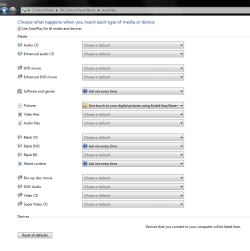
Take a look in control panel and see if your Auto Play is set up somewhat to mine.
Auto play.PNG

I won't give up if you don't!
 

My Computer My Computer

Computer Manufacturer/Model Number
HP M9077c
OS
Windows 7 Home Premium 64bit
CPU
Intel(R)Core(TM)2 quad [email protected] 2.39GHz
Motherboard
ASUSeK
Memory
6GB DDR2 6400
Graphics Card(s)
GeForce 8500/512MB
Sound Card
Realtek High Def Audio
Monitor(s) Displays
HP w2408 LCD 24" widescreen
Screen Resolution
1920x1200
Cooling
6 pack of Bud
Keyboard
MS wireless Inteli
Mouse
MS wireless Inteli
Sound disappears!!

Hi HW, (is that OK?)

All of mine say 'choose a default' with exception of Software and games.

Does that help?

John
 

My Computer My Computer

Computer Manufacturer/Model Number
Dell studio xps 7100
OS
Windows 7 64 bit
Just going through the process of elimination.
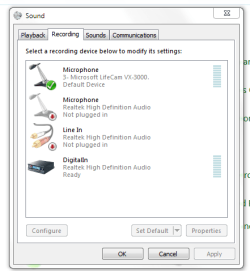
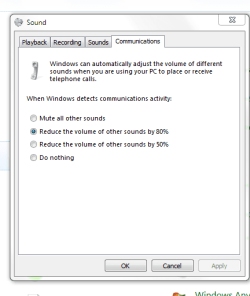
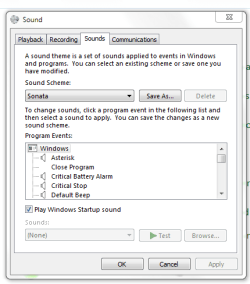
Here is how my sound is set up.............
sound1.PNG

sound2.PNG

sound3.PNG

sound theme.PNG

The theme area you can change and test.
 

My Computer My Computer

Computer Manufacturer/Model Number
HP M9077c
OS
Windows 7 Home Premium 64bit
CPU
Intel(R)Core(TM)2 quad [email protected] 2.39GHz
Motherboard
ASUSeK
Memory
6GB DDR2 6400
Graphics Card(s)
GeForce 8500/512MB
Sound Card
Realtek High Def Audio
Monitor(s) Displays
HP w2408 LCD 24" widescreen
Screen Resolution
1920x1200
Cooling
6 pack of Bud
Keyboard
MS wireless Inteli
Mouse
MS wireless Inteli
Sound disappears!!

Hey HW,

I'm willing to give anything a go!!

Being totally PC inept,......how do i do it?

John

Plesae pretend you are dealing with a six year old!
 

My Computer My Computer

Computer Manufacturer/Model Number
Dell studio xps 7100
OS
Windows 7 64 bit
Got to leave but go to control panel and click on icon that says SOUND!
then check your sound set up with mine. They might not be the same but lets start there.
I will be back to see what you came up with.
Will bring big guns in (Nick) PooManUK to help us both.
 

My Computer My Computer

Computer Manufacturer/Model Number
HP M9077c
OS
Windows 7 Home Premium 64bit
CPU
Intel(R)Core(TM)2 quad [email protected] 2.39GHz
Motherboard
ASUSeK
Memory
6GB DDR2 6400
Graphics Card(s)
GeForce 8500/512MB
Sound Card
Realtek High Def Audio
Monitor(s) Displays
HP w2408 LCD 24" widescreen
Screen Resolution
1920x1200
Cooling
6 pack of Bud
Keyboard
MS wireless Inteli
Mouse
MS wireless Inteli
Sound disappears!!

Well........

Just had a call from a Dell Tec Supvr who has asked if i would mine swapping the sound card from the other (long story, may have already told it in earlier thread!) studio xps 7100, to the new one! Haven't got much to loose so going to give it a go tomorrow! My only concern is that it sounded like a software/driver problem not hardware!

John
 

My Computer My Computer

Computer Manufacturer/Model Number
Dell studio xps 7100
OS
Windows 7 64 bit
John,
Swap it out and see what happens. Nothing to lose.
I think you are spot on with it being a software issue but what do I know.
Just don't give up in getting it fixed to your satisfaction.
Keeps us posted as we all can learn something from this.:thumbsup:
 

My Computer My Computer

Computer Manufacturer/Model Number
HP M9077c
OS
Windows 7 Home Premium 64bit
CPU
Intel(R)Core(TM)2 quad [email protected] 2.39GHz
Motherboard
ASUSeK
Memory
6GB DDR2 6400
Graphics Card(s)
GeForce 8500/512MB
Sound Card
Realtek High Def Audio
Monitor(s) Displays
HP w2408 LCD 24" widescreen
Screen Resolution
1920x1200
Cooling
6 pack of Bud
Keyboard
MS wireless Inteli
Mouse
MS wireless Inteli
Back
Top