

Zombizee
New member
- Local time
- 1:04 AM
- Messages
- 1
First off, I will not claim to be technologically gifted, so please be patient;
I've had a reoccurring issue with my Asus Laptop. Whenever I play music it starts to make this strange guttural sound, accompanied by bouts of freezing and frustratingly slow speeds and responses from my computer. It sounds incredibly similar to this youtube video I found researching my issue. ASUS G73 laptop stops and makes weird noise for a second (couple of times.) - YouTube
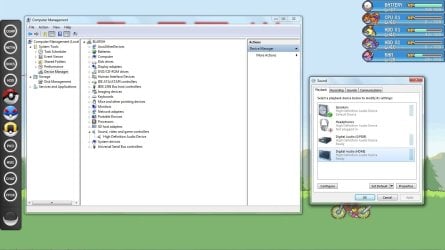
I've used my included recovery disk, and that fixed the problem for a couple months. But the problem returned, and at a loss for what to do, I decided to try to uninstall my sound driver, with the intention of reinstalling it. I restarted and was presented with a new driver "High Definition Audio Device." I don't want to irreversibly destroy anything by continuing this blind voyage. What do I do next? Is it my sound card at all?
I've had a reoccurring issue with my Asus Laptop. Whenever I play music it starts to make this strange guttural sound, accompanied by bouts of freezing and frustratingly slow speeds and responses from my computer. It sounds incredibly similar to this youtube video I found researching my issue. ASUS G73 laptop stops and makes weird noise for a second (couple of times.) - YouTube
I've used my included recovery disk, and that fixed the problem for a couple months. But the problem returned, and at a loss for what to do, I decided to try to uninstall my sound driver, with the intention of reinstalling it. I restarted and was presented with a new driver "High Definition Audio Device." I don't want to irreversibly destroy anything by continuing this blind voyage. What do I do next? Is it my sound card at all?
Attachments
My Computer
At a glance
Windows 7 Home Premium 64bitIntel Core 2 Duo CPU P8700 @2.53 GHz6144 MB, DDR2-6400, 3x 2048 MByteNVIDIA GeForce GTX 260M - 1024 MB, Core: 500 ...
- Computer Manufacturer/Model Number
- ASUSTeK Computer Inc. ASUS Notebook G72GX Series
- OS
- Windows 7 Home Premium 64bit
- CPU
- Intel Core 2 Duo CPU P8700 @2.53 GHz
- Motherboard
- Intel PM45
- Memory
- 6144 MB, DDR2-6400, 3x 2048 MByte
- Graphics Card(s)
- NVIDIA GeForce GTX 260M - 1024 MB, Core: 500 MHz, Memory: 80
- Sound Card
- Realtek ALC663 @ Intel 82801IB ICH9 - High Definition Audio
- Monitor(s) Displays
- 17.3 in. 16:9, 1600x900
- Hard Drives
- Seagate Momentus 7200.4 ST9320423AS, 320GB 7200rpm Two hard disks with 320 GByte each
