Hello
I am new to this forum. I have searched for related problems here but did not find anything relevant, my apologies if this is a duplicate. What follows is a copy of a message sent to VIA (in Taiwan apparently):
I seem to be having some issues with your VIA High Definition Audo drivers in an Asus K60IJ-series laptop (purchased in 2010). The driver version is 6.0.1.7333 dated 09/07/2009. It works fine on its own but when I try to add an external audio device to the system, I run into problems:
- I was not able to make a Toshiba Bluetooth Stack (driving a Kensington K33902 dongle) produce any audio: Windows will not let me set the bluetooth-connected external audio device (Logitech Bluetooth Audio Adapter, provides no Win7 drivers) as a default device while you drivers are installed. If I remove your drivers and allow Windows to install its default drivers instead, I can now choose the Bluetooth device as default but still get no audio out of it, nor out of your VIA audio chipset either (it seems the generic Windows drivers are not compatible with your chipset).
- Am having similar problems with a Creative Digital HS-1200 bluetooth headset: the headset is automatically set as default when the Bluetooth interface is plugged into USB port, but the default can't be changed, and Windows Media Player complains that there are no audio drivers for it (it appears OK under Device Manager)... YouTube continues to play through the VIA despite. The headset works fine on another computer.
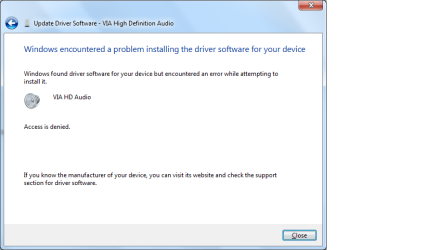
I have read lots of forum articles about related general topics (e.g. inability to set default audio device) and they typically mention driver conflicts as being the cause. I tried to locate possibly updated VIA drivers on your site but don't know which product to select under Select Your Via Product at VIA Drivers and Support Packages Download (and Device Manager does not provide any details on this). I tried some other drivers off the net (via_hd_audio_win7_win8_6_0_11_0400) but it failed to update with an 'Access is denied' error.
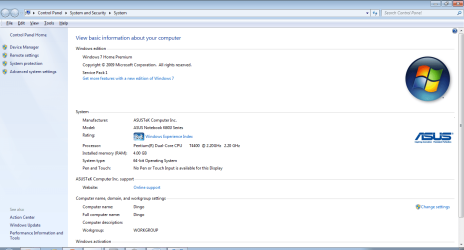
Attached are snapshots of the 'Access is denied' error, and of my computer profile.
Any help would be greatly appreciated. Thank you.
I am new to this forum. I have searched for related problems here but did not find anything relevant, my apologies if this is a duplicate. What follows is a copy of a message sent to VIA (in Taiwan apparently):
I seem to be having some issues with your VIA High Definition Audo drivers in an Asus K60IJ-series laptop (purchased in 2010). The driver version is 6.0.1.7333 dated 09/07/2009. It works fine on its own but when I try to add an external audio device to the system, I run into problems:
- I was not able to make a Toshiba Bluetooth Stack (driving a Kensington K33902 dongle) produce any audio: Windows will not let me set the bluetooth-connected external audio device (Logitech Bluetooth Audio Adapter, provides no Win7 drivers) as a default device while you drivers are installed. If I remove your drivers and allow Windows to install its default drivers instead, I can now choose the Bluetooth device as default but still get no audio out of it, nor out of your VIA audio chipset either (it seems the generic Windows drivers are not compatible with your chipset).
- Am having similar problems with a Creative Digital HS-1200 bluetooth headset: the headset is automatically set as default when the Bluetooth interface is plugged into USB port, but the default can't be changed, and Windows Media Player complains that there are no audio drivers for it (it appears OK under Device Manager)... YouTube continues to play through the VIA despite. The headset works fine on another computer.
I have read lots of forum articles about related general topics (e.g. inability to set default audio device) and they typically mention driver conflicts as being the cause. I tried to locate possibly updated VIA drivers on your site but don't know which product to select under Select Your Via Product at VIA Drivers and Support Packages Download (and Device Manager does not provide any details on this). I tried some other drivers off the net (via_hd_audio_win7_win8_6_0_11_0400) but it failed to update with an 'Access is denied' error.
Attached are snapshots of the 'Access is denied' error, and of my computer profile.
Any help would be greatly appreciated. Thank you.
Attachments
My Computer
At a glance
Win7 64-bit Home PremiumPentium(R) Dual-Core T4400 @ 2.20 GHz4 GB
- Computer type
- PC/Desktop
- Computer Manufacturer/Model Number
- Asus
- OS
- Win7 64-bit Home Premium
- CPU
- Pentium(R) Dual-Core T4400 @ 2.20 GHz
- Motherboard
- whatever is in the Asus Notebook K60IJ Series
- Memory
- 4 GB
- Antivirus
- Avast!
- Browser
- mostly Chrome, some Firefox and IE