Sound Icon has vanished

sundara

New member
Local time
7:02 PM
Messages
24
My sound icon at the bottom right hand corner of the display next to the clock has vanished, help.
 

My Computer

OS
Vista
See if this works .... click on computer, then Local Disk C:\ scroll down to Windows, click on system 32. Scroll down to "SndVol" icon, right click on it, then click on 'pin to taskbar'.
 

My Computer

Computer type
PC/Desktop
Computer Manufacturer/Model Number
Bruce ... somewhere in his 40's
OS
Windows 7 Ultimate 32bit SP1
CPU
Intel(R) Core(TM)2 Quad CPU @ 2.40GHz, 2400 MHz
Motherboard
INTEL/D975XBX2
Memory
4 GB
Graphics Card(s)
ATI Radeon HD 2600 Pro
Monitor(s) Displays
Samsung SyncMaster 914v
Screen Resolution
1280 x 1024
Hard Drives
2/500GB each ... ST3500630AS ATA Device.
One is not connected
PSU
Rocketfish 700 W
Case
G.Skill Gigabyte Chassis
Keyboard
Standard PS/2 Keyboard
Mouse
Microsoft PS/2 Mouse
Internet Speed
DSL
Antivirus
Avira Internet Security
Browser
IE 11
Other Info
ATI HDMI Audio
Also turn off your machine and restart it.
 

My Computer

Computer Manufacturer/Model Number
Self Build 64bit
OS
Vista Ult64, Win7600
CPU
Intel Core 2 Quad Q6600 @ 2400 MHz 64bit OS
Motherboard
Asus P5E3 Deluxe WiFi @p 64 bit OS
Memory
4096 MB DDR3-SDRAM
Graphics Card(s)
ATI Radeon HD 3870 Series x2 Crossfired
Sound Card
Realtek on board
Monitor(s) Displays
Samsung SyncMaster - 23 inches
Screen Resolution
1680x1050 pixels at 60 Hz in True Colors
Hard Drives
Hitachi (250 GB)/Samsung 750 GB. /Barracuda 160 GB.
My Book 1 TB external..

PSU
Cooler Master 1000w
Case
Cooler Master Cosmos 1000.
Cooling
Fans and fresh air,
Keyboard
Wireless
Mouse
Wireless
Internet Speed
Never fast enough
Other Info
I use a Magnum.
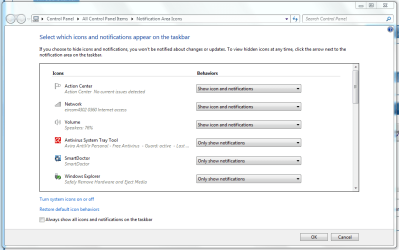
Turn off and restart as I said, if there is no change, check that you have the notification showing as per
the picture, when you right click the little arrow on the taskbar on the bot right.

Volume.PNG
 

My Computer

Computer Manufacturer/Model Number
Self Build 64bit
OS
Vista Ult64, Win7600
CPU
Intel Core 2 Quad Q6600 @ 2400 MHz 64bit OS
Motherboard
Asus P5E3 Deluxe WiFi @p 64 bit OS
Memory
4096 MB DDR3-SDRAM
Graphics Card(s)
ATI Radeon HD 3870 Series x2 Crossfired
Sound Card
Realtek on board
Monitor(s) Displays
Samsung SyncMaster - 23 inches
Screen Resolution
1680x1050 pixels at 60 Hz in True Colors
Hard Drives
Hitachi (250 GB)/Samsung 750 GB. /Barracuda 160 GB.
My Book 1 TB external..
PSU
Cooler Master 1000w
Case
Cooler Master Cosmos 1000.
Cooling
Fans and fresh air,
Keyboard
Wireless
Mouse
Wireless
Internet Speed
Never fast enough
Other Info
I use a Magnum.
As per jfar's picture you can also go to " Turn system icons on or off" on the left bottom of that same page. Check whether it is set to "on".
 

My Computer

Computer Manufacturer/Model Number
HP, Dell, Gateway, Toshiba - 4 laptops and 2 desktops
OS
Vista, Windows7, Mint Mate, Zorin, Windows 8
CPU
from 1.6GHz Duo to i7
Monitor(s) Displays
2x HP w2207
Hard Drives
5x HDD, 7x SSD, 12x Externals
Keyboard
with trackball - no mices
Mouse
Trackball mice
Internet Speed
DSL 6000
Back
Top