
Sound issues driving me crazy

Ross99

New member
Local time
8:45 PM
Messages
7
Ok i know there is numerous threads about this but its getting to me now (im not very computer literate), ive tryed so many different things to try and fix this but its just not happening if i find something and think ive fixed it, 24 hours later it returns i really need somebodys help in trying to solve this as its driving me insane

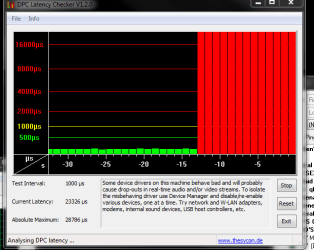
The problem is to do with DPC Latency, ive downloaded the tool and i run it 100% of the time im on my pc to monitor the issue and see if anything i do fixs it, my typical DPC latency when i have no problems is anywhere between 90 and 100 however, when the problem starts it shoots to over 20000 here is a picture of when the problem hits

PICTURE ATTACHED AT BOTTOM

As you can see, it just skyrockets, now this red latency can last anywhere between 30 seconds and 30 minutes before returning back to normal green, it happens randomly more so when im playing games (call of duty modern warfare 2 for example) it also makes the game im playing stutter like i have 1 FPS, when it returns back to green my sound issue is gone and my game runs perfectly

As i said, im not the best with computers so disabling devices and stuff is new to me and im not sure which ones are safe to disable and which are not (except for System and Computer) i have the latest graphics and sound drivers and ive even tryed the default win7 ones and they changed nothing

This is beyond me whats causing it but its got to the point where i simply cannot put up with it anymore and i need to find a fix any help you guys can give me would be greatly appreciated

System Specification
- Power Supply: Corsair TX 650W ATX SLi Compliant Power Supply
- CPU: Intel Core i7 950 3.06GHz Overclocked to 4.00GHz
- Motherboard: Gigabyte EX58A-UD3R Intel X58 (Socket 1366) PCI-Express DDR3 Motherboard
- Cooler: Prolimatech Megahalems Rev B CPU Cooler with Sharkoon Silent Eagle 2000rpm 120mm Fan
- RAM: Corsair XMS3 6GB (3x2GB) DDR3 PC3-12800C8 (1600MHz) Tri-Channel
- Hard Drive: Seagate Barracuda 7200.12 1TB SATA-II 32MB Cache
- Graphics Card: NVIDIA GeForce GTX 460
- Sound: Realtek ALC889 7.1 Channel Sound (On-Board)
- Optical Drive: LG DVD+/-RW SATA Drive
- Windows 7 64-Bit
 

Attachments
  • 2ljj1oy.png
    2ljj1oy.png
    14.2 KB · Views: 32

My Computer

OS
Windows 7 Home Premium 64bit
Take a look at THIS thread from the gearslutz forum about the DPC latency checker. Maybe something in there will help you.
 

My Computer

Computer type
PC/Desktop
Computer Manufacturer/Model Number
My Own Build
OS
Windows 10 64 bit
CPU
Intel i7 6700K
Motherboard
ASUS ROG Maximus VIII Hero
Memory
16GB Corsair Dominator
Graphics Card(s)
Intel CPU Graphics
Sound Card
RealTek
Monitor(s) Displays
27" Dell S2719dgf
Screen Resolution
2560X1440
Hard Drives
1 TB Samsung 850 EVO SSD for Win 10 Pro
500GB Samsung 850 EVO SSD for Win 10 Insider
2 TB drive for backup
PSU
EVGA Supernova 750G2
Case
BeQuiet Silent Base 600
Cooling
Deepcool Captain 120EX
Keyboard
Microsoft Wireless 2000
Mouse
Microsoft wireless
Internet Speed
100 MB/sec (Cable)
Antivirus
Microsoft Defender and Malwarebytes
Browser
Edge/Firefox
Other Info
Cakewalk (Sonar) by BandLab and Studio One 4.1 Pro recording studio software. MOTU 896Mk3 Hybrid recording interface, Frontier Tranzport wireless control unit, Behringer X-Touch Control Surface.
Five USB connected optical drives for CD Audio production using Nero BurningROM
Hi, thanks for linking me that thread, i downloaded the tool LatencyMon and decided to run it in order to see if it could tell me what was causing this problem, the problem is i have no idea what any of it means in terms of which one is actually causing it, shall i post the latencymon results here and see if you could make sense of any of it?
 

My Computer

OS
Windows 7 Home Premium 64bit
You can post them. No guarantee that I can make any more sense out of it than you.
 

My Computer

Computer type
PC/Desktop
Computer Manufacturer/Model Number
My Own Build
OS
Windows 10 64 bit
CPU
Intel i7 6700K
Motherboard
ASUS ROG Maximus VIII Hero
Memory
16GB Corsair Dominator
Graphics Card(s)
Intel CPU Graphics
Sound Card
RealTek
Monitor(s) Displays
27" Dell S2719dgf
Screen Resolution
2560X1440
Hard Drives
1 TB Samsung 850 EVO SSD for Win 10 Pro
500GB Samsung 850 EVO SSD for Win 10 Insider
2 TB drive for backup
PSU
EVGA Supernova 750G2
Case
BeQuiet Silent Base 600
Cooling
Deepcool Captain 120EX
Keyboard
Microsoft Wireless 2000
Mouse
Microsoft wireless
Internet Speed
100 MB/sec (Cable)
Antivirus
Microsoft Defender and Malwarebytes
Browser
Edge/Firefox
Other Info
Cakewalk (Sonar) by BandLab and Studio One 4.1 Pro recording studio software. MOTU 896Mk3 Hybrid recording interface, Frontier Tranzport wireless control unit, Behringer X-Touch Control Surface.
Five USB connected optical drives for CD Audio production using Nero BurningROM
Hasnt happened in the last day or so because its so random, ill update this to see if you can help me when it actually happens :(
 

My Computer

OS
Windows 7 Home Premium 64bit
This is getting to be a common topic.

I am also suffering from it.

I have narrowed it down to my Atheros ethernet adapter and/or bittorrent traffic.

The bittorrent traffic always seals the deal, meaning, it's pretty much guaranteed to start showing spikes anytime soon after opening Vuze or Utorrent.

If I disable my bittorrent, I get a reduction in spikes. If I also disable my adapter, I get straight green bars.

I have gone thru every driver posible, no avail.

I have updated firmware on router.

I can't download and browse together for more than 20 minutes and I have to reboot my PC. Logging off, or just disabling/re-enabling the adapter is not good enough.

Getting real sick of this problem.
 

My Computer

Computer Manufacturer/Model Number
Acer Aspire 6930///Compaq Presario SR5152NX
OS
Windows 7 Professional 32-bit///Vista Home Premium 32-bit
Memory
3GB RAM///2GB RAM
Graphics Card(s)
Built-in, crap///NVIDIA GeForce 6150SE nForce 430
Sound Card
Built-in, alright///Realtek HD audio
Monitor(s) Displays
Built in and 26" LCD/40" LCD (VGA splitter)
Screen Resolution
Laptop: 1366X768 26"Mon: 1366X768 40"Mon:1920X1080
Hard Drives
Internal 350GB///250GB
2 Seagate 1TB HDD Ext.
1 Verbatim 500GB HDD Ext.
Cooling
Stock fans
Keyboard
Intelli-Type Wireless multimedia keyboard
Mouse
MS Wireless Notebook Optical Mouse 3000
Internet Speed
15Mbps Telus DSL
Other Info
2 PS3's, 1 XBOX360, and a Panasonic Blu-Ray player rendering media to various locations in house via PS3 Media Server*****
DIR-655 Xtreme N Gb router w/DAP-1522 bridge/access point******Using Input Director to share keyboard and mouse across all screens and PC's in my room.
File sharing software can cause bottlenecks and hang up the PC.
 

My Computer

Computer type
PC/Desktop
Computer Manufacturer/Model Number
My Own Build
OS
Windows 10 64 bit
CPU
Intel i7 6700K
Motherboard
ASUS ROG Maximus VIII Hero
Memory
16GB Corsair Dominator
Graphics Card(s)
Intel CPU Graphics
Sound Card
RealTek
Monitor(s) Displays
27" Dell S2719dgf
Screen Resolution
2560X1440
Hard Drives
1 TB Samsung 850 EVO SSD for Win 10 Pro
500GB Samsung 850 EVO SSD for Win 10 Insider
2 TB drive for backup
PSU
EVGA Supernova 750G2
Case
BeQuiet Silent Base 600
Cooling
Deepcool Captain 120EX
Keyboard
Microsoft Wireless 2000
Mouse
Microsoft wireless
Internet Speed
100 MB/sec (Cable)
Antivirus
Microsoft Defender and Malwarebytes
Browser
Edge/Firefox
Other Info
Cakewalk (Sonar) by BandLab and Studio One 4.1 Pro recording studio software. MOTU 896Mk3 Hybrid recording interface, Frontier Tranzport wireless control unit, Behringer X-Touch Control Surface.
Five USB connected optical drives for CD Audio production using Nero BurningROM
One or more DPC routines that execute on behalf of drivers running in your system appear to be causing serious problems making your system unsuitable for processing real time audio. You are likely to experience audio dropouts, clicks and pops.
Time running: 0:04:59


Highest DPC routine execution time (µs): 28821
Responsible driver: nvlddmkm.sys (NVIDIA Windows Kernel Mode Driver, Version 260.99 , NVIDIA Corporation)
DPC count (execution time <500 µs): 17351502
DPC count (execution time 500-999 µs): 0
DPC count (execution time 1000-1999 µs): 0
DPC count (execution time 2000-3999 µs): 0
DPC count (execution time >=4000 µs): 29

Highest ISR routine execution time (µs): 79
Responsible driver: dxgkrnl.sys (DirectX Graphics Kernel, Microsoft Corporation)
ISR count (execution time <250 µs): 16799994
ISR count (execution time 250-499 µs): 0
ISR count (execution time 500-999 µs): 0
ISR count (execution time 1000-1999 µs): 0
ISR count (execution time >=2000 µs): 0

Highest pagefault resolution time (µs): 171192
Hard pagefault count (total): 100152
Number of processes hit: 24
Pagefault count of hardest hit process: 82207
Process with highest pagefault count: MsMpEng.exe (PID: 920)

NOTE: some processes were hit by hard pagefaults. If these were programs producing audio, they are likely to interrupt the audio stream resulting in dropouts, clicks and pops. Check the Processes tab to see which programs were hit.

Note: all execution times are calculated based on a CPU clock speed of 4011 MHz. Disable variable speed settings like Intel Speed Step and AMD Cool N Quiet in the BIOS setup for more accurate results.

I really dont understand any of this other than its possibly a nvidia driver? any help is appreciated
 

My Computer

OS
Windows 7 Home Premium 64bit
WIN 7x64 issues as well

Hi all
was going to post a long rant about this issue as well but i see a thread has been started. So in short same latency, audio problems when running 3d apps like Battlefield Bad company 2 and Empire total War. tried Driver roll backs of sound, Lan, and video to no change.

Been fighting with with this thing for a week now and am at a lost for whats next. Any help, suggestions, besides lateral velocity through a window, would be a kindness. So here goes:

Sys Specs First-
MB - MSI P6NSLI
CPU - Intel Dual Core 3.0Ghz
RAM - Kingston DDR2 1Ghz x 4
GPU - Nvidia GForce 8800GTS x 2 Native SLI
PSU - BFG 650w
Audio - Realtek HD Audio
OS - Windows 7 x64 Ultimate
Dynex 100/1gb Netcard (cheap i kno)

Now This has been a running fight to localize and correct this unplayability issue. I have done alot of diagnostic tries and retries. such as the video driver roll back, Audio driver rollback, Ripping the guts out of this machine, re-seating all cards, sticks and plugs. I went and found a Creative SB 24bit i have and put that in uninstalling and disabling, in BIOS, the on board Realtek, Took out the Dynex net card re-enabled the on board LAN. and no change. Even tried one video card at a time.

Been forum hunting since the start.
I found out about the MMCSS ( Multimedia Class Scheduler Service). Was useing the rivatuner not to Over clock but the hardware monitoring and frame-rate monitoring. saw FPS go from 45-65 to zero for a half second every 30-45 seconds. PROOF of something.

My only next step would be, since i belive the RAM GPUs and CPU are good, is to get a new MB but if this is a Win7 driver FUBAR it would be a poor use of monies.

So if any know of a solution other than the Registry edit which did nothing for me. Or in need of more, or less information, please let me know.

thank you for your time,
[CCR] HaVoK41

P.S. before this hair pulling week and a half this machine has run well. no issues.
 

My Computer

Computer Manufacturer/Model Number
Home Built
OS
Win 7 x64 Ultimate
CPU
Intel Dual 3.0 Ghz
Motherboard
MSI P6N SLI
Memory
4x 1G Kingston DDR2
Graphics Card(s)
2x Nvidia 8800GTS
Sound Card
Realtek HD Onboard
Monitor(s) Displays
PNP
Hard Drives
SATA 250g WDigital: OS only
SATA 500g WDigital: Everything Else
PSU
BFG 650w
Case
Mini Tower
Cooling
3 case fans
It appears to be nviddmkm.sys on every single DPC latency spike according to latencymon which i think is my graphics driver, it happened on the previous driver and the newest so im not sure what to do :|

edit: i uninstalled my graphics drivers and went back to an older NVIDIA one and its still the same, the monitor on latencymon shows this

160659h.png
 
Last edited:

My Computer

OS
Windows 7 Home Premium 64bit
Video can be one of the most often causes. I have an ATI Radeon HD4850 video card and I can't use the last 3 versions due to some game problems. I would try several older versions and see if it makes any difference.

You could also give the "uninstall" a try. Uninstall the Video in the Device Manager (do not uninstall the drivers) then restart the PC and when Windows starts it will reinstall the Video. Sometimes this puts devices on a different shared IRQ which can make a difference. Go to the Device Manager, RIGHT click on the entry for the Video card to highlight it and then LEFT click on "uninstall" - restart the PC.
 

My Computer

Computer type
PC/Desktop
Computer Manufacturer/Model Number
My Own Build
OS
Windows 10 64 bit
CPU
Intel i7 6700K
Motherboard
ASUS ROG Maximus VIII Hero
Memory
16GB Corsair Dominator
Graphics Card(s)
Intel CPU Graphics
Sound Card
RealTek
Monitor(s) Displays
27" Dell S2719dgf
Screen Resolution
2560X1440
Hard Drives
1 TB Samsung 850 EVO SSD for Win 10 Pro
500GB Samsung 850 EVO SSD for Win 10 Insider
2 TB drive for backup
PSU
EVGA Supernova 750G2
Case
BeQuiet Silent Base 600
Cooling
Deepcool Captain 120EX
Keyboard
Microsoft Wireless 2000
Mouse
Microsoft wireless
Internet Speed
100 MB/sec (Cable)
Antivirus
Microsoft Defender and Malwarebytes
Browser
Edge/Firefox
Other Info
Cakewalk (Sonar) by BandLab and Studio One 4.1 Pro recording studio software. MOTU 896Mk3 Hybrid recording interface, Frontier Tranzport wireless control unit, Behringer X-Touch Control Surface.
Five USB connected optical drives for CD Audio production using Nero BurningROM
That didnt help, started straight after 1 game of call of duty this time :\ really starting to get annoying and there seems to be no way of fixing it

Dont know if this changes anything, ran it while i had high dpc latency

675mqs.png
 
Last edited:

My Computer

OS
Windows 7 Home Premium 64bit
Just got 3 new things come up in the LAtencymon monitor tab..sigh i dont even know what to do anymore

USBPORT.SYS USB 1.1 & 2.0 Port Driver
dxgkrnl.sys DirectX Graphics Kernel
ataport.SYS ATAPI Driver extension

2v989rn.png
 

My Computer

OS
Windows 7 Home Premium 64bit
That shows a list of different driver routines executing over 20ms. This gives the impression of a system which runs entirely slow. Possibly this is a throttling issue due to overheating. Please check your CPU speed with CPUZ and make sure it shows normal values before looking at anything else.
 

My Computer

OS
Win7 x64
Back
Top