Win 7 Pro x64 Updates not working at all, errors 800736B3 and 80246007

elanus

New member
Local time
2:46 AM
Messages
9
I am dealing with interesting but messy situation with almost new PC.

PC specs: Lenovo ThinkCentre M93p, Windows 7 Pro x64

While windows updates were working normally initially, they are not working at all anymore - all OS updates are failing and do not install (with error code 800736B3). I have tried different voodoo (for me) tricks to no avail. Manually downloaded individual update fails to install as well.

Another issue are huge CBS.log (approx 500MB before cab files are auto-done).

What I have done:

- run SFC /scannow (several times, before and after running SURT)
(result is always "Windows Resource Protection found corrupt files but was unable to fix some of them"

- run SURT

- run "Windows Update Diagnostic"
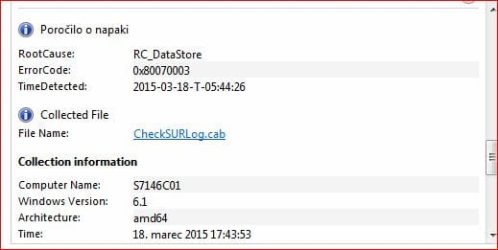
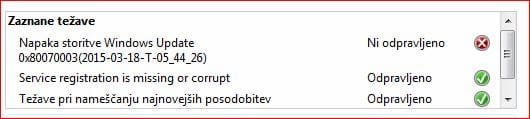
(result is rather confusing - it keeps mentioning 0x80070003 not fixed, but then show as fixed in details - I am attaching screenshots as well)

+ deleting / renaming specific folders as was advised in several forums, restarting WU, BITS services ...

The issue remains same as before - Windows updates are still not installing.
Mostly they fail with 800736B3, sometimes with 80246007 (same "KB" update)

Fresh CheckSUR.log is clean, but I am attaching CheckSUR.persist with some issues for reference.
I am also attaching two partial CBS.log files (after deleting CBS.log at some point). If older CBSpersist are needed, I can provide them (but they are big 3MB - 40MB per file).

Can gurus please help? Thank you in advance ...

EDIT: At moment there are 45 critical updates, that do not install ...
 

Attachments
  • CheckSUR.persist.zip
    CheckSUR.persist.zip
    1 KB · Views: 1
  • 0x80070003.JPG
    0x80070003.JPG
    19.7 KB · Views: 32
  • 0x80070003-2.JPG
    0x80070003-2.JPG
    23.4 KB · Views: 32

My Computer My Computer

At a glance

Windows 7 Pro x64, Windows 7 Enterprise x32
Computer type
PC/Desktop
OS
Windows 7 Pro x64, Windows 7 Enterprise x32
Bump: any knowledgeable good soul around?
 

My Computer My Computer

At a glance

Windows 7 Pro x64, Windows 7 Enterprise x32
Computer type
PC/Desktop
OS
Windows 7 Pro x64, Windows 7 Enterprise x32
Sorry for the delay!
The problem with this error is that it's relatively rare, and tends from what I can make out to be caused by severe registry corruption - although it's possibly the result of (another) failed updated from MS.

In your case, there is come corruption in the SFC scan...
Code:
 Line 5762: 2015-03-18 19:52:34, Info                  CSI    000003d5 [SR] Repairing 3 components
 Line 5763: 2015-03-18 19:52:34, Info                  CSI    000003d6 [SR] Beginning Verify and Repair transaction
 Line 5766: 2015-03-18 19:52:34, Info                  CSI    000003d8 [SR] Cannot repair member file [l:24{12}]"cryptdlg.dll" of Microsoft-Windows-cryptdlg-dll, Version = 6.1.7601.18150, pA = PROCESSOR_ARCHITECTURE_AMD64 (9), Culture neutral, VersionScope = 1 nonSxS, PublicKeyToken = {l:8 b:31bf3856ad364e35}, Type neutral, TypeName neutral, PublicKey neutral in the store, hash mismatch
 Line 5769: 2015-03-18 19:52:34, Info                  CSI    000003da [SR] Cannot repair member file [l:26{13}]"tzres.dll.mui" of Microsoft-Windows-International-TimeZones.Resources, Version = 6.1.7601.18588, pA = PROCESSOR_ARCHITECTURE_AMD64 (9), Culture = [l:10{5}]"sl-SI", VersionScope = 1 nonSxS, PublicKeyToken = {l:8 b:31bf3856ad364e35}, Type neutral, TypeName neutral, PublicKey neutral in the store, hash mismatch
 Line 5772: 2015-03-18 19:52:34, Info                  CSI    000003dc [SR] Cannot repair member file [l:26{13}]"tzres.dll.mui" of Microsoft-Windows-International-TimeZones.Resources, Version = 6.1.7601.18588, pA = PROCESSOR_ARCHITECTURE_INTEL (0), Culture = [l:10{5}]"sl-SI", VersionScope = 1 nonSxS, PublicKeyToken = {l:8 b:31bf3856ad364e35}, Type neutral, TypeName neutral, PublicKey neutral in the store, hash mismatch


I'll post a fix protocol for these when I can.
 

My Computer My Computer

At a glance

Win 7 x64 Home Premium (and x86 VirtualBox VM...i3 370M/i7 6500U8GB - finally :)/8GBit's an i3, dude!/dual Intel&nVidia
Computer type
Laptop
Computer Manufacturer/Model Number
Asus K52F or Lenovo B51-80
OS
Win 7 x64 Home Premium (and x86 VirtualBox VM)/Win10
CPU
i3 370M/i7 6500U
Motherboard
Asus/Lenovo
Memory
8GB - finally :)/8GB
Graphics Card(s)
it's an i3, dude!/dual Intel&nVidia
Sound Card
onboard
Monitor(s) Displays
15.6" built-in
Screen Resolution
1366x768/1920x1080
Hard Drives
750GB Seagate internal
Sundry external drives attached to other computers on the local network
1TB SSD on the Lenovo
PSU
n/a
Internet Speed
as much as I can get - usually on a dongle/phone, so <1MB/s
Antivirus
MSE/Defender
Browser
IE11/12/Edge/Chrome/FF(if I must)
Thank you for reply and help. Will wait for your fix ...
 

My Computer My Computer

At a glance

Windows 7 Pro x64, Windows 7 Enterprise x32
Computer type
PC/Desktop
OS
Windows 7 Pro x64, Windows 7 Enterprise x32
I've uploaded a file - eusaa.zip - to my OneDrive at Noel's OneDrive
Please download and save it.

Right-click on the saved file and select Extract all...
Change the target to C:\ and click on Extract
Close all windows (it would be a good idea to print these instructions!)

Now reboot to the Repair Environment - as soon as the machine restarts, start tapping F8 - this should bring up the Advanced Boot Menu, at the top of which should be the option 'Repair my Computer'
Pick that
You'll have to log in with your username and password.

Pick the option to use a Command Prompt
At the prompt type
DIR C:\eusaa
hit the enter key - if you get a 'Not Found' error try
DIR D:\eusaa
or
DIR E:\eusaa


The drive letter in use when you find the folder will need to be substituted (for<drive>) into the following command...


XCOPY <drive>:\eusaa <drive>:\windows\winsxs /y /i /s /v /h


(e.g. XCOPY P:\wfire P:\windows\winsxs /y /i /s /v /h )


run the command (it should take almost no time) and when the prompt returns, type
EXIT
and hit the Enter key to exit Command Prompt - reboot to Normal Mode Windows.

Now run SFC /SCANNOW in an Elevated Command Prompt
then reboot and upload the new CBS.log file to your reply
 

My Computer My Computer

At a glance

Win 7 x64 Home Premium (and x86 VirtualBox VM...i3 370M/i7 6500U8GB - finally :)/8GBit's an i3, dude!/dual Intel&nVidia
Computer type
Laptop
Computer Manufacturer/Model Number
Asus K52F or Lenovo B51-80
OS
Win 7 x64 Home Premium (and x86 VirtualBox VM)/Win10
CPU
i3 370M/i7 6500U
Motherboard
Asus/Lenovo
Memory
8GB - finally :)/8GB
Graphics Card(s)
it's an i3, dude!/dual Intel&nVidia
Sound Card
onboard
Monitor(s) Displays
15.6" built-in
Screen Resolution
1366x768/1920x1080
Hard Drives
750GB Seagate internal
Sundry external drives attached to other computers on the local network
1TB SSD on the Lenovo
PSU
n/a
Internet Speed
as much as I can get - usually on a dongle/phone, so <1MB/s
Antivirus
MSE/Defender
Browser
IE11/12/Edge/Chrome/FF(if I must)
Thank you, will try it on Monday (as it is for remote computer) ...
 

My Computer My Computer

At a glance

Windows 7 Pro x64, Windows 7 Enterprise x32
Computer type
PC/Desktop
OS
Windows 7 Pro x64, Windows 7 Enterprise x32
Fresh CBS log

Sorry that it took so long, as I didn't have access to the computer. I am attaching fresh CBS log
 

My Computer My Computer

At a glance

Windows 7 Pro x64, Windows 7 Enterprise x32
Computer type
PC/Desktop
OS
Windows 7 Pro x64, Windows 7 Enterprise x32
the SFC scan is clear ;)

So - does Windows Update now work? - what is the new error message (if any) after doing a Check for Updates?
 

My Computer My Computer

At a glance

Win 7 x64 Home Premium (and x86 VirtualBox VM...i3 370M/i7 6500U8GB - finally :)/8GBit's an i3, dude!/dual Intel&nVidia
Computer type
Laptop
Computer Manufacturer/Model Number
Asus K52F or Lenovo B51-80
OS
Win 7 x64 Home Premium (and x86 VirtualBox VM)/Win10
CPU
i3 370M/i7 6500U
Motherboard
Asus/Lenovo
Memory
8GB - finally :)/8GB
Graphics Card(s)
it's an i3, dude!/dual Intel&nVidia
Sound Card
onboard
Monitor(s) Displays
15.6" built-in
Screen Resolution
1366x768/1920x1080
Hard Drives
750GB Seagate internal
Sundry external drives attached to other computers on the local network
1TB SSD on the Lenovo
PSU
n/a
Internet Speed
as much as I can get - usually on a dongle/phone, so <1MB/s
Antivirus
MSE/Defender
Browser
IE11/12/Edge/Chrome/FF(if I must)
Vast majority still failing. Only few "processor" updates went through. Will get report and post it here.
 

My Computer My Computer

At a glance

Windows 7 Pro x64, Windows 7 Enterprise x32
Computer type
PC/Desktop
OS
Windows 7 Pro x64, Windows 7 Enterprise x32
Sorry for long delay. Updates still not working, all fail (except windows defender updates) with error code 800736B3.
 

My Computer My Computer

At a glance

Windows 7 Pro x64, Windows 7 Enterprise x32
Computer type
PC/Desktop
OS
Windows 7 Pro x64, Windows 7 Enterprise x32
Please post the C:\Windows\windowsupdate.log
also...

Open Event Viewer
click on the Windows logs entry in the left pane to expand it.
Now click on the Application entry - wait while it loads.
Click on 'File' in the menu bar and select Save...
Save the file as Appevt.evtx
Repeat for the System log
then zip both, and upload them.
 

My Computer My Computer

At a glance

Win 7 x64 Home Premium (and x86 VirtualBox VM...i3 370M/i7 6500U8GB - finally :)/8GBit's an i3, dude!/dual Intel&nVidia
Computer type
Laptop
Computer Manufacturer/Model Number
Asus K52F or Lenovo B51-80
OS
Win 7 x64 Home Premium (and x86 VirtualBox VM)/Win10
CPU
i3 370M/i7 6500U
Motherboard
Asus/Lenovo
Memory
8GB - finally :)/8GB
Graphics Card(s)
it's an i3, dude!/dual Intel&nVidia
Sound Card
onboard
Monitor(s) Displays
15.6" built-in
Screen Resolution
1366x768/1920x1080
Hard Drives
750GB Seagate internal
Sundry external drives attached to other computers on the local network
1TB SSD on the Lenovo
PSU
n/a
Internet Speed
as much as I can get - usually on a dongle/phone, so <1MB/s
Antivirus
MSE/Defender
Browser
IE11/12/Edge/Chrome/FF(if I must)
TY will do
 

My Computer My Computer

At a glance

Windows 7 Pro x64, Windows 7 Enterprise x32
Computer type
PC/Desktop
OS
Windows 7 Pro x64, Windows 7 Enterprise x32
Back
Top