
Zephandrypus
New member
- Local time
- 7:34 PM
- Messages
- 8
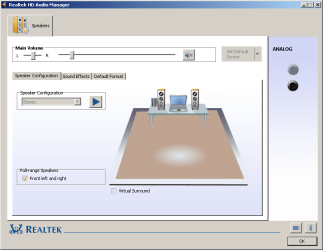
In the Windows audio playback tab there's only "speakers" but sound is playing from both speakers and the headphones, with headphones plugged into the right jack. I checked the Realtek Control Panel and there was F**K ALL for options there (see attached). There is an Intel(R) Display Audio in Device Manager alongside Realtek High Definition Audio. So now I can't watch warm-up videos at school without blasting the sounds through my speakers as well.
I tried a System Restore to before the problem started but it didn't do anything. The problem started around the time I ran an Advanced Systemcare 8 scan, which does the following tasks:
System Specs included inside attached DxDiag.
I tried a System Restore to before the problem started but it didn't do anything. The problem started around the time I ran an Advanced Systemcare 8 scan, which does the following tasks:
- Spyware Removal
- Registry Fix
- Privacy Sweep
- Junk Files Clean
- Internet Boost
- Shortcuts Fix
- Registry Defrag
- System Optimization
- Security Defense
- Disk Scan
- Vulnerability Fix (Windows Updates)
- Disk Optimization
System Specs included inside attached DxDiag.
Attachments
My Computer
At a glance
Windows 7 Professional 64-bit SP1Intel Core i5 2520M @ 2.50 GHz4.00GB Single-Channel DDR3 @ 664MHzIntel HD Graphics 3000
- Computer type
- Laptop
- Computer Manufacturer/Model Number
- Toshiba
- OS
- Windows 7 Professional 64-bit SP1
- CPU
- Intel Core i5 2520M @ 2.50 GHz
- Motherboard
- Toshiba Portable PC
- Memory
- 4.00GB Single-Channel DDR3 @ 664MHz
- Graphics Card(s)
- Intel HD Graphics 3000
- Sound Card
- Realtek High Definition Audio
- Monitor(s) Displays
- Internal LCD
- Screen Resolution
- 1600x900@60Hz
- Hard Drives
- 298 GB HDD Toshiba ATA
- Mouse
- Anker 8200 DPI
- Internet Speed
- 120 mbps
- Antivirus
- MalwareBytes, Microsoft Security Essentials
- Browser
- Vivaldi


