bluesjunior
New member
- Local time
- 3:15 AM
- Messages
- 33
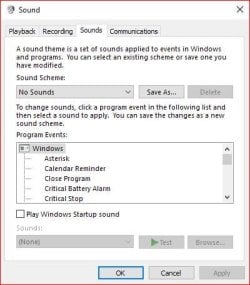
I bought a small DAC in order to use my vintage technics analogue stereo system for audio playback from my Win7 PC. I fitted it together via the toslink connection on the PC to the DAC input and then out via RCA connector cable to the AUX output on my amplifier. It works perfectly and I now get really good hi-fi quality sound output. The problem I am asking about is not about the DAC connection which works fine but, when I click on any folder on my hard drive eg to change music or just generally opening a folder I get this pop sound through the speakers. It is similar to the sound you get when connecting a jack plug to a live amplifier. Perhaps this has always been there but my 5.1 digital sound system wasn't affected so much as the full range studio monitors I am now using are. I realise this must be something to do with the Windows OS sounds but don't know if it is possible to turn them off or indeed if it is even advisable to turn them off. Has anyone experienced this and is there a solution?.
My Computer
- Computer type
- PC/Desktop
- Computer Manufacturer/Model Number
- Custom Build
- OS
- Windows 7 Home Premium 64bit SP1
- CPU
- AMD Athlon II X3 450
- Motherboard
- Gigabyte GA-MA770T-UD3
- Memory
- 8.00GB Dual Channel DDR3
- Graphics Card(s)
- Radeon HD 5750
- Hard Drives
- 465GB SAMSUNG HD502HJ SATA Disk Device
931GB BUFFALO External HDD USB Device
- Antivirus
- Comodo CIS
- Browser
- Pale Moon 64bit