Sound randomly garbled or "underwater"

WillChason

New member
Local time
2:04 AM
Messages
11
Today I updated all the drivers for all my cards, parts, etc., and found that after doing so all sounds coming from my computer, be it through headphones or the built-in speakers, from system sounds to game sounds to music will be garbled. They range from the occasional tiny hiccup to getting about a second of "interruption" for every second of sound. I tried to re-update or un-update my sound card drivers, however I cannot seem to find what kind of sound card I have. My computer is an Alienware14x laptop with all the regular components.

It's driving me crazy and if anyone could offer any suggestions as to how I could possibly look into fixing it that would be great! Thanks!
Will
 

My Computer My Computer

OS
Windows 7 Home Premium 32bit
First question, did you use the Dell supplied drivers, especially the sound, or non-Dell drivers. Generally only Dell should be used, especially for the sound.

Audio is Realtek. Product Support for alienware M14x | Dell US

Some sound systems also have "Enhancements" or effects and if that is enabled that could also be a source of problems.
 

My Computer My Computer

Computer type
PC/Desktop
Computer Manufacturer/Model Number
My Own Build
OS
Windows 10 64 bit
CPU
Intel i7 6700K
Motherboard
ASUS ROG Maximus VIII Hero
Memory
16GB Corsair Dominator
Graphics Card(s)
Intel CPU Graphics
Sound Card
RealTek
Monitor(s) Displays
27" Dell S2719dgf
Screen Resolution
2560X1440
Hard Drives
1 TB Samsung 850 EVO SSD for Win 10 Pro
500GB Samsung 850 EVO SSD for Win 10 Insider
2 TB drive for backup
PSU
EVGA Supernova 750G2
Case
BeQuiet Silent Base 600
Cooling
Deepcool Captain 120EX
Keyboard
Microsoft Wireless 2000
Mouse
Microsoft wireless
Internet Speed
100 MB/sec (Cable)
Antivirus
Microsoft Defender and Malwarebytes
Browser
Edge/Firefox
Other Info
Cakewalk (Sonar) by BandLab and Studio One 4.1 Pro recording studio software. MOTU 896Mk3 Hybrid recording interface, Frontier Tranzport wireless control unit, Behringer X-Touch Control Surface.
Five USB connected optical drives for CD Audio production using Nero BurningROM
I'm running the diagnostic at the Alienware support website now to see what it turns up. Also, how would it be possible to check if there are any special effects going on? I doubt this is the problem because of how random the sound is, however I'd still like to look into it.

Also, I've begin to develop a new theory: I believe these "shudders" in my sound are actually indicative of my whole computer kind of "shuddering" or "stopping" for a split second. Would there be any way for me to test for this or how would I go about working on it?
 

My Computer My Computer

OS
Windows 7 Home Premium 32bit
Sound is always on a shared Interrupt (IRQ) with some other higher priority device. The higher priority device can be "interrupting" the sound and causing this (one possibility). Since you updated the drivers, that may have put it on a different IRQ which is causing this.

One thing to try, go to the Device Manager, RIGHT click on the entry for the sound and then LEFT click "Uninstall". DO NOT check the box to also uninstall the drivers. Then restart the PC and when Windows starts it will detect and reinstall the sound. Sometimes this will put it on a different shared IRQ and fix or minimize the problem.
 

My Computer My Computer

Computer type
PC/Desktop
Computer Manufacturer/Model Number
My Own Build
OS
Windows 10 64 bit
CPU
Intel i7 6700K
Motherboard
ASUS ROG Maximus VIII Hero
Memory
16GB Corsair Dominator
Graphics Card(s)
Intel CPU Graphics
Sound Card
RealTek
Monitor(s) Displays
27" Dell S2719dgf
Screen Resolution
2560X1440
Hard Drives
1 TB Samsung 850 EVO SSD for Win 10 Pro
500GB Samsung 850 EVO SSD for Win 10 Insider
2 TB drive for backup
PSU
EVGA Supernova 750G2
Case
BeQuiet Silent Base 600
Cooling
Deepcool Captain 120EX
Keyboard
Microsoft Wireless 2000
Mouse
Microsoft wireless
Internet Speed
100 MB/sec (Cable)
Antivirus
Microsoft Defender and Malwarebytes
Browser
Edge/Firefox
Other Info
Cakewalk (Sonar) by BandLab and Studio One 4.1 Pro recording studio software. MOTU 896Mk3 Hybrid recording interface, Frontier Tranzport wireless control unit, Behringer X-Touch Control Surface.
Five USB connected optical drives for CD Audio production using Nero BurningROM
I tried that, and it did not seem to help anything :/ Anything else I can try? Or is it possible to change around the IRQ settings to make this not happen?
 

My Computer My Computer

OS
Windows 7 Home Premium 32bit
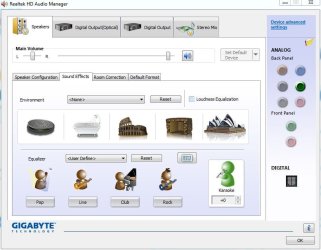
Here is what I have in my Realtek HD Audio Manager, in the Control Panel/Hardware and sound.

Check to see if you have something similiar and check the options.
 

Attachments

  • Capture.JPG
    Capture.JPG
    60.2 KB · Views: 1

My Computer My Computer

Computer type
PC/Desktop
Computer Manufacturer/Model Number
My Own Build
OS
Windows 10 64 bit
CPU
Intel i7 6700K
Motherboard
ASUS ROG Maximus VIII Hero
Memory
16GB Corsair Dominator
Graphics Card(s)
Intel CPU Graphics
Sound Card
RealTek
Monitor(s) Displays
27" Dell S2719dgf
Screen Resolution
2560X1440
Hard Drives
1 TB Samsung 850 EVO SSD for Win 10 Pro
500GB Samsung 850 EVO SSD for Win 10 Insider
2 TB drive for backup
PSU
EVGA Supernova 750G2
Case
BeQuiet Silent Base 600
Cooling
Deepcool Captain 120EX
Keyboard
Microsoft Wireless 2000
Mouse
Microsoft wireless
Internet Speed
100 MB/sec (Cable)
Antivirus
Microsoft Defender and Malwarebytes
Browser
Edge/Firefox
Other Info
Cakewalk (Sonar) by BandLab and Studio One 4.1 Pro recording studio software. MOTU 896Mk3 Hybrid recording interface, Frontier Tranzport wireless control unit, Behringer X-Touch Control Surface.
Five USB connected optical drives for CD Audio production using Nero BurningROM
In my control panel I do not have a Hardware and Sound option. The only thing I have is a Sound option, which simply lists my input and output devices, and allows me to change the default Windows sounds. There are no options for the output devices other than mono or stereo. I'm beginning to think I do not even have Realtek on my computer because I cannot find anything for it anywhere.
 

My Computer My Computer

OS
Windows 7 Home Premium 32bit
If you don't have "Hardware and Sound" that is a major Windows problem as that is a basic part of the Windows operating system.

You may not have Realtek but without the basic Windows feature (available in all Windows installations) that suggests a major OS problem that needs to be addressed first.

I don't know if "SFC /scannow" would find and fix that or if it means a complete reinstall.
 

My Computer My Computer

Computer type
PC/Desktop
Computer Manufacturer/Model Number
My Own Build
OS
Windows 10 64 bit
CPU
Intel i7 6700K
Motherboard
ASUS ROG Maximus VIII Hero
Memory
16GB Corsair Dominator
Graphics Card(s)
Intel CPU Graphics
Sound Card
RealTek
Monitor(s) Displays
27" Dell S2719dgf
Screen Resolution
2560X1440
Hard Drives
1 TB Samsung 850 EVO SSD for Win 10 Pro
500GB Samsung 850 EVO SSD for Win 10 Insider
2 TB drive for backup
PSU
EVGA Supernova 750G2
Case
BeQuiet Silent Base 600
Cooling
Deepcool Captain 120EX
Keyboard
Microsoft Wireless 2000
Mouse
Microsoft wireless
Internet Speed
100 MB/sec (Cable)
Antivirus
Microsoft Defender and Malwarebytes
Browser
Edge/Firefox
Other Info
Cakewalk (Sonar) by BandLab and Studio One 4.1 Pro recording studio software. MOTU 896Mk3 Hybrid recording interface, Frontier Tranzport wireless control unit, Behringer X-Touch Control Surface.
Five USB connected optical drives for CD Audio production using Nero BurningROM
Ok I'm running the SFC /scannow currently. Theoretically, what would happen if it identifies an error? And last night I downloaded a bunch of updates from the dell website you posted, I looked and one them was an installer for Realtek audio. However after successfully running the installation and restarting my computer, the problem is still the same as ever.
 

My Computer My Computer

OS
Windows 7 Home Premium 32bit

My Computer My Computer

Computer type
PC/Desktop
Computer Manufacturer/Model Number
My Own Build
OS
Windows 10 64 bit
CPU
Intel i7 6700K
Motherboard
ASUS ROG Maximus VIII Hero
Memory
16GB Corsair Dominator
Graphics Card(s)
Intel CPU Graphics
Sound Card
RealTek
Monitor(s) Displays
27" Dell S2719dgf
Screen Resolution
2560X1440
Hard Drives
1 TB Samsung 850 EVO SSD for Win 10 Pro
500GB Samsung 850 EVO SSD for Win 10 Insider
2 TB drive for backup
PSU
EVGA Supernova 750G2
Case
BeQuiet Silent Base 600
Cooling
Deepcool Captain 120EX
Keyboard
Microsoft Wireless 2000
Mouse
Microsoft wireless
Internet Speed
100 MB/sec (Cable)
Antivirus
Microsoft Defender and Malwarebytes
Browser
Edge/Firefox
Other Info
Cakewalk (Sonar) by BandLab and Studio One 4.1 Pro recording studio software. MOTU 896Mk3 Hybrid recording interface, Frontier Tranzport wireless control unit, Behringer X-Touch Control Surface.
Five USB connected optical drives for CD Audio production using Nero BurningROM
Ok thank you. I did that, however I still do not have Realtek Audio Manager. I'm downloading it now.
 

My Computer My Computer

OS
Windows 7 Home Premium 32bit
I downloaded Realtek and it went through the installation and upon restart then manager was not there. I also noticed that the speaker toolbar icon has the red x over it indicating that it is muted and displays the message "the audio service is not running" which is incorrect because I can go on to open the mixer and change the volume settings and I still get sound.
 

My Computer My Computer

OS
Windows 7 Home Premium 32bit
What is the status of the RealTek in the Device Manager? Does it show working OK or an error code?

There are some RealTek drivers that do not have a manager screen or what is offered can be different. e.g. the one I pictured is from a Gigabyte motherboard (I have a home built desktop). I also have two others with RealTek, a Lenovo Laptop and another custom built with an ASUS motherboard and they are all different.

Since things are not working with the Dell driver (which normally is the preferred driver) you can try the generic driver from RealTek and see how that works out. Set a System Restore point BEFORE installing the generic RealTek driver in case it screws up things. With the System Restore point you can fall back.

Realtek
 

My Computer My Computer

Computer type
PC/Desktop
Computer Manufacturer/Model Number
My Own Build
OS
Windows 10 64 bit
CPU
Intel i7 6700K
Motherboard
ASUS ROG Maximus VIII Hero
Memory
16GB Corsair Dominator
Graphics Card(s)
Intel CPU Graphics
Sound Card
RealTek
Monitor(s) Displays
27" Dell S2719dgf
Screen Resolution
2560X1440
Hard Drives
1 TB Samsung 850 EVO SSD for Win 10 Pro
500GB Samsung 850 EVO SSD for Win 10 Insider
2 TB drive for backup
PSU
EVGA Supernova 750G2
Case
BeQuiet Silent Base 600
Cooling
Deepcool Captain 120EX
Keyboard
Microsoft Wireless 2000
Mouse
Microsoft wireless
Internet Speed
100 MB/sec (Cable)
Antivirus
Microsoft Defender and Malwarebytes
Browser
Edge/Firefox
Other Info
Cakewalk (Sonar) by BandLab and Studio One 4.1 Pro recording studio software. MOTU 896Mk3 Hybrid recording interface, Frontier Tranzport wireless control unit, Behringer X-Touch Control Surface.
Five USB connected optical drives for CD Audio production using Nero BurningROM
Well thank you, you've inderectly solved my problem! I originally updated all the drivers to try to solve FR issues with Borderlands 2. I later learned that issues were because I'm dumb and was trying to run the game on the highest settings. The Realtek did nothing, however when I went to restore my system I saw that my system had automatically created restore points, so I picked one before I had the issues and now everything works again. Thanks a ton for your help! is there a way I can rate you well or give you a thumbs up or something for helping me?
 

My Computer My Computer

OS
Windows 7 Home Premium 32bit
Back
Top