Sound Recorder not working

mrdreamers

New member
Local time
4:55 AM
Messages
38
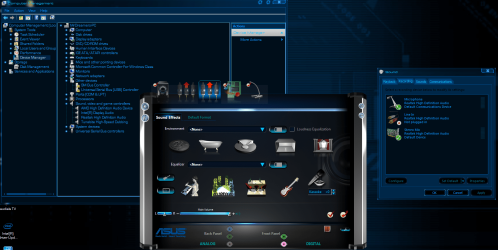
I'm trying to record anything that the computer produces like anything but sound recorder does not record nothing when i use it, i installed Realtek HD Audio Manager so now i got stereo mix but it does nothing even when i enable it and make it default in recording devices and it does nothing i cant manage sounds with Realtek HD Audio Manager either please help ty.
 

Attachments
  • recorder sound problem.PNG
    recorder sound problem.PNG
    199.7 KB · Views: 5

My Computer

Computer Manufacturer/Model Number
IBUYPOWER
OS
Windows 7 Ultimate 64bit
CPU
Intel(R) Core(TM) i7-3770 CPU @ 3.40GHz
Motherboard
ASUS P8 Z77-V LX
Memory
16 gigs rip jaws
Graphics Card(s)
AMD Radeon HD 7770 Series
Sound Card
Realtek High Definition Audio,AMD High Definition Audio Dev.
Monitor(s) Displays
vizo 4k non smart TV
Screen Resolution
1080x1920
Hard Drives
1 TB, 750gigs, 500gigs
PSU
1000w
Case
IBUYPOWER
Cooling
water/fan
First, you have SigmaTel as in your listed System Specs (assuming you are referring to this PC). I'm surprised the Realtek installed. I'm surprised the E521 works well with Win 7. I used to have an E510 and I upgraded it from XP to Vista but no further since it was limited to 4GB of RAM.

I just tested my system, with Realtek and the Stereo Mix and the Sound Recorder recorded what I was playing. I played a song file using the Windows Media Player as the source. But, since its Stereo Mix any sound source that you hear on the PC speakers should record. I don't use the Sound Recorder as I have a computer based Recording Studio (Sonar) and any recordings other than with Sonar I use Goldwave (an audio editor). I would suggest you get the free "Audacity" for any recording. Its full featured and even has some audio editing features.

Audacity: Free Audio Editor and Recorder
 

My Computer

Computer type
PC/Desktop
Computer Manufacturer/Model Number
My Own Build
OS
Windows 10 64 bit
CPU
Intel i7 6700K
Motherboard
ASUS ROG Maximus VIII Hero
Memory
16GB Corsair Dominator
Graphics Card(s)
Intel CPU Graphics
Sound Card
RealTek
Monitor(s) Displays
27" Dell S2719dgf
Screen Resolution
2560X1440
Hard Drives
1 TB Samsung 850 EVO SSD for Win 10 Pro
500GB Samsung 850 EVO SSD for Win 10 Insider
2 TB drive for backup
PSU
EVGA Supernova 750G2
Case
BeQuiet Silent Base 600
Cooling
Deepcool Captain 120EX
Keyboard
Microsoft Wireless 2000
Mouse
Microsoft wireless
Internet Speed
100 MB/sec (Cable)
Antivirus
Microsoft Defender and Malwarebytes
Browser
Edge/Firefox
Other Info
Cakewalk (Sonar) by BandLab and Studio One 4.1 Pro recording studio software. MOTU 896Mk3 Hybrid recording interface, Frontier Tranzport wireless control unit, Behringer X-Touch Control Surface.
Five USB connected optical drives for CD Audio production using Nero BurningROM
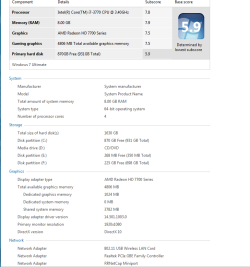
those are old specs i need to update ill do right now my specs are
and btw i tried audacity it does the same thing does not record off my windows maybe through a headset and mic but i want to record from my system
 

Attachments

  • specs.PNG
    specs.PNG
    20.1 KB · Views: 2

My Computer

Computer Manufacturer/Model Number
IBUYPOWER
OS
Windows 7 Ultimate 64bit
CPU
Intel(R) Core(TM) i7-3770 CPU @ 3.40GHz
Motherboard
ASUS P8 Z77-V LX
Memory
16 gigs rip jaws
Graphics Card(s)
AMD Radeon HD 7770 Series
Sound Card
Realtek High Definition Audio,AMD High Definition Audio Dev.
Monitor(s) Displays
vizo 4k non smart TV
Screen Resolution
1080x1920
Hard Drives
1 TB, 750gigs, 500gigs
PSU
1000w
Case
IBUYPOWER
Cooling
water/fan
I wonder if the Tunebite is causing any problems. Temporarily disable that in the device manager, for testing and see what happens. I don't see anything else in the Device Manager that potentially would cause any problems.
 

My Computer

Computer type
PC/Desktop
Computer Manufacturer/Model Number
My Own Build
OS
Windows 10 64 bit
CPU
Intel i7 6700K
Motherboard
ASUS ROG Maximus VIII Hero
Memory
16GB Corsair Dominator
Graphics Card(s)
Intel CPU Graphics
Sound Card
RealTek
Monitor(s) Displays
27" Dell S2719dgf
Screen Resolution
2560X1440
Hard Drives
1 TB Samsung 850 EVO SSD for Win 10 Pro
500GB Samsung 850 EVO SSD for Win 10 Insider
2 TB drive for backup
PSU
EVGA Supernova 750G2
Case
BeQuiet Silent Base 600
Cooling
Deepcool Captain 120EX
Keyboard
Microsoft Wireless 2000
Mouse
Microsoft wireless
Internet Speed
100 MB/sec (Cable)
Antivirus
Microsoft Defender and Malwarebytes
Browser
Edge/Firefox
Other Info
Cakewalk (Sonar) by BandLab and Studio One 4.1 Pro recording studio software. MOTU 896Mk3 Hybrid recording interface, Frontier Tranzport wireless control unit, Behringer X-Touch Control Surface.
Five USB connected optical drives for CD Audio production using Nero BurningROM
I wonder if the Tunebite is causing any problems. Temporarily disable that in the device manager, for testing and see what happens. I don't see anything else in the Device Manager that potentially would cause any problems.

i disabled it but still not able to record anything that comes from my computer this is very strange :confused:
i did get audacity to record tho ;)
but how do i get realtek to work as my default so i can control sound with it? the one in the pic one up from this post the one with the gui interface
 
Last edited:

My Computer

Computer Manufacturer/Model Number
IBUYPOWER
OS
Windows 7 Ultimate 64bit
CPU
Intel(R) Core(TM) i7-3770 CPU @ 3.40GHz
Motherboard
ASUS P8 Z77-V LX
Memory
16 gigs rip jaws
Graphics Card(s)
AMD Radeon HD 7770 Series
Sound Card
Realtek High Definition Audio,AMD High Definition Audio Dev.
Monitor(s) Displays
vizo 4k non smart TV
Screen Resolution
1080x1920
Hard Drives
1 TB, 750gigs, 500gigs
PSU
1000w
Case
IBUYPOWER
Cooling
water/fan
In case there is some type of Windows OS corruption with the RealTek, go to the Device Manager and uninstall RealTek, but DO NOT uninstall the drivers. Restart the PC and when Windows starts it will detect and reinstall the sound. If there were any corruptions this should fix it.

If the uninstall/reinstall did not fix the problem. If you have the install program for Tunebite, uninstall it, restart the PC and then see what happens. On the outside chance even if its disabled it could still interfere. It may not be the problem, but at this point anything is open for testing.
 

My Computer

Computer type
PC/Desktop
Computer Manufacturer/Model Number
My Own Build
OS
Windows 10 64 bit
CPU
Intel i7 6700K
Motherboard
ASUS ROG Maximus VIII Hero
Memory
16GB Corsair Dominator
Graphics Card(s)
Intel CPU Graphics
Sound Card
RealTek
Monitor(s) Displays
27" Dell S2719dgf
Screen Resolution
2560X1440
Hard Drives
1 TB Samsung 850 EVO SSD for Win 10 Pro
500GB Samsung 850 EVO SSD for Win 10 Insider
2 TB drive for backup
PSU
EVGA Supernova 750G2
Case
BeQuiet Silent Base 600
Cooling
Deepcool Captain 120EX
Keyboard
Microsoft Wireless 2000
Mouse
Microsoft wireless
Internet Speed
100 MB/sec (Cable)
Antivirus
Microsoft Defender and Malwarebytes
Browser
Edge/Firefox
Other Info
Cakewalk (Sonar) by BandLab and Studio One 4.1 Pro recording studio software. MOTU 896Mk3 Hybrid recording interface, Frontier Tranzport wireless control unit, Behringer X-Touch Control Surface.
Five USB connected optical drives for CD Audio production using Nero BurningROM
Back
Top