Sound went away

jpk

New member
Local time
9:27 PM
Messages
23
I've lost the audio on my computer. Reloaded the driver just in case it somehow got erased or disabled. Checked in the Bios to make sure all is good there. Device manager says everything is working ok. I have a Logitech 5.1 sound system and it is plugged into the motherboard audio ports. I have a ASUS Sabretooth 990FX Rev.1 mobo. I'm running two EVGA 560Ti Classified GPU's. It quit working after I performed a system restore.
 

My Computer

Computer Manufacturer/Model Number
Home built
OS
W7 Ultimate 32bit
CPU
AMD 955 BE 3.2ghz
Motherboard
MSI NF980-G65
Memory
4Gb OCZ DDR3
Graphics Card(s)
EVGA GTX260 Core 216 Superclocked x 2 Sli
Sound Card
Sound Blaster
Monitor(s) Displays
I-INC iH282
Hard Drives
Seagate 500Gb
PSU
Corsair TX850
Case
Cooler Master HAF-922
Cooling
Cooler Master Hyper N520
Have you checked "Sound" in the Control Panel?

Something may have changed your output device settings (it happened to me a couple of weeks ago).
 

My Computer

Computer type
PC/Desktop
Computer Manufacturer/Model Number
n/a
OS
W7 Ultimate SP1, LM19.2 MATE, W10 Home 1703, W10 Pro 1703 VM, #All 64 bit
CPU
AMD Phenom II x6 1100T, 3.3 GHz
Motherboard
ASUS M4A88T-M/USB3 (AM3)
Memory
12GB DDR3 1333 G-Skill (4GB x 2), G-Skill (2GB x 2)
Graphics Card(s)
NVIDIA GeForce GTX 660
Sound Card
Realtek?
Monitor(s) Displays
Samsung S23B350
Screen Resolution
1920x1080
Hard Drives
WD Green 2TB (SATA), WD Green 3TB (SATA), WD Blue 4TB (SATA), WD Blue 6TB (SATA)
PSU
Cooler Master
Case
Antec GX300 Tower
Cooling
3x Antec TRICOOL 120mm Fans
Mouse
Wired Optical
Internet Speed
DSL
Antivirus
Avast
Browser
Pale Moon (64 bit)
Other Info
2018-12-27 Upgraded HDDs
2015-12-10 Upgraded case, graphics card, storage
2015-08-15 Upgraded motherboard & RAM
2015-07-15 Upgraded LM17.1 to LM17.2
System Restore has an "undo" function that will undo the System Restore. Since it worked until the System Restore, the undo may take care of the sound problem (but you will have to the original problem that you did the System Restore for).
 

My Computer

Computer type
PC/Desktop
Computer Manufacturer/Model Number
My Own Build
OS
Windows 10 64 bit
CPU
Intel i7 6700K
Motherboard
ASUS ROG Maximus VIII Hero
Memory
16GB Corsair Dominator
Graphics Card(s)
Intel CPU Graphics
Sound Card
RealTek
Monitor(s) Displays
27" Dell S2719dgf
Screen Resolution
2560X1440
Hard Drives
1 TB Samsung 850 EVO SSD for Win 10 Pro
500GB Samsung 850 EVO SSD for Win 10 Insider
2 TB drive for backup
PSU
EVGA Supernova 750G2
Case
BeQuiet Silent Base 600
Cooling
Deepcool Captain 120EX
Keyboard
Microsoft Wireless 2000
Mouse
Microsoft wireless
Internet Speed
100 MB/sec (Cable)
Antivirus
Microsoft Defender and Malwarebytes
Browser
Edge/Firefox
Other Info
Cakewalk (Sonar) by BandLab and Studio One 4.1 Pro recording studio software. MOTU 896Mk3 Hybrid recording interface, Frontier Tranzport wireless control unit, Behringer X-Touch Control Surface.
Five USB connected optical drives for CD Audio production using Nero BurningROM
I've lost the audio on my computer. Reloaded the driver just in case it somehow got erased or disabled. Checked in the Bios to make sure all is good there. Device manager says everything is working ok. I have a Logitech 5.1 sound system and it is plugged into the motherboard audio ports. I have a ASUS Sabretooth 990FX Rev.1 mobo. I'm running two EVGA 560Ti Classified GPU's. It quit working after I performed a system restore.


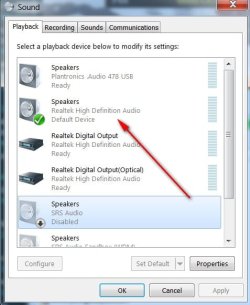
Right click sound icon - near clock bottom right.
Click Playback and check if your speakers are set to default.
If it is, click configure (bottom left) and do a sound test.

Also, make sure you haven't inadvertently clicked "mute".
 

Attachments

  • SOUND 10,16,13.jpg
    SOUND 10,16,13.jpg
    38.6 KB · Views: 41

My Computer

Computer type
PC/Desktop
Computer Manufacturer/Model Number
Self-Built
OS
Windows 7 Professional X64
CPU
Core i7 (2nd gen) i7-2600K / 3.40GHz
Motherboard
ASUS P8Z77-V Intel 7 Series Motherboard
Memory
DDR3 2400MHz (OC) 16gb
Graphics Card(s)
Intel(R) HD Graphics 3000, -1988 Mb
Sound Card
8 ChannelsAudio Chipset Realtek ALC892
Monitor(s) Displays
LG 29UM65 Black 29"
Screen Resolution
2560 x 1080
Hard Drives
840 EVO 250 GB SSD ;2tb (2);Seagate;1tb Seagate; 750 gb Seagate; wd ext (2) 750 gb,WD 2tb X 2;WD 3TB Black
PSU
750 watt
Case
Thermaltake RX -1
Cooling
2120mm Fans Included 1Other Fan Ports 5x 200mm Fan Ports
Keyboard
Microsoft Digital Media Pro
Mouse
Microsoft Wireless 6000
Internet Speed
U-verse 18 mbps
Antivirus
MSE
Browser
Firefox, Chrome and my favorite: Pale Moon
Other Info
HdHomerun Dual Tuner.
SRS Audio Lab,
Pioneer BDR 208-DBK
PS3-What a difference in my Surround Sound Receiver!
HP 4540s - My new Toy.
Epson R280 Printer- To personalize my Dvds.
Canon MP 560 - For scanning.
Realtek HD Audio is not listed as an option in the playback devices menu. I thought I reinstalled the drivers off the mobo driver disc. What is listed under Sound devices in the devices manager folder. There are several Nvidia HD audio devices listed and virtual wave device.
 

My Computer

Computer Manufacturer/Model Number
Home built
OS
W7 Ultimate 32bit
CPU
AMD 955 BE 3.2ghz
Motherboard
MSI NF980-G65
Memory
4Gb OCZ DDR3
Graphics Card(s)
EVGA GTX260 Core 216 Superclocked x 2 Sli
Sound Card
Sound Blaster
Monitor(s) Displays
I-INC iH282
Hard Drives
Seagate 500Gb
PSU
Corsair TX850
Case
Cooler Master HAF-922
Cooling
Cooler Master Hyper N520
Can you post a pic of the Sound Menu?
 

My Computer

Computer type
PC/Desktop
Computer Manufacturer/Model Number
Self-Built
OS
Windows 7 Professional X64
CPU
Core i7 (2nd gen) i7-2600K / 3.40GHz
Motherboard
ASUS P8Z77-V Intel 7 Series Motherboard
Memory
DDR3 2400MHz (OC) 16gb
Graphics Card(s)
Intel(R) HD Graphics 3000, -1988 Mb
Sound Card
8 ChannelsAudio Chipset Realtek ALC892
Monitor(s) Displays
LG 29UM65 Black 29"
Screen Resolution
2560 x 1080
Hard Drives
840 EVO 250 GB SSD ;2tb (2);Seagate;1tb Seagate; 750 gb Seagate; wd ext (2) 750 gb,WD 2tb X 2;WD 3TB Black
PSU
750 watt
Case
Thermaltake RX -1
Cooling
2120mm Fans Included 1Other Fan Ports 5x 200mm Fan Ports
Keyboard
Microsoft Digital Media Pro
Mouse
Microsoft Wireless 6000
Internet Speed
U-verse 18 mbps
Antivirus
MSE
Browser
Firefox, Chrome and my favorite: Pale Moon
Other Info
HdHomerun Dual Tuner.
SRS Audio Lab,
Pioneer BDR 208-DBK
PS3-What a difference in my Surround Sound Receiver!
HP 4540s - My new Toy.
Epson R280 Printer- To personalize my Dvds.
Canon MP 560 - For scanning.
The menu lists first; Speaker, which is checked as the default device and it is named high definition audio device. Then it lists:

Headphone, high definition audio device, ready

Digital Audio S/PDIF high def audio device, ready

Digital Audio S/PDIF High def audio device, ready

That's it, no Realtek, etc..
 

My Computer

Computer Manufacturer/Model Number
Home built
OS
W7 Ultimate 32bit
CPU
AMD 955 BE 3.2ghz
Motherboard
MSI NF980-G65
Memory
4Gb OCZ DDR3
Graphics Card(s)
EVGA GTX260 Core 216 Superclocked x 2 Sli
Sound Card
Sound Blaster
Monitor(s) Displays
I-INC iH282
Hard Drives
Seagate 500Gb
PSU
Corsair TX850
Case
Cooler Master HAF-922
Cooling
Cooler Master Hyper N520
Click the top one (default device) and do a speaker test.

Lower left corner. (Configure > test)
 

My Computer

Computer type
PC/Desktop
Computer Manufacturer/Model Number
Self-Built
OS
Windows 7 Professional X64
CPU
Core i7 (2nd gen) i7-2600K / 3.40GHz
Motherboard
ASUS P8Z77-V Intel 7 Series Motherboard
Memory
DDR3 2400MHz (OC) 16gb
Graphics Card(s)
Intel(R) HD Graphics 3000, -1988 Mb
Sound Card
8 ChannelsAudio Chipset Realtek ALC892
Monitor(s) Displays
LG 29UM65 Black 29"
Screen Resolution
2560 x 1080
Hard Drives
840 EVO 250 GB SSD ;2tb (2);Seagate;1tb Seagate; 750 gb Seagate; wd ext (2) 750 gb,WD 2tb X 2;WD 3TB Black
PSU
750 watt
Case
Thermaltake RX -1
Cooling
2120mm Fans Included 1Other Fan Ports 5x 200mm Fan Ports
Keyboard
Microsoft Digital Media Pro
Mouse
Microsoft Wireless 6000
Internet Speed
U-verse 18 mbps
Antivirus
MSE
Browser
Firefox, Chrome and my favorite: Pale Moon
Other Info
HdHomerun Dual Tuner.
SRS Audio Lab,
Pioneer BDR 208-DBK
PS3-What a difference in my Surround Sound Receiver!
HP 4540s - My new Toy.
Epson R280 Printer- To personalize my Dvds.
Canon MP 560 - For scanning.
Tried that. Nothing. Re-installed realtek and made it default. Nothing. Very unusual. I consider my self reasonably computer savvy and this one has me stumped. Also, I can plug headphones into the front panel output on my desktop and the software recognizes that I've plugged in headphones. No sound through headphone either. According to the test, I have audio, meter moves and showns sound, just nothing from speakers or headphones. Could it be something with the motherboard? I will re check any sound related connectors on the mobo.
 

My Computer

Computer Manufacturer/Model Number
Home built
OS
W7 Ultimate 32bit
CPU
AMD 955 BE 3.2ghz
Motherboard
MSI NF980-G65
Memory
4Gb OCZ DDR3
Graphics Card(s)
EVGA GTX260 Core 216 Superclocked x 2 Sli
Sound Card
Sound Blaster
Monitor(s) Displays
I-INC iH282
Hard Drives
Seagate 500Gb
PSU
Corsair TX850
Case
Cooler Master HAF-922
Cooling
Cooler Master Hyper N520
Try checking the settings in the program you are using to play the files.

Some programs have their own "Sound Device" output settings.
 

My Computer

Computer type
PC/Desktop
Computer Manufacturer/Model Number
n/a
OS
W7 Ultimate SP1, LM19.2 MATE, W10 Home 1703, W10 Pro 1703 VM, #All 64 bit
CPU
AMD Phenom II x6 1100T, 3.3 GHz
Motherboard
ASUS M4A88T-M/USB3 (AM3)
Memory
12GB DDR3 1333 G-Skill (4GB x 2), G-Skill (2GB x 2)
Graphics Card(s)
NVIDIA GeForce GTX 660
Sound Card
Realtek?
Monitor(s) Displays
Samsung S23B350
Screen Resolution
1920x1080
Hard Drives
WD Green 2TB (SATA), WD Green 3TB (SATA), WD Blue 4TB (SATA), WD Blue 6TB (SATA)
PSU
Cooler Master
Case
Antec GX300 Tower
Cooling
3x Antec TRICOOL 120mm Fans
Mouse
Wired Optical
Internet Speed
DSL
Antivirus
Avast
Browser
Pale Moon (64 bit)
Other Info
2018-12-27 Upgraded HDDs
2015-12-10 Upgraded case, graphics card, storage
2015-08-15 Upgraded motherboard & RAM
2015-07-15 Upgraded LM17.1 to LM17.2
Tried that. Nothing. Re-installed realtek and made it default. Nothing. Very unusual. I consider my self reasonably computer savvy and this one has me stumped. Also, I can plug headphones into the front panel output on my desktop and the software recognizes that I've plugged in headphones. No sound through headphone either. According to the test, I have audio, meter moves and showns sound, just nothing from speakers or headphones. Could it be something with the motherboard? I will re check any sound related connectors on the mobo.

I think the only thing left is your Sound Blaster card has failed.
Do you have another card you can install?
Or can you test the card in another comp?

One other thought - uninstall sound card, reboot and let it reinstall.

Can you also try another set of speakers, or try your speakers in another comp?
 
Last edited:

My Computer

Computer type
PC/Desktop
Computer Manufacturer/Model Number
Self-Built
OS
Windows 7 Professional X64
CPU
Core i7 (2nd gen) i7-2600K / 3.40GHz
Motherboard
ASUS P8Z77-V Intel 7 Series Motherboard
Memory
DDR3 2400MHz (OC) 16gb
Graphics Card(s)
Intel(R) HD Graphics 3000, -1988 Mb
Sound Card
8 ChannelsAudio Chipset Realtek ALC892
Monitor(s) Displays
LG 29UM65 Black 29"
Screen Resolution
2560 x 1080
Hard Drives
840 EVO 250 GB SSD ;2tb (2);Seagate;1tb Seagate; 750 gb Seagate; wd ext (2) 750 gb,WD 2tb X 2;WD 3TB Black
PSU
750 watt
Case
Thermaltake RX -1
Cooling
2120mm Fans Included 1Other Fan Ports 5x 200mm Fan Ports
Keyboard
Microsoft Digital Media Pro
Mouse
Microsoft Wireless 6000
Internet Speed
U-verse 18 mbps
Antivirus
MSE
Browser
Firefox, Chrome and my favorite: Pale Moon
Other Info
HdHomerun Dual Tuner.
SRS Audio Lab,
Pioneer BDR 208-DBK
PS3-What a difference in my Surround Sound Receiver!
HP 4540s - My new Toy.
Epson R280 Printer- To personalize my Dvds.
Canon MP 560 - For scanning.
I don't have a sound card installed. I'm using the onboard sound on the mobo. I do have a SB card but I can't install it because I'm running my SLI setup and a video card is blocking the PCI slot that I could put it in. The mobo is an ASUS Sabretooth so it has a 5 year warranty. Maybe I can RMA it. It is just so unusual for just the sound to crap out.
 

My Computer

Computer Manufacturer/Model Number
Home built
OS
W7 Ultimate 32bit
CPU
AMD 955 BE 3.2ghz
Motherboard
MSI NF980-G65
Memory
4Gb OCZ DDR3
Graphics Card(s)
EVGA GTX260 Core 216 Superclocked x 2 Sli
Sound Card
Sound Blaster
Monitor(s) Displays
I-INC iH282
Hard Drives
Seagate 500Gb
PSU
Corsair TX850
Case
Cooler Master HAF-922
Cooling
Cooler Master Hyper N520

My Computer

Computer type
PC/Desktop
Computer Manufacturer/Model Number
Self-Built
OS
Windows 7 Professional X64
CPU
Core i7 (2nd gen) i7-2600K / 3.40GHz
Motherboard
ASUS P8Z77-V Intel 7 Series Motherboard
Memory
DDR3 2400MHz (OC) 16gb
Graphics Card(s)
Intel(R) HD Graphics 3000, -1988 Mb
Sound Card
8 ChannelsAudio Chipset Realtek ALC892
Monitor(s) Displays
LG 29UM65 Black 29"
Screen Resolution
2560 x 1080
Hard Drives
840 EVO 250 GB SSD ;2tb (2);Seagate;1tb Seagate; 750 gb Seagate; wd ext (2) 750 gb,WD 2tb X 2;WD 3TB Black
PSU
750 watt
Case
Thermaltake RX -1
Cooling
2120mm Fans Included 1Other Fan Ports 5x 200mm Fan Ports
Keyboard
Microsoft Digital Media Pro
Mouse
Microsoft Wireless 6000
Internet Speed
U-verse 18 mbps
Antivirus
MSE
Browser
Firefox, Chrome and my favorite: Pale Moon
Other Info
HdHomerun Dual Tuner.
SRS Audio Lab,
Pioneer BDR 208-DBK
PS3-What a difference in my Surround Sound Receiver!
HP 4540s - My new Toy.
Epson R280 Printer- To personalize my Dvds.
Canon MP 560 - For scanning.
I know there's a newer bios available. Never updated it because everything was working ok. Will try that later today. Thanks for your help.
 

My Computer

Computer Manufacturer/Model Number
Home built
OS
W7 Ultimate 32bit
CPU
AMD 955 BE 3.2ghz
Motherboard
MSI NF980-G65
Memory
4Gb OCZ DDR3
Graphics Card(s)
EVGA GTX260 Core 216 Superclocked x 2 Sli
Sound Card
Sound Blaster
Monitor(s) Displays
I-INC iH282
Hard Drives
Seagate 500Gb
PSU
Corsair TX850
Case
Cooler Master HAF-922
Cooling
Cooler Master Hyper N520
Good luck - let us know if it works out.:D
 

My Computer

Computer type
PC/Desktop
Computer Manufacturer/Model Number
Self-Built
OS
Windows 7 Professional X64
CPU
Core i7 (2nd gen) i7-2600K / 3.40GHz
Motherboard
ASUS P8Z77-V Intel 7 Series Motherboard
Memory
DDR3 2400MHz (OC) 16gb
Graphics Card(s)
Intel(R) HD Graphics 3000, -1988 Mb
Sound Card
8 ChannelsAudio Chipset Realtek ALC892
Monitor(s) Displays
LG 29UM65 Black 29"
Screen Resolution
2560 x 1080
Hard Drives
840 EVO 250 GB SSD ;2tb (2);Seagate;1tb Seagate; 750 gb Seagate; wd ext (2) 750 gb,WD 2tb X 2;WD 3TB Black
PSU
750 watt
Case
Thermaltake RX -1
Cooling
2120mm Fans Included 1Other Fan Ports 5x 200mm Fan Ports
Keyboard
Microsoft Digital Media Pro
Mouse
Microsoft Wireless 6000
Internet Speed
U-verse 18 mbps
Antivirus
MSE
Browser
Firefox, Chrome and my favorite: Pale Moon
Other Info
HdHomerun Dual Tuner.
SRS Audio Lab,
Pioneer BDR 208-DBK
PS3-What a difference in my Surround Sound Receiver!
HP 4540s - My new Toy.
Epson R280 Printer- To personalize my Dvds.
Canon MP 560 - For scanning.
I tried to use the ASUS software to auto install the new bios. It didn't seem to work. I let it run for about 10 minutes and it seemed to be in a loop. Will do a straight download and manual install later today.
 

My Computer

Computer Manufacturer/Model Number
Home built
OS
W7 Ultimate 32bit
CPU
AMD 955 BE 3.2ghz
Motherboard
MSI NF980-G65
Memory
4Gb OCZ DDR3
Graphics Card(s)
EVGA GTX260 Core 216 Superclocked x 2 Sli
Sound Card
Sound Blaster
Monitor(s) Displays
I-INC iH282
Hard Drives
Seagate 500Gb
PSU
Corsair TX850
Case
Cooler Master HAF-922
Cooling
Cooler Master Hyper N520
BIOS updates can be tricky.

I would call ASUS and let them guide you through it.

I did that and it solved a problem for me.
 

My Computer

Computer type
PC/Desktop
Computer Manufacturer/Model Number
Self-Built
OS
Windows 7 Professional X64
CPU
Core i7 (2nd gen) i7-2600K / 3.40GHz
Motherboard
ASUS P8Z77-V Intel 7 Series Motherboard
Memory
DDR3 2400MHz (OC) 16gb
Graphics Card(s)
Intel(R) HD Graphics 3000, -1988 Mb
Sound Card
8 ChannelsAudio Chipset Realtek ALC892
Monitor(s) Displays
LG 29UM65 Black 29"
Screen Resolution
2560 x 1080
Hard Drives
840 EVO 250 GB SSD ;2tb (2);Seagate;1tb Seagate; 750 gb Seagate; wd ext (2) 750 gb,WD 2tb X 2;WD 3TB Black
PSU
750 watt
Case
Thermaltake RX -1
Cooling
2120mm Fans Included 1Other Fan Ports 5x 200mm Fan Ports
Keyboard
Microsoft Digital Media Pro
Mouse
Microsoft Wireless 6000
Internet Speed
U-verse 18 mbps
Antivirus
MSE
Browser
Firefox, Chrome and my favorite: Pale Moon
Other Info
HdHomerun Dual Tuner.
SRS Audio Lab,
Pioneer BDR 208-DBK
PS3-What a difference in my Surround Sound Receiver!
HP 4540s - My new Toy.
Epson R280 Printer- To personalize my Dvds.
Canon MP 560 - For scanning.
I've updated BIOS' before, they can be a little nerve racking to update. Never had one fail yet though. I will take your advice and call ASUS and let them help, couldn't hurt. It's been several years since I've done it.
 

My Computer

Computer Manufacturer/Model Number
Home built
OS
W7 Ultimate 32bit
CPU
AMD 955 BE 3.2ghz
Motherboard
MSI NF980-G65
Memory
4Gb OCZ DDR3
Graphics Card(s)
EVGA GTX260 Core 216 Superclocked x 2 Sli
Sound Card
Sound Blaster
Monitor(s) Displays
I-INC iH282
Hard Drives
Seagate 500Gb
PSU
Corsair TX850
Case
Cooler Master HAF-922
Cooling
Cooler Master Hyper N520
I called ASUS...several times today. They suggested reset CMOS, done. No affect. Called again, they suggest I remove all Nvidia drivers, no affect. I'm assuming because they have not suggested I install the latest BIOS they feel that is not the problem. They at first believed it was a drive conflict but now when I plug in just the green audio plug on the motherboard I get a severe hum through the speakers. The tech said it might be a bad cap on the board. The Sabretooth has a 5 year warranty so I'm good if I need to RMA it. It's only two years old.
 

My Computer

Computer Manufacturer/Model Number
Home built
OS
W7 Ultimate 32bit
CPU
AMD 955 BE 3.2ghz
Motherboard
MSI NF980-G65
Memory
4Gb OCZ DDR3
Graphics Card(s)
EVGA GTX260 Core 216 Superclocked x 2 Sli
Sound Card
Sound Blaster
Monitor(s) Displays
I-INC iH282
Hard Drives
Seagate 500Gb
PSU
Corsair TX850
Case
Cooler Master HAF-922
Cooling
Cooler Master Hyper N520
I still think it is a BIOS issue.

I would call again and request a walk-through on a BIOS update.

If that still fails, then an RMA would be your last option.:eek:

Sorry 'bout that.
 

My Computer

Computer type
PC/Desktop
Computer Manufacturer/Model Number
Self-Built
OS
Windows 7 Professional X64
CPU
Core i7 (2nd gen) i7-2600K / 3.40GHz
Motherboard
ASUS P8Z77-V Intel 7 Series Motherboard
Memory
DDR3 2400MHz (OC) 16gb
Graphics Card(s)
Intel(R) HD Graphics 3000, -1988 Mb
Sound Card
8 ChannelsAudio Chipset Realtek ALC892
Monitor(s) Displays
LG 29UM65 Black 29"
Screen Resolution
2560 x 1080
Hard Drives
840 EVO 250 GB SSD ;2tb (2);Seagate;1tb Seagate; 750 gb Seagate; wd ext (2) 750 gb,WD 2tb X 2;WD 3TB Black
PSU
750 watt
Case
Thermaltake RX -1
Cooling
2120mm Fans Included 1Other Fan Ports 5x 200mm Fan Ports
Keyboard
Microsoft Digital Media Pro
Mouse
Microsoft Wireless 6000
Internet Speed
U-verse 18 mbps
Antivirus
MSE
Browser
Firefox, Chrome and my favorite: Pale Moon
Other Info
HdHomerun Dual Tuner.
SRS Audio Lab,
Pioneer BDR 208-DBK
PS3-What a difference in my Surround Sound Receiver!
HP 4540s - My new Toy.
Epson R280 Printer- To personalize my Dvds.
Canon MP 560 - For scanning.
Back
Top