
Speaker hum

gogreen

New member
Power User
VIP
Local time
9:58 AM
Messages
544
Location
Florida
When I shut down my computer and the room is silent, I notice the speakers humming. Doesn't seem to affect the sound otherwise. Lots of crossed wires on the floor behind the computer, but I've tried different ways to isolate the speaker cables and power cord, to no avail. Logitech Z2300 speaker system. Any ideas on why I'm getting this hum, and how to stop it? Thanks.
 

My Computer

Computer type
PC/Desktop
Computer Manufacturer/Model Number
Dell Studio XPS 8100, Dell XPS 15 laptop
OS
Windows 10 Home, 64 bit
CPU
Intel Core i7 860 @ 2.8 GHz
Motherboard
Dell 0T568R (CPU1)
Memory
8.0 GB Dual Channel DDR3 @ 664 MHz (9-9-9-24)
Graphics Card(s)
nVidia GeForce GTS 240
Sound Card
M-Audio Delta Audiophile 2496
Monitor(s) Displays
Dell 2407WFP
Screen Resolution
1920x1200
Hard Drives
977 GB Western Digital WDC WD1001FAES-75W7A0 (SCSI)
Antivirus
Windows Defender, MalwareBytes Anti-Malware, AdwCleaner
Browser
Firefox, occasionally IE and Edge
Other Info
Mozilla Firefox, Mozilla Thunderbird. Western Digital Passport 250 GB external HD, two Mushkin Enhanced Mulholland 32GB USB flash drives, AKG K240 Studio headphones, Asus AC-1900 dual band wireless router.
Is your computer near to one of those fluorescent lamps?
 

My Computer

Computer type
PC/Desktop
OS
Windows
When I shut down my computer and the room is silent, I notice the speakers humming. Doesn't seem to affect the sound otherwise. Lots of crossed wires on the floor behind the computer, but I've tried different ways to isolate the speaker cables and power cord, to no avail. Logitech Z2300 speaker system. Any ideas on why I'm getting this hum, and how to stop it? Thanks.
\


Hums are usually a grounding issue. Is the computer and speakers grounded correctly into a surge strip or its equivalent?


Ken J
 

My Computer

Computer Manufacturer/Model Number
HP Pavillion dv-7 1005 Tx
OS
Win 8 Release candidate 8400
CPU
[email protected]
Memory
4 gigs
Graphics Card(s)
Nvidia 9600M
Sound Card
HD built-in
Monitor(s) Displays
17" Wxga
Screen Resolution
1440x900
Cooling
none
Internet Speed
45Mb down 5Mb up
When I shut down my computer and the room is silent, I notice the speakers humming. Doesn't seem to affect the sound otherwise. Lots of crossed wires on the floor behind the computer, but I've tried different ways to isolate the speaker cables and power cord, to no avail. Logitech Z2300 speaker system. Any ideas on why I'm getting this hum, and how to stop it? Thanks.
\


Hums are usually a grounding issue. Is the computer and speakers grounded correctly into a surge strip or its equivalent?


Ken J

Hey Ken, actually "Hum" is not a grounding issue, that's called a "Hiss", "Hum" is an oscillation of the AC at the frequency of mains electricity (60 or 50Hz)

I'm definitely sure it's not a grounding issue because that would sound like a high pitch hiss that could go away with touching the "non (or poor) grounded" spot...
 

My Computer

Computer type
PC/Desktop
OS
Windows
Zigzag3143 and Punkster: Thanks. No fluorescents near the computer or in the room, in fact. I had the speakers power cord plugged into a grounded strip at first--still humming. Then I plugged into a wall socket--still humming.
 

My Computer

Computer type
PC/Desktop
Computer Manufacturer/Model Number
Dell Studio XPS 8100, Dell XPS 15 laptop
OS
Windows 10 Home, 64 bit
CPU
Intel Core i7 860 @ 2.8 GHz
Motherboard
Dell 0T568R (CPU1)
Memory
8.0 GB Dual Channel DDR3 @ 664 MHz (9-9-9-24)
Graphics Card(s)
nVidia GeForce GTS 240
Sound Card
M-Audio Delta Audiophile 2496
Monitor(s) Displays
Dell 2407WFP
Screen Resolution
1920x1200
Hard Drives
977 GB Western Digital WDC WD1001FAES-75W7A0 (SCSI)
Antivirus
Windows Defender, MalwareBytes Anti-Malware, AdwCleaner
Browser
Firefox, occasionally IE and Edge
Other Info
Mozilla Firefox, Mozilla Thunderbird. Western Digital Passport 250 GB external HD, two Mushkin Enhanced Mulholland 32GB USB flash drives, AKG K240 Studio headphones, Asus AC-1900 dual band wireless router.
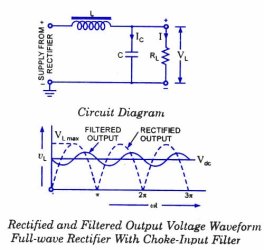
Hum can be caused by a problem in the power supply allowing noise to pass through and be amplified. This is a filtering problem, and the common way to eliminate it is to add a coil (choke) and capacitor as follows (the use of ferrite beads on the power leads may also prove benficial):

choke-input-filter-rectified-waveform.jpg

A standard PSU as found in speakers consists of a transformer, a rectifier and some form of power conditioning/smoothing (filter). This filter is often just a single capacitor across the rectifier output. The job of this capacitor is to store energy and to supply it to the rest of the circuitry. With reference to the above image, the dotted waveform represents the output from the rectifier. As you can see, this is far from smooth. It is the job of the capacitor to store some of the energy that is supplied and to release it to the rest of the circuitry when voltage level of the rectifier output drops (as it does on a cyclic basis). Even the PSU found in computers suffers from this, although the effects are very much minimised because of the higher frequencies involved (the higher the frequency of the voltage pulses on the input, the smoother the filtered output will be).

Again with reference to the above image, the closer to horizontal that we can get the filtered output, the less noise will be imparted to the rest of the circuitry. This is done by selecting appropriate value components for L and C. In addition, the use of ferrite beads on the input/output leads of the filter will prove beneficial.

Amplifier/speaker hiss is usually caused by having a floating input with the gain turned right up. The effect can be exacerbated if excess hum is also present.

One way to reduce this is to ensure that the amplifier/speakers is plugged into the same power strip as the rest of the system and to ensure that the gain is not set too high.
 

My Computer

Computer type
PC/Desktop
Computer Manufacturer/Model Number
Dwarf Dwf/11/2012 r09/2013
OS
Windows 8.1 Pro RTM x64
CPU
Intel Core-i5-3570K 4-core @ 3.4GHz (Ivy Bridge) (OC 4.4GHz)
Motherboard
ASRock Z77 Extreme4-M
Memory
4 x 4GB DDR3-1600 Corsair Vengeance CMZ8GX3M2A1600C9B (16GB)
Graphics Card(s)
MSI GeForce GTX770 Gaming OC 2GB
Sound Card
Realtek High Definition on board solution (ALC 898)
Monitor(s) Displays
ViewSonic VA1912w Widescreen (VGA)
Screen Resolution
1440x900
Hard Drives
OCZ Agility 3 SSD 120GB SATA III x2 (RAID 0)
Samsung HD501LJ 500GB SATA II x2
Hitachi HDS721010CLA332 1TB SATA II
Iomega 1.5TB Ext USB 2.0
WD 2.0TB Ext USB 3.0
PSU
XFX Pro Series 850W Semi-Modular
Case
Gigabyte IF233
Cooling
1 x 120mm Front Inlet 1 x 120mm Rear Exhaust
Keyboard
Microsoft Comfort Curve Keyboard 3000 (USB)
Mouse
Microsoft Comfort Mouse 3000 for Business (USB)
Internet Speed
NetGear DG834Gv3 ADSL Modem/Router (Ethernet) ~4.0 Mb/s (O2)
Antivirus
Avast! 8.0.1497
Browser
IE 11
Other Info
Optical Drive: HL-DT-ST BD-RE BH10LS30 SATA Bluray
Lexmark S305 Printer/Scanner/Copier (USB)
WEI Score: 8.1/8.1/8.5/8.5/8.25
Asus Eee PC 1011PX Netbook (Windows 7 x86 Starter)
Dwarf nailed it..... most inexpensive computer speakers have shoddy power supplys I corrected 90% of the hum in a cheap set just by beefing up the filter capacitors.

Ap
 

My Computer

Computer Manufacturer/Model Number
Assembled in my workshop
OS
Windows 7 Home Premium
CPU
Intel Core 2 Duo @ 3.00gHz
Motherboard
Gigabyte GA-P35-S3G
Memory
4 GB
Graphics Card(s)
ATI Radeon HD 2600 XT
Sound Card
RME 24/96 Card, Realtek Internal Audio PreSonus FireStudio
Monitor(s) Displays
Acer 1917 (x2)
Screen Resolution
1280 x 1024 on both monitors
Hard Drives
Three 250GB Seagate SATA Barracuda 7200rpm
PSU
Rosewill 500-watt
Case
Rosewill mid-tower
Cooling
Noctua NH-U9B (CPU), PwrSupply fan + single large case Fan
Keyboard
Macally w/2/USB ports.
Mouse
Trackman Wheel
Other Info
Event 20/20 bas studio monitors, Yamaha sub.
Rackmount Korg/Roland/Yamaha synthesizers,
Cubase MIDI/audio recording. Sony Soundforge audio/mastering software. CD Architect Mastering. RME & Presonus audio interfaces.
OK. I might be in way over my head here, but how do I beef up the filter capacitors?
 

My Computer

Computer type
PC/Desktop
Computer Manufacturer/Model Number
Dell Studio XPS 8100, Dell XPS 15 laptop
OS
Windows 10 Home, 64 bit
CPU
Intel Core i7 860 @ 2.8 GHz
Motherboard
Dell 0T568R (CPU1)
Memory
8.0 GB Dual Channel DDR3 @ 664 MHz (9-9-9-24)
Graphics Card(s)
nVidia GeForce GTS 240
Sound Card
M-Audio Delta Audiophile 2496
Monitor(s) Displays
Dell 2407WFP
Screen Resolution
1920x1200
Hard Drives
977 GB Western Digital WDC WD1001FAES-75W7A0 (SCSI)
Antivirus
Windows Defender, MalwareBytes Anti-Malware, AdwCleaner
Browser
Firefox, occasionally IE and Edge
Other Info
Mozilla Firefox, Mozilla Thunderbird. Western Digital Passport 250 GB external HD, two Mushkin Enhanced Mulholland 32GB USB flash drives, AKG K240 Studio headphones, Asus AC-1900 dual band wireless router.
When I shut down my computer and the room is silent, I notice the speakers humming. Doesn't seem to affect the sound otherwise. Lots of crossed wires on the floor behind the computer, but I've tried different ways to isolate the speaker cables and power cord, to no avail. Logitech Z2300 speaker system. Any ideas on why I'm getting this hum, and how to stop it? Thanks.
\


Hums are usually a grounding issue. Is the computer and speakers grounded correctly into a surge strip or its equivalent?


Ken J

Hey Ken, actually "Hum" is not a grounding issue, that's called a "Hiss", "Hum" is an oscillation of the AC at the frequency of mains electricity (60 or 50Hz)

I'm definitely sure it's not a grounding issue because that would sound like a high pitch hiss that could go away with touching the "non (or poor) grounded" spot...

While no expert the last 5 articles I have read including the IEEE say

A one-volt difference, while seemingly insignificant, can cause large loop currents to flow through the ground conductor of the signal cable. Depending on the circuit configuration of the audio hardware, the audio signal impedance and the impedance of the signal cable ground, the currents may cause induced voltages in the audio circuitry. This is a source of the familiar 'hum' problem.
 

My Computer

Computer Manufacturer/Model Number
HP Pavillion dv-7 1005 Tx
OS
Win 8 Release candidate 8400
CPU
[email protected]
Memory
4 gigs
Graphics Card(s)
Nvidia 9600M
Sound Card
HD built-in
Monitor(s) Displays
17" Wxga
Screen Resolution
1440x900
Cooling
none
Internet Speed
45Mb down 5Mb up
OK, zigzag3143. And how do I solve the problem? Thanks. I get the feeling that curing this problem could be more complicated than I suspected.
 

My Computer

Computer type
PC/Desktop
Computer Manufacturer/Model Number
Dell Studio XPS 8100, Dell XPS 15 laptop
OS
Windows 10 Home, 64 bit
CPU
Intel Core i7 860 @ 2.8 GHz
Motherboard
Dell 0T568R (CPU1)
Memory
8.0 GB Dual Channel DDR3 @ 664 MHz (9-9-9-24)
Graphics Card(s)
nVidia GeForce GTS 240
Sound Card
M-Audio Delta Audiophile 2496
Monitor(s) Displays
Dell 2407WFP
Screen Resolution
1920x1200
Hard Drives
977 GB Western Digital WDC WD1001FAES-75W7A0 (SCSI)
Antivirus
Windows Defender, MalwareBytes Anti-Malware, AdwCleaner
Browser
Firefox, occasionally IE and Edge
Other Info
Mozilla Firefox, Mozilla Thunderbird. Western Digital Passport 250 GB external HD, two Mushkin Enhanced Mulholland 32GB USB flash drives, AKG K240 Studio headphones, Asus AC-1900 dual band wireless router.
OK, zigzag3143. And how do I solve the problem? Thanks. I get the feeling that curing this problem could be more complicated than I suspected.


You might want to google audio hum yourself so you can choose the solution that will work best for you. There is a somewhat complicated description of the fix here

Avoiding Ground Loop Hum

There are devices (isolated, impedance balancers, etc) but more often than not if you make sure all the cables are solidly grounded and hopefully the computer as well, it may minimize it.

Also, this type of noise is usually more prevelant in spkr sys with sub woofers. If the sub is ampliefied I would start there.


ken J
 

My Computer

Computer Manufacturer/Model Number
HP Pavillion dv-7 1005 Tx
OS
Win 8 Release candidate 8400
CPU
[email protected]
Memory
4 gigs
Graphics Card(s)
Nvidia 9600M
Sound Card
HD built-in
Monitor(s) Displays
17" Wxga
Screen Resolution
1440x900
Cooling
none
Internet Speed
45Mb down 5Mb up
OK. Thanks, Ken J. Yes, the Logitech Z2300 speaker system includes a subwoofer. I'll have to move some things around and check all that's been suggested here. Thanks again.
 

My Computer

Computer type
PC/Desktop
Computer Manufacturer/Model Number
Dell Studio XPS 8100, Dell XPS 15 laptop
OS
Windows 10 Home, 64 bit
CPU
Intel Core i7 860 @ 2.8 GHz
Motherboard
Dell 0T568R (CPU1)
Memory
8.0 GB Dual Channel DDR3 @ 664 MHz (9-9-9-24)
Graphics Card(s)
nVidia GeForce GTS 240
Sound Card
M-Audio Delta Audiophile 2496
Monitor(s) Displays
Dell 2407WFP
Screen Resolution
1920x1200
Hard Drives
977 GB Western Digital WDC WD1001FAES-75W7A0 (SCSI)
Antivirus
Windows Defender, MalwareBytes Anti-Malware, AdwCleaner
Browser
Firefox, occasionally IE and Edge
Other Info
Mozilla Firefox, Mozilla Thunderbird. Western Digital Passport 250 GB external HD, two Mushkin Enhanced Mulholland 32GB USB flash drives, AKG K240 Studio headphones, Asus AC-1900 dual band wireless router.
OK. Thanks, Ken J. Yes, the Logitech Z2300 speaker system includes a subwoofer. I'll have to move some things around and check all that's been suggested here. Thanks again.

Do you have any small wall-wart power adapters in the vicinity of your speaker wires?

Are the speakers plugged into the same power supply as the computer, the same wall outlet? Also, does the speaker system power supply have a 2 or 3 prong (grounded) plug.

The Logitech you own is a well built system so I doubt if you need to deal with beefing up filter capacitors.

Ap
 

My Computer

Computer Manufacturer/Model Number
Assembled in my workshop
OS
Windows 7 Home Premium
CPU
Intel Core 2 Duo @ 3.00gHz
Motherboard
Gigabyte GA-P35-S3G
Memory
4 GB
Graphics Card(s)
ATI Radeon HD 2600 XT
Sound Card
RME 24/96 Card, Realtek Internal Audio PreSonus FireStudio
Monitor(s) Displays
Acer 1917 (x2)
Screen Resolution
1280 x 1024 on both monitors
Hard Drives
Three 250GB Seagate SATA Barracuda 7200rpm
PSU
Rosewill 500-watt
Case
Rosewill mid-tower
Cooling
Noctua NH-U9B (CPU), PwrSupply fan + single large case Fan
Keyboard
Macally w/2/USB ports.
Mouse
Trackman Wheel
Other Info
Event 20/20 bas studio monitors, Yamaha sub.
Rackmount Korg/Roland/Yamaha synthesizers,
Cubase MIDI/audio recording. Sony Soundforge audio/mastering software. CD Architect Mastering. RME & Presonus audio interfaces.
OK. Thanks, Ken J. Yes, the Logitech Z2300 speaker system includes a subwoofer. I'll have to move some things around and check all that's been suggested here. Thanks again.

Last on this..

If the Logitech speaker system has a three prong plug, use a ground lift adapter (3-prong -> 2-prong) and see if that eliminates audible hum.

Ap
 

My Computer

Computer Manufacturer/Model Number
Assembled in my workshop
OS
Windows 7 Home Premium
CPU
Intel Core 2 Duo @ 3.00gHz
Motherboard
Gigabyte GA-P35-S3G
Memory
4 GB
Graphics Card(s)
ATI Radeon HD 2600 XT
Sound Card
RME 24/96 Card, Realtek Internal Audio PreSonus FireStudio
Monitor(s) Displays
Acer 1917 (x2)
Screen Resolution
1280 x 1024 on both monitors
Hard Drives
Three 250GB Seagate SATA Barracuda 7200rpm
PSU
Rosewill 500-watt
Case
Rosewill mid-tower
Cooling
Noctua NH-U9B (CPU), PwrSupply fan + single large case Fan
Keyboard
Macally w/2/USB ports.
Mouse
Trackman Wheel
Other Info
Event 20/20 bas studio monitors, Yamaha sub.
Rackmount Korg/Roland/Yamaha synthesizers,
Cubase MIDI/audio recording. Sony Soundforge audio/mastering software. CD Architect Mastering. RME & Presonus audio interfaces.
The speakers have the newer 2-pronged plug. The speakers aren't plugged into the same wall outlet.
 

My Computer

Computer type
PC/Desktop
Computer Manufacturer/Model Number
Dell Studio XPS 8100, Dell XPS 15 laptop
OS
Windows 10 Home, 64 bit
CPU
Intel Core i7 860 @ 2.8 GHz
Motherboard
Dell 0T568R (CPU1)
Memory
8.0 GB Dual Channel DDR3 @ 664 MHz (9-9-9-24)
Graphics Card(s)
nVidia GeForce GTS 240
Sound Card
M-Audio Delta Audiophile 2496
Monitor(s) Displays
Dell 2407WFP
Screen Resolution
1920x1200
Hard Drives
977 GB Western Digital WDC WD1001FAES-75W7A0 (SCSI)
Antivirus
Windows Defender, MalwareBytes Anti-Malware, AdwCleaner
Browser
Firefox, occasionally IE and Edge
Other Info
Mozilla Firefox, Mozilla Thunderbird. Western Digital Passport 250 GB external HD, two Mushkin Enhanced Mulholland 32GB USB flash drives, AKG K240 Studio headphones, Asus AC-1900 dual band wireless router.
The problem is the insulation surrounding the speaker wires isn't sufficient enough for all the electricity that the computer is generating from the power supply and other electronics and the hum is the sound of electricity penetrating you insulation and rendering it audible through the speakers. Most computer speaker manufacturers don't consider that. The only solution is to buy a high quality sound system for the computer one that is made for that type of environment...cause I wouldn't be breaking out the black electrical tape to beef it up, also speakers that plug into the outlet on the back of the motherboard are very susceptible to noise cause the electronic components used to create the outlets aren't of high enough quality...grounding won't get rid of this noise....speaker magnets are wonderful tools in amplifying the sound of electricity...

I forgot that one way to help the situation is to turn the sound down on the computer to about 50 percent and make sure you don't have microphones un-muted and things of that nature also turn the speaker volume down so not so much electricity is amplified....;)
 

My Computer

Computer Manufacturer/Model Number
Custom built be me
OS
Windows 7 Ultimate x64
CPU
Amd dual-core 4400 Socket 979
Motherboard
Asus A8N-SLI
Memory
Kingston 3gb ddr 3200
Graphics Card(s)
Radeon Sapphire HD5670 1gb GDDR5 Artic cooling
Sound Card
Standard Motherboards Realtec
Monitor(s) Displays
IC Power
Screen Resolution
1280 x 1024
Hard Drives
Seagate Barracuda 500gb Sata 16mb Cache 7200 rpm Primary Drive
300gb Maxtor IDE
Seagate 500gb usb freeagent backup drive
PSU
600 watt power star
Case
Lian-Li Aluminum
Cooling
MassCool Socket 979
Keyboard
Microsoft Comfort Curve
Mouse
Microsoft Basic Optical Mouse 2.0
Internet Speed
5mb
Other Info
The system as of now is about a year old and the OS was installed on 11/30/2010..
Back
Top