Solved Speaker icon missing Windows 7

Namo3

New member
Local time
4:41 PM
Messages
2
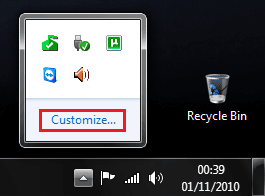
The last couple of times I have started my computer (Windows 7) my speaker icon has been missing on the tool bar. Some times it will come back after I restart the computer. I tried right clicking on the time at the bottom and went to properties. The volume is set to off but is gray and I can not change it. I need some help.
 

My Computer

Computer Manufacturer/Model Number
Dell Inspiron
OS
Windows 7
Last edited by a moderator:

My Computer

Computer Manufacturer/Model Number
Compaq Desktop
OS
Windows 7 Ultimate x64
CPU
AMD Sempron Dual Core
Memory
3GB
Graphics Card(s)
NVIDIA GeForce 6150SE nForce 430
Screen Resolution
1024x768
Hard Drives
150GB Sata
Thanks for the help but I did try that and when I get to the part to turn it on from the off position it is gray and I can not do anything.:)
 

My Computer

Computer Manufacturer/Model Number
Dell Inspiron
OS
Windows 7
Guessing

Open your control panel, open your sound card panel, and check to see if you have a device set as default.
 

My Computer

Computer Manufacturer/Model Number
BGC (Bob's Garage Crew)
OS
win 7 X64 Ultimate SP1
CPU
I3770K
Motherboard
Asus P8Z77-V Deluxe
Memory
G Skill F3-14900CL9-4GBXL x 4
Graphics Card(s)
NVIDIA GeForce GTX670 + Intel 4000
Sound Card
Realtek HD 5.1 (MOB)
Monitor(s) Displays
Asus VW224T (1)
Screen Resolution
1920 x 1080
Hard Drives
SATA Corsair Force GT 2.5" 180GB (System) Sata 3
OCZ Vertex3 120GB
OCZ Vertex 2 120GB 2.5" SATA II
ST31000524AS 1000.2GB
WD15EARS (External)
PSU
CoolerMaster 1000 Watt
Case
CoolerMaster HAF X
Cooling
CPU -- CoolerMaster 520N
Keyboard
MS Wireless 3000 V2
Mouse
MS Wireless 3000 V2
Internet Speed
Cable
Antivirus
Norton Internet Security
Browser
IE9
Other Info
AMI Bios 1805
OC'd 3%
HammerHead,
I have the same problem with No speaker icon in the control panel under sound, have try what you have listed here, Still nothing, win 7 sp1 32
Any think else that I could try let me know.
Thanks
 

My Computer

Computer type
PC/Desktop
Computer Manufacturer/Model Number
Custom Built
OS
win 7-32,64, Win 8.1
CPU
AMD Phemon II X 6 1100T@3300 mhz, Intel I7-4700MQ
Motherboard
Asrock A770DE+
Memory
4GB
Graphics Card(s)
EVGA 560FTW 448core
Sound Card
built in motherboard
Monitor(s) Displays
Samsung
Screen Resolution
24
Hard Drives
Samsung, WD, Seagate, 5-3.5 1TB
PSU
850watt corsair
Case
Antec
Cooling
5 Fans box cooler
Keyboard
102 key
Mouse
M/S optical
Internet Speed
30Mb
Antivirus
Avast
Browser
SeaMonkey by Mozilla

My Computer

Computer type
PC/Desktop
Computer Manufacturer/Model Number
Self built custom
OS
64-bit Windows 11 Pro for Workstations
CPU
Intel i7-8700K OC'd to 5 GHz
Motherboard
ASUS ROG Maximus XI Formula Z390
Memory
64 GB (4x16GB) G.SKILL TridentZ RGB DDR4 3600 MHz
Graphics Card(s)
ASUS ROG-STRIX-GTX1080TI-O11G-GAMING
Sound Card
Integrated
Monitor(s) Displays
2 x Samsung Odyssey G7 27"
Screen Resolution
2560x1440
Hard Drives
1TB Samsung 990 PRO M.2,
4TB Samsung 990 PRO PRO M.2,
TerraMaster F8 SSD Plus NAS
PSU
Seasonic Prime Titanium 850W
Case
Thermaltake Core P3
Cooling
Corsair Hydro H115i
Keyboard
Logitech wireless K800
Mouse
Logitech MX Master 4
Internet Speed
2 Gb/s Download and 100 Mb/s Upload
Antivirus
Malwarebyte Anti-Malware Premium
Browser
Google Chrome
Other Info
Logitech Z625 speaker system,
Logitech BRIO 4K Pro webcam,
HP Color LaserJet Pro MFP M477fdn,
APC SMART-UPS RT 1000 XL - SURT1000XLI,
Galaxy S23 Plus phone
speaker icon missing.

Bink,
Thanks for the reply, Sorry if I posted the message in the wrong board area

But it is for win 7 forum,

I had already try some of the post, when I try to install the factory driver audio, it give the message unable to install???
The volume control on the task bar does work bring the volume up and down as needed but no sound from the speakers???
In one of the message posted it said to download fix which was RegCure Pro, Is this what you meant???
Any other tip to try would be helpful..

Thanks in advance Shawn
 

My Computer

Computer type
PC/Desktop
Computer Manufacturer/Model Number
Custom Built
OS
win 7-32,64, Win 8.1
CPU
AMD Phemon II X 6 1100T@3300 mhz, Intel I7-4700MQ
Motherboard
Asrock A770DE+
Memory
4GB
Graphics Card(s)
EVGA 560FTW 448core
Sound Card
built in motherboard
Monitor(s) Displays
Samsung
Screen Resolution
24
Hard Drives
Samsung, WD, Seagate, 5-3.5 1TB
PSU
850watt corsair
Case
Antec
Cooling
5 Fans box cooler
Keyboard
102 key
Mouse
M/S optical
Internet Speed
30Mb
Antivirus
Avast
Browser
SeaMonkey by Mozilla
Don't know where you got RegCure Pro from, but that's not going to help at all.

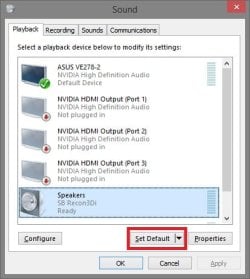
Right click on your volume system icon, and click on Playback devices.
volume-1.jpg
Next, select another listed playback device, click on Set Default, and test to see if you hear audio from something. If not, repeat with another listed playback device until hopefully you do.
volume-2.jpg
 

My Computer

Computer type
PC/Desktop
Computer Manufacturer/Model Number
Self built custom
OS
64-bit Windows 11 Pro for Workstations
CPU
Intel i7-8700K OC'd to 5 GHz
Motherboard
ASUS ROG Maximus XI Formula Z390
Memory
64 GB (4x16GB) G.SKILL TridentZ RGB DDR4 3600 MHz
Graphics Card(s)
ASUS ROG-STRIX-GTX1080TI-O11G-GAMING
Sound Card
Integrated
Monitor(s) Displays
2 x Samsung Odyssey G7 27"
Screen Resolution
2560x1440
Hard Drives
1TB Samsung 990 PRO M.2,
4TB Samsung 990 PRO PRO M.2,
TerraMaster F8 SSD Plus NAS
PSU
Seasonic Prime Titanium 850W
Case
Thermaltake Core P3
Cooling
Corsair Hydro H115i
Keyboard
Logitech wireless K800
Mouse
Logitech MX Master 4
Internet Speed
2 Gb/s Download and 100 Mb/s Upload
Antivirus
Malwarebyte Anti-Malware Premium
Browser
Google Chrome
Other Info
Logitech Z625 speaker system,
Logitech BRIO 4K Pro webcam,
HP Color LaserJet Pro MFP M477fdn,
APC SMART-UPS RT 1000 XL - SURT1000XLI,
Galaxy S23 Plus phone
speaker Icon Missing

Brink,
The RegCure Pro, Came off of your site, from one of the answer that you had posted to me on the early message, so I had download it, but did not install it until I heard back from you.

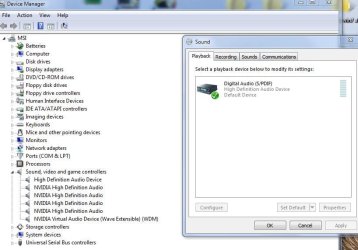
As far the other message tip of right click on the play back device, the only one listed there when you open it up is my Digital audio (s/pdif) which I do not use,

I do not see anything else that I can change to make it a default item.
How do I get this icon in there, That is where my problem lies,

TIA for all the help any other tip that I could try???
 

My Computer

Computer type
PC/Desktop
Computer Manufacturer/Model Number
Custom Built
OS
win 7-32,64, Win 8.1
CPU
AMD Phemon II X 6 1100T@3300 mhz, Intel I7-4700MQ
Motherboard
Asrock A770DE+
Memory
4GB
Graphics Card(s)
EVGA 560FTW 448core
Sound Card
built in motherboard
Monitor(s) Displays
Samsung
Screen Resolution
24
Hard Drives
Samsung, WD, Seagate, 5-3.5 1TB
PSU
850watt corsair
Case
Antec
Cooling
5 Fans box cooler
Keyboard
102 key
Mouse
M/S optical
Internet Speed
30Mb
Antivirus
Avast
Browser
SeaMonkey by Mozilla
I didn't post any such thing. It may have been advertising if you were not logged in to the site at the time.

If this is still on your ASRock A770DE+ motherboard, then double check to make sure that you have these drives installed from either ASRock driver download links below for your Windows version to see if that may help.

ASRock > Products > Motherboard > A770DE+ > Download

OR

ASRock > A770DE+


  • VIA high definition audio driver
...and install the latest NVIDIA driver for your EVGA 560FTW graphics card

http://www.sevenforums.com/graphic-cards/602-latest-nvidia-forceware-video-drivers-windows-7-a.html

Afterwards, see if you may be able to do what I previously posted to get audio back. :)
 
Last edited:

My Computer

Computer type
PC/Desktop
Computer Manufacturer/Model Number
Self built custom
OS
64-bit Windows 11 Pro for Workstations
CPU
Intel i7-8700K OC'd to 5 GHz
Motherboard
ASUS ROG Maximus XI Formula Z390
Memory
64 GB (4x16GB) G.SKILL TridentZ RGB DDR4 3600 MHz
Graphics Card(s)
ASUS ROG-STRIX-GTX1080TI-O11G-GAMING
Sound Card
Integrated
Monitor(s) Displays
2 x Samsung Odyssey G7 27"
Screen Resolution
2560x1440
Hard Drives
1TB Samsung 990 PRO M.2,
4TB Samsung 990 PRO PRO M.2,
TerraMaster F8 SSD Plus NAS
PSU
Seasonic Prime Titanium 850W
Case
Thermaltake Core P3
Cooling
Corsair Hydro H115i
Keyboard
Logitech wireless K800
Mouse
Logitech MX Master 4
Internet Speed
2 Gb/s Download and 100 Mb/s Upload
Antivirus
Malwarebyte Anti-Malware Premium
Browser
Google Chrome
Other Info
Logitech Z625 speaker system,
Logitech BRIO 4K Pro webcam,
HP Color LaserJet Pro MFP M477fdn,
APC SMART-UPS RT 1000 XL - SURT1000XLI,
Galaxy S23 Plus phone
Brink,
Sorry for the late reply but this is what I have check out since then.

Were you able to turn on the Volume icon as posted above?

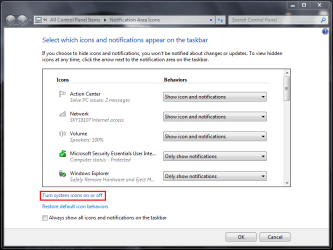
If not, was it grayed out? yes it is gray out, have try turn all on it still does not enable the speaker to be turn on

System Icons - Enable or Disable
---------------
Do you have you audio drivers installed? yes new installed both new video driver have try 8 new version, for the audio have try 2 version still no speaker icon, seems to me that it could be window system maybe how would you check if it is turn on on not.???
---------------
Have try opition number two no sucess there,
------------
have try option number one it now put a speaker icon only when you open the sound icon in the control panel, but it is not enable still gray out, system still think the digital audio s/pdif is the main sound device. How to you switch it over ???
I click on the audio driver file VIA HD deck, when in the control panel does nothing also no sound output or open the file for audio, any idea where to go from here???
----------------
Have try the enable volume notification icon registry file, it says it is done, but I have check with regedit. it show no value change, I not sure on this one..
Brink, I download the enable registry notifaction icon, then check with regedit at the location it shows nothing default value set

 

My Computer

Computer type
PC/Desktop
Computer Manufacturer/Model Number
Custom Built
OS
win 7-32,64, Win 8.1
CPU
AMD Phemon II X 6 1100T@3300 mhz, Intel I7-4700MQ
Motherboard
Asrock A770DE+
Memory
4GB
Graphics Card(s)
EVGA 560FTW 448core
Sound Card
built in motherboard
Monitor(s) Displays
Samsung
Screen Resolution
24
Hard Drives
Samsung, WD, Seagate, 5-3.5 1TB
PSU
850watt corsair
Case
Antec
Cooling
5 Fans box cooler
Keyboard
102 key
Mouse
M/S optical
Internet Speed
30Mb
Antivirus
Avast
Browser
SeaMonkey by Mozilla

My Computer

Computer type
PC/Desktop
Computer Manufacturer/Model Number
Self built custom
OS
64-bit Windows 11 Pro for Workstations
CPU
Intel i7-8700K OC'd to 5 GHz
Motherboard
ASUS ROG Maximus XI Formula Z390
Memory
64 GB (4x16GB) G.SKILL TridentZ RGB DDR4 3600 MHz
Graphics Card(s)
ASUS ROG-STRIX-GTX1080TI-O11G-GAMING
Sound Card
Integrated
Monitor(s) Displays
2 x Samsung Odyssey G7 27"
Screen Resolution
2560x1440
Hard Drives
1TB Samsung 990 PRO M.2,
4TB Samsung 990 PRO PRO M.2,
TerraMaster F8 SSD Plus NAS
PSU
Seasonic Prime Titanium 850W
Case
Thermaltake Core P3
Cooling
Corsair Hydro H115i
Keyboard
Logitech wireless K800
Mouse
Logitech MX Master 4
Internet Speed
2 Gb/s Download and 100 Mb/s Upload
Antivirus
Malwarebyte Anti-Malware Premium
Browser
Google Chrome
Other Info
Logitech Z625 speaker system,
Logitech BRIO 4K Pro webcam,
HP Color LaserJet Pro MFP M477fdn,
APC SMART-UPS RT 1000 XL - SURT1000XLI,
Galaxy S23 Plus phone
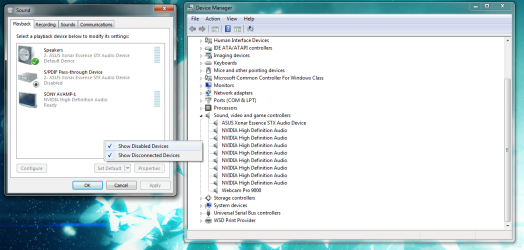
are you sure its just not disabled for some reason make sure you can see disabled devices, and what does your device manager say about your sound devices?
 

Attachments

  • sound4.png
    sound4.png
    90.2 KB · Views: 2

My Computer

Computer type
PC/Desktop
Computer Manufacturer/Model Number
Custom
OS
10 Pro x64
CPU
Ryzen 9 3900X
Motherboard
Asrock x370 Tachi
Memory
64GB(4x16GB) DDR4
Graphics Card(s)
EVGA 1080ti FTW3
Sound Card
ASUS Xonar Essence STX (V4 Bursons), ODAC rev B, NFB-11, O2
Monitor(s) Displays
3xASUS PB278Q/R, Optoma HD142X
Screen Resolution
3x1440p, 1080p
Hard Drives
512GB 850 EVO(OS, Programs)
4TB (Movies)
3TB (Downloads)
3TB (Programs)
1TB HDD (Games)
2x6TB R1 (videos)
PSU
AX760
Case
Fractal Define R5
Cooling
NH-D15S
Keyboard
Massdrop Ctrl with Box Navy's
Mouse
G903, Alioth XXL Mat
Internet Speed
280/40
Antivirus
MBAM, ESET
Browser
Canary 64 Bit
Other Info
I also own a Thinkpad P50 Xeon 4K, X220T, X1C5
Brink
I wanted to show you a pic of the problem here with the missing iconDevice mgr & sound playback.jpg
 

My Computer

Computer type
PC/Desktop
Computer Manufacturer/Model Number
Custom Built
OS
win 7-32,64, Win 8.1
CPU
AMD Phemon II X 6 1100T@3300 mhz, Intel I7-4700MQ
Motherboard
Asrock A770DE+
Memory
4GB
Graphics Card(s)
EVGA 560FTW 448core
Sound Card
built in motherboard
Monitor(s) Displays
Samsung
Screen Resolution
24
Hard Drives
Samsung, WD, Seagate, 5-3.5 1TB
PSU
850watt corsair
Case
Antec
Cooling
5 Fans box cooler
Keyboard
102 key
Mouse
M/S optical
Internet Speed
30Mb
Antivirus
Avast
Browser
SeaMonkey by Mozilla
so that pic is with show disabled devices checked? and your sound was not through your gpu right? as in your sound is not through something like a hdmi cable to a tv, and it is through a 3.5mm jack?
 

My Computer

Computer type
PC/Desktop
Computer Manufacturer/Model Number
Custom
OS
10 Pro x64
CPU
Ryzen 9 3900X
Motherboard
Asrock x370 Tachi
Memory
64GB(4x16GB) DDR4
Graphics Card(s)
EVGA 1080ti FTW3
Sound Card
ASUS Xonar Essence STX (V4 Bursons), ODAC rev B, NFB-11, O2
Monitor(s) Displays
3xASUS PB278Q/R, Optoma HD142X
Screen Resolution
3x1440p, 1080p
Hard Drives
512GB 850 EVO(OS, Programs)
4TB (Movies)
3TB (Downloads)
3TB (Programs)
1TB HDD (Games)
2x6TB R1 (videos)
PSU
AX760
Case
Fractal Define R5
Cooling
NH-D15S
Keyboard
Massdrop Ctrl with Box Navy's
Mouse
G903, Alioth XXL Mat
Internet Speed
280/40
Antivirus
MBAM, ESET
Browser
Canary 64 Bit
Other Info
I also own a Thinkpad P50 Xeon 4K, X220T, X1C5
Brink & rvcjew
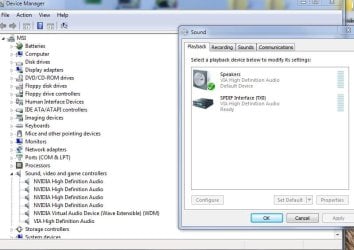
Big changes from the last report, visit the VIA Chip Maker site found another version of drivers for my audio chip set that they put out.:)
now have SOUND coming out of the SPEAKER,:thumbsup::thumbsup:
see pic speaker.jpg
I would like to thank all of you for the help and efforts on this...
 

My Computer

Computer type
PC/Desktop
Computer Manufacturer/Model Number
Custom Built
OS
win 7-32,64, Win 8.1
CPU
AMD Phemon II X 6 1100T@3300 mhz, Intel I7-4700MQ
Motherboard
Asrock A770DE+
Memory
4GB
Graphics Card(s)
EVGA 560FTW 448core
Sound Card
built in motherboard
Monitor(s) Displays
Samsung
Screen Resolution
24
Hard Drives
Samsung, WD, Seagate, 5-3.5 1TB
PSU
850watt corsair
Case
Antec
Cooling
5 Fans box cooler
Keyboard
102 key
Mouse
M/S optical
Internet Speed
30Mb
Antivirus
Avast
Browser
SeaMonkey by Mozilla
Great news. :party:
 

My Computer

Computer type
PC/Desktop
Computer Manufacturer/Model Number
Self built custom
OS
64-bit Windows 11 Pro for Workstations
CPU
Intel i7-8700K OC'd to 5 GHz
Motherboard
ASUS ROG Maximus XI Formula Z390
Memory
64 GB (4x16GB) G.SKILL TridentZ RGB DDR4 3600 MHz
Graphics Card(s)
ASUS ROG-STRIX-GTX1080TI-O11G-GAMING
Sound Card
Integrated
Monitor(s) Displays
2 x Samsung Odyssey G7 27"
Screen Resolution
2560x1440
Hard Drives
1TB Samsung 990 PRO M.2,
4TB Samsung 990 PRO PRO M.2,
TerraMaster F8 SSD Plus NAS
PSU
Seasonic Prime Titanium 850W
Case
Thermaltake Core P3
Cooling
Corsair Hydro H115i
Keyboard
Logitech wireless K800
Mouse
Logitech MX Master 4
Internet Speed
2 Gb/s Download and 100 Mb/s Upload
Antivirus
Malwarebyte Anti-Malware Premium
Browser
Google Chrome
Other Info
Logitech Z625 speaker system,
Logitech BRIO 4K Pro webcam,
HP Color LaserJet Pro MFP M477fdn,
APC SMART-UPS RT 1000 XL - SURT1000XLI,
Galaxy S23 Plus phone
Brink

That was the best present Santa could bring me this year, :D
Hope it stay there for a long time...
 

My Computer

Computer type
PC/Desktop
Computer Manufacturer/Model Number
Custom Built
OS
win 7-32,64, Win 8.1
CPU
AMD Phemon II X 6 1100T@3300 mhz, Intel I7-4700MQ
Motherboard
Asrock A770DE+
Memory
4GB
Graphics Card(s)
EVGA 560FTW 448core
Sound Card
built in motherboard
Monitor(s) Displays
Samsung
Screen Resolution
24
Hard Drives
Samsung, WD, Seagate, 5-3.5 1TB
PSU
850watt corsair
Case
Antec
Cooling
5 Fans box cooler
Keyboard
102 key
Mouse
M/S optical
Internet Speed
30Mb
Antivirus
Avast
Browser
SeaMonkey by Mozilla
Start windows task manager, find explorer.exe in Processes tab, end that process and than run that same process again
 

My Computer

Computer type
Laptop
Computer Manufacturer/Model Number
Lenovo
OS
Windows 7 Ultimate x64
Browser
Mozilla Firefox
Back
Top