Speaker Unplugged

Zandorph

New member
Local time
8:12 PM
Messages
4
Hi there,
I may be being really stupid here, I'm not so sure, but I installed the windows 7 RC and everything is fine except that there is no sound. In device manager I tried to update the driver but it says that the driver is up to date. I then tried to change the volume, where it said that there was no audio device installed. The device manager says that the speaker is unplugged, but they are laptop speakers so I don't know what to do to plug them in. Could anyone offer any help?
Thankyou
 

My Computer

OS
Windows 7
laptop speakers

Hi there,
I may be being really stupid here, I'm not so sure, but I installed the windows 7 RC and everything is fine except that there is no sound. In device manager I tried to update the driver but it says that the driver is up to date. I then tried to change the volume, where it said that there was no audio device installed. The device manager says that the speaker is unplugged, but they are laptop speakers so I don't know what to do to plug them in. Could anyone offer any help?
Thankyou

Hi and welcome to SWaiting for info

KenF

If its a laptop then the speakers are installed. We need some further info before wew can be of much use to ya. things like compter mfr,make, model,ram video card OS, was it 32nit or 64. was it a clean install or upgrade. and anything else you can think of
 

My Computer

Computer Manufacturer/Model Number
HP Pavillion dv-7 1005 Tx
OS
Win 8 Release candidate 8400
CPU
[email protected]
Memory
4 gigs
Graphics Card(s)
Nvidia 9600M
Sound Card
HD built-in
Monitor(s) Displays
17" Wxga
Screen Resolution
1440x900
Cooling
none
Internet Speed
45Mb down 5Mb up
hehe this 1 made me smile/chuckle (sorry) however like zigzag3143has said, further info will enable to help us swiftly solve your issue, could i just check also that you don't have any other audio device plugged in I.e USB head set, Blue tooth dongle/attached to any other audio sorces as 7 will try to se these devices as default audio, if so it may well be just a simple case of setting the correct devise as Default :D
 

My Computer

Computer Manufacturer/Model Number
Me :P
OS
Windows 7 Home Premium x64 SP1
CPU
Core 2 Quad Q6600
Motherboard
Abit IN9 32X MAX
Memory
8 GB OCZ PC2-6400 nVIDIA SLI-Ready Edition (4X2GB)
Graphics Card(s)
AMP! GeForce GTX 260² 896MB 448-bit GDDR3 (650MHz/2100MHz)
Sound Card
Realtek 7.1 CH HD Audio
Monitor(s) Displays
37" LG 1080p HD LCD TV
Screen Resolution
1280x1024 + 1360x768
Hard Drives
40GB Mushkin SSD
60GB Intel 520 SSD
150GB Raptor HDD
500GB Caviar HDD
PSU
Thermaltake W0133RB 1200W PSU
Case
Antec 900
Cooling
OCZ Vendetta 2 + Antec 900 case fans
Keyboard
Logitech G15 (full layout)
Mouse
R.A.T.9
Internet Speed
Not fast enough!
Erm, here's a few things:


System Manufacturer FUJITSU SIEMENS
System Model Amilo M3438 Series
System Type X86-based PC


Name High Definition Audio Device
Manufacturer Microsoft
Status OK

Adapter Description NVIDIA GeForce 6800

Terribly sorry for being thick, it was a clean install, 32bit obviously
, build 7100, anything else you need?
 

My Computer

OS
Windows 7
Oh and, no there's nothing else attached that might be default. I'm pretty sure my sound card is RealTek something or other but I can't seem to find that information on my system.
 

My Computer

OS
Windows 7
speaker unplugged

Oh and, no there's nothing else attached that might be default. I'm pretty sure my sound card is RealTek something or other but I can't seem to find that information on my system.

There are several ways to find out wha your sound card is. One way is to get a third party utility. That way you can also use it for other info. One thats around is SiSoft Sandra. they have a home version thats free

Hope this helps

Ken
 

My Computer

Computer Manufacturer/Model Number
HP Pavillion dv-7 1005 Tx
OS
Win 8 Release candidate 8400
CPU
[email protected]
Memory
4 gigs
Graphics Card(s)
Nvidia 9600M
Sound Card
HD built-in
Monitor(s) Displays
17" Wxga
Screen Resolution
1440x900
Cooling
none
Internet Speed
45Mb down 5Mb up
I tried Sisoft and Everest and I don't think either found my real soundcard. this is what Everest gave with regards to audio.

Windows Audio Device Identifier Device Description midi-out.0 0001 001B Microsoft GS Wavetable Synth mixer.0 0001 FFFF Microphone (High Definition Aud mixer.1 0001 FFFF Digital Audio (S/PDIF) (High De wave-in.0 0001 FFFF Microphone (High Definition Aud wave-in.1 0001 0050 Modem #0 Line Record wave-in.2 0001 FFFF Digital Audio (S/PDIF) (High De wave-out.0 0001 0051 Modem #0 Line Playback

PCI / PnP Audio Device Description Type High Definition Audio Controller [NoDB] PCI
 

My Computer

OS
Windows 7
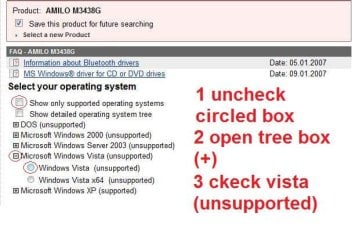
here should be you laptop specs, give or take a few
I still can work out what sound-card it runs however i keep coming across this driver detective.

Fujitsu Siemens Computers AMILO M3438 drivers or
Fujitsu Siemens Computers AMILO M3438 drivers

Centrino Machine
Screen: 17" WUXGA/WXGA+ Crystal View
Processor: Pentium M 1.6 to 2.13 GHz (review unit config is 1.86GHz)
RAM: Up to 2GB DDR2 SO-DIMM (400/533 MHz) (Review unit config is 512MB at purchase, but upgraded to 1536MB (1GB + 512MB) after purchase)
GPU: NVidia Geforce Go 6800 256 MB
HDD: Up to 2 Serial-ATA HDDs (RAID 0/1 functionality)
Network: 10/100 Ethernet
WLAN: Intel PRO/Wireless 802.11b/g
Modem: V.92 56K fax modem
Optical Drive: DVD+-RW Dual Layer
Media Drive: 4-in-1 card reader with SD/MS/MMC/MSPRO support
Connection Ports: 4xUSB 2.0, 1xS/PDIF out, 1xFireWire 400, 1xDVI-I, 1xS-Video out Expansion Slot: ExpressCard
Speakers: 2.1 (stereo + subwoofer)
Additional Features: Instant-On function and built-in remote control
Dimensions: 408 X 289 X 38.1 mm
Weight: 4.1 kg (with 2 disks)
Battery Life: 2.5 hours
Fujitsu Siemens Product Website for Amilo M3438 / M4438
 

My Computer

Computer Manufacturer/Model Number
Me :P
OS
Windows 7 Home Premium x64 SP1
CPU
Core 2 Quad Q6600
Motherboard
Abit IN9 32X MAX
Memory
8 GB OCZ PC2-6400 nVIDIA SLI-Ready Edition (4X2GB)
Graphics Card(s)
AMP! GeForce GTX 260² 896MB 448-bit GDDR3 (650MHz/2100MHz)
Sound Card
Realtek 7.1 CH HD Audio
Monitor(s) Displays
37" LG 1080p HD LCD TV
Screen Resolution
1280x1024 + 1360x768
Hard Drives
40GB Mushkin SSD
60GB Intel 520 SSD
150GB Raptor HDD
500GB Caviar HDD
PSU
Thermaltake W0133RB 1200W PSU
Case
Antec 900
Cooling
OCZ Vendetta 2 + Antec 900 case fans
Keyboard
Logitech G15 (full layout)
Mouse
R.A.T.9
Internet Speed
Not fast enough!
speaker

Erm, here's a few things:


System Manufacturer FUJITSU SIEMENS
System Model Amilo M3438 Series
System Type X86-based PC


Name High Definition Audio Device
Manufacturer Microsoft
Status OK

Adapter Description NVIDIA GeForce 6800

Terribly sorry for being thick, it was a clean install, 32bit obviously
, build 7100, anything else you need?


Hey
Any particular reason you dont go to the amilo driver download forum or the fujitsu forum?

Ken
 

My Computer

Computer Manufacturer/Model Number
HP Pavillion dv-7 1005 Tx
OS
Win 8 Release candidate 8400
CPU
[email protected]
Memory
4 gigs
Graphics Card(s)
Nvidia 9600M
Sound Card
HD built-in
Monitor(s) Displays
17" Wxga
Screen Resolution
1440x900
Cooling
none
Internet Speed
45Mb down 5Mb up

Attachments

  • Untitled.jpg
    Untitled.jpg
    42.5 KB · Views: 338

My Computer

Computer Manufacturer/Model Number
Me :P
OS
Windows 7 Home Premium x64 SP1
CPU
Core 2 Quad Q6600
Motherboard
Abit IN9 32X MAX
Memory
8 GB OCZ PC2-6400 nVIDIA SLI-Ready Edition (4X2GB)
Graphics Card(s)
AMP! GeForce GTX 260² 896MB 448-bit GDDR3 (650MHz/2100MHz)
Sound Card
Realtek 7.1 CH HD Audio
Monitor(s) Displays
37" LG 1080p HD LCD TV
Screen Resolution
1280x1024 + 1360x768
Hard Drives
40GB Mushkin SSD
60GB Intel 520 SSD
150GB Raptor HDD
500GB Caviar HDD
PSU
Thermaltake W0133RB 1200W PSU
Case
Antec 900
Cooling
OCZ Vendetta 2 + Antec 900 case fans
Keyboard
Logitech G15 (full layout)
Mouse
R.A.T.9
Internet Speed
Not fast enough!
Back
Top