Speakers play ONLY when headphones are plugged in

chocobomoto

New member
Local time
4:30 AM
Messages
3
Hi everyone,

I have had this problem for a while now not sure what started it though. My Acer 1410 Laptop speakers only will play when the headphone jack is connected to something. It seems that it is confused on when headphones are plugged in and when they are out. I have tried to uninstall and reinstall the Realtek drivers but with no results. Is there a way to switch it back??

Thanks a alot for helping!
 

My Computer My Computer

At a glance

Windows 7 Home
Computer Manufacturer/Model Number
Acer 1410 Laptop
OS
Windows 7 Home
Your drivers may have a setting that allows you to play different things through the headphones than the speakers. I bet you could find a solution using that setting.
 

My Computer My Computer

At a glance

Windows 7 Home Premium 64bit
OS
Windows 7 Home Premium 64bit
ssaamm how would you do that? I mean the speakers work fine but they only work when i plug something into the headphone jack. If nothing is plugged in no sound comes out from the speakers
 

My Computer My Computer

At a glance

Windows 7 Home
Computer Manufacturer/Model Number
Acer 1410 Laptop
OS
Windows 7 Home
"ssaamm how would you do that? I mean the speakers work fine but they only work when i plug something into the headphone jack. If nothing is plugged in no sound comes out from the speakers"

If by speakers,you mean built-in speakers then you need to install the sound drivers made by the manufacturer i.e. Acer in your case.You could download the sound drivers from the website,simply by giving your laptop model and etc.
Realtek driver won't work in this case.Use the driver made by Acer.
 

My Computer My Computer

At a glance

Windows 7 Ultimate x32Core 2 Duo4GBIntel(R) GMA 3000(Intel(R) Q965/Q963 Express ...
Computer Manufacturer/Model Number
ACER Vpro 3900
OS
Windows 7 Ultimate x32
CPU
Core 2 Duo
Motherboard
Veriton 3900pro
Memory
4GB
Graphics Card(s)
Intel(R) GMA 3000(Intel(R) Q965/Q963 Express Chipset Family)
Sound Card
High Definition Audio Device
Monitor(s) Displays
LCD
Screen Resolution
1024 X 768
Hard Drives
Seagate ST3500418AS ATA Device 500gig hard drive
Internet Speed
4MB
The driver that I downloaded from Acer is a Realtek HD Audiodriver. It still does the same thing though. Oh yeah MirzaAsad the speakers are the built-in speakers.
 

My Computer My Computer

At a glance

Windows 7 Home
Computer Manufacturer/Model Number
Acer 1410 Laptop
OS
Windows 7 Home
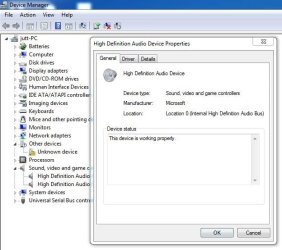
hit "windows button + r" on your keyboard and type "devmgmt.msc" in the run open bar---------------then navigate to "sound,video and game controllers" right click on them and navigate to the properties menu and check what does the system says about device driver.It should say "This device is working properly.Also under the driver tab in the properties window hit update driver in order to make sure your device driver is up to date or not.
If still not works then "goto Control Panel->Sound->Playback tab. Right click on speakers and select Setas Default".
If still the problem persists then "go to Control Panel->Troubleshooting and select Troubleshoot audio playback and follow the prompts"
 

Attachments

  • 1.jpg
    1.jpg
    31.6 KB · Views: 90
  • Capture.JPG
    Capture.JPG
    53.2 KB · Views: 86

My Computer My Computer

At a glance

Windows 7 Ultimate x32Core 2 Duo4GBIntel(R) GMA 3000(Intel(R) Q965/Q963 Express ...
Computer Manufacturer/Model Number
ACER Vpro 3900
OS
Windows 7 Ultimate x32
CPU
Core 2 Duo
Motherboard
Veriton 3900pro
Memory
4GB
Graphics Card(s)
Intel(R) GMA 3000(Intel(R) Q965/Q963 Express Chipset Family)
Sound Card
High Definition Audio Device
Monitor(s) Displays
LCD
Screen Resolution
1024 X 768
Hard Drives
Seagate ST3500418AS ATA Device 500gig hard drive
Internet Speed
4MB
Re:

Hi, I am having the exact same issues with my laptop computer. I have an HP Pavillion DV7 with Beats by Dre sound system. I've had the laptop for about a month and this issue just started two days ago. Did you ever figure it out?
 

My Computer My Computer

At a glance

Windows 7 64 bit
OS
Windows 7 64 bit
I've tried to troubleshoot this for hours. I've reinstalled all drivers, reinstalled BIOS, and even formatted my computer to factory condition. Not sure why it still is not working!
 

My Computer My Computer

At a glance

Windows 7 64 bit
OS
Windows 7 64 bit
Back
Top