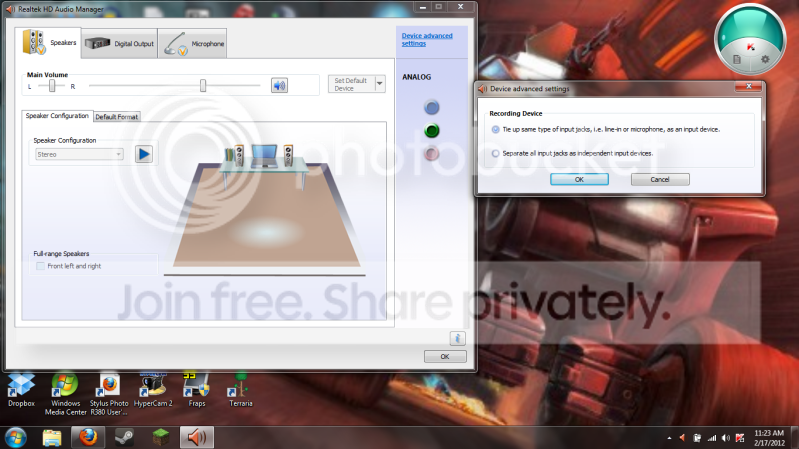
Speakers stuck in headphone mode

DemonNecron

New member
Local time
12:27 AM
Messages
11
So I am not getting any audio through my speakers anymore this happened after I unplugged my headphones but it doesn't disable that they are unplugged I open my Realtek HD Audio Manager and it shows that the front jack has headphones in when they indeed aren't.
I can plug in my USB headset/mic and get sound through there due to it coming up as its own device so its something to do with my speakers in headphone mode.
Also I have tried restarts and shutdowns with and without the headphones in to try and get it to reset whatever happened with no success so any ideas?
 

My Computer My Computer

At a glance

Windows 7 Home Premium 64 Bit
Computer Manufacturer/Model Number
Asus
OS
Windows 7 Home Premium 64 Bit
Try uninstalling/reinstalling the sound and see if that resets it. Remove the USB headset/mic so it's not interferring or conflicting with the next steps. Go to the Device Manager and RIGHT click on the entry for the RealTek sound device and then LEFT click on the device and click "uninstall" DO NOT check the box to uninstall the drivers. Restart (reboot) the PC and when Windows starts it will detect and reinstall the RealTek sound.
 

My Computer My Computer

At a glance

Windows 10 64 bitIntel i7 6700K16GB Corsair DominatorIntel CPU Graphics
Computer type
PC/Desktop
Computer Manufacturer/Model Number
My Own Build
OS
Windows 10 64 bit
CPU
Intel i7 6700K
Motherboard
ASUS ROG Maximus VIII Hero
Memory
16GB Corsair Dominator
Graphics Card(s)
Intel CPU Graphics
Sound Card
RealTek
Monitor(s) Displays
27" Dell S2719dgf
Screen Resolution
2560X1440
Hard Drives
1 TB Samsung 850 EVO SSD for Win 10 Pro
500GB Samsung 850 EVO SSD for Win 10 Insider
2 TB drive for backup
PSU
EVGA Supernova 750G2
Case
BeQuiet Silent Base 600
Cooling
Deepcool Captain 120EX
Keyboard
Microsoft Wireless 2000
Mouse
Microsoft wireless
Internet Speed
100 MB/sec (Cable)
Antivirus
Microsoft Defender and Malwarebytes
Browser
Edge/Firefox
Other Info
Cakewalk (Sonar) by BandLab and Studio One 4.1 Pro recording studio software. MOTU 896Mk3 Hybrid recording interface, Frontier Tranzport wireless control unit, Behringer X-Touch Control Surface.
Five USB connected optical drives for CD Audio production using Nero BurningROM
Ok I tried that and it didn't work its still stuck in headphone mode.
 

My Computer My Computer

At a glance

Windows 7 Home Premium 64 Bit
Computer Manufacturer/Model Number
Asus
OS
Windows 7 Home Premium 64 Bit
Are you using the latest driver?
Realtek
 

My Computer My Computer

At a glance

Windows 7 Home Premium 64 bitIntel Core i7-4790G.SKILL 8GB (2 x 4GB) DDR3 F3-10666CL9D-8GBNTAMD Radeon R7 250
Computer type
PC/Desktop
Computer Manufacturer/Model Number
Custom Build
OS
Windows 7 Home Premium 64 bit
CPU
Intel Core i7-4790
Motherboard
GA-Z87X-D3H
Memory
G.SKILL 8GB (2 x 4GB) DDR3 F3-10666CL9D-8GBNT
Graphics Card(s)
AMD Radeon R7 250
Sound Card
Realtek ALC892
Monitor(s) Displays
Samsung UN32EH5000, Dell 1703FPT
Screen Resolution
1920 x 1080, 1280 x 1024
Hard Drives
WD5003AZEX
WD10EZEX
Samsung HD103SJ
Samsung 128 GB 840 PRO
PSU
SeaSonic M12II SS-500GM
Case
Fractal Design Define R4
Cooling
Zalman CNPS9900ALED
Keyboard
Logitech K800
Mouse
Logitech M705
Internet Speed
16 Mbps
Antivirus
Avast
Browser
Firefox
Other Info
Bose Companion 2 Multimedia Speakers
Yes I have the latest Realtek driver. Im thinking I need to disable the input jacks then re-enable them or something along those lines. I don't know how to do that though.
 

My Computer My Computer

At a glance

Windows 7 Home Premium 64 Bit
Computer Manufacturer/Model Number
Asus
OS
Windows 7 Home Premium 64 Bit
Go to the Realtek device advanced settings.
You should see two Playback Device options.
See if either of those resolve the issue.
 

My Computer My Computer

At a glance

Windows 7 Home Premium 64 bitIntel Core i7-4790G.SKILL 8GB (2 x 4GB) DDR3 F3-10666CL9D-8GBNTAMD Radeon R7 250
Computer type
PC/Desktop
Computer Manufacturer/Model Number
Custom Build
OS
Windows 7 Home Premium 64 bit
CPU
Intel Core i7-4790
Motherboard
GA-Z87X-D3H
Memory
G.SKILL 8GB (2 x 4GB) DDR3 F3-10666CL9D-8GBNT
Graphics Card(s)
AMD Radeon R7 250
Sound Card
Realtek ALC892
Monitor(s) Displays
Samsung UN32EH5000, Dell 1703FPT
Screen Resolution
1920 x 1080, 1280 x 1024
Hard Drives
WD5003AZEX
WD10EZEX
Samsung HD103SJ
Samsung 128 GB 840 PRO
PSU
SeaSonic M12II SS-500GM
Case
Fractal Design Define R4
Cooling
Zalman CNPS9900ALED
Keyboard
Logitech K800
Mouse
Logitech M705
Internet Speed
16 Mbps
Antivirus
Avast
Browser
Firefox
Other Info
Bose Companion 2 Multimedia Speakers
I went there and its odd I only have Recording Device options.

screenprint.png
 

My Computer My Computer

At a glance

Windows 7 Home Premium 64 Bit
Computer Manufacturer/Model Number
Asus
OS
Windows 7 Home Premium 64 Bit
You may want to unplug the USB device temporarily and uninstall any drivers associated with it. I suspect there's some type of conflict between it and the onboard audio device.
 

My Computer My Computer

At a glance

Windows 7 Home Premium 64 bitIntel Core i7-4790G.SKILL 8GB (2 x 4GB) DDR3 F3-10666CL9D-8GBNTAMD Radeon R7 250
Computer type
PC/Desktop
Computer Manufacturer/Model Number
Custom Build
OS
Windows 7 Home Premium 64 bit
CPU
Intel Core i7-4790
Motherboard
GA-Z87X-D3H
Memory
G.SKILL 8GB (2 x 4GB) DDR3 F3-10666CL9D-8GBNT
Graphics Card(s)
AMD Radeon R7 250
Sound Card
Realtek ALC892
Monitor(s) Displays
Samsung UN32EH5000, Dell 1703FPT
Screen Resolution
1920 x 1080, 1280 x 1024
Hard Drives
WD5003AZEX
WD10EZEX
Samsung HD103SJ
Samsung 128 GB 840 PRO
PSU
SeaSonic M12II SS-500GM
Case
Fractal Design Define R4
Cooling
Zalman CNPS9900ALED
Keyboard
Logitech K800
Mouse
Logitech M705
Internet Speed
16 Mbps
Antivirus
Avast
Browser
Firefox
Other Info
Bose Companion 2 Multimedia Speakers
the headphones are in the input jack not USB that is a separate pair that works properly. Also I have already tried that and nothing is plugged into it right now.
 

My Computer My Computer

At a glance

Windows 7 Home Premium 64 Bit
Computer Manufacturer/Model Number
Asus
OS
Windows 7 Home Premium 64 Bit
Don't know much about usb headsets, but try going into BIOS, disable the sound card, start up windows, and then shut down, and re-enable the card. Once you start up it should reset all settings as it will redetect the card and reapply the drivers. Uninstalling driver and reinstalling may also be a go after you disable the card in bios. But only AFTER you disable it. Windows comes with it's own realtek generic driver embeded into it, so even after uninstall, if the card is still enabled in the system, it may not properly reset it. Hope this helps.
 

My Computer My Computer

At a glance

Windows 7 Ultimate x64AMD Athlon II X3A-DATA XPG Gaming Series V2.0 2x2GBAMD ATI RADEON HD 5570 OC to 750Mhz
Computer Manufacturer/Model Number
Self-made
OS
Windows 7 Ultimate x64
CPU
AMD Athlon II X3
Motherboard
ASRock 890FX Deluxe5
Memory
A-DATA XPG Gaming Series V2.0 2x2GB
Graphics Card(s)
AMD ATI RADEON HD 5570 OC to 750Mhz
Sound Card
Asus XONAR DS 7.1
Monitor(s) Displays
PHILIPS Brilliance C-line
Screen Resolution
1680x1050 16:10
Hard Drives
Samsung Spinpoint F3 SATAII 1TB
Yes ive tried that as well and didnt fix it and this has nothing to do with the USB headset it has to to with the actual headset jack input that is registering it has an ear bud plugged into it.
 

My Computer My Computer

At a glance

Windows 7 Home Premium 64 Bit
Computer Manufacturer/Model Number
Asus
OS
Windows 7 Home Premium 64 Bit
I did not say it does have smth to do with the headset. Read the article in the Sound & Audio section that is pinned in the upper part. May shed some light on the issue.
 

My Computer My Computer

At a glance

Windows 7 Ultimate x64AMD Athlon II X3A-DATA XPG Gaming Series V2.0 2x2GBAMD ATI RADEON HD 5570 OC to 750Mhz
Computer Manufacturer/Model Number
Self-made
OS
Windows 7 Ultimate x64
CPU
AMD Athlon II X3
Motherboard
ASRock 890FX Deluxe5
Memory
A-DATA XPG Gaming Series V2.0 2x2GB
Graphics Card(s)
AMD ATI RADEON HD 5570 OC to 750Mhz
Sound Card
Asus XONAR DS 7.1
Monitor(s) Displays
PHILIPS Brilliance C-line
Screen Resolution
1680x1050 16:10
Hard Drives
Samsung Spinpoint F3 SATAII 1TB
Back
Top