
Speech Recognition - Language Configuration is Not Supported Error Fix

How to Fix the Speech Recognition "Language Configuration is Not Supported" Error

   Information
This tutorial will help show you a few solutions that can be done to fix when you try to start Speech Recognition and get the error message below.

Speech Recognition could not start because the language configuration is not supported.

The recognizer language must match the language of the user interface. Please change the recognizer language in the Speech Recognition control panel under Advanced Options.

One or more of the solutions below may need to be applied to fix this error message. Start with SOLUTION 1 and work your way down, and stop when the error is fixed and stops displaying when you start Speech Recognition.


SOLUTION 1

Add ctfmon.exe to Run at Startup


NOTE: You must be logged in as an administrator to be able to do this solution.
1. To Add "ctfmon.exe" to Run at Startup
NOTE: This is the option you need to do to try and fix the error.
A) Click on the Download button below to download the file below.
Run_ctfmon_at_Startup.reg

Download


B) Go to step 3.
2. To Undo and Remove "ctfmon.exe"from Running at Startup
NOTE: Just because I always add an undo option.
A) Click on the Download button below to download the file below.
Undo_Run_ctfmon_at_Startup.reg

Download


3. Click on Save and save the .reg file to the desktop.

4. Right click on the downloaded .reg file and click on Merge.
5. When prompted, click on Run, Yes (UAC-Windows 7) or Continue (UAC-Vista), Yes, and OK.

6. Restart the computer to apply.

7. You can now delete the downloaded .reg file if you like.


SOLUTION 2

Verify and Set Correct Speech Properties Language Locale


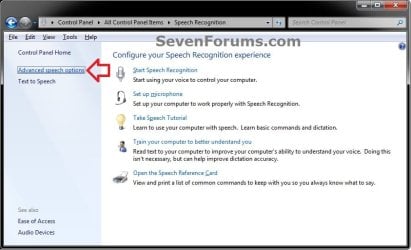
1. Open the Control Panel (icons view), click on the Speech Recognition icon, and click on the Advanced speech options link in the left pane. (see screenshot below)
step1.jpg
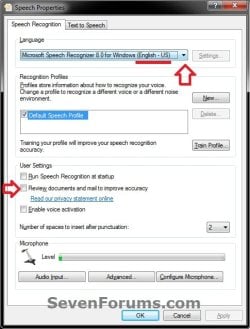
2. Verify and make sure that the Language is set to the correct locale (ex: English-US), and that the Review documents box is unchecked. (see screenshot below)
step2.jpg
3. Make any needed changes, and click on OK. (see screenshot above)


SOLUTION 3

Toggle Region and Language Current Location Setting


1. Open the Control Panel (icons view), click on the Region and Language icon.

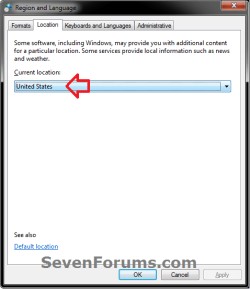
2. Click on the Location tab, select any different location, click on OK, and restart the computer. (see screenshot below)
step3.png
3. After the computer restarts, change the location back to your correct location (ex: United States), click on OK, and restart the computer again.. (see screenshot above)


SOLUTION 4

Create New Speech Recognition Profile


NOTE: This is if none of the above solutions was able to stop the error message.
1. Open the Control Panel (icons view), click on the Speech Recognition icon, and click on the Advanced speech options link in the left pane. (see screenshot below)
step1.jpg
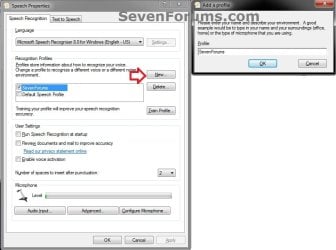
2. Under Recognition Profiles, click on the New button, type in a new profile name, click on OK, and follow the rest of the on-screen instructions to finish setting up a new Speech Recognition profile. (see screenshots below)
step4.jpg
3. When finshed, check your new profile box to make it the default profile, and click on OK. (see left screenshot below step 2)
That's it,
Shawn


Attachments

Last edited:
Nice. I'm sure that this will help a lot of members. ;)
 

My Computer My Computer

Computer type
PC/Desktop
Computer Manufacturer/Model Number
Custom Build
OS
Windows 10 Pro x64
CPU
Intel Core i5 4440 @Stock
Motherboard
Gigabyte Z97 D3H
Memory
4 x 4GB HyperX Fury DDR3
Graphics Card(s)
Gigabyte GTX 1050Ti O4G
Sound Card
Integrated
Monitor(s) Displays
Dell P2417H
Screen Resolution
1920 x 1080
Hard Drives
Samsung EVO 850 120GB / Toshiba DT01ACA050 1TB 7200prm 32MB
PSU
Riotoro Onyx 750W
Case
NZXT H500 Black-Red
Cooling
Stock CPU + NZXT 120mm + 2x120mm red fans
Keyboard
Modecom Volcano Lanparty
Mouse
Asus ROG Gladius / DeepCool E-Pad Plus
Internet Speed
DOCSIS 50/3 Mbit
Browser
Google Chrome
Other Info
Asus K55VJ(i5 3210M, GT635M / 2GB, 8GB DDR3, 500GB HDD)
I hope so. :)
 

My Computer My Computer

Computer type
PC/Desktop
Computer Manufacturer/Model Number
Self built custom
OS
64-bit Windows 11 Pro for Workstations
CPU
Intel i7-8700K OC'd to 5 GHz
Motherboard
ASUS ROG Maximus XI Formula Z390
Memory
64 GB (4x16GB) G.SKILL TridentZ RGB DDR4 3600 MHz
Graphics Card(s)
ASUS ROG-STRIX-GTX1080TI-O11G-GAMING
Sound Card
Integrated
Monitor(s) Displays
2 x Samsung Odyssey G7 27"
Screen Resolution
2560x1440
Hard Drives
1TB Samsung 990 PRO M.2,
4TB Samsung 990 PRO PRO M.2,
TerraMaster F8 SSD Plus NAS
PSU
Seasonic Prime Titanium 850W
Case
Thermaltake Core P3
Cooling
Corsair Hydro H115i
Keyboard
Logitech wireless K800
Mouse
Logitech MX Master 4
Internet Speed
2 Gb/s Download and 100 Mb/s Upload
Antivirus
Malwarebyte Anti-Malware Premium
Browser
Google Chrome
Other Info
Logitech Z625 speaker system,
Logitech BRIO 4K Pro webcam,
HP Color LaserJet Pro MFP M477fdn,
APC SMART-UPS RT 1000 XL - SURT1000XLI,
Galaxy S23 Plus phone
Thanks Brink. Lovely, solution 1 worked for me.
 

My Computer My Computer

Computer type
PC/Desktop
Computer Manufacturer/Model Number
Custom Build
OS
Windows 7 Ultimate X64
CPU
Intel Core i7 -2600 @ 3.40 Ghz 3401 Mhz
Motherboard
DH67BL
Memory
8GB DDR3 Corsair RAM
Graphics Card(s)
Nvidia GeForce GT-520
Hard Drives
Western Digital 500 GB Caviar Blue
Antivirus
AVG Anti Virus Free Edition 2013
Browser
Mozilla Firefox - 20
You're most welcome 7Human. I'm happy to hear it was able to help. :)
 

My Computer My Computer

Computer type
PC/Desktop
Computer Manufacturer/Model Number
Self built custom
OS
64-bit Windows 11 Pro for Workstations
CPU
Intel i7-8700K OC'd to 5 GHz
Motherboard
ASUS ROG Maximus XI Formula Z390
Memory
64 GB (4x16GB) G.SKILL TridentZ RGB DDR4 3600 MHz
Graphics Card(s)
ASUS ROG-STRIX-GTX1080TI-O11G-GAMING
Sound Card
Integrated
Monitor(s) Displays
2 x Samsung Odyssey G7 27"
Screen Resolution
2560x1440
Hard Drives
1TB Samsung 990 PRO M.2,
4TB Samsung 990 PRO PRO M.2,
TerraMaster F8 SSD Plus NAS
PSU
Seasonic Prime Titanium 850W
Case
Thermaltake Core P3
Cooling
Corsair Hydro H115i
Keyboard
Logitech wireless K800
Mouse
Logitech MX Master 4
Internet Speed
2 Gb/s Download and 100 Mb/s Upload
Antivirus
Malwarebyte Anti-Malware Premium
Browser
Google Chrome
Other Info
Logitech Z625 speaker system,
Logitech BRIO 4K Pro webcam,
HP Color LaserJet Pro MFP M477fdn,
APC SMART-UPS RT 1000 XL - SURT1000XLI,
Galaxy S23 Plus phone
I have been trying to figure how to get this working off and on for several months. Just came across this thread and got speech recognition working in about 2 minutes, first item got it going.... Thanks for the post..
 

My Computer My Computer

Computer type
PC/Desktop
Computer Manufacturer/Model Number
custom build
OS
windows 7 pro 64-bit
CPU
amd phenomII
Motherboard
asus m2n68-am plus
Memory
4gb
Graphics Card(s)
nvidia gt630
Hard Drives
500gb
120gb
Antivirus
avg free
Browser
ie 10 and google chrome
Same goes for me Brink, thanks
 

My Computer My Computer

Computer type
PC/Desktop
Computer Manufacturer/Model Number
custom build
OS
win7 Ultimate 64
CPU
icore5
Motherboard
Gigabyte P67
Memory
4 Gig
Graphics Card(s)
ATI Radeon HD5700
Sound Card
envy24
Monitor(s) Displays
Samsung SyncMaster T22HD/HP F1905
Screen Resolution
1680x1050
Hard Drives
Samsung
WDC
PSU
650
Case
GMC
Cooling
corsair
Keyboard
Dell
Mouse
MS3000
Internet Speed
slow
Antivirus
Microsoft
Browser
IE
You're most welcome KOREA7. :)
 

My Computer My Computer

Computer type
PC/Desktop
Computer Manufacturer/Model Number
Self built custom
OS
64-bit Windows 11 Pro for Workstations
CPU
Intel i7-8700K OC'd to 5 GHz
Motherboard
ASUS ROG Maximus XI Formula Z390
Memory
64 GB (4x16GB) G.SKILL TridentZ RGB DDR4 3600 MHz
Graphics Card(s)
ASUS ROG-STRIX-GTX1080TI-O11G-GAMING
Sound Card
Integrated
Monitor(s) Displays
2 x Samsung Odyssey G7 27"
Screen Resolution
2560x1440
Hard Drives
1TB Samsung 990 PRO M.2,
4TB Samsung 990 PRO PRO M.2,
TerraMaster F8 SSD Plus NAS
PSU
Seasonic Prime Titanium 850W
Case
Thermaltake Core P3
Cooling
Corsair Hydro H115i
Keyboard
Logitech wireless K800
Mouse
Logitech MX Master 4
Internet Speed
2 Gb/s Download and 100 Mb/s Upload
Antivirus
Malwarebyte Anti-Malware Premium
Browser
Google Chrome
Other Info
Logitech Z625 speaker system,
Logitech BRIO 4K Pro webcam,
HP Color LaserJet Pro MFP M477fdn,
APC SMART-UPS RT 1000 XL - SURT1000XLI,
Galaxy S23 Plus phone
hi there! this my first post and i had signed up just because of this. thank you very much! my problem was solved using solution 2. #2 unchecking review documents. KUDOS BRINK! keep it up!
 
Last edited:

My Computer My Computer

Computer type
Laptop
Computer Manufacturer/Model Number
Acer
OS
Windows 7 Home Premium 64bit
CPU
AMD Dual Core Processor
Motherboard
ASPIRE 5253
Memory
4 GB DDR3
Graphics Card(s)
AMD Radeon HD 6310
Hard Drives
WDC WD5000BPV-22HXZT1 ATA Device
Antivirus
MSE, Iobit Malware Fighter
Browser
Google Chrome, Firefox
I'm glad it was able to help Rapmig, and welcome to Seven Forums. :)
 

My Computer My Computer

Computer type
PC/Desktop
Computer Manufacturer/Model Number
Self built custom
OS
64-bit Windows 11 Pro for Workstations
CPU
Intel i7-8700K OC'd to 5 GHz
Motherboard
ASUS ROG Maximus XI Formula Z390
Memory
64 GB (4x16GB) G.SKILL TridentZ RGB DDR4 3600 MHz
Graphics Card(s)
ASUS ROG-STRIX-GTX1080TI-O11G-GAMING
Sound Card
Integrated
Monitor(s) Displays
2 x Samsung Odyssey G7 27"
Screen Resolution
2560x1440
Hard Drives
1TB Samsung 990 PRO M.2,
4TB Samsung 990 PRO PRO M.2,
TerraMaster F8 SSD Plus NAS
PSU
Seasonic Prime Titanium 850W
Case
Thermaltake Core P3
Cooling
Corsair Hydro H115i
Keyboard
Logitech wireless K800
Mouse
Logitech MX Master 4
Internet Speed
2 Gb/s Download and 100 Mb/s Upload
Antivirus
Malwarebyte Anti-Malware Premium
Browser
Google Chrome
Other Info
Logitech Z625 speaker system,
Logitech BRIO 4K Pro webcam,
HP Color LaserJet Pro MFP M477fdn,
APC SMART-UPS RT 1000 XL - SURT1000XLI,
Galaxy S23 Plus phone
Back
Top