Splitting video in Windows Live Movie Maker

Hikertrash

New member
I'd like to take a hour long video and split it into 5 parts to upload to Youtube and Facebook. In WLMM I see how I can make the start and end points, fade in and out the sound etc and and then click "save trim" but if I save the movie it's still one large file which encodes or whatever all over again. :mad:

Can anyone help?
 

My Computer

Computer type
PC/Desktop
Computer Manufacturer/Model Number
Dell Vostro 3558 (Laptop)
OS
Windows 7 Professional 64bit
Motherboard
Dell
Memory
8GB
Graphics Card(s)
Intel HD Graphics, NVIDIA GeForce
Screen Resolution
1366 x 768
Antivirus
Avira Free, MalwareBytes AntiMalware Pro
Browser
Chrome
WL Movie Maker has only basic editing. It won't save a split movie as separate files. You need to delete the parts you don't want to save after splitting.
 

My Computer

Computer type
Laptop
Computer Manufacturer/Model Number
Hewlett-Packard/G62-107SA Notebook
OS
Microsoft Windows 7 Home Premium 64-bit Service Pack 1
CPU
Intel(R) Core(TM) i3 CPU M 330 @ 2.13GHz
Motherboard
Hewlett-Packard 1425
Memory
8 GB DDR3
Graphics Card(s)
Intel(R) HD Graphics
Sound Card
Realtek High Definition Audio
Monitor(s) Displays
Builtin
Screen Resolution
1366 x 768 x 32 bits (4294967296 colors) @ 60 Hz
Hard Drives
250 GB SATA Hard Disk Drive 7200 rpm
2TB Seagate GoFlex USB 2 Drive
1TB Iomega Prestige USB 2 Drive
1.5TB Iomega Prestige USB 2 Drive (Samsung)
2TB WD MyBook Live NAS.
Mouse
Logitech Anywhere MX
Internet Speed
152 Mbs download 10 Mbs upload
Antivirus
Norton 360
Browser
Chrome
You can also revert to the Vista version "Windows Movie Maker" (not Windows Live Movie Maker). As I recall, all you need is access to a Vista disc and then copy the files over.

Using Windows Movie Maker, the process would be:

1: Open the full length video and begin playing it.

2: Locate the desired split point and split the file. The screen now shows 2 parts.

3: Drag the first part (up to the split point) to the "time line" area at the screen bottom.

4: "Publish" the portion you just dragged to the time line. That's now short movie number 1

5: Repeat the process for 2, 3, 4, etc. Make sure that the time line contains only the short clip when you "publish". If you instead split the long movie into 5 short clips and then drag all 5 to the time line, the published movie will be the same as the original long movie--the 5 short clips will be rejoined.

I'm surprised Windows Live Movie Maker can't do this, but that may be one of the reasons why the warning went out that it was inferior to the older "Windows Movie Maker" from Vista.
 

My Computer

Computer type
PC/Desktop
Computer Manufacturer/Model Number
Ignatz Special; 4 speed manual gearbox; factory air conditioning; one of one
OS
Windows 7 Home Premium SP1, 64-bit
CPU
Intel Skylake i5-6600K, not overclocked
Motherboard
AsRock Z170M Extreme 4, micro ATX
Memory
8 GB HyperX DDR4-2666 (2 x 4 GB)
Graphics Card(s)
none; graphics are integrated on CPU
Sound Card
onboard: Realtek ALC1150; external: USB Behringer UF0-202
Monitor(s) Displays
Dell S2340M 23 inch IPS
Screen Resolution
1600 x 900
Hard Drives
System: Crucial MX100 series SSD, 128 GB;
Data: Samsung Spinpoint 103SJ, 1 TB;
Backup: WD Caviar Green WD30EZRX-00D8PB0, 3 TB
PSU
Rosewill SilentNight 500 watt fanless, semi-modular
Case
Antec Solo II
Cooling
Noctua NH-U12S; Noctua F12 intake, Noctua S12A exhaust
Keyboard
Microsoft 200 6JH-00001 USB
Mouse
Dell or Microsoft optical wired; USB
Antivirus
Microsoft Security Essentials and Malwarebytes Premium
Browser
Pale Moon
Other Info
All fans PWM; speeds at idle: CPU circa 500 rpm; intake circa 600 rpm; exhaust circa 600 rpm; CPU temps 27 idle and 47 C load in a warm room (27 C/81 F) when running Intel Extreme Tuning Utility stress test.

My Computer

Computer type
Laptop
Computer Manufacturer/Model Number
Hewlett-Packard/G62-107SA Notebook
OS
Microsoft Windows 7 Home Premium 64-bit Service Pack 1
CPU
Intel(R) Core(TM) i3 CPU M 330 @ 2.13GHz
Motherboard
Hewlett-Packard 1425
Memory
8 GB DDR3
Graphics Card(s)
Intel(R) HD Graphics
Sound Card
Realtek High Definition Audio
Monitor(s) Displays
Builtin
Screen Resolution
1366 x 768 x 32 bits (4294967296 colors) @ 60 Hz
Hard Drives
250 GB SATA Hard Disk Drive 7200 rpm
2TB Seagate GoFlex USB 2 Drive
1TB Iomega Prestige USB 2 Drive
1.5TB Iomega Prestige USB 2 Drive (Samsung)
2TB WD MyBook Live NAS.
Mouse
Logitech Anywhere MX
Internet Speed
152 Mbs download 10 Mbs upload
Antivirus
Norton 360
Browser
Chrome
Thanks for all the help and suggestions. I guess newer isn't always better. Taking the splits and fades I made with WLMM, I'm in the process of working it out with VirtualDub Portable
 

My Computer

Computer type
PC/Desktop
Computer Manufacturer/Model Number
Dell Vostro 3558 (Laptop)
OS
Windows 7 Professional 64bit
Motherboard
Dell
Memory
8GB
Graphics Card(s)
Intel HD Graphics, NVIDIA GeForce
Screen Resolution
1366 x 768
Antivirus
Avira Free, MalwareBytes AntiMalware Pro
Browser
Chrome
No need to use Vdub on that but if you use it, the process is identical to the movie maker way of handling stuff like that:
Load a copy of your movie in the movie maker, delete everything (except for the first clip you want to keep and save that. Now do that again until you have your 5 (or so ) clips

While VD has the advantage that you don't have to re-encode the material (just set Video and Audio to Direct Stream Copy) and don't forget to cut on Keyframes only (use the yellow/golden keys to navigate to the final cut points;)
-DG
 

My Computer

Computer Manufacturer/Model Number
HP m8000n
OS
Windows 7 Ultimate x86
CPU
DualCore AMD Athlon 64 X2, 2600 MHz 5200+
Motherboard
Asus M2N68-LA (Narra)
Memory
Samsung 2GB DDR2
Graphics Card(s)
Onboard NVIDIA GeForce 6150SE nForce 430
Sound Card
Onboard nVIDIA nForce 6100-430 (MCP61P)
Monitor(s) Displays
Westinghouse 19" LED
Screen Resolution
1280x1024
Hard Drives
SATA II Seagate Barracuda 500GB
USB II WD Elements 500GB
USB II WD My Book 1TB
USB II WD My Book 2TB
PSU
Stock (HP)
Case
Stock (HP)
Cooling
Stock
Keyboard
Logitech Classic KB 200
Mouse
Standard HP opticle USB mouse
There is also a free version of Microsoft Expression Encoder which with a bit of playing around can do the same thing. You can download it from here Expression Encoder 4 Overview | Microsoft® Expression®
This is an excellent program (once you grasped the typical complex MS interface). But unfortunately the free version drops on you after 10 minutes - only $199 will cure that.

don't forget to cut on Keyframes only
But that can be a pain because sometimes the key frames are far and apart.
 

My Computer

Computer Manufacturer/Model Number
HP, Dell, Gateway, Toshiba - 4 laptops and 2 desktops
OS
Vista, Windows7, Mint Mate, Zorin, Windows 8
CPU
from 1.6GHz Duo to i7
Monitor(s) Displays
2x HP w2207
Hard Drives
5x HDD, 7x SSD, 12x Externals
Keyboard
with trackball - no mices
Mouse
Trackball mice
Internet Speed
DSL 6000
As I recall, you can place a start point for a cut anywhere, but the ending point must be a key frame?

It is really weird. I have seen cases where there were 10 key frames in 5 seconds, and then as WHS says, you might have to wait a while for a stop point.

Question:

Is there a decent free basic editor that works on WMV and MPEG (non-AVI in general) that does NOT re-encode? I like that feature in Virtual Dub, but other than that I don't much like it.
 

My Computer

Computer type
PC/Desktop
Computer Manufacturer/Model Number
Ignatz Special; 4 speed manual gearbox; factory air conditioning; one of one
OS
Windows 7 Home Premium SP1, 64-bit
CPU
Intel Skylake i5-6600K, not overclocked
Motherboard
AsRock Z170M Extreme 4, micro ATX
Memory
8 GB HyperX DDR4-2666 (2 x 4 GB)
Graphics Card(s)
none; graphics are integrated on CPU
Sound Card
onboard: Realtek ALC1150; external: USB Behringer UF0-202
Monitor(s) Displays
Dell S2340M 23 inch IPS
Screen Resolution
1600 x 900
Hard Drives
System: Crucial MX100 series SSD, 128 GB;
Data: Samsung Spinpoint 103SJ, 1 TB;
Backup: WD Caviar Green WD30EZRX-00D8PB0, 3 TB
PSU
Rosewill SilentNight 500 watt fanless, semi-modular
Case
Antec Solo II
Cooling
Noctua NH-U12S; Noctua F12 intake, Noctua S12A exhaust
Keyboard
Microsoft 200 6JH-00001 USB
Mouse
Dell or Microsoft optical wired; USB
Antivirus
Microsoft Security Essentials and Malwarebytes Premium
Browser
Pale Moon
Other Info
All fans PWM; speeds at idle: CPU circa 500 rpm; intake circa 600 rpm; exhaust circa 600 rpm; CPU temps 27 idle and 47 C load in a warm room (27 C/81 F) when running Intel Extreme Tuning Utility stress test.
Question:

Is there a decent free basic editor that works on WMV and MPEG (non-AVI in general) that does NOT re-encode? I like that feature in Virtual Dub, but other than that I don't much like it.

I had been looking for a long time for such an editor - but in vain. For $19.95 I bought this one ( Easy Video Editor for FLV, WMV, MP4, AVI etc files ) which works very well and is easy to use. And it is really lossless. I think they have a 4 week trial, so you can check it out.
 

My Computer

Computer Manufacturer/Model Number
HP, Dell, Gateway, Toshiba - 4 laptops and 2 desktops
OS
Vista, Windows7, Mint Mate, Zorin, Windows 8
CPU
from 1.6GHz Duo to i7
Monitor(s) Displays
2x HP w2207
Hard Drives
5x HDD, 7x SSD, 12x Externals
Keyboard
with trackball - no mices
Mouse
Trackball mice
Internet Speed
DSL 6000
There is also a free version of Microsoft Expression Encoder which with a bit of playing around can do the same thing. You can download it from here Expression Encoder 4 Overview | Microsoft® Expression®
This is an excellent program (once you grasped the typical complex MS interface). But unfortunately the free version drops on you after 10 minutes - only $199 will cure that.

I thought the ten minute limit only applied to the screen capture app.
 

My Computer

Computer type
Laptop
Computer Manufacturer/Model Number
Hewlett-Packard/G62-107SA Notebook
OS
Microsoft Windows 7 Home Premium 64-bit Service Pack 1
CPU
Intel(R) Core(TM) i3 CPU M 330 @ 2.13GHz
Motherboard
Hewlett-Packard 1425
Memory
8 GB DDR3
Graphics Card(s)
Intel(R) HD Graphics
Sound Card
Realtek High Definition Audio
Monitor(s) Displays
Builtin
Screen Resolution
1366 x 768 x 32 bits (4294967296 colors) @ 60 Hz
Hard Drives
250 GB SATA Hard Disk Drive 7200 rpm
2TB Seagate GoFlex USB 2 Drive
1TB Iomega Prestige USB 2 Drive
1.5TB Iomega Prestige USB 2 Drive (Samsung)
2TB WD MyBook Live NAS.
Mouse
Logitech Anywhere MX
Internet Speed
152 Mbs download 10 Mbs upload
Antivirus
Norton 360
Browser
Chrome
Thanks for all the help and suggestions. I was able to split the video and upload to Youtube. I set it to direct stream copy and the splits only took seconds to save.

What's a keyframe?

One more thing. Within minutes of uploading part III of my video, Youtube flag it with for a copyrighted song, and muted the audio for the entire video*. Rather than use their Audio Swap BS, how can I cut the out the minute and 45 seconds the song is playing? The guilty song begins at 1:46.

* If the software can identify the song why can't they just mute that part?
 

My Computer

Computer type
PC/Desktop
Computer Manufacturer/Model Number
Dell Vostro 3558 (Laptop)
OS
Windows 7 Professional 64bit
Motherboard
Dell
Memory
8GB
Graphics Card(s)
Intel HD Graphics, NVIDIA GeForce
Screen Resolution
1366 x 768
Antivirus
Avira Free, MalwareBytes AntiMalware Pro
Browser
Chrome
You're most welcome, Hikertrash.
What's a keyframe
Virtual Dub was originally created to edit ASFs and AVIs.
The main reason why AVIs are smaller than the original Movie clips without degrading the pictures too much were in the way those Clips were compressed. A good exlplanation you can find here:
Key frame - Wikipedia, the free encyclopedia

The Problem you'll see if you cut besides key frames is a completely distorted picture for several seconds (because vital picture information is missing and will be substituted by garbage) until the player reaches the next key frame (thus getting a stable picture again)

As for your Audio problem..that's a little more work-intensive: You'd have to
#1) Export the complete audio of said clip (nr.3, was it?)
#2) Edit the Audio track by either mute the duration of the copyrighted song or exchange it for something other
#3) Re-import the new audio stream to overwrite the original one.

* If the software can identify the song why can't they just mute that part?

Because frankly they don't give a *** They just mute the whole clip and are safe from retributions from the copyright holders....Go the way of the least resistance seems to be the policy here ;)

If you need more help with the audio part, let me know

-DG
 

My Computer

Computer Manufacturer/Model Number
HP m8000n
OS
Windows 7 Ultimate x86
CPU
DualCore AMD Athlon 64 X2, 2600 MHz 5200+
Motherboard
Asus M2N68-LA (Narra)
Memory
Samsung 2GB DDR2
Graphics Card(s)
Onboard NVIDIA GeForce 6150SE nForce 430
Sound Card
Onboard nVIDIA nForce 6100-430 (MCP61P)
Monitor(s) Displays
Westinghouse 19" LED
Screen Resolution
1280x1024
Hard Drives
SATA II Seagate Barracuda 500GB
USB II WD Elements 500GB
USB II WD My Book 1TB
USB II WD My Book 2TB
PSU
Stock (HP)
Case
Stock (HP)
Cooling
Stock
Keyboard
Logitech Classic KB 200
Mouse
Standard HP opticle USB mouse
I thought the ten minute limit only applied to the screen capture app.
Hmm, you may be right. Since the 2 programs come together, I assumed it applied to both. But now I am not sure any more. Matter of trying - I have only used it for short clips up to now.
 

My Computer

Computer Manufacturer/Model Number
HP, Dell, Gateway, Toshiba - 4 laptops and 2 desktops
OS
Vista, Windows7, Mint Mate, Zorin, Windows 8
CPU
from 1.6GHz Duo to i7
Monitor(s) Displays
2x HP w2207
Hard Drives
5x HDD, 7x SSD, 12x Externals
Keyboard
with trackball - no mices
Mouse
Trackball mice
Internet Speed
DSL 6000
As for your Audio problem..that's a little more work-intensive: You'd have to
#1) Export the complete audio of said clip (nr.3, was it?)
#2) Edit the Audio track by either mute the duration of the copyrighted song or exchange it for something other
#3) Re-import the new audio stream to overwrite the original one.

OK, I think I can handle that. Would I have to use a program like Audacity to split and splice the audio? I'm really not sure what I can use. I'll find something obscure.

You'd think the powers that be would be happy you used their music. It's credited at the end of the movie. Free advertising.

BTW, a friend made this Movie which is a slideshow with interviews about a hiking groups 25th Anniversary and only used a couple copyrighted songs. One by Eva Cassidy "A Wonderful Life" was allowed to remain and YT provided a link to her works.

There is one other song on the same video by the Allman Brothers "Little Martha" where I've see has the link like Cassidy's. Hopefully, it will be treated the same.
 

My Computer

Computer type
PC/Desktop
Computer Manufacturer/Model Number
Dell Vostro 3558 (Laptop)
OS
Windows 7 Professional 64bit
Motherboard
Dell
Memory
8GB
Graphics Card(s)
Intel HD Graphics, NVIDIA GeForce
Screen Resolution
1366 x 768
Antivirus
Avira Free, MalwareBytes AntiMalware Pro
Browser
Chrome
Well...the audio part is probably in MP3 or wav format so Audacity sounds like a plan :D
The easiest way would be, load that 3rd clip back into VirtualDub and export the audio part under Files/Save WAV. Leave virtualDub open.
Load that Wav into Audacity, Mark the area of the copyrighted clip and set it to mute. save it and go back to Virtual Dub again. now you substitute the old audio with the edited one via AUDIO/Browse for Audio. Save it again and you're back in business;)

Hope they leave your other clips alone

-DG
 

My Computer

Computer Manufacturer/Model Number
HP m8000n
OS
Windows 7 Ultimate x86
CPU
DualCore AMD Athlon 64 X2, 2600 MHz 5200+
Motherboard
Asus M2N68-LA (Narra)
Memory
Samsung 2GB DDR2
Graphics Card(s)
Onboard NVIDIA GeForce 6150SE nForce 430
Sound Card
Onboard nVIDIA nForce 6100-430 (MCP61P)
Monitor(s) Displays
Westinghouse 19" LED
Screen Resolution
1280x1024
Hard Drives
SATA II Seagate Barracuda 500GB
USB II WD Elements 500GB
USB II WD My Book 1TB
USB II WD My Book 2TB
PSU
Stock (HP)
Case
Stock (HP)
Cooling
Stock
Keyboard
Logitech Classic KB 200
Mouse
Standard HP opticle USB mouse
Well...the audio part is probably in MP3 or wav format so Audacity sounds like a plan :D
The easiest way would be, load that 3rd clip back into VirtualDub and export the audio part under Files/Save WAV. Leave virtualDub open.
Load that Wav into Audacity, Mark the area of the copyrighted clip and set it to mute. save it and go back to Virtual Dub again. now you substitute the old audio with the edited one via AUDIO/Browse for Audio. Save it again and you're back in business;)

Hope they leave your other clips alone

-DG

Thanks. That sounds like what I need to do. I'll let you know.

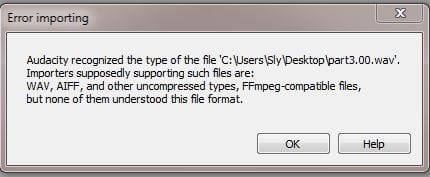
Edit: Ran into a glitch (why am I not surprised?) Although it played another wav clip I found on my laptop, it seems like Audacity had a problem.
 

Attachments

  • Capture3.JPG
    Capture3.JPG
    24.1 KB · Views: 4

My Computer

Computer type
PC/Desktop
Computer Manufacturer/Model Number
Dell Vostro 3558 (Laptop)
OS
Windows 7 Professional 64bit
Motherboard
Dell
Memory
8GB
Graphics Card(s)
Intel HD Graphics, NVIDIA GeForce
Screen Resolution
1366 x 768
Antivirus
Avira Free, MalwareBytes AntiMalware Pro
Browser
Chrome
OK, I was able to edit the audio portion of the video using VirtualDub to extract the wav and Adobe Soundbooth to silence the minute 30 with the copyrighted song and re-upload to Youtube.

Since I lost some valuable commentary, ideally I'd like to atleast separate the voice from the music. Attempting that will be my next step.
 

My Computer

Computer type
PC/Desktop
Computer Manufacturer/Model Number
Dell Vostro 3558 (Laptop)
OS
Windows 7 Professional 64bit
Motherboard
Dell
Memory
8GB
Graphics Card(s)
Intel HD Graphics, NVIDIA GeForce
Screen Resolution
1366 x 768
Antivirus
Avira Free, MalwareBytes AntiMalware Pro
Browser
Chrome
Oh Boy....since that's already muxed in the audio track it's near impossible to separate it later on.
Your best bet would be, to have the original commentary from a point before the music was mixed in.
If you absolutely have to do it with the material at hand...would be playing with the frequencys (but I'm not sure if Audacity can do it...I used to play around with Soundforge (a GREAT Program but unfortunately not free)
Anyhow...the results are usually less than optimal. You'd be better off , grabbing a mike and speak said comment over the mute part yourself.

-DG
 

My Computer

Computer Manufacturer/Model Number
HP m8000n
OS
Windows 7 Ultimate x86
CPU
DualCore AMD Athlon 64 X2, 2600 MHz 5200+
Motherboard
Asus M2N68-LA (Narra)
Memory
Samsung 2GB DDR2
Graphics Card(s)
Onboard NVIDIA GeForce 6150SE nForce 430
Sound Card
Onboard nVIDIA nForce 6100-430 (MCP61P)
Monitor(s) Displays
Westinghouse 19" LED
Screen Resolution
1280x1024
Hard Drives
SATA II Seagate Barracuda 500GB
USB II WD Elements 500GB
USB II WD My Book 1TB
USB II WD My Book 2TB
PSU
Stock (HP)
Case
Stock (HP)
Cooling
Stock
Keyboard
Logitech Classic KB 200
Mouse
Standard HP opticle USB mouse
I agree with SladgeDG 100%. Splitting voice and music is nigh impossible even for the professional with all their expensive kit. Not a road worth going down.
 

My Computer

Computer type
PC/Desktop
OS
Microsoft Windows 7 Home Premium 64-bit 7601 Multiprocessor Free Service Pack 1
CPU
Intel(R) Core(TM) i7-3770 CPU @ 3.40GHz
Motherboard
ASUSTeK COMPUTER INC. P8H77-M
Memory
8.00 GB
Graphics Card(s)
Intel(R) HD Graphics 4000
Sound Card
On Board
Monitor(s) Displays
Dell 24"
Screen Resolution
1920 x 1080
Hard Drives
(1) INTEL SSDSC2CT180A3 ATA Device (2) ST500DM002-1BD142 ATA Device (3) WDC WD3200AAKS-75L9A0 ATA Device (4) Generic- Compact Flash USB Device (5) Generic- MS/MS-Pro USB Device (6) Generic- SD/MMC USB Device (7) Generic- SM/xD-Picture USB
PSU
500w Corsair
Case
Cooler Master
Cooling
3 Fans
Keyboard
Logitech MK300
Mouse
Logitech WOM
Internet Speed
75Mb
Antivirus
Norton 360
Browser
Firefox, Opera, IE
I agree with SladgeDG 100%. Splitting voice and music is nigh impossible even for the professional with all their expensive kit. Not a road worth going down.

Yeah, seems like too much trouble... I was lucky enough to be able use a buddies laptop for Sound Booth.

Again, thanks for all the advice, especially Sladge. The DVD was distributed throughout the organization so most members have it. I just uploaded to Youtube as a convenience and for others outside the org. As is, I'll call it close enough.
 

My Computer

Computer type
PC/Desktop
Computer Manufacturer/Model Number
Dell Vostro 3558 (Laptop)
OS
Windows 7 Professional 64bit
Motherboard
Dell
Memory
8GB
Graphics Card(s)
Intel HD Graphics, NVIDIA GeForce
Screen Resolution
1366 x 768
Antivirus
Avira Free, MalwareBytes AntiMalware Pro
Browser
Chrome
Back
Top