Solved Sporadic hard drive intensely busy, apps stop responding

cytherian

New member
Power User
Local time
9:51 AM
Messages
218
I'm not sure what started to cause this. My computer was working perfectly fine up until this week.
HP dv6 Pavillion laptop, 500gb with 40% free, Windows 7 with latest updates, 4Gb RAM.

The symptom is this: All of the sudden, applications start throwing the "not responding" state. I check my hard drive light and see it's on non-stop (no flicker). When I listen to the laptop, I hear the hard drive in a "loop" of click sounds. A bunch of rapid clicks for about 2 seconds that ends in a "double-click" sound, a pause, then repeats. It just keeps going. If I close down Outlook and a bunch of other applications, and wait, the pattern eventually stops and my laptop is functioning normally again.

I've run a disk defragmenter program and overall my drive showed to be in good shape. I also ran a disk surface detector and didn't find anything wrong, no bad sectors.

At first I thought Outlook might have been the culprit, but I've seen it trigger when something else is running, like Event Viewer.

So my question is... is my laptop suffering from a "partial" hardware issue? Or is it a software problem? I managed to get the task manager running when the busy hard drive issue popped up, to see what program was taxing the CPU, and... nothing. I couldn't get the Resource Monitor open, because it was just too damned busy.

My Event Viewer had a clutter of messages... but the only thing I saw peculiar were strings of about 15~20 "Bonjour Service" errors. I cleared everything out to start fresh and once this happens again, I'll note the time and see if there are any event entries that coincide that might shed some light.

Meanwhile, any ideas?
 

My Computer My Computer

At a glance

Windows 7 Home Premium x64AMD Vision A8-3500M 4 Core8GbAMD Radeon HD 6620G
Computer type
Laptop
Computer Manufacturer/Model Number
HP Pavillion dv6 (dv6-6165dx)
OS
Windows 7 Home Premium x64
CPU
AMD Vision A8-3500M 4 Core
Motherboard
AMD
Memory
8Gb
Graphics Card(s)
AMD Radeon HD 6620G
Screen Resolution
1366x768
Hard Drives
Hitachi Travelstar 500Gb
Internet Speed
Realtek RTL8188CE 802.11b/g/n

My Computer My Computer

At a glance

Windows 7 Ultimate x64 SP1AMD Phenom 2 1090T2x8GB Kingston HyperX Fury Black 1600Mhz Unga...MSI GTX 970 Gaming 4G
Computer type
PC/Desktop
Computer Manufacturer/Model Number
Custom Build
OS
Windows 7 Ultimate x64 SP1
CPU
AMD Phenom 2 1090T
Motherboard
Gigabyte GA-890FXA-UD5
Memory
2x8GB Kingston HyperX Fury Black 1600Mhz Unganged
Graphics Card(s)
MSI GTX 970 Gaming 4G
Sound Card
Realtek On-Board HD 7.1 Audio / Logitech G35
Monitor(s) Displays
3xAcer GD245HQ
Screen Resolution
1920x1080
Hard Drives
Samsung 850 Pro 512GB SSD - OS /
WD Caviar Black SATA 3 - 1 TBx2 - Dynamic RAID 0 /
WD Caviar Green SATA 2 - 640GBx2 - Dynamic RAID 0 /
WD Caviar Green SATA 2 - 640GB - Internal Backup /
Seagate Barracude SATA 3 - 3TB - External Backup/ Sync
PSU
HighPower 1000W
Case
Cooler Master HAF 932
Cooling
Noctua NH-D14
Keyboard
Logitech G19
Mouse
Logitech G500
Internet Speed
100/4 Mbit Cable (100GB quota)
Antivirus
ZoneAlarm Extreme Security / MBAM Pro / MBAE Free / SAS Free
Browser
IE 11 - Firefox - Chrome
Other Info
Logitech F710/ G27/ G940/ Z5500 // TrackIR 5 // Nvidia 3D Surround Vision
Thanks for the tip, GokAy.

I've booted up in safe mode and at first everything was normal. But when I went to look at the Event Viewer, the busy hard drive pattern started to repeat. So, definitely not a driver issue.

I'm running CHKDSK to do a full drive scan and see if there's a bad sector somewhere. I imagine if a bad sector cropped up and affected a system file, something like this might happen.

Are there any decent (and free) basic disk diagnostic and repair programs that you'd recommend?
 

My Computer My Computer

At a glance

Windows 7 Home Premium x64AMD Vision A8-3500M 4 Core8GbAMD Radeon HD 6620G
Computer type
Laptop
Computer Manufacturer/Model Number
HP Pavillion dv6 (dv6-6165dx)
OS
Windows 7 Home Premium x64
CPU
AMD Vision A8-3500M 4 Core
Motherboard
AMD
Memory
8Gb
Graphics Card(s)
AMD Radeon HD 6620G
Screen Resolution
1366x768
Hard Drives
Hitachi Travelstar 500Gb
Internet Speed
Realtek RTL8188CE 802.11b/g/n

My Computer My Computer

At a glance

Windows 7 Ultimate x64 SP1AMD Phenom 2 1090T2x8GB Kingston HyperX Fury Black 1600Mhz Unga...MSI GTX 970 Gaming 4G
Computer type
PC/Desktop
Computer Manufacturer/Model Number
Custom Build
OS
Windows 7 Ultimate x64 SP1
CPU
AMD Phenom 2 1090T
Motherboard
Gigabyte GA-890FXA-UD5
Memory
2x8GB Kingston HyperX Fury Black 1600Mhz Unganged
Graphics Card(s)
MSI GTX 970 Gaming 4G
Sound Card
Realtek On-Board HD 7.1 Audio / Logitech G35
Monitor(s) Displays
3xAcer GD245HQ
Screen Resolution
1920x1080
Hard Drives
Samsung 850 Pro 512GB SSD - OS /
WD Caviar Black SATA 3 - 1 TBx2 - Dynamic RAID 0 /
WD Caviar Green SATA 2 - 640GBx2 - Dynamic RAID 0 /
WD Caviar Green SATA 2 - 640GB - Internal Backup /
Seagate Barracude SATA 3 - 3TB - External Backup/ Sync
PSU
HighPower 1000W
Case
Cooler Master HAF 932
Cooling
Noctua NH-D14
Keyboard
Logitech G19
Mouse
Logitech G500
Internet Speed
100/4 Mbit Cable (100GB quota)
Antivirus
ZoneAlarm Extreme Security / MBAM Pro / MBAE Free / SAS Free
Browser
IE 11 - Firefox - Chrome
Other Info
Logitech F710/ G27/ G940/ Z5500 // TrackIR 5 // Nvidia 3D Surround Vision
Thanks.

I ran CHKDSK /F, and it claimed that no errors were found. I ran SFC /SCANNOW and it didn't turn up any critical errors.

Is it possible that there's a corrupt system file somewhere that Windows is simply not detecting?

Sounds like I need to run a more extensive low-level kind of disk utility. Certainly doesn't seem to be a driver related problem as it cropped up while booted into safe mode. But I guess it might not be a bad idea to run Process Explorer to see if there's any particular process actively accessing the disk.

I have a freshly updated anti-virus always running and do not visit suspicious sites... and I'm thinking this shouldn't be any kind of maleware or virus, because hard drive disk activity would be done with minimal effect on the operating system (last thing malicious people want is someone being alerted). The drive access noise being made has a definite pattern to it that repeats over and over, until some random point when it stops. But then it may kick up again at any time.
 

My Computer My Computer

At a glance

Windows 7 Home Premium x64AMD Vision A8-3500M 4 Core8GbAMD Radeon HD 6620G
Computer type
Laptop
Computer Manufacturer/Model Number
HP Pavillion dv6 (dv6-6165dx)
OS
Windows 7 Home Premium x64
CPU
AMD Vision A8-3500M 4 Core
Motherboard
AMD
Memory
8Gb
Graphics Card(s)
AMD Radeon HD 6620G
Screen Resolution
1366x768
Hard Drives
Hitachi Travelstar 500Gb
Internet Speed
Realtek RTL8188CE 802.11b/g/n
OK, the disk utility didn't find anything wrong...

When I was able to gain control for a few moments, I was able to launch the system process monitor and observe the Resource Monitor for the disk. I then launched the Event Viewer which often triggers the incessant disk activity loop.

Sytem Process ID number 4... heavy read/write.
Cause? System Volume information (Logfilre NTFS Volume Log) leads the charge with several other volume related processes.

When I scanned the Event Viewer System log, I saw something peculiar... a Warning for Wininit. "Custom dynamic link libraries are being loaded for every application. The system administrator should review the list of libraries to ensure they are related to trusted applications." THAT... is unnerving! What does it mean? I do have AVAST! and I found some people post that it may cause that.
 

My Computer My Computer

At a glance

Windows 7 Home Premium x64AMD Vision A8-3500M 4 Core8GbAMD Radeon HD 6620G
Computer type
Laptop
Computer Manufacturer/Model Number
HP Pavillion dv6 (dv6-6165dx)
OS
Windows 7 Home Premium x64
CPU
AMD Vision A8-3500M 4 Core
Motherboard
AMD
Memory
8Gb
Graphics Card(s)
AMD Radeon HD 6620G
Screen Resolution
1366x768
Hard Drives
Hitachi Travelstar 500Gb
Internet Speed
Realtek RTL8188CE 802.11b/g/n
There were some Windows Telemetry files flagged as problematic in the SFC /scannow log, which I was able to fix using a custom utility (SFCFIX.exe). Everything seemed fine, but I was able to trigger the endless hard drive activity again... just by going into the Windows System Events and clicking to view one of the nodes. I had created a shortcut to the Resource Monitor and launched it. System PID #4 has 137 threads launched. Disk I/O very busy with pagefile.sys.

Then I noticed something strange... I did not have Google Chrome running, but Chrome related processes are chugging away, especially with the "Safe Browsing Bloom" under User Data... whatever that is. I'm starting to wonder if Chrome is the issue here.
 

My Computer My Computer

At a glance

Windows 7 Home Premium x64AMD Vision A8-3500M 4 Core8GbAMD Radeon HD 6620G
Computer type
Laptop
Computer Manufacturer/Model Number
HP Pavillion dv6 (dv6-6165dx)
OS
Windows 7 Home Premium x64
CPU
AMD Vision A8-3500M 4 Core
Motherboard
AMD
Memory
8Gb
Graphics Card(s)
AMD Radeon HD 6620G
Screen Resolution
1366x768
Hard Drives
Hitachi Travelstar 500Gb
Internet Speed
Realtek RTL8188CE 802.11b/g/n
Did you check your RAM in all of this? You shouldn't be writing to pagefile unless you are running out of RAM.
Also check free space on C.
 

My Computer My Computer

At a glance

Windows 7 Ultimate x64 SP1AMD Phenom 2 1090T2x8GB Kingston HyperX Fury Black 1600Mhz Unga...MSI GTX 970 Gaming 4G
Computer type
PC/Desktop
Computer Manufacturer/Model Number
Custom Build
OS
Windows 7 Ultimate x64 SP1
CPU
AMD Phenom 2 1090T
Motherboard
Gigabyte GA-890FXA-UD5
Memory
2x8GB Kingston HyperX Fury Black 1600Mhz Unganged
Graphics Card(s)
MSI GTX 970 Gaming 4G
Sound Card
Realtek On-Board HD 7.1 Audio / Logitech G35
Monitor(s) Displays
3xAcer GD245HQ
Screen Resolution
1920x1080
Hard Drives
Samsung 850 Pro 512GB SSD - OS /
WD Caviar Black SATA 3 - 1 TBx2 - Dynamic RAID 0 /
WD Caviar Green SATA 2 - 640GBx2 - Dynamic RAID 0 /
WD Caviar Green SATA 2 - 640GB - Internal Backup /
Seagate Barracude SATA 3 - 3TB - External Backup/ Sync
PSU
HighPower 1000W
Case
Cooler Master HAF 932
Cooling
Noctua NH-D14
Keyboard
Logitech G19
Mouse
Logitech G500
Internet Speed
100/4 Mbit Cable (100GB quota)
Antivirus
ZoneAlarm Extreme Security / MBAM Pro / MBAE Free / SAS Free
Browser
IE 11 - Firefox - Chrome
Other Info
Logitech F710/ G27/ G940/ Z5500 // TrackIR 5 // Nvidia 3D Surround Vision
I have 4Gb of RAM... which has been suiting my needs just fine. System managed pagefile was about 7.5Gb. I figured if the pagefile had a problem, would be a good idea to rebuild it, so I set paging to "no file", rebooted, set it manually to 7.8Gb, then rebooted once more. Still happens. I have over 40% free drive space.

I'll have to run a memory check to be sure RAM is testing OK... but I suspect this isn't the problem.
 

My Computer My Computer

At a glance

Windows 7 Home Premium x64AMD Vision A8-3500M 4 Core8GbAMD Radeon HD 6620G
Computer type
Laptop
Computer Manufacturer/Model Number
HP Pavillion dv6 (dv6-6165dx)
OS
Windows 7 Home Premium x64
CPU
AMD Vision A8-3500M 4 Core
Motherboard
AMD
Memory
8Gb
Graphics Card(s)
AMD Radeon HD 6620G
Screen Resolution
1366x768
Hard Drives
Hitachi Travelstar 500Gb
Internet Speed
Realtek RTL8188CE 802.11b/g/n
Yes, I would try resetting pagefile too.

I am not telling 4GB is low. Still, open Memory tab of Resource Manager and trigger the issue. See if you can spot anything unordinary.
 

My Computer My Computer

At a glance

Windows 7 Ultimate x64 SP1AMD Phenom 2 1090T2x8GB Kingston HyperX Fury Black 1600Mhz Unga...MSI GTX 970 Gaming 4G
Computer type
PC/Desktop
Computer Manufacturer/Model Number
Custom Build
OS
Windows 7 Ultimate x64 SP1
CPU
AMD Phenom 2 1090T
Motherboard
Gigabyte GA-890FXA-UD5
Memory
2x8GB Kingston HyperX Fury Black 1600Mhz Unganged
Graphics Card(s)
MSI GTX 970 Gaming 4G
Sound Card
Realtek On-Board HD 7.1 Audio / Logitech G35
Monitor(s) Displays
3xAcer GD245HQ
Screen Resolution
1920x1080
Hard Drives
Samsung 850 Pro 512GB SSD - OS /
WD Caviar Black SATA 3 - 1 TBx2 - Dynamic RAID 0 /
WD Caviar Green SATA 2 - 640GBx2 - Dynamic RAID 0 /
WD Caviar Green SATA 2 - 640GB - Internal Backup /
Seagate Barracude SATA 3 - 3TB - External Backup/ Sync
PSU
HighPower 1000W
Case
Cooler Master HAF 932
Cooling
Noctua NH-D14
Keyboard
Logitech G19
Mouse
Logitech G500
Internet Speed
100/4 Mbit Cable (100GB quota)
Antivirus
ZoneAlarm Extreme Security / MBAM Pro / MBAE Free / SAS Free
Browser
IE 11 - Firefox - Chrome
Other Info
Logitech F710/ G27/ G940/ Z5500 // TrackIR 5 // Nvidia 3D Surround Vision
Please post pictures of

msconfig/Startup and NON Microsoft Services.
 

My Computer My Computer

At a glance

Windows 10 Pro. 64/ version 1709 Windows 7 Pr...Intel i7-6800K @ 4.3Corsair Platinum 16 gig @2400EVGA GTX 1070 OC
Computer type
PC/Desktop
Computer Manufacturer/Model Number
Home made Desktop
OS
Windows 10 Pro. 64/ version 1709 Windows 7 Pro/64
CPU
Intel i7-6800K @ 4.3
Motherboard
ASUS X-99 Deluxe II
Memory
Corsair Platinum 16 gig @2400
Graphics Card(s)
EVGA GTX 1070 OC
Monitor(s) Displays
Asus 27" LED LCD/VE278Q
Screen Resolution
1920-1080 or 1280-720 HDMI
Hard Drives
INTEL SSD 730-240 Gb Sata 3.0/
PSU
EVGA Platium 1200W
Case
Phanteks Luxe Tempered Glass 8 fans/ one radiator
Cooling
XSPC/ Water Cooled CPU
Keyboard
Das 4 Professional
Mouse
Logitech M705/MX Anywhere 2-S
Internet Speed
100 mbits
Antivirus
Microsoft Security Essentials/ Malwarebytes Premium 3.0/ SAS
Browser
I.E. 11 default/Firefox/ ISP Time Warner Cable/Spectrum
Other Info
LG BluRay Burner/
Sound system-KLipsch-THX/
Icy Dock ssd Hot Swap bays.
The disk isn't thrashing, but some process is definitely grabbing priority over it, forcing everything else to wait.

I did see some "Hard faults/sec" in Memory. "Svchost.exe (netsvcs)" was showing around 8 for a stretch, then dropped to 0. Is it OK to occasionally see hard faults, or is that indicative of something serious with the drive?

What puzzles me is that when I did a fresh boot and I took a look at processes, I see Google Chrome in there... and I didn't even start it. It's not the updater. Also, for a while wmpnetwk.exe was hogging quite a lot of resources on the disk... and it's some network sharing service for Windows Media. Went to services and immediately stopped it, set it to manual. Maybe this was contributing to the chaos.
 

My Computer My Computer

At a glance

Windows 7 Home Premium x64AMD Vision A8-3500M 4 Core8GbAMD Radeon HD 6620G
Computer type
Laptop
Computer Manufacturer/Model Number
HP Pavillion dv6 (dv6-6165dx)
OS
Windows 7 Home Premium x64
CPU
AMD Vision A8-3500M 4 Core
Motherboard
AMD
Memory
8Gb
Graphics Card(s)
AMD Radeon HD 6620G
Screen Resolution
1366x768
Hard Drives
Hitachi Travelstar 500Gb
Internet Speed
Realtek RTL8188CE 802.11b/g/n

My Computer My Computer

At a glance

Windows 7 Home Premium x64AMD Vision A8-3500M 4 Core8GbAMD Radeon HD 6620G
Computer type
Laptop
Computer Manufacturer/Model Number
HP Pavillion dv6 (dv6-6165dx)
OS
Windows 7 Home Premium x64
CPU
AMD Vision A8-3500M 4 Core
Motherboard
AMD
Memory
8Gb
Graphics Card(s)
AMD Radeon HD 6620G
Screen Resolution
1366x768
Hard Drives
Hitachi Travelstar 500Gb
Internet Speed
Realtek RTL8188CE 802.11b/g/n
Jack, I suggested a clean startup in post #2. So it should be clean? But no idea if it will help, as issue persisted in Safe Mode too.
 

My Computer My Computer

At a glance

Windows 7 Ultimate x64 SP1AMD Phenom 2 1090T2x8GB Kingston HyperX Fury Black 1600Mhz Unga...MSI GTX 970 Gaming 4G
Computer type
PC/Desktop
Computer Manufacturer/Model Number
Custom Build
OS
Windows 7 Ultimate x64 SP1
CPU
AMD Phenom 2 1090T
Motherboard
Gigabyte GA-890FXA-UD5
Memory
2x8GB Kingston HyperX Fury Black 1600Mhz Unganged
Graphics Card(s)
MSI GTX 970 Gaming 4G
Sound Card
Realtek On-Board HD 7.1 Audio / Logitech G35
Monitor(s) Displays
3xAcer GD245HQ
Screen Resolution
1920x1080
Hard Drives
Samsung 850 Pro 512GB SSD - OS /
WD Caviar Black SATA 3 - 1 TBx2 - Dynamic RAID 0 /
WD Caviar Green SATA 2 - 640GBx2 - Dynamic RAID 0 /
WD Caviar Green SATA 2 - 640GB - Internal Backup /
Seagate Barracude SATA 3 - 3TB - External Backup/ Sync
PSU
HighPower 1000W
Case
Cooler Master HAF 932
Cooling
Noctua NH-D14
Keyboard
Logitech G19
Mouse
Logitech G500
Internet Speed
100/4 Mbit Cable (100GB quota)
Antivirus
ZoneAlarm Extreme Security / MBAM Pro / MBAE Free / SAS Free
Browser
IE 11 - Firefox - Chrome
Other Info
Logitech F710/ G27/ G940/ Z5500 // TrackIR 5 // Nvidia 3D Surround Vision
Their are many auto updates, Cloud backups ect. that could be reinstalling themselves in msconfig. It never hurts to take another look. It's free and easy to do.

When you get a lot of auto this and that calling home all kinds of things can happen.

@cytherian do you have any registry cleaners or speedup, tuneup my computer programs.
Do you have any programs by IOBit??

Please complete your (My System Specs). Make sure you put what security programs you use and the power suppy.
 

My Computer My Computer

At a glance

Windows 10 Pro. 64/ version 1709 Windows 7 Pr...Intel i7-6800K @ 4.3Corsair Platinum 16 gig @2400EVGA GTX 1070 OC
Computer type
PC/Desktop
Computer Manufacturer/Model Number
Home made Desktop
OS
Windows 10 Pro. 64/ version 1709 Windows 7 Pro/64
CPU
Intel i7-6800K @ 4.3
Motherboard
ASUS X-99 Deluxe II
Memory
Corsair Platinum 16 gig @2400
Graphics Card(s)
EVGA GTX 1070 OC
Monitor(s) Displays
Asus 27" LED LCD/VE278Q
Screen Resolution
1920-1080 or 1280-720 HDMI
Hard Drives
INTEL SSD 730-240 Gb Sata 3.0/
PSU
EVGA Platium 1200W
Case
Phanteks Luxe Tempered Glass 8 fans/ one radiator
Cooling
XSPC/ Water Cooled CPU
Keyboard
Das 4 Professional
Mouse
Logitech M705/MX Anywhere 2-S
Internet Speed
100 mbits
Antivirus
Microsoft Security Essentials/ Malwarebytes Premium 3.0/ SAS
Browser
I.E. 11 default/Firefox/ ISP Time Warner Cable/Spectrum
Other Info
LG BluRay Burner/
Sound system-KLipsch-THX/
Icy Dock ssd Hot Swap bays.
Just got back (was traveling). I did a boot up in safe mode and was still able to trigger the continuous disk activity. The easiest way has been to launch Event Viewer, then select a sub folder (e.g. System or Application).

I have not used any registry cleaners or speed-up utilities (I tried some of those years ago with another computer and learned my lesson -- they often make more problems than they solve). No programs by IOBit.

When I did a fresh start up I had launched Process Explorer and Resource Monitor then triggered the behavior... and I couldn't isolate a culprit. Very frustrating. If I kick off Event Viewer and it starts, then highly unlikely it's a 3rd party app, right? I remember back in my days of using Vista, I ran into an elusive problem like this where all kinds of diagnostics and troubleshooting couldn't turn up a culprit... and the only recourse was a complete reinstall of the operating system. I'd hate for it to come to that. Anyway, I'll try to run up my complete system specs by tomorrow (getting late here and exhausted). Thanks again for your help, guys.
 

My Computer My Computer

At a glance

Windows 7 Home Premium x64AMD Vision A8-3500M 4 Core8GbAMD Radeon HD 6620G
Computer type
Laptop
Computer Manufacturer/Model Number
HP Pavillion dv6 (dv6-6165dx)
OS
Windows 7 Home Premium x64
CPU
AMD Vision A8-3500M 4 Core
Motherboard
AMD
Memory
8Gb
Graphics Card(s)
AMD Radeon HD 6620G
Screen Resolution
1366x768
Hard Drives
Hitachi Travelstar 500Gb
Internet Speed
Realtek RTL8188CE 802.11b/g/n
cytherian get you rest. Take your time. The forum is open 24/7.
 

My Computer My Computer

At a glance

Windows 10 Pro. 64/ version 1709 Windows 7 Pr...Intel i7-6800K @ 4.3Corsair Platinum 16 gig @2400EVGA GTX 1070 OC
Computer type
PC/Desktop
Computer Manufacturer/Model Number
Home made Desktop
OS
Windows 10 Pro. 64/ version 1709 Windows 7 Pro/64
CPU
Intel i7-6800K @ 4.3
Motherboard
ASUS X-99 Deluxe II
Memory
Corsair Platinum 16 gig @2400
Graphics Card(s)
EVGA GTX 1070 OC
Monitor(s) Displays
Asus 27" LED LCD/VE278Q
Screen Resolution
1920-1080 or 1280-720 HDMI
Hard Drives
INTEL SSD 730-240 Gb Sata 3.0/
PSU
EVGA Platium 1200W
Case
Phanteks Luxe Tempered Glass 8 fans/ one radiator
Cooling
XSPC/ Water Cooled CPU
Keyboard
Das 4 Professional
Mouse
Logitech M705/MX Anywhere 2-S
Internet Speed
100 mbits
Antivirus
Microsoft Security Essentials/ Malwarebytes Premium 3.0/ SAS
Browser
I.E. 11 default/Firefox/ ISP Time Warner Cable/Spectrum
Other Info
LG BluRay Burner/
Sound system-KLipsch-THX/
Icy Dock ssd Hot Swap bays.
I updated my system specs to reflect my current laptop.

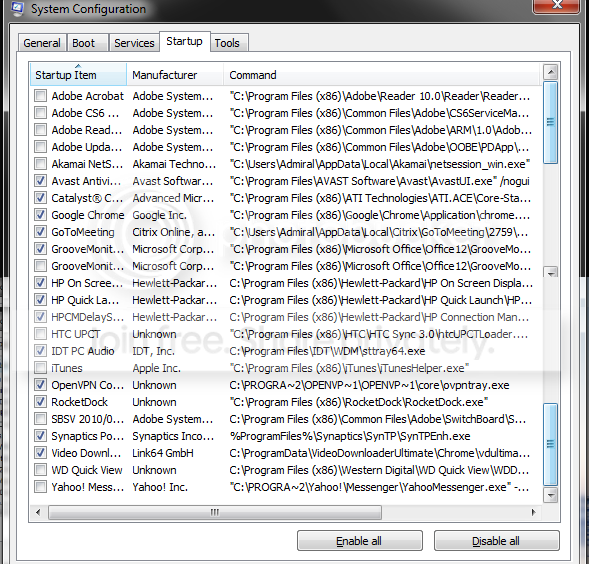
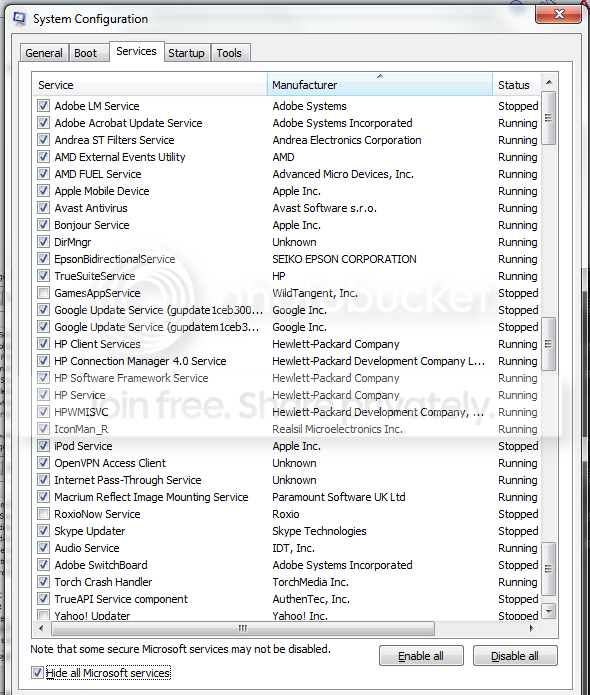
And below are some screenshots of MSCONFIG screens. I'm surprised that Microsoft doesn't have a convenient export facility for this, but even more annoying is the INABILITY to size this dialog. I had to take multiple screenshots and piece them together.

dv6_startup.png


dv6_services.png


Now I see why Chrome is running in the background after starting. While I do launch Chrome for every session, I just presume leave it unchecked. I can wait a few more seconds for it to launch the first time. Everything else pretty much looks normal. BUT.. I'm not happy seeing *2* Google Updater services running. I really question the need for that. I don't want Google silently updating things on me.

My HP laptop has an "F2" hot key on start up that brings it into a diagnostic mode. I ran the whole thing, which thoroughly checks RAM and disk, plus other things. Everything checked out OK.

Meanwhile... So far I haven't run into this strange hard disk busy induced lag (knock wood).
 

My Computer My Computer

At a glance

Windows 7 Home Premium x64AMD Vision A8-3500M 4 Core8GbAMD Radeon HD 6620G
Computer type
Laptop
Computer Manufacturer/Model Number
HP Pavillion dv6 (dv6-6165dx)
OS
Windows 7 Home Premium x64
CPU
AMD Vision A8-3500M 4 Core
Motherboard
AMD
Memory
8Gb
Graphics Card(s)
AMD Radeon HD 6620G
Screen Resolution
1366x768
Hard Drives
Hitachi Travelstar 500Gb
Internet Speed
Realtek RTL8188CE 802.11b/g/n
Those are huge list. All those thing running at boot should keep the old hard drive busy for sure.

Some of them I don't know what to do with because they are HP and I don't know what they do or if they are needed.

In my systems all I have is MSE checked in Startup.
Non Microsoft Services all I have is Malwarebytes checked.


You don't need all those things starting at boot and running in the background when not in use.

Remember that all those things unchecked will still run and work when you or your system needs them. They just won't be running when not needed.
 

My Computer My Computer

At a glance

Windows 10 Pro. 64/ version 1709 Windows 7 Pr...Intel i7-6800K @ 4.3Corsair Platinum 16 gig @2400EVGA GTX 1070 OC
Computer type
PC/Desktop
Computer Manufacturer/Model Number
Home made Desktop
OS
Windows 10 Pro. 64/ version 1709 Windows 7 Pro/64
CPU
Intel i7-6800K @ 4.3
Motherboard
ASUS X-99 Deluxe II
Memory
Corsair Platinum 16 gig @2400
Graphics Card(s)
EVGA GTX 1070 OC
Monitor(s) Displays
Asus 27" LED LCD/VE278Q
Screen Resolution
1920-1080 or 1280-720 HDMI
Hard Drives
INTEL SSD 730-240 Gb Sata 3.0/
PSU
EVGA Platium 1200W
Case
Phanteks Luxe Tempered Glass 8 fans/ one radiator
Cooling
XSPC/ Water Cooled CPU
Keyboard
Das 4 Professional
Mouse
Logitech M705/MX Anywhere 2-S
Internet Speed
100 mbits
Antivirus
Microsoft Security Essentials/ Malwarebytes Premium 3.0/ SAS
Browser
I.E. 11 default/Firefox/ ISP Time Warner Cable/Spectrum
Other Info
LG BluRay Burner/
Sound system-KLipsch-THX/
Icy Dock ssd Hot Swap bays.
The problem returned.

Keep in mind that I've had most of that software installed for a very long time without issues. Some of these services are needed by various programs that run periodically during a session.

In any case, when you boot up in SAFE mode, only the bare minimum is loaded right? The hard drive busy problem happened then too...

Also, I created a new user profile and logged in with that... problem repeated. So, it's not user profile related.
 

My Computer My Computer

At a glance

Windows 7 Home Premium x64AMD Vision A8-3500M 4 Core8GbAMD Radeon HD 6620G
Computer type
Laptop
Computer Manufacturer/Model Number
HP Pavillion dv6 (dv6-6165dx)
OS
Windows 7 Home Premium x64
CPU
AMD Vision A8-3500M 4 Core
Motherboard
AMD
Memory
8Gb
Graphics Card(s)
AMD Radeon HD 6620G
Screen Resolution
1366x768
Hard Drives
Hitachi Travelstar 500Gb
Internet Speed
Realtek RTL8188CE 802.11b/g/n
Back
Top