
You are using an out of date browser. It may not display this or other websites correctly.
You should upgrade or use an alternative browser.
You should upgrade or use an alternative browser.
Solved spyhunter
- Thread starter Rose1
- Start date

Last edited:
My Computers
System One System Two
-
- Computer type
- PC/Desktop
- Computer Manufacturer/Model Number
- HP Pavilion 6751c
- OS
- Win7, Win10, Win11
- Internet Speed
- 100 Mbps
- Antivirus
- Norton 360
- Browser
- IE 11
-
- Computer type
- PC/Desktop
- System Manufacturer/Model Number
- HP ENVY 750-514 & Dell XPS 8960
- OS
- Win7, Win10, Win11
- Antivirus
- Norton 360

- Local time
- 5:55 AM
- Messages
- 8,608
I uninstall spyhunter and also don't the reset notification thing and its still in notification. Even when I restart the computer.
Once SpyHunter Uninstall window appears, it will ask you if you’re sure you wish to remove SpyHunter. Click Yes to start the uninstallation process. This will start the uninstallation process.
My Computer
- Computer type
- PC/Desktop
- Computer Manufacturer/Model Number
- Bruce ... somewhere in his 40's
- OS
- Windows 7 Ultimate 32bit SP1
- CPU
- Intel(R) Core(TM)2 Quad CPU @ 2.40GHz, 2400 MHz
- Motherboard
- INTEL/D975XBX2
- Memory
- 4 GB
- Graphics Card(s)
- ATI Radeon HD 2600 Pro
- Monitor(s) Displays
- Samsung SyncMaster 914v
- Screen Resolution
- 1280 x 1024
- Hard Drives
- 2/500GB each ... ST3500630AS ATA Device.
One is not connected
- PSU
- Rocketfish 700 W
- Case
- G.Skill Gigabyte Chassis
- Keyboard
- Standard PS/2 Keyboard
- Mouse
- Microsoft PS/2 Mouse
- Internet Speed
- DSL
- Antivirus
- Avira Internet Security
- Browser
- IE 11
- Other Info
- ATI HDMI Audio

Spyhunter
Don't know much about Spyhunter.
When I see a program that still appears to run after using the programs built in uninstaller or add/ remove programs or a third party software removal utility what I usually do is:
Reinstall it to get a clean copy to remove.
Reboot.
Stop the program from running. Sometimes by right clicking the icon in the notification area and clicking "Exit". Sometimes by checking running processes. Sometimes by disabling it's startup entry and rebooting.
Check to see if it installed a service. If the service is running - disable it.
Then try uninstalling it again.
Don't know much about Spyhunter.
When I see a program that still appears to run after using the programs built in uninstaller or add/ remove programs or a third party software removal utility what I usually do is:
Reinstall it to get a clean copy to remove.
Reboot.
Stop the program from running. Sometimes by right clicking the icon in the notification area and clicking "Exit". Sometimes by checking running processes. Sometimes by disabling it's startup entry and rebooting.
Check to see if it installed a service. If the service is running - disable it.
Then try uninstalling it again.
My Computer
- Computer type
- Laptop
- Computer Manufacturer/Model Number
- ASUS
- OS
- Microsoft Windows 7 Home Premium 64-bit 7601 Multiprocessor Free Service Pack 1
- CPU
- AMD C-60 APU with Radeon(tm) HD Graphics
- Motherboard
- ASUSTeK COMPUTER INC. X501U
- Memory
- 4.00 GB
- Graphics Card(s)
- AMD Radeon HD 6290 Graphics
- Sound Card
- (1) AMD High Definition Audio Device (2) Realtek High Defi
- Screen Resolution
- 1366 x 768 x 32 bits (4294967296 colors) @ 60 Hz
- Hard Drives
- Hitachi HTS545050A7E380 SATA Disk Device
- Antivirus
- Comodo CIS & FW, SecureAplus App Whitelisting, Threatfire
- Browser
- Cyberfox 64bit, Opera 64bit, Airfox
- Other Info
- Spy-The-Spy, HitmanPro.Alert, Norton Connect Safe, MJRegWatcher, BitDefender TrafficLight, Voodoo Shield, Zemana AntiMalware

- Local time
- 3:55 PM
- Messages
- 416
I already uninstall the spyhunter, but it shows on windows notification icons.I uninstall spyhunter and also don't the reset notification thing and its still in notification. Even when I restart the computer.
Once SpyHunter Uninstall window appears, it will ask you if you’re sure you wish to remove SpyHunter. Click Yes to start the uninstallation process. This will start the uninstallation process.
My Computer
- Computer type
- Laptop
- Computer Manufacturer/Model Number
- compaq
- OS
- windows Ultimate
Icon
What happens when:
1). You left click on the icon
2). You right click on the icon
What happens when:
1). You left click on the icon
2). You right click on the icon
My Computer
- Computer type
- Laptop
- Computer Manufacturer/Model Number
- ASUS
- OS
- Microsoft Windows 7 Home Premium 64-bit 7601 Multiprocessor Free Service Pack 1
- CPU
- AMD C-60 APU with Radeon(tm) HD Graphics
- Motherboard
- ASUSTeK COMPUTER INC. X501U
- Memory
- 4.00 GB
- Graphics Card(s)
- AMD Radeon HD 6290 Graphics
- Sound Card
- (1) AMD High Definition Audio Device (2) Realtek High Defi
- Screen Resolution
- 1366 x 768 x 32 bits (4294967296 colors) @ 60 Hz
- Hard Drives
- Hitachi HTS545050A7E380 SATA Disk Device
- Antivirus
- Comodo CIS & FW, SecureAplus App Whitelisting, Threatfire
- Browser
- Cyberfox 64bit, Opera 64bit, Airfox
- Other Info
- Spy-The-Spy, HitmanPro.Alert, Norton Connect Safe, MJRegWatcher, BitDefender TrafficLight, Voodoo Shield, Zemana AntiMalware
- Local time
- 3:55 PM
- Messages
- 416
What happens when:
1). You left click on the icon
2). You right click on the icon
Its not in the box, but its in the customize notifications.
My Computer
- Computer type
- Laptop
- Computer Manufacturer/Model Number
- compaq
- OS
- windows Ultimate
Remove previously used icons
Hi,
So it's not running and you want to remove the icon from the list of previously used icons.
There's a tutorial here:
http://www.sevenforums.com/tutorials/13102-notification-area-icons-reset.html
Note: Requires a reboot.
Hi,
So it's not running and you want to remove the icon from the list of previously used icons.
There's a tutorial here:
http://www.sevenforums.com/tutorials/13102-notification-area-icons-reset.html
Note: Requires a reboot.
My Computer
- Computer type
- Laptop
- Computer Manufacturer/Model Number
- ASUS
- OS
- Microsoft Windows 7 Home Premium 64-bit 7601 Multiprocessor Free Service Pack 1
- CPU
- AMD C-60 APU with Radeon(tm) HD Graphics
- Motherboard
- ASUSTeK COMPUTER INC. X501U
- Memory
- 4.00 GB
- Graphics Card(s)
- AMD Radeon HD 6290 Graphics
- Sound Card
- (1) AMD High Definition Audio Device (2) Realtek High Defi
- Screen Resolution
- 1366 x 768 x 32 bits (4294967296 colors) @ 60 Hz
- Hard Drives
- Hitachi HTS545050A7E380 SATA Disk Device
- Antivirus
- Comodo CIS & FW, SecureAplus App Whitelisting, Threatfire
- Browser
- Cyberfox 64bit, Opera 64bit, Airfox
- Other Info
- Spy-The-Spy, HitmanPro.Alert, Norton Connect Safe, MJRegWatcher, BitDefender TrafficLight, Voodoo Shield, Zemana AntiMalware
- Local time
- 3:55 PM
- Messages
- 416
Done that. No luck still in costumize notifications.Hi,
So it's not running and you want to remove the icon from the list of previously used icons.
There's a tutorial here:
http://www.sevenforums.com/tutorials/13102-notification-area-icons-reset.html
Note: Requires a reboot.
My Computer
- Computer type
- Laptop
- Computer Manufacturer/Model Number
- compaq
- OS
- windows Ultimate
Manual Method
Here's the manual method to clear out old icons.
Start> Run then type
regedit
Press ENTER
Navigate to:
HKEY_CURRENT_USER\Software\Classes\Local Settings\Software\Microsoft\Windows\CurrentVersion\TrayNotify
In the right pane right click IconStreams and choose delete
Right click PastIconStreams and choose delete
Then open Task Manager by pressing Ctrl+Alt+Del
On the processes tab highlight explorer.exe and end the process by clicking the box on the bottom right hand side of the window.
Then choose File > New Task > Run
Type explorer.exe
Choose OK
Here's the manual method to clear out old icons.
Start> Run then type
regedit
Press ENTER
Navigate to:
HKEY_CURRENT_USER\Software\Classes\Local Settings\Software\Microsoft\Windows\CurrentVersion\TrayNotify
In the right pane right click IconStreams and choose delete
Right click PastIconStreams and choose delete
Then open Task Manager by pressing Ctrl+Alt+Del
On the processes tab highlight explorer.exe and end the process by clicking the box on the bottom right hand side of the window.
Then choose File > New Task > Run
Type explorer.exe
Choose OK
My Computer
- Computer type
- Laptop
- Computer Manufacturer/Model Number
- ASUS
- OS
- Microsoft Windows 7 Home Premium 64-bit 7601 Multiprocessor Free Service Pack 1
- CPU
- AMD C-60 APU with Radeon(tm) HD Graphics
- Motherboard
- ASUSTeK COMPUTER INC. X501U
- Memory
- 4.00 GB
- Graphics Card(s)
- AMD Radeon HD 6290 Graphics
- Sound Card
- (1) AMD High Definition Audio Device (2) Realtek High Defi
- Screen Resolution
- 1366 x 768 x 32 bits (4294967296 colors) @ 60 Hz
- Hard Drives
- Hitachi HTS545050A7E380 SATA Disk Device
- Antivirus
- Comodo CIS & FW, SecureAplus App Whitelisting, Threatfire
- Browser
- Cyberfox 64bit, Opera 64bit, Airfox
- Other Info
- Spy-The-Spy, HitmanPro.Alert, Norton Connect Safe, MJRegWatcher, BitDefender TrafficLight, Voodoo Shield, Zemana AntiMalware
- Local time
- 3:55 PM
- Messages
- 416
On the explorer.exe I'm using firefox browser. Do I still put the explorer.exe?Here's the manual method to clear out old icons.
Start> Run then type
regedit
Press ENTER
Navigate to:
HKEY_CURRENT_USER\Software\Classes\Local Settings\Software\Microsoft\Windows\CurrentVersion\TrayNotify
In the right pane right click IconStreams and choose delete
Right click PastIconStreams and choose delete
Then open Task Manager by pressing Ctrl+Alt+Del
On the processes tab highlight explorer.exe and end the process by clicking the box on the bottom right hand side of the window.
Then choose File > New Task > Run
Type explorer.exe
Choose OK
My Computer
- Computer type
- Laptop
- Computer Manufacturer/Model Number
- compaq
- OS
- windows Ultimate
Firefox?
[/QUOTE]
On the explorer.exe I'm using firefox browser. Do I still put the explorer.exe?[/QUOTE]
Yes. explorer.exe is nothing to do with browsers. It's "Windows Explorer"
On another note: If there's still no luck the next step will be:
Start > Run type
services.msc
Press Enter.
From the menu bar choose Action > Export List
Save the file to your desktop with the file name services.txt and attach it to your next post.
[/QUOTE]
On the explorer.exe I'm using firefox browser. Do I still put the explorer.exe?[/QUOTE]
Yes. explorer.exe is nothing to do with browsers. It's "Windows Explorer"
On another note: If there's still no luck the next step will be:
Start > Run type
services.msc
Press Enter.
From the menu bar choose Action > Export List
Save the file to your desktop with the file name services.txt and attach it to your next post.
My Computer
- Computer type
- Laptop
- Computer Manufacturer/Model Number
- ASUS
- OS
- Microsoft Windows 7 Home Premium 64-bit 7601 Multiprocessor Free Service Pack 1
- CPU
- AMD C-60 APU with Radeon(tm) HD Graphics
- Motherboard
- ASUSTeK COMPUTER INC. X501U
- Memory
- 4.00 GB
- Graphics Card(s)
- AMD Radeon HD 6290 Graphics
- Sound Card
- (1) AMD High Definition Audio Device (2) Realtek High Defi
- Screen Resolution
- 1366 x 768 x 32 bits (4294967296 colors) @ 60 Hz
- Hard Drives
- Hitachi HTS545050A7E380 SATA Disk Device
- Antivirus
- Comodo CIS & FW, SecureAplus App Whitelisting, Threatfire
- Browser
- Cyberfox 64bit, Opera 64bit, Airfox
- Other Info
- Spy-The-Spy, HitmanPro.Alert, Norton Connect Safe, MJRegWatcher, BitDefender TrafficLight, Voodoo Shield, Zemana AntiMalware
- Local time
- 3:55 PM
- Messages
- 416
On the explorer.exe I'm using firefox browser. Do I still put the explorer.exe?[/QUOTE]
Yes. explorer.exe is nothing to do with browsers. It's "Windows Explorer"
On another note: If there's still no luck the next step will be:
Start > Run type
services.msc
Press Enter.
From the menu bar choose Action > Export List
Save the file to your desktop with the file name services.txt and attach it to your next post.[/QUOTE]
The file is not there.
Yes. explorer.exe is nothing to do with browsers. It's "Windows Explorer"
On another note: If there's still no luck the next step will be:
Start > Run type
services.msc
Press Enter.
From the menu bar choose Action > Export List
Save the file to your desktop with the file name services.txt and attach it to your next post.[/QUOTE]
The file is not there.
My Computer
- Computer type
- Laptop
- Computer Manufacturer/Model Number
- compaq
- OS
- windows Ultimate
Screenshot
Try saving it like this.
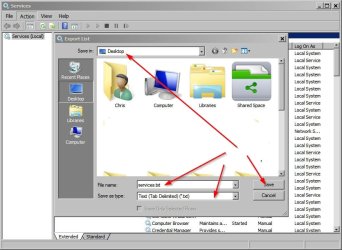
Alternatively you can use the following method to get a list of all services:
Start> Run then type
cmd.exe
Press Enter
type cd \windows
Press enter
Type the following including the spaces
sc query type= service state= all > allserviceslist.txt
Press Enter
Type exit and press Enter
Navigate to C:\Windows and scroll down until you see allserviceslist.txt
Cut and paste it to your desktop. Attach file to your next post. Delete the file afterwards.
Try saving it like this.
Alternatively you can use the following method to get a list of all services:
Start> Run then type
cmd.exe
Press Enter
type cd \windows
Press enter
Type the following including the spaces
sc query type= service state= all > allserviceslist.txt
Press Enter
Type exit and press Enter
Navigate to C:\Windows and scroll down until you see allserviceslist.txt
Cut and paste it to your desktop. Attach file to your next post. Delete the file afterwards.
My Computer
- Computer type
- Laptop
- Computer Manufacturer/Model Number
- ASUS
- OS
- Microsoft Windows 7 Home Premium 64-bit 7601 Multiprocessor Free Service Pack 1
- CPU
- AMD C-60 APU with Radeon(tm) HD Graphics
- Motherboard
- ASUSTeK COMPUTER INC. X501U
- Memory
- 4.00 GB
- Graphics Card(s)
- AMD Radeon HD 6290 Graphics
- Sound Card
- (1) AMD High Definition Audio Device (2) Realtek High Defi
- Screen Resolution
- 1366 x 768 x 32 bits (4294967296 colors) @ 60 Hz
- Hard Drives
- Hitachi HTS545050A7E380 SATA Disk Device
- Antivirus
- Comodo CIS & FW, SecureAplus App Whitelisting, Threatfire
- Browser
- Cyberfox 64bit, Opera 64bit, Airfox
- Other Info
- Spy-The-Spy, HitmanPro.Alert, Norton Connect Safe, MJRegWatcher, BitDefender TrafficLight, Voodoo Shield, Zemana AntiMalware
- Local time
- 3:55 PM
- Messages
- 416
Ok, but what am I supposed to save. The spyhunter file is no where.Try saving it like this.
My Computer
- Computer type
- Laptop
- Computer Manufacturer/Model Number
- compaq
- OS
- windows Ultimate
Need to see a list of all installed services
Save the entire list of services. Don't bother if you don't see anything related to spyhunter in the list. Not sure what you mean by "the spyhunter file".
Perhaps it's time for another member to offer assistance?
Ok, but what am I supposed to save. The spyhunter file is no where.Try saving it like this.
Save the entire list of services. Don't bother if you don't see anything related to spyhunter in the list. Not sure what you mean by "the spyhunter file".
Perhaps it's time for another member to offer assistance?
My Computer
- Computer type
- Laptop
- Computer Manufacturer/Model Number
- ASUS
- OS
- Microsoft Windows 7 Home Premium 64-bit 7601 Multiprocessor Free Service Pack 1
- CPU
- AMD C-60 APU with Radeon(tm) HD Graphics
- Motherboard
- ASUSTeK COMPUTER INC. X501U
- Memory
- 4.00 GB
- Graphics Card(s)
- AMD Radeon HD 6290 Graphics
- Sound Card
- (1) AMD High Definition Audio Device (2) Realtek High Defi
- Screen Resolution
- 1366 x 768 x 32 bits (4294967296 colors) @ 60 Hz
- Hard Drives
- Hitachi HTS545050A7E380 SATA Disk Device
- Antivirus
- Comodo CIS & FW, SecureAplus App Whitelisting, Threatfire
- Browser
- Cyberfox 64bit, Opera 64bit, Airfox
- Other Info
- Spy-The-Spy, HitmanPro.Alert, Norton Connect Safe, MJRegWatcher, BitDefender TrafficLight, Voodoo Shield, Zemana AntiMalware
Did you ever attempt System Restore, as suggested earlier?
My Computers
System One System Two
-
- Computer type
- PC/Desktop
- Computer Manufacturer/Model Number
- HP Pavilion 6751c
- OS
- Win7, Win10, Win11
- Internet Speed
- 100 Mbps
- Antivirus
- Norton 360
- Browser
- IE 11
-
- Computer type
- PC/Desktop
- System Manufacturer/Model Number
- HP ENVY 750-514 & Dell XPS 8960
- OS
- Win7, Win10, Win11
- Antivirus
- Norton 360
- Local time
- 5:55 AM
- Messages
- 8,608
Also, did you reboot after removing the program?
My Computer
- Computer type
- PC/Desktop
- Computer Manufacturer/Model Number
- Bruce ... somewhere in his 40's
- OS
- Windows 7 Ultimate 32bit SP1
- CPU
- Intel(R) Core(TM)2 Quad CPU @ 2.40GHz, 2400 MHz
- Motherboard
- INTEL/D975XBX2
- Memory
- 4 GB
- Graphics Card(s)
- ATI Radeon HD 2600 Pro
- Monitor(s) Displays
- Samsung SyncMaster 914v
- Screen Resolution
- 1280 x 1024
- Hard Drives
- 2/500GB each ... ST3500630AS ATA Device.
One is not connected
- PSU
- Rocketfish 700 W
- Case
- G.Skill Gigabyte Chassis
- Keyboard
- Standard PS/2 Keyboard
- Mouse
- Microsoft PS/2 Mouse
- Internet Speed
- DSL
- Antivirus
- Avira Internet Security
- Browser
- IE 11
- Other Info
- ATI HDMI Audio
- Local time
- 3:55 PM
- Messages
- 416
No, because I was afraid that I would lose some programs.Did you ever attempt System Restore, as suggested earlier?
My Computer
- Computer type
- Laptop
- Computer Manufacturer/Model Number
- compaq
- OS
- windows Ultimate
- Local time
- 3:55 PM
- Messages
- 416
Yes. Didn't help.Also, did you reboot after removing the program?
My Computer
- Computer type
- Laptop
- Computer Manufacturer/Model Number
- compaq
- OS
- windows Ultimate
Similar threads
- Replies
- 15
- Views
- 5K


- Replies
- 2
- Views
- 16K

- Replies
- 2
- Views
- 5K