Spywareblaster's icon is generic in taskbar?

flycaster

New member
Member
VIP
Local time
9:51 AM
Messages
472
Location
Boynton Beach, FL
I am a SpywareBlaster user and something strange is now happening when I pin it to my taskbar. In all the years i have been using this app, its icon always has shown properly when pinned to the taskbar, but now when pinning, the icon is a generic icon??? I guess i can live with it, but i would much rather have the app's original icon. How can I get it back?
 

My Computer

Computer Manufacturer/Model Number
Gateway DX4720-03/HP Pavilion dv6
OS
Windows 7 HP 64-bit
Memory
4GB/4GB
Antivirus
Avast Pro
Browser
Firefox, the latest
I'm curious as to why you need it pinned to the taskbar? It runs silently in the background.
 

My Computer

Computer type
PC/Desktop
Computer Manufacturer/Model Number
Bruce ... somewhere in his 40's
OS
Windows 7 Ultimate 32bit SP1
CPU
Intel(R) Core(TM)2 Quad CPU @ 2.40GHz, 2400 MHz
Motherboard
INTEL/D975XBX2
Memory
4 GB
Graphics Card(s)
ATI Radeon HD 2600 Pro
Monitor(s) Displays
Samsung SyncMaster 914v
Screen Resolution
1280 x 1024
Hard Drives
2/500GB each ... ST3500630AS ATA Device.
One is not connected
PSU
Rocketfish 700 W
Case
G.Skill Gigabyte Chassis
Keyboard
Standard PS/2 Keyboard
Mouse
Microsoft PS/2 Mouse
Internet Speed
DSL
Antivirus
Avira Internet Security
Browser
IE 11
Other Info
ATI HDMI Audio
Last edited by a moderator:

My Computer

Computer Manufacturer/Model Number
HP DV6 1330sa
OS
Windows 7 Professional 64 Bit SP1
CPU
INTEL DUAL CORE 2.1Ghz
Motherboard
N/A
Memory
4GB DDR3
Graphics Card(s)
INTEL
Sound Card
LAPTOP
Monitor(s) Displays
2
Screen Resolution
3200x1080
Hard Drives
250GB
PSU
LAPTOP
Case
LAPTOP
Cooling
LAPTOP
Keyboard
SOLID YEAR 260U
Mouse
USB
Internet Speed
20 MB/S
I'm curious as to why you need it pinned to the taskbar? It runs silently in the background.

I don't have the automated update version, so I have to manually update...
 

My Computer

Computer Manufacturer/Model Number
Gateway DX4720-03/HP Pavilion dv6
OS
Windows 7 HP 64-bit
Memory
4GB/4GB
Antivirus
Avast Pro
Browser
Firefox, the latest
So do I ... I have all my security programs in a single folder.
 

My Computer

Computer type
PC/Desktop
Computer Manufacturer/Model Number
Bruce ... somewhere in his 40's
OS
Windows 7 Ultimate 32bit SP1
CPU
Intel(R) Core(TM)2 Quad CPU @ 2.40GHz, 2400 MHz
Motherboard
INTEL/D975XBX2
Memory
4 GB
Graphics Card(s)
ATI Radeon HD 2600 Pro
Monitor(s) Displays
Samsung SyncMaster 914v
Screen Resolution
1280 x 1024
Hard Drives
2/500GB each ... ST3500630AS ATA Device.
One is not connected
PSU
Rocketfish 700 W
Case
G.Skill Gigabyte Chassis
Keyboard
Standard PS/2 Keyboard
Mouse
Microsoft PS/2 Mouse
Internet Speed
DSL
Antivirus
Avira Internet Security
Browser
IE 11
Other Info
ATI HDMI Audio
Maybe clear the icon cache? http://www.sevenforums.com/tutorials/49819-icon-cache-rebuild.html

I am a SpywareBlaster user and something strange is now happening when I pin it to my taskbar. In all the years i have been using this app, its icon always has shown properly when pinned to the taskbar, but now when pinning, the icon is a generic icon??? I guess i can live with it, but i would much rather have the app's original icon. How can I get it back?

DL'd the icon cashe app and it worked like a charm. Thanks.

EDIT: Update. Worked on my Gateway, but not the HP laptop. Both are running W7 HP 64-bit. When I ran the program on the laptop and the DOS screen came up and I tapped any key (Space), the DOS screen immediately disappeared, the desktop appeared and I couldn't get the taskbar to show, and I had to manually shutdown and restart without any changes in the icons. On the Gateway I got a process going and then was asked to click Y or N...completely different that what happened on the HP laptop??? BTW, I tried to manually do the cashe, and when I put in the first line, got an error message that couldn't find "explorer.exe/F"???
 
Last edited:

My Computer

Computer Manufacturer/Model Number
Gateway DX4720-03/HP Pavilion dv6
OS
Windows 7 HP 64-bit
Memory
4GB/4GB
Antivirus
Avast Pro
Browser
Firefox, the latest
Try this:

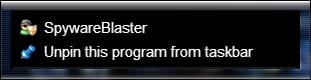
Right click on the Spyware Blaster icon in taskbar> Right click on Spyware Blaster in list that appears

Spy.jpg

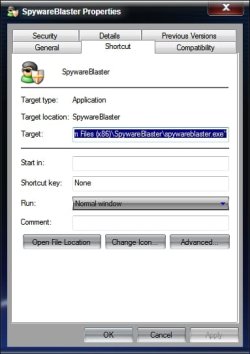
And choose properties

Properties.jpg

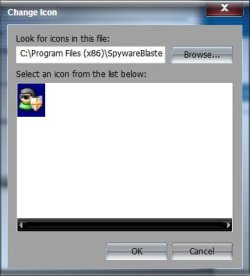
On shortcut tab, click on Change Icon> Browse to the folder where Spyware blaster is installed (usually C:\program files (x86)\SpywareBlaster, or C:\program files\SpywareBlaster for 32 bit) and choose the spywareblaster.exe

Change.jpg

OK your way out and see if the icon isn't correct now.

A Guy
 

My Computer

Computer type
PC/Desktop
OS
Windows 10 Home x64
CPU
INTEL Core i5-750 Quad-Core 3.37GHz
Motherboard
ASUS P7P55D
Memory
HyperX Fury Black Series 8GB (2 x 4GB) 1866Mhz
Graphics Card(s)
EVGA GeForce GTX 750 Superclocked 1GB 128-Bit GDDR5
Monitor(s) Displays
LG 32MA68HY 32" IPS
Screen Resolution
1920 x 1080
Hard Drives
Samsung 840 Evo 120GB, SEAGATE 500GB Barracuda® 7200.12, SATA 3 Gb/s, 7200 RPM, 16MB cache
PSU
ANTEC TruePower New TP-550, 80 PLUS, 550W
Case
ANTEC Three Hundred Illusion
Cooling
COOLER MASTER Hyper 212 Plus, 4 x 120mm 1 x 140mm Noctua's
Internet Speed
85 + Mbps
Antivirus
Avast
Browser
Vivaldi
Did all that you suggested, several times. The appropriate icon was in the properties/shortcut screens; however, although I chose it again, did Apply and OK as I backed out, nothing happened to change from generic to proper icon. In fact, I had another generic icon in my taskbar (Cookiemonster) that also failed respond to this effort.

Although I really don't know much about these things, it does seem strange that I should be able to pin the proper icon to the taskbar in one computer but not the other even though they are both running the same OS.
 

My Computer

Computer Manufacturer/Model Number
Gateway DX4720-03/HP Pavilion dv6
OS
Windows 7 HP 64-bit
Memory
4GB/4GB
Antivirus
Avast Pro
Browser
Firefox, the latest
Unpin the generic icon, then pin again.
 

My Computer

Computer Manufacturer/Model Number
Too many to describe...
OS
Windows 7 x64 pro/ Windows 7 x86 Pro/ XP SP3 x86
Problems solved before I saw your post, Bill2, but not quite sure what I did. I think that the problem with the properties method I first used was that I had left the generic icon in the taskbar while doing the fix. The properties fix did work when I worked on the proper icon while it was on the desktop and there was no icon in the taskbar...I think.
 

My Computer

Computer Manufacturer/Model Number
Gateway DX4720-03/HP Pavilion dv6
OS
Windows 7 HP 64-bit
Memory
4GB/4GB
Antivirus
Avast Pro
Browser
Firefox, the latest
Glad you got it sorted. I should have added to unpin the one you had, and pin a new one after changing the icon. Good add Bill. Good you got it fixed in any case :)

A Guy
 

My Computer

Computer type
PC/Desktop
OS
Windows 10 Home x64
CPU
INTEL Core i5-750 Quad-Core 3.37GHz
Motherboard
ASUS P7P55D
Memory
HyperX Fury Black Series 8GB (2 x 4GB) 1866Mhz
Graphics Card(s)
EVGA GeForce GTX 750 Superclocked 1GB 128-Bit GDDR5
Monitor(s) Displays
LG 32MA68HY 32" IPS
Screen Resolution
1920 x 1080
Hard Drives
Samsung 840 Evo 120GB, SEAGATE 500GB Barracuda® 7200.12, SATA 3 Gb/s, 7200 RPM, 16MB cache
PSU
ANTEC TruePower New TP-550, 80 PLUS, 550W
Case
ANTEC Three Hundred Illusion
Cooling
COOLER MASTER Hyper 212 Plus, 4 x 120mm 1 x 140mm Noctua's
Internet Speed
85 + Mbps
Antivirus
Avast
Browser
Vivaldi
Back
Top