Where did Spywareblaster's original icon go?

flycaster

New member
Member
VIP
Local time
11:13 PM
Messages
472
Location
Boynton Beach, FL
Somehow I deleted my taskbar of all its shortcut icons. When I got to replacing SWB, I deleted it and installed the latest edition (4.5). Viewing the installed SWB in Windows Explorer (program files (x86), I noted that the icon next to spywareblaster.exe was a generic icon and not the one I'm used to seeing. Tried everything, including uninstalling and loading from different sources, but still the generic icon. What gives?
 

My Computer My Computer

At a glance

Windows 7 HP 64-bit4GB/4GB
Computer Manufacturer/Model Number
Gateway DX4720-03/HP Pavilion dv6
OS
Windows 7 HP 64-bit
Memory
4GB/4GB
Antivirus
Avast Pro
Browser
Firefox, the latest

My Computer My Computer

At a glance

64-bit Windows 11 Pro for WorkstationsIntel i7-8700K OC'd to 5 GHz64 GB (4x16GB) G.SKILL TridentZ RGB DDR4 3600...ASUS ROG-STRIX-GTX1080TI-O11G-GAMING
Computer type
PC/Desktop
Computer Manufacturer/Model Number
Self built custom
OS
64-bit Windows 11 Pro for Workstations
CPU
Intel i7-8700K OC'd to 5 GHz
Motherboard
ASUS ROG Maximus XI Formula Z390
Memory
64 GB (4x16GB) G.SKILL TridentZ RGB DDR4 3600 MHz
Graphics Card(s)
ASUS ROG-STRIX-GTX1080TI-O11G-GAMING
Sound Card
Integrated
Monitor(s) Displays
2 x Samsung Odyssey G7 27"
Screen Resolution
2560x1440
Hard Drives
1TB Samsung 990 PRO M.2,
4TB Samsung 990 PRO PRO M.2,
TerraMaster F8 SSD Plus NAS
PSU
Seasonic Prime Titanium 850W
Case
Thermaltake Core P3
Cooling
Corsair Hydro H115i
Keyboard
Logitech wireless K800
Mouse
Logitech MX Master 4
Internet Speed
2 Gb/s Download and 100 Mb/s Upload
Antivirus
Malwarebyte Anti-Malware Premium
Browser
Google Chrome
Other Info
Logitech Z625 speaker system,
Logitech BRIO 4K Pro webcam,
HP Color LaserJet Pro MFP M477fdn,
APC SMART-UPS RT 1000 XL - SURT1000XLI,
Galaxy S23 Plus phone
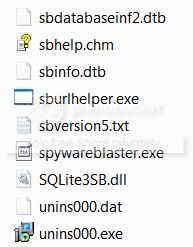
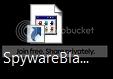
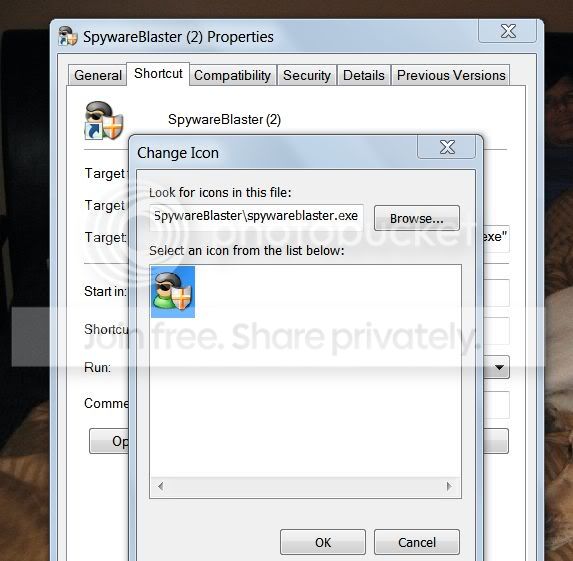
I'm going to hold off doing the cache rebuild, but here are 3 screen shots to illustrate the problem:

spywareblaster.exe icon in Windows Explorer and on the taskbar (after pinning it)

SWB-WinExplorer.jpg


Spywareblaster icon as it appears in desktop icon and on taskbar after pinning it.

SWB-Shortcut.jpg


Spywareblaster icon as it appears in Taskbar>Spywareblaster>Porperties

SWB-Properties.jpg


Interestingly, as you can see, the icon is fine in the Properties???
 
Last edited:

My Computer My Computer

At a glance

Windows 7 HP 64-bit4GB/4GB
Computer Manufacturer/Model Number
Gateway DX4720-03/HP Pavilion dv6
OS
Windows 7 HP 64-bit
Memory
4GB/4GB
Antivirus
Avast Pro
Browser
Firefox, the latest
I'm going to hold off doing the cache rebuild, but here are 3 screen shots to illustrate the problem:

spywareblaster.exe icon in Windows Explorer and on the taskbar (after pinning it)

SWB-WinExplorer.jpg


Spywareblaster icon as it appears in desktop icon and on taskbar after pinning it.

SWB-Shortcut.jpg


Spywareblaster icon as it appears in Taskbar>Spywareblaster>Porperties

SWB-Properties.jpg


Interestingly, as you can see, the icon is fine in the Properties???

Hello flycaster,

Why do you want to hold off on the icon cache rebuilding? It sounds like the best solution right now.

Tom
 

My Computer My Computer

At a glance

Windows 8.1 Pro x64Intel i7 3770K @4.5GHzCorsair Vengeance 2x4GB DDR3 1600MHz Low Prof...Gigabyte Radeon HD 7850 (2GB GDDR5)
Computer type
PC/Desktop
Computer Manufacturer/Model Number
Build #1
OS
Windows 8.1 Pro x64
CPU
Intel i7 3770K @4.5GHz
Motherboard
ASUS P8Z77-V PRO
Memory
Corsair Vengeance 2x4GB DDR3 1600MHz Low Profile (White)
Graphics Card(s)
Gigabyte Radeon HD 7850 (2GB GDDR5)
Sound Card
Integrated on motherboard
Monitor(s) Displays
23" LG LCD/LED IPS
Screen Resolution
1920*1080
Hard Drives
Samsung EVO 128GB SSD
Seagate Barracuda 2GB 7200rpm
2x Seagate FreeAgent [500gb]
PSU
Corsair TX650W V2 (80+ Bronze)
Case
NZXT Phantom 410 White
Cooling
Corsair H100 Water Cooler
Keyboard
Microsoft Desktop 2000 Wireless Keyboard
Mouse
Microsoft Desktop 2000 Wireless Mouse
Internet Speed
95 Mb/s Download 70 Mb/s Upload
Antivirus
MSE + MBAM Pro
Browser
Firefox
Yep, I would recommend to rebuild the icon cache to see how that works, and go from there if it doesn't.
 

My Computer My Computer

At a glance

64-bit Windows 11 Pro for WorkstationsIntel i7-8700K OC'd to 5 GHz64 GB (4x16GB) G.SKILL TridentZ RGB DDR4 3600...ASUS ROG-STRIX-GTX1080TI-O11G-GAMING
Computer type
PC/Desktop
Computer Manufacturer/Model Number
Self built custom
OS
64-bit Windows 11 Pro for Workstations
CPU
Intel i7-8700K OC'd to 5 GHz
Motherboard
ASUS ROG Maximus XI Formula Z390
Memory
64 GB (4x16GB) G.SKILL TridentZ RGB DDR4 3600 MHz
Graphics Card(s)
ASUS ROG-STRIX-GTX1080TI-O11G-GAMING
Sound Card
Integrated
Monitor(s) Displays
2 x Samsung Odyssey G7 27"
Screen Resolution
2560x1440
Hard Drives
1TB Samsung 990 PRO M.2,
4TB Samsung 990 PRO PRO M.2,
TerraMaster F8 SSD Plus NAS
PSU
Seasonic Prime Titanium 850W
Case
Thermaltake Core P3
Cooling
Corsair Hydro H115i
Keyboard
Logitech wireless K800
Mouse
Logitech MX Master 4
Internet Speed
2 Gb/s Download and 100 Mb/s Upload
Antivirus
Malwarebyte Anti-Malware Premium
Browser
Google Chrome
Other Info
Logitech Z625 speaker system,
Logitech BRIO 4K Pro webcam,
HP Color LaserJet Pro MFP M477fdn,
APC SMART-UPS RT 1000 XL - SURT1000XLI,
Galaxy S23 Plus phone
Rebuilt cache as instructed. The icon is back on the taskbar, but is still generic in Windows Explorer? Thanks. Although you guys have given me good advice over the years, I'm still cautious when I'm doing something I really don't know much about...thus my little delay in rebuilding the cache. BTW, could someone tell me just what happened (why) when I lost this icon (and only this icon)?
 

My Computer My Computer

At a glance

Windows 7 HP 64-bit4GB/4GB
Computer Manufacturer/Model Number
Gateway DX4720-03/HP Pavilion dv6
OS
Windows 7 HP 64-bit
Memory
4GB/4GB
Antivirus
Avast Pro
Browser
Firefox, the latest
That's great news Flycaster.

As a test, change the icon size of the .exe file in Windows Explorer to see if the icon may be correct for a larger size icon. Perhaps, they didn't have a correct icon for the smaller size.

All of this could happen if the icon cache got corrupted somehow, or loaded a bad copy of the icon into the icon cache. Either way, rebuilding the icon cache clears and resets it so it will load a new copy of the icons into the icon cache.
 

My Computer My Computer

At a glance

64-bit Windows 11 Pro for WorkstationsIntel i7-8700K OC'd to 5 GHz64 GB (4x16GB) G.SKILL TridentZ RGB DDR4 3600...ASUS ROG-STRIX-GTX1080TI-O11G-GAMING
Computer type
PC/Desktop
Computer Manufacturer/Model Number
Self built custom
OS
64-bit Windows 11 Pro for Workstations
CPU
Intel i7-8700K OC'd to 5 GHz
Motherboard
ASUS ROG Maximus XI Formula Z390
Memory
64 GB (4x16GB) G.SKILL TridentZ RGB DDR4 3600 MHz
Graphics Card(s)
ASUS ROG-STRIX-GTX1080TI-O11G-GAMING
Sound Card
Integrated
Monitor(s) Displays
2 x Samsung Odyssey G7 27"
Screen Resolution
2560x1440
Hard Drives
1TB Samsung 990 PRO M.2,
4TB Samsung 990 PRO PRO M.2,
TerraMaster F8 SSD Plus NAS
PSU
Seasonic Prime Titanium 850W
Case
Thermaltake Core P3
Cooling
Corsair Hydro H115i
Keyboard
Logitech wireless K800
Mouse
Logitech MX Master 4
Internet Speed
2 Gb/s Download and 100 Mb/s Upload
Antivirus
Malwarebyte Anti-Malware Premium
Browser
Google Chrome
Other Info
Logitech Z625 speaker system,
Logitech BRIO 4K Pro webcam,
HP Color LaserJet Pro MFP M477fdn,
APC SMART-UPS RT 1000 XL - SURT1000XLI,
Galaxy S23 Plus phone
Back
Top