
Square symbols showing up in volume mixer and google chrome

BryanS

New member
Local time
1:29 PM
Messages
28
It's always done this i looked around and saw that maybe another program could be conflicting with it, and something about the font maybe being corrupt. Could be it, or maybe it's an easy fix?

In google chrome it seems japanese symbols or any type of foreign language shows up as ☐☐☐☐'s in the tab titles.

What made me notice / look for it:
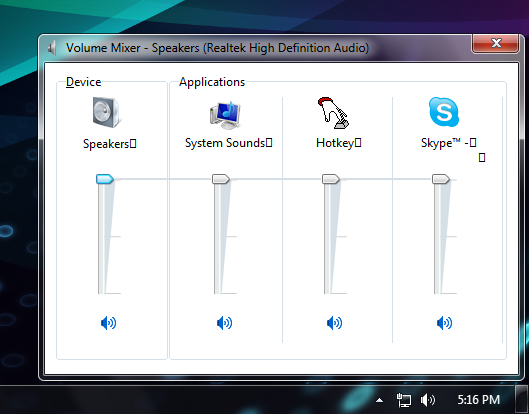
G6wTc.png


Solutions? I can fill in system specs too if needed. Also note that this comp is completely up to date.
 

My Computer My Computer

At a glance

windows 7 home premium 64bit
OS
windows 7 home premium 64bit
I just noticed this exact same thing, however, in mine its not coming up beside speakers.
 

My Computer My Computer

At a glance

Windows 7 Ultimate x86Intel e5300 @2.6Kingston 2x1+1x1 DDR2 800mhzSapphire radeon 5670 1GB
OS
Windows 7 Ultimate x86
CPU
Intel e5300 @2.6
Motherboard
MSI g31tm-p21
Memory
Kingston 2x1+1x1 DDR2 800mhz
Graphics Card(s)
Sapphire radeon 5670 1GB
Hard Drives
WD 320GB
PSU
FSP Saga II 400watts
Working fine now, thanks.
 
Last edited:

My Computer My Computer

At a glance

Windows 7 Home Premium x64
OS
Windows 7 Home Premium x64
Sorry if this is an old post.

Did you ever figure out an solution for this? I'm having the same problems. I'm using Google Chrome also and didn't realize my volume mixer had those square box things at the end.

So if you did find a solution to fix or return it to normal could you forward a how-to to me?

Thanks,

Loran

Well since then i have upgraded my monitor to a full hd one and in the process the boxes were fixed without me doing anything specially for it, i suppose changing the resolution did the trick for me...but its just a hunch.
Hope this helps.
 

My Computer My Computer

At a glance

Windows 7 Ultimate x86Intel e5300 @2.6Kingston 2x1+1x1 DDR2 800mhzSapphire radeon 5670 1GB
OS
Windows 7 Ultimate x86
CPU
Intel e5300 @2.6
Motherboard
MSI g31tm-p21
Memory
Kingston 2x1+1x1 DDR2 800mhz
Graphics Card(s)
Sapphire radeon 5670 1GB
Hard Drives
WD 320GB
PSU
FSP Saga II 400watts
Sorry if this is an old post but I also have the same problem. I do not know how to remove the squares. I can't re-install since no windows disk. any ideas?
 

My Computer My Computer

At a glance

Windows 7 Professional, 64 bitIntel Core i7-4510U @ 2.00GHz16GB DDR3Intel HD 4400 (integrated)
Computer type
Laptop
Computer Manufacturer/Model Number
HP 15-ac153sa
OS
Windows 7 Professional, 64 bit
CPU
Intel Core i7-4510U @ 2.00GHz
Memory
16GB DDR3
Graphics Card(s)
Intel HD 4400 (integrated)
Monitor(s) Displays
Inbuilt 15.6 inch HD display
Screen Resolution
1366x768
Hard Drives
2TB HDD, partitioned as 1TB (Windows 7) and 1TB (Windows 10)
2TB external HDD (portable)
Cooling
1x built in laptop fan
Keyboard
HP Slimline Wired Keyboard
Mouse
HP Optical Wired Mouse
Internet Speed
Virgin Media 250Mbps
Antivirus
Microsoft Windows Defender
Browser
Chrome, Firefox
Other Info
Laptop is set up as dual boot with Windows 7 Professional and Windows 10 Home. Windows 7 preferred.
got rid of them by uninstalling ie9

Hello,

A quick update on the square issue with the volume mixer. I can remember when I first got my Windows 7 computer, the volume mixer was fine. The squares were only noticed a few days after installing IE9.
So I have decided to uninstall IE9 from the Control Panel, and ever since I have not had any issues with the square symbols. So if you have any issues, try uninstalling IE9 from the CP.
 

My Computer My Computer

At a glance

Windows 7 Professional, 64 bitIntel Core i7-4510U @ 2.00GHz16GB DDR3Intel HD 4400 (integrated)
Computer type
Laptop
Computer Manufacturer/Model Number
HP 15-ac153sa
OS
Windows 7 Professional, 64 bit
CPU
Intel Core i7-4510U @ 2.00GHz
Memory
16GB DDR3
Graphics Card(s)
Intel HD 4400 (integrated)
Monitor(s) Displays
Inbuilt 15.6 inch HD display
Screen Resolution
1366x768
Hard Drives
2TB HDD, partitioned as 1TB (Windows 7) and 1TB (Windows 10)
2TB external HDD (portable)
Cooling
1x built in laptop fan
Keyboard
HP Slimline Wired Keyboard
Mouse
HP Optical Wired Mouse
Internet Speed
Virgin Media 250Mbps
Antivirus
Microsoft Windows Defender
Browser
Chrome, Firefox
Other Info
Laptop is set up as dual boot with Windows 7 Professional and Windows 10 Home. Windows 7 preferred.
Back
Top