Weird text glitch in volume mixer

dferdsg

New member
Local time
12:10 AM
Messages
17
Hi,
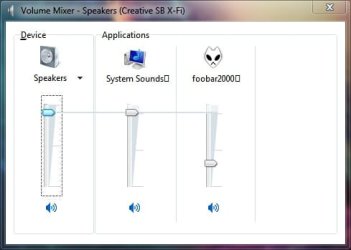
I have a weird text glitch in volume mixer and don't know why it happens. See attachment. :mad: The squares! :mad:
I'm talking about the square like character "[]" after the text "system sounds" and "foobar2000".

I am using X-FI sound card with recent drivers and have all the windows updates installed.
Un fortunately I did not find an explanation searching for it on google and on forums.
Anyone has an idea what causes this glitch?
 

Attachments
  • Untitled.jpg
    Untitled.jpg
    16.3 KB · Views: 151
Last edited:

My Computer My Computer

At a glance

Windows 8.1
OS
Windows 8.1
You have apparently installed the Foobar 2000 media player. Uninstall it if you don't want or need it. I've seen this attached to some other downloaded programs and you have to uncheck a box or it will install.
 

My Computer My Computer

At a glance

Windows 10 64 bitIntel i7 6700K16GB Corsair DominatorIntel CPU Graphics
Computer type
PC/Desktop
Computer Manufacturer/Model Number
My Own Build
OS
Windows 10 64 bit
CPU
Intel i7 6700K
Motherboard
ASUS ROG Maximus VIII Hero
Memory
16GB Corsair Dominator
Graphics Card(s)
Intel CPU Graphics
Sound Card
RealTek
Monitor(s) Displays
27" Dell S2719dgf
Screen Resolution
2560X1440
Hard Drives
1 TB Samsung 850 EVO SSD for Win 10 Pro
500GB Samsung 850 EVO SSD for Win 10 Insider
2 TB drive for backup
PSU
EVGA Supernova 750G2
Case
BeQuiet Silent Base 600
Cooling
Deepcool Captain 120EX
Keyboard
Microsoft Wireless 2000
Mouse
Microsoft wireless
Internet Speed
100 MB/sec (Cable)
Antivirus
Microsoft Defender and Malwarebytes
Browser
Edge/Firefox
Other Info
Cakewalk (Sonar) by BandLab and Studio One 4.1 Pro recording studio software. MOTU 896Mk3 Hybrid recording interface, Frontier Tranzport wireless control unit, Behringer X-Touch Control Surface.
Five USB connected optical drives for CD Audio production using Nero BurningROM
Thanks for the reply.
Foobar is my music player of choice and it's not the cause of the squares. These squares sometimes are there from a fresh boot, sometimes they appear after some time using the pc, sometimes never but most of the time they are there...I don't think foobar has anything to do with it.
 

My Computer My Computer

At a glance

Windows 8.1
OS
Windows 8.1
Oh, are you talking about the dotted line around the Speakers Device? I have no idea why that is there.
 

My Computer My Computer

At a glance

Windows 10 64 bitIntel i7 6700K16GB Corsair DominatorIntel CPU Graphics
Computer type
PC/Desktop
Computer Manufacturer/Model Number
My Own Build
OS
Windows 10 64 bit
CPU
Intel i7 6700K
Motherboard
ASUS ROG Maximus VIII Hero
Memory
16GB Corsair Dominator
Graphics Card(s)
Intel CPU Graphics
Sound Card
RealTek
Monitor(s) Displays
27" Dell S2719dgf
Screen Resolution
2560X1440
Hard Drives
1 TB Samsung 850 EVO SSD for Win 10 Pro
500GB Samsung 850 EVO SSD for Win 10 Insider
2 TB drive for backup
PSU
EVGA Supernova 750G2
Case
BeQuiet Silent Base 600
Cooling
Deepcool Captain 120EX
Keyboard
Microsoft Wireless 2000
Mouse
Microsoft wireless
Internet Speed
100 MB/sec (Cable)
Antivirus
Microsoft Defender and Malwarebytes
Browser
Edge/Firefox
Other Info
Cakewalk (Sonar) by BandLab and Studio One 4.1 Pro recording studio software. MOTU 896Mk3 Hybrid recording interface, Frontier Tranzport wireless control unit, Behringer X-Touch Control Surface.
Five USB connected optical drives for CD Audio production using Nero BurningROM
No, i'm talking about the square like character "[]" after the text "system sounds" and "foobar2000"
 

My Computer My Computer

At a glance

Windows 8.1
OS
Windows 8.1
That looks sort of like a font issue. Whatever font that is, could be corrupted.
 

My Computer My Computer

At a glance

Windows 10 64 bitIntel i7 6700K16GB Corsair DominatorIntel CPU Graphics
Computer type
PC/Desktop
Computer Manufacturer/Model Number
My Own Build
OS
Windows 10 64 bit
CPU
Intel i7 6700K
Motherboard
ASUS ROG Maximus VIII Hero
Memory
16GB Corsair Dominator
Graphics Card(s)
Intel CPU Graphics
Sound Card
RealTek
Monitor(s) Displays
27" Dell S2719dgf
Screen Resolution
2560X1440
Hard Drives
1 TB Samsung 850 EVO SSD for Win 10 Pro
500GB Samsung 850 EVO SSD for Win 10 Insider
2 TB drive for backup
PSU
EVGA Supernova 750G2
Case
BeQuiet Silent Base 600
Cooling
Deepcool Captain 120EX
Keyboard
Microsoft Wireless 2000
Mouse
Microsoft wireless
Internet Speed
100 MB/sec (Cable)
Antivirus
Microsoft Defender and Malwarebytes
Browser
Edge/Firefox
Other Info
Cakewalk (Sonar) by BandLab and Studio One 4.1 Pro recording studio software. MOTU 896Mk3 Hybrid recording interface, Frontier Tranzport wireless control unit, Behringer X-Touch Control Surface.
Five USB connected optical drives for CD Audio production using Nero BurningROM
More then likely the font character they used cannot be displayed in the system font.

Either that, or as fireberd said, corrupted font. Or the program is written with a flaw in the coding pertaining to the display
 

My Computer My Computer

At a glance

Win 7 32 Home Premium, Win 7 64 Pro, Win 8.1,...Intel Core 2 Duo 2.93GHzNot much with my ADHDATI Radeon HD 4350
Computer type
PC/Desktop
Computer Manufacturer/Model Number
Dell Hell oh Well
OS
Win 7 32 Home Premium, Win 7 64 Pro, Win 8.1, Win 10
CPU
Intel Core 2 Duo 2.93GHz
Memory
Not much with my ADHD
Graphics Card(s)
ATI Radeon HD 4350
Monitor(s) Displays
24" HDTV/Monitor
Screen Resolution
Blurry after a Scotch or 2
Hard Drives
1 HDD 250 GB, 1 HDD 1 TB, 3 - 1 TB Externals
Case
Don't get on my case...man :D
Cooling
I have an Air Conditioner & Diet Pepsi
Keyboard
Saitek Cyborg
Mouse
10 yr old MS optical mouse that still works
Internet Speed
Never fast enough
Antivirus
Various
Browser
Various
You wanna talk bizarre, my mixer at times will present sliders for non audio apps ! Like volume slider for a graphics editor or other such non audio apps. Weird ! They go away tho and i haven't seen that for a while now. I have a audigy 2 ZS.
 

My Computer My Computer

At a glance

windows 7 pro 64 biti5 7604GB G skill DDR3 1600XFX 5850
OS
windows 7 pro 64 bit
CPU
i5 760
Motherboard
GIGABYTE GA-P55A-UD3
Memory
4GB G skill DDR3 1600
Graphics Card(s)
XFX 5850
Sound Card
audigy 2 ZS
Monitor(s) Displays
samsung 22" 1650x1080
Hard Drives
Patriot SSD 120GB Inferno
maxtor 300GB IDE storage drive
PSU
Corsair TX650w
Thanks for the reply guys, but how can the standard font be corrupted ? And if it's corrupted why it doesn't show this "[]" character all the time?

More then likely the font character they used cannot be displayed in the system font.

Who do you mean with "they"? These squares are after every software name in the volume mixer whether they are from microsoft or some 3'rd party's...
Yesterday the volume mixer was fine, today the characters are back...sadly, I can't explain it. :(
 
Last edited:

My Computer My Computer

At a glance

Windows 8.1
OS
Windows 8.1
If you're using a 3rd party software (Foobar), sometimes programs will not integrate 100% with Windows. This can cause the kind of problems you're seeing.

You could uninstall it and see if the problem disappears. Depending how much it integrated with the drivers that may fix it.

It would probably be a good idea to run a full system scan with an AV or Malwarebytes just to be sure, but I've seen this kind of behavior before with certain 3rd party software and, short of uninstalling it, if it's not causing any problems and there is no malware/viruses present, then there should be nothing to worry about.

You could also run a SFC /Scannow to see if it finds any problems and can fix them.
 
Last edited:

My Computer My Computer

At a glance

Win 7 32 Home Premium, Win 7 64 Pro, Win 8.1,...Intel Core 2 Duo 2.93GHzNot much with my ADHDATI Radeon HD 4350
Computer type
PC/Desktop
Computer Manufacturer/Model Number
Dell Hell oh Well
OS
Win 7 32 Home Premium, Win 7 64 Pro, Win 8.1, Win 10
CPU
Intel Core 2 Duo 2.93GHz
Memory
Not much with my ADHD
Graphics Card(s)
ATI Radeon HD 4350
Monitor(s) Displays
24" HDTV/Monitor
Screen Resolution
Blurry after a Scotch or 2
Hard Drives
1 HDD 250 GB, 1 HDD 1 TB, 3 - 1 TB Externals
Case
Don't get on my case...man :D
Cooling
I have an Air Conditioner & Diet Pepsi
Keyboard
Saitek Cyborg
Mouse
10 yr old MS optical mouse that still works
Internet Speed
Never fast enough
Antivirus
Various
Browser
Various
Still did not find a solution, and even worse, now they appear on my brand new laptop too. I did not install anything out of the ordinary on my laptop. Hopeless...
 

My Computer My Computer

At a glance

Windows 8.1
OS
Windows 8.1
I see this too often on my laptop, an it has nothing to do with Foobar. It is either a Windows bug (more probable) or a Realtek driver bug (less probable). The tooltip displayed for the sound source doesn't have that square.
 

My Computer My Computer

At a glance

Windows 7 x64 Ultimate SP1Core i7-2630QM6 GB DDR3Nvidia GT 540M / Intel HD 3000 - Optimus swit...
Computer Manufacturer/Model Number
Asus N73SV
OS
Windows 7 x64 Ultimate SP1
CPU
Core i7-2630QM
Motherboard
Intel HM 65
Memory
6 GB DDR3
Graphics Card(s)
Nvidia GT 540M / Intel HD 3000 - Optimus switching
Sound Card
HD Audio (Intel Azalia/Realtek) ALC269
Monitor(s) Displays
LED flat panel
Screen Resolution
1920 x 1080
Hard Drives
2x Seagate Momentus 640 GB - 1,28 TB in total
Internet Speed
4 MB/256 kbps
Other Info
External HDs

WD Elements 1,5 TB
WD MyBook 500 GB
I re-installed Windows 7 and the squares where there again, BUT I got rid of them now. It seems the solution, for me anyway, was to delete the file FNTCACHE.DAT in Windows\System32 and restart. :cool:
I tried this before re-installing windows 7 but it did not work, this time however it worked. For two weeks now I'm free of the squares and Chinese characters are displayed correctly too in explorer.
Yes it seems the problem with Chinese characters displayed as squares in explorer and the squares in mixer volume are going hand in hand and is a bug in windows 7 font cache or something...
 

My Computer My Computer

At a glance

Windows 8.1
OS
Windows 8.1
I also have this squares problem, like yours. It has the squares on all volume mixer sliders, and appears most of the time. However, at the start, just after bootup, if I click the volume mixer BEFORE I play any audio, they don't appear. Why is this, and how do I remove them? Also I have heard that deleting the font cache can result in BSOD, I have had enough BSODS on my computer (even though its only 1 yr old!) so is it safe to delete it?
Thank you
spotify95
 

Attachments

  • volume mixer.png
    volume mixer.png
    296.3 KB · Views: 0
Last edited:

My Computer My Computer

At a glance

Windows 7 Professional, 64 bitIntel Core i7-4510U @ 2.00GHz16GB DDR3Intel HD 4400 (integrated)
Computer type
Laptop
Computer Manufacturer/Model Number
HP 15-ac153sa
OS
Windows 7 Professional, 64 bit
CPU
Intel Core i7-4510U @ 2.00GHz
Memory
16GB DDR3
Graphics Card(s)
Intel HD 4400 (integrated)
Monitor(s) Displays
Inbuilt 15.6 inch HD display
Screen Resolution
1366x768
Hard Drives
2TB HDD, partitioned as 1TB (Windows 7) and 1TB (Windows 10)
2TB external HDD (portable)
Cooling
1x built in laptop fan
Keyboard
HP Slimline Wired Keyboard
Mouse
HP Optical Wired Mouse
Internet Speed
Virgin Media 250Mbps
Antivirus
Microsoft Windows Defender
Browser
Chrome, Firefox
Other Info
Laptop is set up as dual boot with Windows 7 Professional and Windows 10 Home. Windows 7 preferred.
I had exactly the same behavior as you described and yes, by deleting that file was the only way I got rid of them for good.
 

My Computer My Computer

At a glance

Windows 8.1
OS
Windows 8.1
Will that file re-appear in the system32 folder after the restart? Im just a bit concerned that I do not want to ruin anything, since the system32 folder is needed for the O/S, and I do not want to ruin the laptop.... and you are sure that it is safe to do?
Thank you
Spotify95
 
Last edited:

My Computer My Computer

At a glance

Windows 7 Professional, 64 bitIntel Core i7-4510U @ 2.00GHz16GB DDR3Intel HD 4400 (integrated)
Computer type
Laptop
Computer Manufacturer/Model Number
HP 15-ac153sa
OS
Windows 7 Professional, 64 bit
CPU
Intel Core i7-4510U @ 2.00GHz
Memory
16GB DDR3
Graphics Card(s)
Intel HD 4400 (integrated)
Monitor(s) Displays
Inbuilt 15.6 inch HD display
Screen Resolution
1366x768
Hard Drives
2TB HDD, partitioned as 1TB (Windows 7) and 1TB (Windows 10)
2TB external HDD (portable)
Cooling
1x built in laptop fan
Keyboard
HP Slimline Wired Keyboard
Mouse
HP Optical Wired Mouse
Internet Speed
Virgin Media 250Mbps
Antivirus
Microsoft Windows Defender
Browser
Chrome, Firefox
Other Info
Laptop is set up as dual boot with Windows 7 Professional and Windows 10 Home. Windows 7 preferred.
By the way, this is the screenshot of what I am getting.
Is it safe to delete that fntcache.dat file?

Thank you

Spotify95
 
Last edited:

My Computer My Computer

At a glance

Windows 7 Professional, 64 bitIntel Core i7-4510U @ 2.00GHz16GB DDR3Intel HD 4400 (integrated)
Computer type
Laptop
Computer Manufacturer/Model Number
HP 15-ac153sa
OS
Windows 7 Professional, 64 bit
CPU
Intel Core i7-4510U @ 2.00GHz
Memory
16GB DDR3
Graphics Card(s)
Intel HD 4400 (integrated)
Monitor(s) Displays
Inbuilt 15.6 inch HD display
Screen Resolution
1366x768
Hard Drives
2TB HDD, partitioned as 1TB (Windows 7) and 1TB (Windows 10)
2TB external HDD (portable)
Cooling
1x built in laptop fan
Keyboard
HP Slimline Wired Keyboard
Mouse
HP Optical Wired Mouse
Internet Speed
Virgin Media 250Mbps
Antivirus
Microsoft Windows Defender
Browser
Chrome, Firefox
Other Info
Laptop is set up as dual boot with Windows 7 Professional and Windows 10 Home. Windows 7 preferred.
Well from my experience by deleting it from my main PC and laptop (I had the squares on both, the PC and laptop), it was not a problem because it was recreated after restart. But if somethings goes wrong, which is unlikely, don't make me responsible! :)
 

My Computer My Computer

At a glance

Windows 8.1
OS
Windows 8.1
Those funny squares have came up again, even though the laptop had to perform some windows updates yesterday, hoping they would cure it!!:mad: Anyway, will try deleting the fntcache.dat and will see what happens.
 

My Computer My Computer

At a glance

Windows 7 Professional, 64 bitIntel Core i7-4510U @ 2.00GHz16GB DDR3Intel HD 4400 (integrated)
Computer type
Laptop
Computer Manufacturer/Model Number
HP 15-ac153sa
OS
Windows 7 Professional, 64 bit
CPU
Intel Core i7-4510U @ 2.00GHz
Memory
16GB DDR3
Graphics Card(s)
Intel HD 4400 (integrated)
Monitor(s) Displays
Inbuilt 15.6 inch HD display
Screen Resolution
1366x768
Hard Drives
2TB HDD, partitioned as 1TB (Windows 7) and 1TB (Windows 10)
2TB external HDD (portable)
Cooling
1x built in laptop fan
Keyboard
HP Slimline Wired Keyboard
Mouse
HP Optical Wired Mouse
Internet Speed
Virgin Media 250Mbps
Antivirus
Microsoft Windows Defender
Browser
Chrome, Firefox
Other Info
Laptop is set up as dual boot with Windows 7 Professional and Windows 10 Home. Windows 7 preferred.
Okay, I deleted the file and restarted. After nervously waiting for the re-boot, I found out that the system did indeed re-create the font cache after the computer was restarted.
Argh!!! The square boxes are still there!!! What do I do now? (P.S. I have no windows disk, so re-install isn`t an option) :mad::mad::mad:
 

My Computer My Computer

At a glance

Windows 7 Professional, 64 bitIntel Core i7-4510U @ 2.00GHz16GB DDR3Intel HD 4400 (integrated)
Computer type
Laptop
Computer Manufacturer/Model Number
HP 15-ac153sa
OS
Windows 7 Professional, 64 bit
CPU
Intel Core i7-4510U @ 2.00GHz
Memory
16GB DDR3
Graphics Card(s)
Intel HD 4400 (integrated)
Monitor(s) Displays
Inbuilt 15.6 inch HD display
Screen Resolution
1366x768
Hard Drives
2TB HDD, partitioned as 1TB (Windows 7) and 1TB (Windows 10)
2TB external HDD (portable)
Cooling
1x built in laptop fan
Keyboard
HP Slimline Wired Keyboard
Mouse
HP Optical Wired Mouse
Internet Speed
Virgin Media 250Mbps
Antivirus
Microsoft Windows Defender
Browser
Chrome, Firefox
Other Info
Laptop is set up as dual boot with Windows 7 Professional and Windows 10 Home. Windows 7 preferred.
Back
Top