Solved SSD booting challenge

gdcowan

New member
Local time
3:23 AM
Messages
6
Hello

I recently purchased a new Gateway FX6860-UR20P RT (link) a 128GB Crucial M4 SSD, which I want to set up as the boot disk to improve overall system performance.

After reading numerous forum threads on the topic of setting up an SSD as a boot disk I did the following:
(i) Install the SDD and format
(ii) Create a Gateway system recovery disk to allow for reinstall of the operating system
(iii) Unplug the original HDD
(iv) Use the recovery disk to install the OS on the SSD

At this point everything is working great - the system boots using the new SSD no problem. So I shut everything down and reconnect the original HDD, then reboot and ensure that the BIOS shows the SSD as the boot drive.

After all of this though, when I restart the system I get a "reboot and select proper boot device" message. Nothing I've been able to find online has been able to fix this issue. Here are a couple of other points:
(a) When I used the system recovery disk I had to choose the "Restore operating system to Factory defaults" option rather than the "Completely Restore Compture to factor defaults", which I would have preferred and indicated that "All data in the hidden partition and on the system partition will be restored". This option was inactive and not available when I tried to use it. The only reason I can think of is that I only had a single partition rather than the 3 that the original HDD had (20GB Recovery Partition; 100MB System Reserved; 1377 GB remainder).

(b) If I insert a Windows 7 repair disk it gives me the option to press a key to boot into CD or DVD but if I don't, it then automatically boots using the SSD.

(c) If I hit F12 during reboot it shows the 2 drives (SSD and original HDD) as well as the DVD. Until recently if I selected the SSD it would boot in fine. After running the Win7 System Repair Disk though, now it takes me to a boot manager that gives me the choice of the 2 drives. If I select the original HDD after F12 it boots right up without going through the boot manager.

Overall it seems like the original HDD is maintaining some sort of wierd priority even though the BIOS says otherwise. I'm not sure if the lack of a System Reserved partition on the SSD has anythiing to do with it.

Any help to solve this issue would be much appreciated. Thanks!!
 

My Computer

Computer Manufacturer/Model Number
Gateway FX6860-UR20P
OS
Windows 7 Premium 64 Bit
CPU
Intel i7
Graphics Card(s)
ATI Radeon HD 6750
Hard Drives
128 GB Crucial M4 SSD
1.5 TB HDD
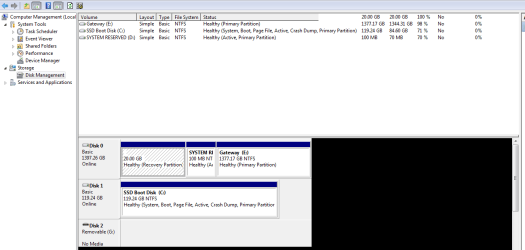
Can you post a screen shot of Disk Management, showing details of your drives and partitions? Arrange the sliders so it shows details such as boot, active,system, page file, etc.

Does Disk Management show that the SSD is set to "active"?
 

My Computer

Computer type
PC/Desktop
Computer Manufacturer/Model Number
Ignatz Special; 4 speed manual gearbox; factory air conditioning; one of one
OS
Windows 7 Home Premium SP1, 64-bit
CPU
Intel Skylake i5-6600K, not overclocked
Motherboard
AsRock Z170M Extreme 4, micro ATX
Memory
8 GB HyperX DDR4-2666 (2 x 4 GB)
Graphics Card(s)
none; graphics are integrated on CPU
Sound Card
onboard: Realtek ALC1150; external: USB Behringer UF0-202
Monitor(s) Displays
Dell S2340M 23 inch IPS
Screen Resolution
1600 x 900
Hard Drives
System: Crucial MX100 series SSD, 128 GB;
Data: Samsung Spinpoint 103SJ, 1 TB;
Backup: WD Caviar Green WD30EZRX-00D8PB0, 3 TB
PSU
Rosewill SilentNight 500 watt fanless, semi-modular
Case
Antec Solo II
Cooling
Noctua NH-U12S; Noctua F12 intake, Noctua S12A exhaust
Keyboard
Microsoft 200 6JH-00001 USB
Mouse
Dell or Microsoft optical wired; USB
Antivirus
Microsoft Security Essentials and Malwarebytes Premium
Browser
Pale Moon
Other Info
All fans PWM; speeds at idle: CPU circa 500 rpm; intake circa 600 rpm; exhaust circa 600 rpm; CPU temps 27 idle and 47 C load in a warm room (27 C/81 F) when running Intel Extreme Tuning Utility stress test.
Did you format the HDD?


i.e., is Windows 7 still installed on the HDD? Only the SSD should have Windows 7 installed now.

It appears Windows 7 is on both the HDD + SSD.

Regards. . .

jcgriff2

`
 

My Computer

OS
Windows 7 - Vista
Can you post a screen shot of Disk Management, showing details of your drives and partitions? Arrange the sliders so it shows details such as boot, active,system, page file, etc.

Does Disk Management show that the SSD is set to "active"?

I've attached the screenshot. SSD is set as active. The System Reserved partition on the HDD is also set as active. I did go in to the command prompt and used diskpart to set this as inactive but somehow it reset itself to active - it's possible that the Win7 system repair disk did this when I tried to use it to get things working but the confused boot problem was still there after using diskpart and before using the system repair disk so I don't think that's the issue. Maybe there's some other nuance.

thx!
 

Attachments

  • disksetup.PNG
    disksetup.PNG
    19.5 KB · Views: 171

My Computer

Computer Manufacturer/Model Number
Gateway FX6860-UR20P
OS
Windows 7 Premium 64 Bit
CPU
Intel i7
Graphics Card(s)
ATI Radeon HD 6750
Hard Drives
128 GB Crucial M4 SSD
1.5 TB HDD
Did you format the HDD?


i.e., is Windows 7 still installed on the HDD? Only the SSD should have Windows 7 installed now.

It appears Windows 7 is on both the HDD + SSD.

Regards. . .

jcgriff2

`


Thanks for the suggestion - that's definitely my fallback plan. 2 reasons I haven't done it yet:
(1) I was hoping to have a backup boot capability just in case anything goes funky on the SSD
(2) (More importantly) I wanted to make sure that the other 2 partitions on the original HDD are not necessary for something that's not immediately obvious. Yes the SSD worked fine when booting by itself but from long experience sometimes you discover down the road after putting in a bunch of hours that something was not quite set up right and now everything needs to be redone :confused:
I assume the Gateway guys didn't set it up this way for fun - should I adjust the partitions on the SSD to mimic the ones on the HDD? Should I somehow point the SSD OS to the partitions on the HDD?

Based on all the threads I've read this should be possible so I thought I'd give it a crack. If I cant figure it out in the next day or so I'll do exactly as you suggest and format the original HDD.
 

My Computer

Computer Manufacturer/Model Number
Gateway FX6860-UR20P
OS
Windows 7 Premium 64 Bit
CPU
Intel i7
Graphics Card(s)
ATI Radeon HD 6750
Hard Drives
128 GB Crucial M4 SSD
1.5 TB HDD
I havent read all the comments as i'm about to go out, Check the BIOS for a Disk Order option, (not boot order but hard drive order) this was needed when I was changing boot drives.
 

My Computer

Computer type
PC/Desktop
Computer Manufacturer/Model Number
Self Build
OS
Windows 7 Ultimate x64
CPU
Intel Core2 Quad Q8300 2.5Ghz
Motherboard
Asus P5QD Turbo
Memory
Kingston HyperX 4x1GB DDR2 1066Mhz
Graphics Card(s)
Asus/Nvidia 9500GT 1GB
Sound Card
On-Board HD
Monitor(s) Displays
22" Widescreen TFT
Screen Resolution
1920x1080
Hard Drives
2x 320Gb Seagate SATAII RAID 0
2x 80Gb Seagate SATAII RAID 0
1x 1tb hybrid (8gb ssd)
PSU
650w
Case
ATX
Cooling
140mm front, 120mm Rear, 80mm Chipset + stock CPU and GPU
Keyboard
Plastic one
Mouse
Plastic one
Internet Speed
4Mbps
Other Info
Laptop: HP Elitebook 2560p
i5 @2.7Ghz 4GB DDR3
I did go in to the command prompt and used diskpart to set this as inactive but somehow it reset itself to active - it's possible that the Win7 system repair disk did this when I tried to use it to get things working but the confused boot problem was still there after using diskpart and before using the system repair disk so I don't think that's the issue. Maybe there's some other nuance.

Have you tried to set it to inactive through Disk Management?
 

My Computer

Computer type
PC/Desktop
Computer Manufacturer/Model Number
Ignatz Special; 4 speed manual gearbox; factory air conditioning; one of one
OS
Windows 7 Home Premium SP1, 64-bit
CPU
Intel Skylake i5-6600K, not overclocked
Motherboard
AsRock Z170M Extreme 4, micro ATX
Memory
8 GB HyperX DDR4-2666 (2 x 4 GB)
Graphics Card(s)
none; graphics are integrated on CPU
Sound Card
onboard: Realtek ALC1150; external: USB Behringer UF0-202
Monitor(s) Displays
Dell S2340M 23 inch IPS
Screen Resolution
1600 x 900
Hard Drives
System: Crucial MX100 series SSD, 128 GB;
Data: Samsung Spinpoint 103SJ, 1 TB;
Backup: WD Caviar Green WD30EZRX-00D8PB0, 3 TB
PSU
Rosewill SilentNight 500 watt fanless, semi-modular
Case
Antec Solo II
Cooling
Noctua NH-U12S; Noctua F12 intake, Noctua S12A exhaust
Keyboard
Microsoft 200 6JH-00001 USB
Mouse
Dell or Microsoft optical wired; USB
Antivirus
Microsoft Security Essentials and Malwarebytes Premium
Browser
Pale Moon
Other Info
All fans PWM; speeds at idle: CPU circa 500 rpm; intake circa 600 rpm; exhaust circa 600 rpm; CPU temps 27 idle and 47 C load in a warm room (27 C/81 F) when running Intel Extreme Tuning Utility stress test.
I did go in to the command prompt and used diskpart to set this as inactive but somehow it reset itself to active - it's possible that the Win7 system repair disk did this when I tried to use it to get things working but the confused boot problem was still there after using diskpart and before using the system repair disk so I don't think that's the issue. Maybe there's some other nuance.

Have you tried to set it to inactive through Disk Management?

Yep - somehow it set itself back to active.
 

My Computer

Computer Manufacturer/Model Number
Gateway FX6860-UR20P
OS
Windows 7 Premium 64 Bit
CPU
Intel i7
Graphics Card(s)
ATI Radeon HD 6750
Hard Drives
128 GB Crucial M4 SSD
1.5 TB HDD
Someone like Gregrocker needs to look at this.

Have you tried system repair recently, with only the SSD connected?
 

My Computer

Computer type
PC/Desktop
Computer Manufacturer/Model Number
Ignatz Special; 4 speed manual gearbox; factory air conditioning; one of one
OS
Windows 7 Home Premium SP1, 64-bit
CPU
Intel Skylake i5-6600K, not overclocked
Motherboard
AsRock Z170M Extreme 4, micro ATX
Memory
8 GB HyperX DDR4-2666 (2 x 4 GB)
Graphics Card(s)
none; graphics are integrated on CPU
Sound Card
onboard: Realtek ALC1150; external: USB Behringer UF0-202
Monitor(s) Displays
Dell S2340M 23 inch IPS
Screen Resolution
1600 x 900
Hard Drives
System: Crucial MX100 series SSD, 128 GB;
Data: Samsung Spinpoint 103SJ, 1 TB;
Backup: WD Caviar Green WD30EZRX-00D8PB0, 3 TB
PSU
Rosewill SilentNight 500 watt fanless, semi-modular
Case
Antec Solo II
Cooling
Noctua NH-U12S; Noctua F12 intake, Noctua S12A exhaust
Keyboard
Microsoft 200 6JH-00001 USB
Mouse
Dell or Microsoft optical wired; USB
Antivirus
Microsoft Security Essentials and Malwarebytes Premium
Browser
Pale Moon
Other Info
All fans PWM; speeds at idle: CPU circa 500 rpm; intake circa 600 rpm; exhaust circa 600 rpm; CPU temps 27 idle and 47 C load in a warm room (27 C/81 F) when running Intel Extreme Tuning Utility stress test.
OK - so I finally resolved the issue though not in an entirely intuitive fashion. For posterity, here's what I did:

After trying all sorts of stuff I finally decide to reformat the original HDD to eliminate any confusion on the part of the boot manager. This was not quite as easy as it sounds since there were 2 hidden partitions but to cust a long story short I ended up using the diskpart "clean" function which seemed to work well. Then formatted using diskpart ntfs quick.

Set up 3 partitions for various uses as shown in the attached screenshot. All looks good. So then I restart. What happens? Same message ("reboot and select proper boot device"). WTF? Again, if I use F12 and select the SSD, it boots fine. Used Win7 System repair Disk - no issues found. Can't find ANYTHING that indicates this should be happening.
I checked the BIOS again - boot order and HDD priority all seem as they should, with SSD as the boot HDD shown and listed as the first priority HDD.

Out of desperation I *CHANGED* the HDD priority so the original, now reformatted HDD is the 1st priority HDD (i.e. SSD is second). Restart. Works like a charm - boots straight up. WTF???

Anyhoo - its working now. Thanks for all your advice. I hope this helps someone else down the road.
 

Attachments

  • new disk setup.PNG
    new disk setup.PNG
    10.7 KB · Views: 64

My Computer

Computer Manufacturer/Model Number
Gateway FX6860-UR20P
OS
Windows 7 Premium 64 Bit
CPU
Intel i7
Graphics Card(s)
ATI Radeon HD 6750
Hard Drives
128 GB Crucial M4 SSD
1.5 TB HDD
did you try swapping out the sata cables?

I did not - the new SSD drive I put in one of the externally accessible hot-swappable bays in the PC. I guess I could have tried installing it internally but now it's working fine so I guess I'll just stick with it :)

Regards
Gary
 

My Computer

Computer Manufacturer/Model Number
Gateway FX6860-UR20P
OS
Windows 7 Premium 64 Bit
CPU
Intel i7
Graphics Card(s)
ATI Radeon HD 6750
Hard Drives
128 GB Crucial M4 SSD
1.5 TB HDD
Considering that the fix was in fact switching to a different connector of sorts, i've gotta wonder if it was the cable.
Oh well, all's well that ends well.
 

My Computer

OS
Win 7 Ultimate x64
Back
Top