SSD disappears from Device manager and Disk management

DumbDave

New member
Local time
10:03 AM
Messages
7
Location
US
Hello all,
I have a Crucial 64gb SSD labeled as the D: drive. It is not the primary drive. IT keeps disappearing from windows. When it does I can not see it in device manager or disk management.

So I disconnected and reconnected it to a different port on the motherboard and restarted the computer and It showed up again and worked fine.

While I was backing up my Lightroom catalog to that drive, my computer froze and D: was gone again. So I connected it to a different port, restarted the computer and now it is showing up again. I fear it is only a matter of time before this happens again.
I tried CrystalDiskInfo and the drive doesn't show up there.

Edit:

It has failed again, this time I wasn't using the drive for anything. Windows Explorer stopped working so I restarted the computer and the drive is not showing in explorer, device manager, or disk management.
 
Last edited:

My Computer My Computer

Computer Manufacturer/Model Number
Custom Desktop
OS
Windows 7 Home Premium 64bit Sp1
CPU
Intel Core i7 950 @ 3.07GHz
Motherboard
Gigabyte Technology Co., Ltd. X58A-UD3R (Socket 1366)
Memory
6.00 GB Triple-Channel DDR3 @ 539MHz (7-7-7-20)
Graphics Card(s)
ATI Radeon HD 5700 Series (MSI)
Sound Card
Onboard
Screen Resolution
1920x1080@60Hz
Hard Drives
Crucial SSD C300-CTFDDAC064MAG - 63GB (C: Primary) /
Crucial SSD M4-CT064M4SSD2 - 63GB (D:) /
WDC WD3200JS-60PDB0 - 313GB /
WDC WD10EACS-00D6B0 - 977GB /
WDC WD1002FAEX-00Y9A0 -977GB /
Seagate ST2000DL003-9VT166 - 1954GB /
PSU
Corsair TX650
Case
Cooler Master HAF 932
Cooling
Air
Hello,

It sounds like the drive maybe faulty. Crucial do have an SSD Drive Utility which will test it for you. - Sorry, I cant send you a link as the site is down for maintenance atm.

I'd also check to see what PSU you have installed. It maybe underpowered for the amount of devices you have in your PC. However this is uncommon.


Dave
 

My Computer My Computer

Computer type
PC/Desktop
Computer Manufacturer/Model Number
Custom
OS
Windows 7 Ultimate x64
CPU
Intel Core i7 2600K (O/C 4.7GHz)
Motherboard
Asus ROG Maximus IV Extreme-Z - Intel Z68 Chipset
Memory
8GB Corsair Vengeance LP, DDR3, 1600Mhz
Graphics Card(s)
Nvidia GTX 460 Graphics Card
Sound Card
Onboard
Monitor(s) Displays
Dell E228WFP
Hard Drives
2 x 500GB Samsung SpinPoint Drives (1 for OS, 1 for Data and Apps)
PSU
CoolerMaster 1000W
Case
CoolerMaster HAF
Cooling
Air
Internet Speed
Fibre - 60MB Down, 30MB Up
Antivirus
ESET NOD32 Antivirus
Thread Starter Dave
you need to elevate your opinion of yourself. You are quite intelligent.

Would you please fill out your system specs?
Update your SevenForums System Specs
User CP (located on the top menu bar) |
Your Profile | Edit System Spec
(left-hand column)

To gather info, use Speccy (my favorite) or SIW or System Info

Add the word laptop or desktop or netbook to the
“system manufacturer” block, for example,
Toshiba Satellite L305D notebook.

Provide full windows version info, for example:
MS Windows 7 Ultimate SP1 64-bit

Use the “Other Info” block for Optical Reader,
Mouse, touchpad, wifi adapter, speakers, monitor, etc

Scroll down and click on SAVE CHANGES.
 

My Computer My Computer

Computer Manufacturer/Model Number
Toshiba Satellite S875D-S7239 laptop
OS
MS Windows 7 Ultimate SP1 64-bit
CPU
AMD A10-4600M
Motherboard
AMD Pumori (Socket FT1)
Memory
6.00 GB Dual-Channel DDR3 @ 798MHz (11-11-12-28)
Graphics Card(s)
AMD Radeon HD 7660G
Sound Card
High Definition Audio Device
Monitor(s) Displays
Generic PnP Monitor (1600x900@60Hz)
Screen Resolution
1600x900@60Hz
Hard Drives
SSD 119GB Corsair CSSD-V128GB2 ATA Device
Keyboard
Standard PS/2 Keyboard
Mouse
HP Wireless Optical Mobile Mouse Model FHA-3410
Internet Speed
What the local pub, local coffee shop offers.
Other Info
Optical Drive:MATSHITA BD-CMB UJ160B ATA Device


Also have an Asus ha1002xp netbook with Win 7 Ultimate installed.
HI,
Thank you for your responses.
Dave Atkin: The PSU is a Corsair TX650W.
karlsnooks: I updated my System Specs. Thanks for letting me know how to do this and for Speccy

D: failed again so I reconnected it to the port I had originally connected it to and It came online. Which makes me think that the mobo is not at fault (correct me if I am mistaken) While it was online I used CrystalDiskInfo and it said the drive was good. Then I ran the Win Check Disk utility and it also said the drive was good. The the drive failed again, this time while I was playing Mass Effect 3 which is installed in the D: drive.
 

My Computer My Computer

Computer Manufacturer/Model Number
Custom Desktop
OS
Windows 7 Home Premium 64bit Sp1
CPU
Intel Core i7 950 @ 3.07GHz
Motherboard
Gigabyte Technology Co., Ltd. X58A-UD3R (Socket 1366)
Memory
6.00 GB Triple-Channel DDR3 @ 539MHz (7-7-7-20)
Graphics Card(s)
ATI Radeon HD 5700 Series (MSI)
Sound Card
Onboard
Screen Resolution
1920x1080@60Hz
Hard Drives
Crucial SSD C300-CTFDDAC064MAG - 63GB (C: Primary) /
Crucial SSD M4-CT064M4SSD2 - 63GB (D:) /
WDC WD3200JS-60PDB0 - 313GB /
WDC WD10EACS-00D6B0 - 977GB /
WDC WD1002FAEX-00Y9A0 -977GB /
Seagate ST2000DL003-9VT166 - 1954GB /
PSU
Corsair TX650
Case
Cooler Master HAF 932
Cooling
Air
Dave,
Stop using all of those disk utitlities. They can only cause you problems.
 

My Computer My Computer

Computer Manufacturer/Model Number
Toshiba Satellite S875D-S7239 laptop
OS
MS Windows 7 Ultimate SP1 64-bit
CPU
AMD A10-4600M
Motherboard
AMD Pumori (Socket FT1)
Memory
6.00 GB Dual-Channel DDR3 @ 798MHz (11-11-12-28)
Graphics Card(s)
AMD Radeon HD 7660G
Sound Card
High Definition Audio Device
Monitor(s) Displays
Generic PnP Monitor (1600x900@60Hz)
Screen Resolution
1600x900@60Hz
Hard Drives
SSD 119GB Corsair CSSD-V128GB2 ATA Device
Keyboard
Standard PS/2 Keyboard
Mouse
HP Wireless Optical Mobile Mouse Model FHA-3410
Internet Speed
What the local pub, local coffee shop offers.
Other Info
Optical Drive:MATSHITA BD-CMB UJ160B ATA Device


Also have an Asus ha1002xp netbook with Win 7 Ultimate installed.
dave,
Have you installed SP1? If yes, then please update your system specs to reflect that sp1 is installed.

WIN | type WINVER | ENTER

WIN=key with microsoft flag on top.

That will show you if you have installed SP1.

Is SP1 installed?
 

My Computer My Computer

Computer Manufacturer/Model Number
Toshiba Satellite S875D-S7239 laptop
OS
MS Windows 7 Ultimate SP1 64-bit
CPU
AMD A10-4600M
Motherboard
AMD Pumori (Socket FT1)
Memory
6.00 GB Dual-Channel DDR3 @ 798MHz (11-11-12-28)
Graphics Card(s)
AMD Radeon HD 7660G
Sound Card
High Definition Audio Device
Monitor(s) Displays
Generic PnP Monitor (1600x900@60Hz)
Screen Resolution
1600x900@60Hz
Hard Drives
SSD 119GB Corsair CSSD-V128GB2 ATA Device
Keyboard
Standard PS/2 Keyboard
Mouse
HP Wireless Optical Mobile Mouse Model FHA-3410
Internet Speed
What the local pub, local coffee shop offers.
Other Info
Optical Drive:MATSHITA BD-CMB UJ160B ATA Device


Also have an Asus ha1002xp netbook with Win 7 Ultimate installed.
No sp1 is not installed
 

My Computer My Computer

Computer Manufacturer/Model Number
Custom Desktop
OS
Windows 7 Home Premium 64bit Sp1
CPU
Intel Core i7 950 @ 3.07GHz
Motherboard
Gigabyte Technology Co., Ltd. X58A-UD3R (Socket 1366)
Memory
6.00 GB Triple-Channel DDR3 @ 539MHz (7-7-7-20)
Graphics Card(s)
ATI Radeon HD 5700 Series (MSI)
Sound Card
Onboard
Screen Resolution
1920x1080@60Hz
Hard Drives
Crucial SSD C300-CTFDDAC064MAG - 63GB (C: Primary) /
Crucial SSD M4-CT064M4SSD2 - 63GB (D:) /
WDC WD3200JS-60PDB0 - 313GB /
WDC WD10EACS-00D6B0 - 977GB /
WDC WD1002FAEX-00Y9A0 -977GB /
Seagate ST2000DL003-9VT166 - 1954GB /
PSU
Corsair TX650
Case
Cooler Master HAF 932
Cooling
Air
Dave, Dave,

Keep that Win 7 current. You avoid a plethora of problems.

follow this procedure as if your making it out of school was dependent upon it (could be).

UPDATING YOUR WIN 7
ASSURE THAT YOU RECEIVE ALL UPDATES
WIN | type WINDOWS UPDATE | ENTER |
Change settings (left-hand column) |
checkmark all four of the boxes | OK
button

Approve any dialog boxes presented. Let Windows install any update features.

WIN is the key with the Microsoft flag on top.

INSTALL CRITICAL UPDATES
Check for Updates
(left-hand column)
Install ALL critical updates.
Restart your computer (even if not prompted)

Repeat this procedure until there are no more critical updates.

DO NOT TRUST the “Windows is up to date” in center of dialog. until you see that TWICE IN A ROW!

INSTALL IMPORTANT UPDATES
Use the “critical update” procedure until all important updates are installed.

INSTALL OPTIONAL UPDATES
Use the “critical update” procedure until all optional updates are installed.

Under Optional updates you will be presented with a list of about 34 language updates.
You can hide those updates so that aren't continually notified of those updates. When you click on 34 optional updates are available, then you
a) highlight all of the language updates,
b) right-click anywhere in the highlighted list.
c) click on Hide Updates,
d) OK button.


UPDATE GOLDEN RULES

Install ALL, yes, ALL updates.
This is Win 7 and not Vista or XP (eXPired).

UPDATE IS HUNG –TAKING FOREVER
Hung is very doubtful unless you interrupted updates.

CTRL + SHIFT + ESC key combo will pop-up the Task Manager.
Lo and behold, Windows Update is still running!

You hold down the CTRL and SHIFT keys.
While holding them down, tap the ESC key once.
=============================================
 

My Computer My Computer

Computer Manufacturer/Model Number
Toshiba Satellite S875D-S7239 laptop
OS
MS Windows 7 Ultimate SP1 64-bit
CPU
AMD A10-4600M
Motherboard
AMD Pumori (Socket FT1)
Memory
6.00 GB Dual-Channel DDR3 @ 798MHz (11-11-12-28)
Graphics Card(s)
AMD Radeon HD 7660G
Sound Card
High Definition Audio Device
Monitor(s) Displays
Generic PnP Monitor (1600x900@60Hz)
Screen Resolution
1600x900@60Hz
Hard Drives
SSD 119GB Corsair CSSD-V128GB2 ATA Device
Keyboard
Standard PS/2 Keyboard
Mouse
HP Wireless Optical Mobile Mouse Model FHA-3410
Internet Speed
What the local pub, local coffee shop offers.
Other Info
Optical Drive:MATSHITA BD-CMB UJ160B ATA Device


Also have an Asus ha1002xp netbook with Win 7 Ultimate installed.
Thanks, I 'll do that when I have the time. I though Windows updated automatically, I never turned that off.
 

My Computer My Computer

Computer Manufacturer/Model Number
Custom Desktop
OS
Windows 7 Home Premium 64bit Sp1
CPU
Intel Core i7 950 @ 3.07GHz
Motherboard
Gigabyte Technology Co., Ltd. X58A-UD3R (Socket 1366)
Memory
6.00 GB Triple-Channel DDR3 @ 539MHz (7-7-7-20)
Graphics Card(s)
ATI Radeon HD 5700 Series (MSI)
Sound Card
Onboard
Screen Resolution
1920x1080@60Hz
Hard Drives
Crucial SSD C300-CTFDDAC064MAG - 63GB (C: Primary) /
Crucial SSD M4-CT064M4SSD2 - 63GB (D:) /
WDC WD3200JS-60PDB0 - 313GB /
WDC WD10EACS-00D6B0 - 977GB /
WDC WD1002FAEX-00Y9A0 -977GB /
Seagate ST2000DL003-9VT166 - 1954GB /
PSU
Corsair TX650
Case
Cooler Master HAF 932
Cooling
Air
post back after you have followed the procedure.
 

My Computer My Computer

Computer Manufacturer/Model Number
Toshiba Satellite S875D-S7239 laptop
OS
MS Windows 7 Ultimate SP1 64-bit
CPU
AMD A10-4600M
Motherboard
AMD Pumori (Socket FT1)
Memory
6.00 GB Dual-Channel DDR3 @ 798MHz (11-11-12-28)
Graphics Card(s)
AMD Radeon HD 7660G
Sound Card
High Definition Audio Device
Monitor(s) Displays
Generic PnP Monitor (1600x900@60Hz)
Screen Resolution
1600x900@60Hz
Hard Drives
SSD 119GB Corsair CSSD-V128GB2 ATA Device
Keyboard
Standard PS/2 Keyboard
Mouse
HP Wireless Optical Mobile Mouse Model FHA-3410
Internet Speed
What the local pub, local coffee shop offers.
Other Info
Optical Drive:MATSHITA BD-CMB UJ160B ATA Device


Also have an Asus ha1002xp netbook with Win 7 Ultimate installed.
Windows is now fully up to date.
After updating,
I tried backing up my Lightroom catalog to D: again and lightroom encountered a problem and had to quit and so did Steam which is installed on the D: drive also. I checked my computer and D: was gone again.

It seems that every time I reconnect the drive to a different port it is found on the computer and then fails within a half hour. It doesn't turn up again just by restarting the computer, I have to actually reconnect it to a different port.
 

My Computer My Computer

Computer Manufacturer/Model Number
Custom Desktop
OS
Windows 7 Home Premium 64bit Sp1
CPU
Intel Core i7 950 @ 3.07GHz
Motherboard
Gigabyte Technology Co., Ltd. X58A-UD3R (Socket 1366)
Memory
6.00 GB Triple-Channel DDR3 @ 539MHz (7-7-7-20)
Graphics Card(s)
ATI Radeon HD 5700 Series (MSI)
Sound Card
Onboard
Screen Resolution
1920x1080@60Hz
Hard Drives
Crucial SSD C300-CTFDDAC064MAG - 63GB (C: Primary) /
Crucial SSD M4-CT064M4SSD2 - 63GB (D:) /
WDC WD3200JS-60PDB0 - 313GB /
WDC WD10EACS-00D6B0 - 977GB /
WDC WD1002FAEX-00Y9A0 -977GB /
Seagate ST2000DL003-9VT166 - 1954GB /
PSU
Corsair TX650
Case
Cooler Master HAF 932
Cooling
Air
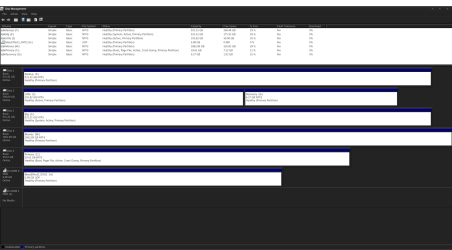
Need a diskmanagement display.

HOW TO POST A SNAPSHOT OF DISK MANAGEMENT DISPLAY
Run disk management:
WIN |
type DISKMGMT.MSC | ENTER
WIN=
key with Microsoft logo on top.


Maximize the output of Disk Management:
ALT-Spacebar
key combo | X key (selects Maximize) |
Drag the field separators (such as between Status and Capacity) to show entire field.


Make a snapshot:
WIN |
type SNIPPING | ENTER | New
Drag the cursor around the area you want to snip.
File | Save as | select save location and name | Save


Post the snapshot:
Post a File or Screenshot in Seven Forums

================================================

Upload the files mentioned here:
Install CCleaner:
CCleaner - PC Optimization and Cleaning - Free Download

list of STARTUP PROGRAMS

CCleaner | Tools
icon | Startup button | Windows tab |
click on Save to text file button (bottom right side) |
accept Startup.txt as file name | SAVE button

list of SCHEDULED TASKS

CCleaner | Tools
icon | Startup button | Scheduled Tasks tab |
click on Save to text file button (bottom right side) |
enter Scheduled Tasks as File name | Save button

List of INSTALLED PROGRAMS

CCleaner | Tools
icon | Uninstall button |
click on Save to text file button (bottom right side) |
accept install.txt as File name | Save button


UPLOAD the startup.txt file
UPLOAD the Scheduled Tasks.txt file
UPLOAD the install.txt file.

HOW TO UPLOAD
Post a File or Screenshot in Seven Forums
===================================================

Go tho he gigabyte website.
Fetch,install the latest bios update for your motherboard (VERY IMPORTANT)
fetch,install the latest chipset driver
fetch install other drivers.
 

My Computer My Computer

Computer Manufacturer/Model Number
Toshiba Satellite S875D-S7239 laptop
OS
MS Windows 7 Ultimate SP1 64-bit
CPU
AMD A10-4600M
Motherboard
AMD Pumori (Socket FT1)
Memory
6.00 GB Dual-Channel DDR3 @ 798MHz (11-11-12-28)
Graphics Card(s)
AMD Radeon HD 7660G
Sound Card
High Definition Audio Device
Monitor(s) Displays
Generic PnP Monitor (1600x900@60Hz)
Screen Resolution
1600x900@60Hz
Hard Drives
SSD 119GB Corsair CSSD-V128GB2 ATA Device
Keyboard
Standard PS/2 Keyboard
Mouse
HP Wireless Optical Mobile Mouse Model FHA-3410
Internet Speed
What the local pub, local coffee shop offers.
Other Info
Optical Drive:MATSHITA BD-CMB UJ160B ATA Device


Also have an Asus ha1002xp netbook with Win 7 Ultimate installed.
I tried updating the BIOS but it said that the file size is wrong.
 

Attachments

My Computer My Computer

Computer Manufacturer/Model Number
Custom Desktop
OS
Windows 7 Home Premium 64bit Sp1
CPU
Intel Core i7 950 @ 3.07GHz
Motherboard
Gigabyte Technology Co., Ltd. X58A-UD3R (Socket 1366)
Memory
6.00 GB Triple-Channel DDR3 @ 539MHz (7-7-7-20)
Graphics Card(s)
ATI Radeon HD 5700 Series (MSI)
Sound Card
Onboard
Screen Resolution
1920x1080@60Hz
Hard Drives
Crucial SSD C300-CTFDDAC064MAG - 63GB (C: Primary) /
Crucial SSD M4-CT064M4SSD2 - 63GB (D:) /
WDC WD3200JS-60PDB0 - 313GB /
WDC WD10EACS-00D6B0 - 977GB /
WDC WD1002FAEX-00Y9A0 -977GB /
Seagate ST2000DL003-9VT166 - 1954GB /
PSU
Corsair TX650
Case
Cooler Master HAF 932
Cooling
Air
The go back to the gigabyte site and redownload.

Make sure you are downloading the bios for your motherboard.
After that: update the chipset driver
after that: update the other drivers.

thanks.
 

My Computer My Computer

Computer Manufacturer/Model Number
Toshiba Satellite S875D-S7239 laptop
OS
MS Windows 7 Ultimate SP1 64-bit
CPU
AMD A10-4600M
Motherboard
AMD Pumori (Socket FT1)
Memory
6.00 GB Dual-Channel DDR3 @ 798MHz (11-11-12-28)
Graphics Card(s)
AMD Radeon HD 7660G
Sound Card
High Definition Audio Device
Monitor(s) Displays
Generic PnP Monitor (1600x900@60Hz)
Screen Resolution
1600x900@60Hz
Hard Drives
SSD 119GB Corsair CSSD-V128GB2 ATA Device
Keyboard
Standard PS/2 Keyboard
Mouse
HP Wireless Optical Mobile Mouse Model FHA-3410
Internet Speed
What the local pub, local coffee shop offers.
Other Info
Optical Drive:MATSHITA BD-CMB UJ160B ATA Device


Also have an Asus ha1002xp netbook with Win 7 Ultimate installed.
Did it again same results. It says that the file is the wrong size.
I also tried @BIOS and it stops at 100% with an error message Runtime Error abnormal program termination

all other drivers are up to date.
 

My Computer My Computer

Computer Manufacturer/Model Number
Custom Desktop
OS
Windows 7 Home Premium 64bit Sp1
CPU
Intel Core i7 950 @ 3.07GHz
Motherboard
Gigabyte Technology Co., Ltd. X58A-UD3R (Socket 1366)
Memory
6.00 GB Triple-Channel DDR3 @ 539MHz (7-7-7-20)
Graphics Card(s)
ATI Radeon HD 5700 Series (MSI)
Sound Card
Onboard
Screen Resolution
1920x1080@60Hz
Hard Drives
Crucial SSD C300-CTFDDAC064MAG - 63GB (C: Primary) /
Crucial SSD M4-CT064M4SSD2 - 63GB (D:) /
WDC WD3200JS-60PDB0 - 313GB /
WDC WD10EACS-00D6B0 - 977GB /
WDC WD1002FAEX-00Y9A0 -977GB /
Seagate ST2000DL003-9VT166 - 1954GB /
PSU
Corsair TX650
Case
Cooler Master HAF 932
Cooling
Air
Contact the Gigabyte site and ask for an explanation.

Be sure to read their procedure very carefully.
 

My Computer My Computer

Computer Manufacturer/Model Number
Toshiba Satellite S875D-S7239 laptop
OS
MS Windows 7 Ultimate SP1 64-bit
CPU
AMD A10-4600M
Motherboard
AMD Pumori (Socket FT1)
Memory
6.00 GB Dual-Channel DDR3 @ 798MHz (11-11-12-28)
Graphics Card(s)
AMD Radeon HD 7660G
Sound Card
High Definition Audio Device
Monitor(s) Displays
Generic PnP Monitor (1600x900@60Hz)
Screen Resolution
1600x900@60Hz
Hard Drives
SSD 119GB Corsair CSSD-V128GB2 ATA Device
Keyboard
Standard PS/2 Keyboard
Mouse
HP Wireless Optical Mobile Mouse Model FHA-3410
Internet Speed
What the local pub, local coffee shop offers.
Other Info
Optical Drive:MATSHITA BD-CMB UJ160B ATA Device


Also have an Asus ha1002xp netbook with Win 7 Ultimate installed.
I believe I am experiencing the same issue. I am using Win7 64 home, have been using a crucial m4 128 as my boot drive for over 6 months. 2 days ago I woke up and my PC was frozen (it's always on). Power down, then turn on and it says non-system disk, press any key. If I press a key the computer boots up as normal, works flawlessly for about an hour then locks up again. Each time if I power down then turn on again I still receive the non-system disk error, but it still works perfectly for about an hour (I haven't timed it but it's close). If I boot off my regular drive and disconnect the SSD the PC works fine, no press any key, no freezes. If I connect the SSD and boot off the regular drive it will see the SSD for about an hour. On the bright side the pc doesn't lock up the SSD disappears just as you describe. Time for us to make sure we have everything backed up from our SSD I think :). I wonder if crucial will replace them when they work ok for an hour :).

Edit: update - I updated the firmware from 0009 to 000F (crucial.com) as well as making sure all windows updates/drivers are to to date. I still got the press any key non-system disk message but the PC hasn't crashed in over 3 hours. Let's see how long it lasts when I fire up some world of warcraft :).

update: seems like the firmware+drivers+updates corrected the problem going strong for 12 hours of heavy use. not sure what triggered the issue though as it worked fine for the past 6 months.
 
Last edited:

My Computer My Computer

OS
Windows 7 Home Premium 64bit
For people having this problem: Try doing a power cycle of the SSD. The following steps should be carried out and take ~1 hour to complete.
  1. Power off the system.
  2. Remove all power supplies (ac adapter then battery for laptop, ac adapter for desktop)
  3. Hold down the power button for 30 seconds to close the circuit and drain all components of power.
  4. Reconnect all power supplies (battery then ac adapter for laptop, ac adapter for desktop)
  5. Turn on the system and enter the BIOS (see your manual for the steps to enter the BIOS)
  6. Let the computer remain in the BIOS for 20 minutes.
  7. Follow steps 1-3 and physically remove the SSD from the system by disconnecting the cables for a desktop or disconnecting the drive from the junction for a laptop.
  8. Leave the drive disconnected for 30 seconds to let all power drain from it.
  9. Replace the drive connection(s) and then do steps 4-8 again.
  10. Repeat steps 1-4.
  11. Start your computer normally and run Windows.

The above steps were a result of: Why did my SSD "disappear" from my system? - Crucial Community

While that may not be your drive, a power cycle should be the same on all SSD drives. See how the system responds after the SSD power cycle.
 

My Computer My Computer

Computer Manufacturer/Model Number
HP Pavilion e9110t
OS
Windows 7 Home Premium 64 Bit
CPU
Intel(R) Core(TM)2 Quad CPU Q9550 @ 2.83GHz
Motherboard
Pegatron IPIEL-LA3
Memory
6.00 GB Hundai HMT125U6BFR8C-H9
Graphics Card(s)
ATI Radeon HD 4850
Sound Card
Realtek High Definition Audio/ATI High Definition Audio
Monitor(s) Displays
Acer AL2216W
Screen Resolution
1680x1050
Hard Drives
Hitachi HDP725050GLA360 ATA Device 500 GB
PSU
Unknown/installed by HP
Case
HP generic case
Cooling
Intel Stock Cooling
Keyboard
HP Keyboard
Mouse
HP Mouse
Internet Speed
Download: 19.15 Mbps Upload: 1.67 Mbps
Other Info
Network Adapter Realtek RTL8168D/8111D Family PCI-E Gigabit Ethernet NIC (NDIS 6.20)
Network Adapter 802.11n Wireless PCI Express Card LAN Adapter
Similar issue to Quatra: Crucial M4 256GB working fine as boot drive for several months then system freezes (with mouse moving but not being able to click anything) followed by a crash/reboot to a 'non-system' disk error. In my case, a 'reset' wouldn't work (M4 disappears from BIOS) but a power shutdown then start leads to normal boot. After about an hour, the process repeats. I was on Firmware 0009.

The power cycle process described by writhziden (and in the crucial forums) worked. I did it with the drive data cable disconnected throughout the whole process and simply booting into the BIOS with sata power cable only. I also repeated the process 3 times for good measure.

After the drive was back to normal, I updated the M4 firmware to the latest 000F. This required switching from AHCI to IDE in the BIOS (both in the SATA section and the controller section), otherwise the updater doesn't see the drive.
 

My Computer My Computer

OS
Windows 7 Ultimate x64
Sorry for resurrecting an old topic but i solved similar problem myself and can't find any similar solution on web. Here's my problem and solution:

I bought an Kingston HyperX SSD (SH103S3/120G) and installed on my desktop computer with ASUS (M4A785D-M Pro) motherboard.

I only installed games on drive, installation was ok but after a while, SSD drive started to disappear randomly (while reading/writing) from computer and reappearing after reboot. I checked firmware, bios and windows updates, but they were all up to date.

After a while, I was trying to find a solution desperately in bios settings and find out there are 2 sata controllers on mainboard. First with IDE/AHCI and RAID support on SATA port 1 to 4. Second one with only IDE support and using SATA ports 5 and 6 and i have installed SSD on port 5.

Which means this was the solution. I just unplug my SSD from SATA port 5 and plug to SATA port 1 (just in case :) ) My SSD working fine from then.

Hopefully this might helps someone else too.
 
Last edited:

My Computer My Computer

Computer type
PC/Desktop
OS
Windows 7 Ultimate x64
Back
Top