
SSD - Fix Misalignment

If the alignment of your SSD is not divisible by 4, you will suffer a noticeable performance degradation. On an SSD with an installed OS, this situation is not easily corrected. You can try the Paragon Alignment Tool, but I am not sure whether they will do the job without a fee.

The steps below and the program I use are completely free and a lot of fun. I hope it can help you when your SSD is in an unfortunate misalignment situation.


1. The fast method

1. Watch this video: Align Partition Easily with AOMEI Partition Assistant Free

2. Download the program from here: Free Partition Manager - AOMEI Partition Assistant Standard

3. In case you do not remember the steps, here are the 3 steps to take once you are in the AOMEI program:

Note: The operation may take a moment because it has to shove a lot of data around.
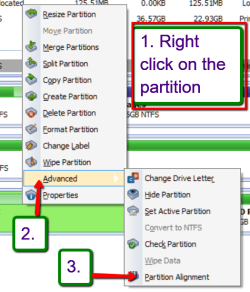


2014-01-13_2203.png


2. The traditional Method

Step 1 - Transfer the bootmgr to C:

Note: This step only applies if you have the 100MB active System Partition - in case of a Dell system it may be the active Recovery Partition. If not, start with Step2.

Eliminating the 100MB active System Partition or the active Recovery Partition will make the job a lot easier and is prerequisite for the following steps to properly work. As first step we will move the bootmgr from the 100MB partition to the C: partition. This is extremely easy with EasyBCD. Follow the picture and the instructions below.


pfco.png


After "Perform Action" you will be prompted to select which letter you like to use as the new boot partition - C: will most likely already be selected as default. When you confirm the selection, EasyBCD will automatically:

v Install the bootmgr to the selected partition
v Make the selected partition active
v Install the bootmgr to both the bootsector and the MBR of the selected partition
v Copy all entries from the old boot partition to the newly-selected one
v Update partition references to work with the new boot partition

Step 2 - Image your system

This is the most important step because it will be your only lifeline. I recommend to use free Macrium or free Paragon for imaging. Make sure you have a good image - better even, make two identical images on two different disks.

Step 3 - Delete the volume

For this and the following steps we will use Command Prompt (cmd) from your installation or recovery disc. In fact, you can use an installation or recovery disks from any system - it need not necessarily be from the system you work on. We only need a cmd.

Once you have opened cmd, run these commands:

Diskpart (Do not exit from Diskpart until all steps are done)
List disk
Select disk n (where n is the number that was given for your SSD in List disk)
List Partition
Select Partition=0
Delete Partition (that will give you unallocated space for the first partition on the SSD)

Note: If you have the 100MB system partition, you just deleted that one. You now have to Select and Delete for Partition=1 to get rid of the OS partition.

Option: If you want to reset the SSD to factory state, you could run a Secure Erase before you start with the Diskpart steps. In that case you would skip Step 3 and start with Step 4 after the Secure Erase. The first command for Step 4 would then be Diskpart.

Step 4 - Define an aligned partition

Select disk n (same as above)
Create partition primary align=1024
Active

Step 5 - Format the new partition

Select disk n (same as above)
Select partition=0
Format /fs:NTFS Quick

Step 6 - Assign drive letter (optional)

List volume
Select volume n (n is from the list and it is not necessarily 0 - the numbering follows the partitions within the Sata port sequence)
Assign letter=M (or any other higher letter - once it is the OS partition, it will become C anyhow)

Step 7 - Double check the alignment

List disk
Select disk n
List partition

Now you should see a result like this.

Partition ### Type Size Offset
------------- ---------------- ------- -------
Partition 1 Primary 59 GB 1024 KB - but 64KB or any number divisible by 4 is also good

The offset (in KBs) has to be divisible by 4.

Exit (we now exit Diskpart because we are done with cmd)

Step 8 - Load the image and boot Windows 7

Now you boot from your imaging CD and reload the image to the newly created partition. After that you reboot and hopefully the OS will work.
 
Last edited by a moderator:
Vey nice, Wolfgang.
 

My Computer

Computer type
Laptop
Computer Manufacturer/Model Number
Sony Vaio VPCEB47GM Laptop
OS
Win 7 Pro 64-bit
CPU
Intel i5 2.4 Ghz
Memory
8GB DDR3
Graphics Card(s)
Intel HD 3000
Sound Card
IDT High Definition
Monitor(s) Displays
15.6 WGXA Anti-Glare LED
Screen Resolution
1280x800
Hard Drives
640Gb 7200rpm
Antivirus
MSE
Browser
Opera (primary) with IE9 backup
Well written and will prove to be very useful.

A quick question : how do you tell if your SSD is misaligned, and any performance degradation is not easily noticeable?
 

My Computer

Computer type
PC/Desktop
Computer Manufacturer/Model Number
Golden Mk. I.4
OS
Windows 10 Pro x64 ; Xubuntu x64
CPU
Intel i7 860 @ 2.80 GHz O/C'ed to 4.0GHz
Motherboard
Gigabyte P55A-UD3R Rev.1. Award BIOS F13
Memory
16GB Corsair Vengance DDR3 @ 661 MHz Dual Channel (9-9-9-24)
Graphics Card(s)
EVGA NVidia GTX 560 1024MB
Sound Card
Realtek Integrated
Monitor(s) Displays
Dual Samsung SyncMaster 2494HS
Screen Resolution
1920*1080 and 1920*1080
Hard Drives
1*Samsung 840 EVO 120GB SSD;
1*OCZ Vertex 2 60GB SSD;
2*Samsung F3 SpinPoint 1TB in RAID0;
1*Samsung F1 SpinPoint 1TB;
2*Western Digital 1TB External USB 3.0
1*Western Digital 500GB External USB 3.0
1*Seagate 500GB External USB 2.0
PSU
Thermaltake ToughPower QFan 750W
Case
Thermaltake Element S VK60001W2Z
Cooling
Corsair H60 Water Cooling, 2*230mm and 2*80mm case fans
Keyboard
Logitech G110
Mouse
Logitech MX518
Well written and will prove to be very useful.

A quick question : how do you tell if your SSD is misaligned, and any performance degradation is not easily noticeable?
see step #7 - can be done with Diskpart any time.
 

My Computer

Computer Manufacturer/Model Number
HP, Dell, Gateway, Toshiba - 4 laptops and 2 desktops
OS
Vista, Windows7, Mint Mate, Zorin, Windows 8
CPU
from 1.6GHz Duo to i7
Monitor(s) Displays
2x HP w2207
Hard Drives
5x HDD, 7x SSD, 12x Externals
Keyboard
with trackball - no mices
Mouse
Trackball mice
Internet Speed
DSL 6000
Very nice and needed tutorial.
Since this is aimed at SSD's, I would suggest a secure erase as an option to replace Step 3. This could be particularly important for smaller SSD's since the delete and re-imaging process would create a fairly large amount of activity for the internal garbage collection process. A secure erase would bring the SSD to "fresh" speeds.
 

My Computer

Computer Manufacturer/Model Number
Homemade
OS
Win 7 64 bit professional
CPU
CPU: 3930K @ 4.8 MHz Stable as a rock
Motherboard
ASUS Rampage IV Extreme LGA 2011
Memory
CORSAIR DOMINATOR GT 16GB (4 x 4GB) 240-Pin DDR3
Graphics Card(s)
EVGA SuperClocked+ GeForce GTX 680
Monitor(s) Displays
Dell 3007WFP
Screen Resolution
2560 x 1600
Hard Drives
Vector(256gb) x 2
RevoDrive 3 X2 space (240 GB)
Crucial C300 256 GB SSD
PSU
CORSAIR AX1200i 1200W Digital ATX12V v2.31 and EPS 2.92 SLI
Cooling
Water cooling EK Supremacy ELITE
Mouse
ratZ-7
Other Info
WEI-7.8
Very nice and needed tutorial.
Since this is aimed at SSD's, I would suggest a secure erase as an option to replace Step 3. This could be particularly important for smaller SSD's since the delete and re-imaging process would create a fairly large amount of activity for the internal garbage collection process. A secure erase would bring the SSD to "fresh" speeds.

Good suggestion. Option added. Thanks!
 

My Computer

Computer Manufacturer/Model Number
HP, Dell, Gateway, Toshiba - 4 laptops and 2 desktops
OS
Vista, Windows7, Mint Mate, Zorin, Windows 8
CPU
from 1.6GHz Duo to i7
Monitor(s) Displays
2x HP w2207
Hard Drives
5x HDD, 7x SSD, 12x Externals
Keyboard
with trackball - no mices
Mouse
Trackball mice
Internet Speed
DSL 6000
Great writeup. Just checked my SSDs. Both doing well.
 

My Computer

Computer Manufacturer/Model Number
Custom
OS
Windows 7 Pro x64 -- PCLinuxOS KDE4 FullMonty 2011
CPU
i7-875k @ Turbo - 7,6,5,5 - 3.6ghz
Motherboard
Asus P7P55D-E Deluxe
Memory
Corsair CMD8GX3M4A1600C8 8gb
Graphics Card(s)
Asus EAH5850 DirectCU/2DIS/1GD5
Sound Card
On Board
Monitor(s) Displays
Samsung SyncMaster T220 - Panasonic VT30a 50"
Screen Resolution
1680x1050 -
Hard Drives
Corsair Force 3 SSD 120GB x 2 ::
WD VelociRaptor 150GB WD1500HLFS x 2
PSU
Corsair HX-850 Power Supply
Case
Coolmaster HAF 932
Cooling
Corsair H50
Keyboard
Logitech Wireless MK700
Mouse
Logitech Wireless MX620
Internet Speed
Good enough for now
Other Info
Voip. Insanely cheap phone calls.
Very nice Wolfgang :thumbsup:

A Guy
 

My Computer

Computer type
PC/Desktop
OS
Windows 10 Home x64
CPU
INTEL Core i5-750 Quad-Core 3.37GHz
Motherboard
ASUS P7P55D
Memory
HyperX Fury Black Series 8GB (2 x 4GB) 1866Mhz
Graphics Card(s)
EVGA GeForce GTX 750 Superclocked 1GB 128-Bit GDDR5
Monitor(s) Displays
LG 32MA68HY 32" IPS
Screen Resolution
1920 x 1080
Hard Drives
Samsung 840 Evo 120GB, SEAGATE 500GB Barracuda® 7200.12, SATA 3 Gb/s, 7200 RPM, 16MB cache
PSU
ANTEC TruePower New TP-550, 80 PLUS, 550W
Case
ANTEC Three Hundred Illusion
Cooling
COOLER MASTER Hyper 212 Plus, 4 x 120mm 1 x 140mm Noctua's
Internet Speed
85 + Mbps
Antivirus
Avast
Browser
Vivaldi

My Computer

Computer type
PC/Desktop
Computer Manufacturer/Model Number
Golden Mk. I.4
OS
Windows 10 Pro x64 ; Xubuntu x64
CPU
Intel i7 860 @ 2.80 GHz O/C'ed to 4.0GHz
Motherboard
Gigabyte P55A-UD3R Rev.1. Award BIOS F13
Memory
16GB Corsair Vengance DDR3 @ 661 MHz Dual Channel (9-9-9-24)
Graphics Card(s)
EVGA NVidia GTX 560 1024MB
Sound Card
Realtek Integrated
Monitor(s) Displays
Dual Samsung SyncMaster 2494HS
Screen Resolution
1920*1080 and 1920*1080
Hard Drives
1*Samsung 840 EVO 120GB SSD;
1*OCZ Vertex 2 60GB SSD;
2*Samsung F3 SpinPoint 1TB in RAID0;
1*Samsung F1 SpinPoint 1TB;
2*Western Digital 1TB External USB 3.0
1*Western Digital 500GB External USB 3.0
1*Seagate 500GB External USB 2.0
PSU
Thermaltake ToughPower QFan 750W
Case
Thermaltake Element S VK60001W2Z
Cooling
Corsair H60 Water Cooling, 2*230mm and 2*80mm case fans
Keyboard
Logitech G110
Mouse
Logitech MX518
Great tutorial whs, well done.
 

My Computer

Computer type
PC/Desktop
Computer Manufacturer/Model Number
76~2.0
OS
Windows 7 Ult x64 - SP1/ Windows 8 Pro x64
CPU
Intel Core i5-3570K 4.6GHz
Motherboard
Gigabyte GA-Z77X UD3H, f18
Memory
8GB (2X4GB) DDR3 1600 Corsair Vengeance CL8 1.5v
Graphics Card(s)
Sapphire HD 7770 Vapor-X OC 1GB DDR5
Sound Card
Onboard VIA VT2021
Monitor(s) Displays
22" LCD Dell
Screen Resolution
1680x1050
Hard Drives
Samsung 840Pro 128GB SSD,
Seagate Barracuda 500GB SATA2 7200rpm 32MB cache, Seagate Barracuda 1TB SATA2 7200rpm 32MB cache,
PSU
Corsair HX650W
Case
Cooler Master Storm Scout
Cooling
Corsair H80 2x12cm Noctua NF P12 , 2x14cm case fans
Keyboard
Logitech Wave
Mouse
CM Sentinel
Internet Speed
Dismal
Antivirus
Avast
Browser
Opera Next
Other Info
Haswell laptop: HP Envy 17t-j, i7-4700MQ, GeForce 740M 2GB DDR3, 17.3" Full HD 1920x1080, 16GB RAM, Samsung 840 Pro 128GB, 1TB Hitachi 7200 HDD,
Desktop: eSATA ports,
External eSATA Seagate 500GB SATA2 7200rpm,
External WD USB 500GB
It looks like I am a candidate for your tutorial Wolfgang - Patition 2 offset 101 MB not divisible by 4. I'll give it a go this weekend and post back here.

Code:
Microsoft Windows [Version 6.1.7601]
Copyright (c) 2009 Microsoft Corporation.  All rights reserved.
C:\Windows\system32>diskpart
Microsoft DiskPart version 6.1.7601
Copyright (C) 1999-2008 Microsoft Corporation.
On computer: COLIN-PC
DISKPART> list disk
  Disk ###  Status         Size     Free     Dyn  Gpt
  --------  -------------  -------  -------  ---  ---
  Disk 0    Online          931 GB  1024 KB
  Disk 1    Online          931 GB  6144 KB
  Disk 2    Online           55 GB      0 B
  Disk 3    Online          931 GB     8 MB
  Disk 4    Online          465 GB      0 B
  Disk 5    Online          465 GB  1024 KB
DISKPART> select disk 2
Disk 2 is now the selected disk.
DISKPART> list partition
  Partition ###  Type              Size     Offset
  -------------  ----------------  -------  -------
  Partition 1    Primary            100 MB  1024 KB
  Partition 2    Primary             55 GB   101 MB
DISKPART>

EDIT : My bad :o. 101 MB = 103,424 KB which IS divisible by 4
 

My Computer

Computer type
PC/Desktop
Computer Manufacturer/Model Number
Golden Mk. I.4
OS
Windows 10 Pro x64 ; Xubuntu x64
CPU
Intel i7 860 @ 2.80 GHz O/C'ed to 4.0GHz
Motherboard
Gigabyte P55A-UD3R Rev.1. Award BIOS F13
Memory
16GB Corsair Vengance DDR3 @ 661 MHz Dual Channel (9-9-9-24)
Graphics Card(s)
EVGA NVidia GTX 560 1024MB
Sound Card
Realtek Integrated
Monitor(s) Displays
Dual Samsung SyncMaster 2494HS
Screen Resolution
1920*1080 and 1920*1080
Hard Drives
1*Samsung 840 EVO 120GB SSD;
1*OCZ Vertex 2 60GB SSD;
2*Samsung F3 SpinPoint 1TB in RAID0;
1*Samsung F1 SpinPoint 1TB;
2*Western Digital 1TB External USB 3.0
1*Western Digital 500GB External USB 3.0
1*Seagate 500GB External USB 2.0
PSU
Thermaltake ToughPower QFan 750W
Case
Thermaltake Element S VK60001W2Z
Cooling
Corsair H60 Water Cooling, 2*230mm and 2*80mm case fans
Keyboard
Logitech G110
Mouse
Logitech MX518
The first partition is the one that needs to be aligned.
 

My Computer

Computer type
PC/Desktop
Computer Manufacturer/Model Number
76~2.0
OS
Windows 7 Ult x64 - SP1/ Windows 8 Pro x64
CPU
Intel Core i5-3570K 4.6GHz
Motherboard
Gigabyte GA-Z77X UD3H, f18
Memory
8GB (2X4GB) DDR3 1600 Corsair Vengeance CL8 1.5v
Graphics Card(s)
Sapphire HD 7770 Vapor-X OC 1GB DDR5
Sound Card
Onboard VIA VT2021
Monitor(s) Displays
22" LCD Dell
Screen Resolution
1680x1050
Hard Drives
Samsung 840Pro 128GB SSD,
Seagate Barracuda 500GB SATA2 7200rpm 32MB cache, Seagate Barracuda 1TB SATA2 7200rpm 32MB cache,
PSU
Corsair HX650W
Case
Cooler Master Storm Scout
Cooling
Corsair H80 2x12cm Noctua NF P12 , 2x14cm case fans
Keyboard
Logitech Wave
Mouse
CM Sentinel
Internet Speed
Dismal
Antivirus
Avast
Browser
Opera Next
Other Info
Haswell laptop: HP Envy 17t-j, i7-4700MQ, GeForce 740M 2GB DDR3, 17.3" Full HD 1920x1080, 16GB RAM, Samsung 840 Pro 128GB, 1TB Hitachi 7200 HDD,
Desktop: eSATA ports,
External eSATA Seagate 500GB SATA2 7200rpm,
External WD USB 500GB

My Computer

Computer type
PC/Desktop
Computer Manufacturer/Model Number
Golden Mk. I.4
OS
Windows 10 Pro x64 ; Xubuntu x64
CPU
Intel i7 860 @ 2.80 GHz O/C'ed to 4.0GHz
Motherboard
Gigabyte P55A-UD3R Rev.1. Award BIOS F13
Memory
16GB Corsair Vengance DDR3 @ 661 MHz Dual Channel (9-9-9-24)
Graphics Card(s)
EVGA NVidia GTX 560 1024MB
Sound Card
Realtek Integrated
Monitor(s) Displays
Dual Samsung SyncMaster 2494HS
Screen Resolution
1920*1080 and 1920*1080
Hard Drives
1*Samsung 840 EVO 120GB SSD;
1*OCZ Vertex 2 60GB SSD;
2*Samsung F3 SpinPoint 1TB in RAID0;
1*Samsung F1 SpinPoint 1TB;
2*Western Digital 1TB External USB 3.0
1*Western Digital 500GB External USB 3.0
1*Seagate 500GB External USB 2.0
PSU
Thermaltake ToughPower QFan 750W
Case
Thermaltake Element S VK60001W2Z
Cooling
Corsair H60 Water Cooling, 2*230mm and 2*80mm case fans
Keyboard
Logitech G110
Mouse
Logitech MX518
The first partition is the one that needs to be aligned.

Doh! {face palm x 2}

From Step 1:

Note: This step only applies if you have the 100MB active System Partition

Thanks Dave :geek:
You are OK. You fell into the classic trap. The second partition offset is in 101MB which is 101,000KB and very well divisible by 4.
 

My Computer

Computer Manufacturer/Model Number
HP, Dell, Gateway, Toshiba - 4 laptops and 2 desktops
OS
Vista, Windows7, Mint Mate, Zorin, Windows 8
CPU
from 1.6GHz Duo to i7
Monitor(s) Displays
2x HP w2207
Hard Drives
5x HDD, 7x SSD, 12x Externals
Keyboard
with trackball - no mices
Mouse
Trackball mice
Internet Speed
DSL 6000

My Computer

Computer type
PC/Desktop
Computer Manufacturer/Model Number
76~2.0
OS
Windows 7 Ult x64 - SP1/ Windows 8 Pro x64
CPU
Intel Core i5-3570K 4.6GHz
Motherboard
Gigabyte GA-Z77X UD3H, f18
Memory
8GB (2X4GB) DDR3 1600 Corsair Vengeance CL8 1.5v
Graphics Card(s)
Sapphire HD 7770 Vapor-X OC 1GB DDR5
Sound Card
Onboard VIA VT2021
Monitor(s) Displays
22" LCD Dell
Screen Resolution
1680x1050
Hard Drives
Samsung 840Pro 128GB SSD,
Seagate Barracuda 500GB SATA2 7200rpm 32MB cache, Seagate Barracuda 1TB SATA2 7200rpm 32MB cache,
PSU
Corsair HX650W
Case
Cooler Master Storm Scout
Cooling
Corsair H80 2x12cm Noctua NF P12 , 2x14cm case fans
Keyboard
Logitech Wave
Mouse
CM Sentinel
Internet Speed
Dismal
Antivirus
Avast
Browser
Opera Next
Other Info
Haswell laptop: HP Envy 17t-j, i7-4700MQ, GeForce 740M 2GB DDR3, 17.3" Full HD 1920x1080, 16GB RAM, Samsung 840 Pro 128GB, 1TB Hitachi 7200 HDD,
Desktop: eSATA ports,
External eSATA Seagate 500GB SATA2 7200rpm,
External WD USB 500GB
Very nice and needed tutorial.
Since this is aimed at SSD's, I would suggest a secure erase as an option to replace Step 3. This could be particularly important for smaller SSD's since the delete and re-imaging process would create a fairly large amount of activity for the internal garbage collection process. A secure erase would bring the SSD to "fresh" speeds.

Good suggestion. Option added. Thanks!
Does the Parted Magic do the same as the clean all command?
 

My Computer

Computer type
PC/Desktop
Computer Manufacturer/Model Number
Home Built Desktop By DataTech
OS
Windows 7 Ultimate X64 SP1
CPU
Intel i5-2550K, Differing ~4.4-4.8GHz No built in GPU
Motherboard
ASUS P8Z68-V PRO/GEN3
Memory
16GB G.Skill Sniper 1866MHz @ 2133MHz 2x8GB
Graphics Card(s)
ASUS GTX650TIB-DC2OC-2GD5, (650TI Boost)
Sound Card
Onboard Realtek 5-1
Monitor(s) Displays
Samsung P2570HD
Screen Resolution
1920x1080
Hard Drives
Samsung 840 Pro 256GB SSD for OS, 500GB Seagate Constellation (Enterprise drive) for Data
PSU
Corsair HX650W
Case
Inwin Dragon Rider
Cooling
Hyper 212 EVO w/two Noctua fans, push-pull, @1300 RPM
Keyboard
E-Z Eyes, bright yellow keys with large characters
Mouse
steelseries SENSEI Laser Pro Gaming
Internet Speed
48-51Mbs Mbs down, 11 Mbs up Xfinity Cable
Antivirus
Norton Internet Security 2013
Browser
IE 10, Opera, Pale Moon if needed
Other Info
4 case fans, LG BluRay-RE, ASUS DVD-RW, Mr. Fusion power supply, 1.21 gigawatts.
I don't know. Maybe someone else knows.
 

My Computer

Computer Manufacturer/Model Number
HP, Dell, Gateway, Toshiba - 4 laptops and 2 desktops
OS
Vista, Windows7, Mint Mate, Zorin, Windows 8
CPU
from 1.6GHz Duo to i7
Monitor(s) Displays
2x HP w2207
Hard Drives
5x HDD, 7x SSD, 12x Externals
Keyboard
with trackball - no mices
Mouse
Trackball mice
Internet Speed
DSL 6000
Yes parted magic can do a secure erase.
 

My Computer

Computer Manufacturer/Model Number
Custom
OS
Windows 7 Pro x64 -- PCLinuxOS KDE4 FullMonty 2011
CPU
i7-875k @ Turbo - 7,6,5,5 - 3.6ghz
Motherboard
Asus P7P55D-E Deluxe
Memory
Corsair CMD8GX3M4A1600C8 8gb
Graphics Card(s)
Asus EAH5850 DirectCU/2DIS/1GD5
Sound Card
On Board
Monitor(s) Displays
Samsung SyncMaster T220 - Panasonic VT30a 50"
Screen Resolution
1680x1050 -
Hard Drives
Corsair Force 3 SSD 120GB x 2 ::
WD VelociRaptor 150GB WD1500HLFS x 2
PSU
Corsair HX-850 Power Supply
Case
Coolmaster HAF 932
Cooling
Corsair H50
Keyboard
Logitech Wireless MK700
Mouse
Logitech Wireless MX620
Internet Speed
Good enough for now
Other Info
Voip. Insanely cheap phone calls.
Yes parted magic can do a secure erase.
I know that, but is it the same as the diskpart clean all command which also writes zeros to all sectors?. The article says PM will take "Acouple of minutes" while clean all takes much longer. PM claims it is doing the same. :confused:
 

My Computer

Computer type
PC/Desktop
Computer Manufacturer/Model Number
Home Built Desktop By DataTech
OS
Windows 7 Ultimate X64 SP1
CPU
Intel i5-2550K, Differing ~4.4-4.8GHz No built in GPU
Motherboard
ASUS P8Z68-V PRO/GEN3
Memory
16GB G.Skill Sniper 1866MHz @ 2133MHz 2x8GB
Graphics Card(s)
ASUS GTX650TIB-DC2OC-2GD5, (650TI Boost)
Sound Card
Onboard Realtek 5-1
Monitor(s) Displays
Samsung P2570HD
Screen Resolution
1920x1080
Hard Drives
Samsung 840 Pro 256GB SSD for OS, 500GB Seagate Constellation (Enterprise drive) for Data
PSU
Corsair HX650W
Case
Inwin Dragon Rider
Cooling
Hyper 212 EVO w/two Noctua fans, push-pull, @1300 RPM
Keyboard
E-Z Eyes, bright yellow keys with large characters
Mouse
steelseries SENSEI Laser Pro Gaming
Internet Speed
48-51Mbs Mbs down, 11 Mbs up Xfinity Cable
Antivirus
Norton Internet Security 2013
Browser
IE 10, Opera, Pale Moon if needed
Other Info
4 case fans, LG BluRay-RE, ASUS DVD-RW, Mr. Fusion power supply, 1.21 gigawatts.
I'm no expert not even close with using parted magic.

I've used it a few times for doing a secure erase. First couple of times it took 1 or 2 seconds. Supposedly writing zeros.

Next time I did it it went to an additional screen. (can't remember what it was about) This time for a 120gb drive it took 24 minutes. Supposedly writing zeros also.
 

My Computer

Computer Manufacturer/Model Number
Custom
OS
Windows 7 Pro x64 -- PCLinuxOS KDE4 FullMonty 2011
CPU
i7-875k @ Turbo - 7,6,5,5 - 3.6ghz
Motherboard
Asus P7P55D-E Deluxe
Memory
Corsair CMD8GX3M4A1600C8 8gb
Graphics Card(s)
Asus EAH5850 DirectCU/2DIS/1GD5
Sound Card
On Board
Monitor(s) Displays
Samsung SyncMaster T220 - Panasonic VT30a 50"
Screen Resolution
1680x1050 -
Hard Drives
Corsair Force 3 SSD 120GB x 2 ::
WD VelociRaptor 150GB WD1500HLFS x 2
PSU
Corsair HX-850 Power Supply
Case
Coolmaster HAF 932
Cooling
Corsair H50
Keyboard
Logitech Wireless MK700
Mouse
Logitech Wireless MX620
Internet Speed
Good enough for now
Other Info
Voip. Insanely cheap phone calls.
Back
Top